
BSOD Error 0x0000001A

CazBumBaz

New member
Local time
7:31 AM
Messages
3
Location
Sunny Stockport
Hiya

I was hoping you could help me.
My son got a new PC on the 2nd May, it has been working great until yesterday when he started getting the BSOD, he was doing nothing different, playing COD like most teenagers. I have scoured this forum for some help and I am a complete loss.

I tried to get a screenshot, but every time I tried the PC shut down, so I managed to take a photo (i know Im sorry) and I will upload. When it finally comes back on, There are alot of lines all across the screen ( i have another photo of that too)

Any help would be appreciated.

ThankYou
Caroline
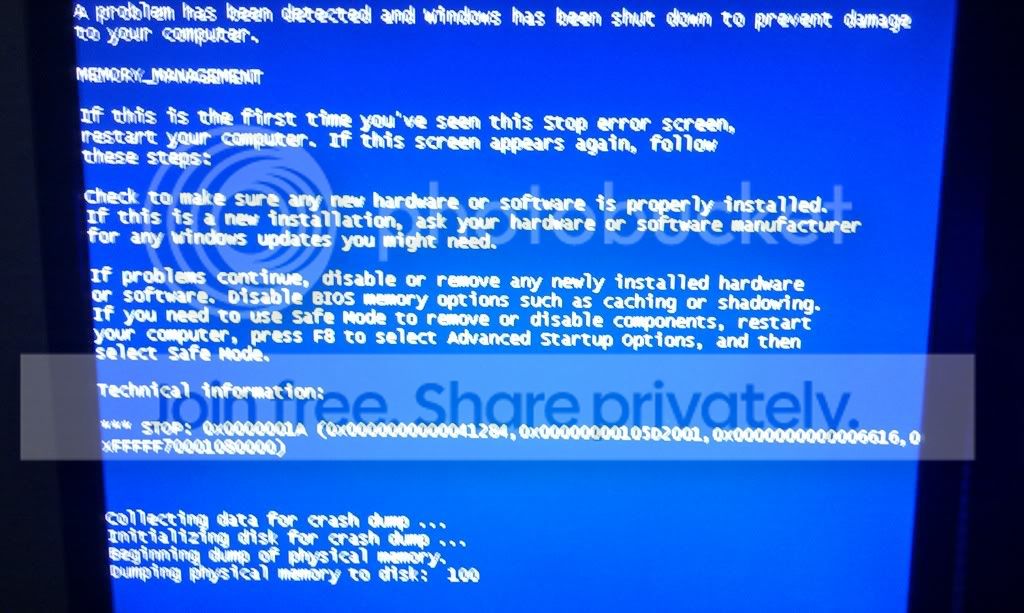
IMAG0665.jpg

mattspc.jpg
 

My Computer

OS
Windows 7 64 bit
CPU
AMD FX Quad Core 3.6ghz
Memory
8gb
Graphics Card(s)
ATI Radeon 5450
Hiya

I was hoping you could help me.
My son got a new PC on the 2nd May, it has been working great until yesterday when he started getting the BSOD, he was doing nothing different, playing COD like most teenagers. I have scoured this forum for some help and I am a complete loss.

I tried to get a screenshot, but every time I tried the PC shut down, so I managed to take a photo (i know Im sorry) and I will upload. When it finally comes back on, There are alot of lines all across the screen ( i have another photo of that too)

Any help would be appreciated.

ThankYou
Caroline

IMAG0665.jpg

mattspc.jpg
Hi Caz, welcome to seven forums, thank you for the screen shots, they helped quite a bit on narrowing down the culprit to this particular issue, I suspect it maybe an issue with the RAM(random access memory) that you have inside the system, it should still be under guarantee with where you purchased the PC, I suggest you contact the retailer and ask them to diagnose the system, there are steps you can take to check the issue is what I think it is, here's a video of what you need to do, apologies for the background noise, dad is deaf


My Computer

Computer type
PC/Desktop
Computer Manufacturer/Model Number
Custom Build
OS
Windows 7 Ultimate x64 SP1
CPU
Intel Q6600 @ 2.6Ghz
Motherboard
Evga NF78-CK-132-A 3-Way SLI
Memory
4Gb DDR2 Corsair Dominator @ 800Mhz 5-5-5-15
Graphics Card(s)
EVGA 560 GTX SC FTW 1GB
Sound Card
Realtek HD 7.1 Audio, Plantronics GameCom780 7.1 Headset
Monitor(s) Displays
Dell S2409W
Screen Resolution
1920 x 1080
Hard Drives
SanDisk SDSSDHII-120G-G25 120GB SSD
Samsung 7200RPM 750Gb SATA
Samsung 850 EVO 120GB SSD
Western Digital Green 1TB 7200RPM
PSU
Xigmatek 750W Quad sli quad core 80% eff
Case
Antec 900 Gaming Case
Cooling
Zalman CNPS9700-NT NVIDIA Tritium
Keyboard
Logitech generic keyboard, MS wireless keyboard
Mouse
Razor Lachesis Banshee V2 Blue, 4000DPI, MS wireless mouse
Internet Speed
152Mb Virgin Media Fibre Optic
Antivirus
Microsoft Security Essentials
Browser
Google Chrome
Other Info
Wireless Gaming Receiver for Windows, Wireless Xbox 360 Pad
Thank you so much for your quick reply, I shall investigate that further..
 

My Computer

OS
Windows 7 64 bit
CPU
AMD FX Quad Core 3.6ghz
Memory
8gb
Graphics Card(s)
ATI Radeon 5450
Well i ran the memory diagnosing tool, and you were correct. I phoned the company and I explained what was going on, and i didnt want to mess with the system. They told me to open the case and take one lot of memory out and see if that resloves the issue. He was right, I took out one stick and then ran the Memory tool again and it found no error on the stick of RAM that I has left in the PC. But now I have a different problem. My son booted up COD and it seemed to work fine, and then when I asked if it was OK, he said ,Oh it just shut down again. ARRRRRRRGHHHHHHHH. I think I may have messed up, I removed the stick of memory that was closest to the CPU, but didn't move the other into the slot. Could it be the reason why it shut down, or could it be the graphics card. The chap from the PC Company, told me to just send the stick of memory, and they will just send another one out.
Would it be worth waiting until they replace the Stick of RAM to see if that's the problem,or would you send the Graphics card back too?
Im sorry for all the questions.

Thanks!
 

My Computer

OS
Windows 7 64 bit
CPU
AMD FX Quad Core 3.6ghz
Memory
8gb
Graphics Card(s)
ATI Radeon 5450
Well i ran the memory diagnosing tool, and you were correct. I phoned the company and I explained what was going on, and i didnt want to mess with the system. They told me to open the case and take one lot of memory out and see if that resloves the issue. He was right, I took out one stick and then ran the Memory tool again and it found no error on the stick of RAM that I has left in the PC. But now I have a different problem. My son booted up COD and it seemed to work fine, and then when I asked if it was OK, he said ,Oh it just shut down again. ARRRRRRRGHHHHHHHH. I think I may have messed up, I removed the stick of memory that was closest to the CPU, but didn't move the other into the slot. Could it be the reason why it shut down, or could it be the graphics card. The chap from the PC Company, told me to just send the stick of memory, and they will just send another one out.
Would it be worth waiting until they replace the Stick of RAM to see if that's the problem,or would you send the Graphics card back too?
Im sorry for all the questions.

Thanks!

No need to be sorry, I think they should take it back, it would be easier for them to diagnose if it was in the system, however, you could send both sticks back and say that you're not sure if that one is faulty as well, give them another call and explain that you'd feel more comfortable with 2 new sticks, they can't argue with it really, I've come to this conclusion really due to the fact that the screenshots you posted look exactly like memory faults, your graphics card isn't a bottleneck, if the graphics card was at fault then you'd see a big difference in performance, the sudden shutdown suggests the ram is still at fault.

Dave
 

My Computer

Computer type
PC/Desktop
Computer Manufacturer/Model Number
Custom Build
OS
Windows 7 Ultimate x64 SP1
CPU
Intel Q6600 @ 2.6Ghz
Motherboard
Evga NF78-CK-132-A 3-Way SLI
Memory
4Gb DDR2 Corsair Dominator @ 800Mhz 5-5-5-15
Graphics Card(s)
EVGA 560 GTX SC FTW 1GB
Sound Card
Realtek HD 7.1 Audio, Plantronics GameCom780 7.1 Headset
Monitor(s) Displays
Dell S2409W
Screen Resolution
1920 x 1080
Hard Drives
SanDisk SDSSDHII-120G-G25 120GB SSD
Samsung 7200RPM 750Gb SATA
Samsung 850 EVO 120GB SSD
Western Digital Green 1TB 7200RPM
PSU
Xigmatek 750W Quad sli quad core 80% eff
Case
Antec 900 Gaming Case
Cooling
Zalman CNPS9700-NT NVIDIA Tritium
Keyboard
Logitech generic keyboard, MS wireless keyboard
Mouse
Razor Lachesis Banshee V2 Blue, 4000DPI, MS wireless mouse
Internet Speed
152Mb Virgin Media Fibre Optic
Antivirus
Microsoft Security Essentials
Browser
Google Chrome
Other Info
Wireless Gaming Receiver for Windows, Wireless Xbox 360 Pad
Back
Top