
BSOD: hal.dll and ntoskrnl.exe at fault

mastahelix

New member
Local time
4:33 AM
Messages
36
I have recently updated from 32-bit windows 7 to 64-bit windows 7 for obvious reasons. I have had 5 BSODs since I did that, I have checked my drivers and they seemed to be fine on most of the programmes I used, I have also used cmd to scan for errors using the sfc /scannow command first time it found corrupted files second time it didn't. After it happened again I then used Bluescreen viewer to see what caused it and all but one had something to do with hal.dll and ntoskrnl.exe, so now I am confused as many things I have read says its a driver or bios issue, but seeing as I am not that good at this sort of thing I thought I should ask for help.

I have grabbed all using the SF diagnostic Tool

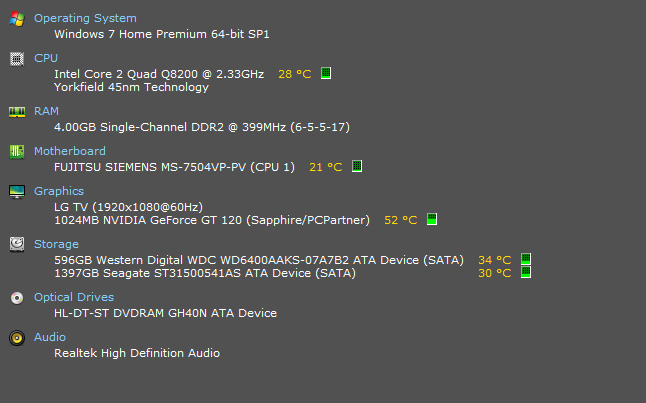
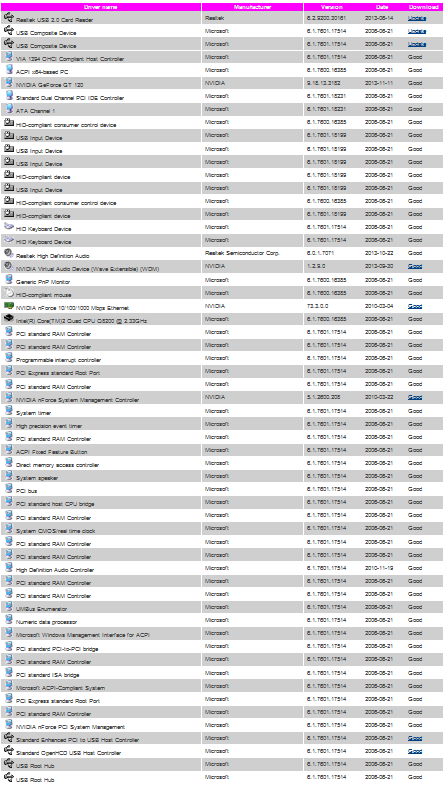
*Ok I had another BSoD so I thought I would troubleshoot this myself. The bug check code is 0x00000124 and the cause is hal.dll so I read that it was a hardware issue, but since the computer worked perfectly on 32-bit I don't think that is the problem but I checked temperatures to see if anything was overheating (see below) I then checked drivers again and found 3 drivers on Driver Magician after scanning, audio, card reader and motherboard options so I installed them all, but the motherboard driver I was given was 15.57-nforce-winvista-win7-64bit-international-whql, I scanned again and it give me the same driver....I don't know if that is the problem, but if someone could translate the dump files and point me in the right direction.

I used a driver identifier to check all my drivers and it only found 3 that needed updating (see below) but no motherboard driver that needs updating so now either it is false information or I have a corrupt driver somewhere I think.
 
Last edited:

My Computer My Computer

At a glance

Windows 7 Home Premium 64bitIntel Core i5 34708.00GB DDR3Nvidia GeForce GTX 750 Ti
Computer type
PC/Desktop
Computer Manufacturer/Model Number
Custom Asustek Computer
OS
Windows 7 Home Premium 64bit
CPU
Intel Core i5 3470
Motherboard
Asus H61M-D
Memory
8.00GB DDR3
Graphics Card(s)
Nvidia GeForce GTX 750 Ti
Monitor(s) Displays
LG TV, 60Hz
Screen Resolution
1080p, 1920x1080
Hard Drives
Samsung SSD 850 EVO 1TB
ST31500541AS ATA (1.36TB)
Internet Speed
Download:50Mbps Upload:3Mbps
Antivirus
Comodo Internet Security Premium
Browser
Firefox
I have had another 6 BSoD since I started this thread so I have updated the Attachment
 

My Computer My Computer

At a glance

Windows 7 Home Premium 64bitIntel Core i5 34708.00GB DDR3Nvidia GeForce GTX 750 Ti
Computer type
PC/Desktop
Computer Manufacturer/Model Number
Custom Asustek Computer
OS
Windows 7 Home Premium 64bit
CPU
Intel Core i5 3470
Motherboard
Asus H61M-D
Memory
8.00GB DDR3
Graphics Card(s)
Nvidia GeForce GTX 750 Ti
Monitor(s) Displays
LG TV, 60Hz
Screen Resolution
1080p, 1920x1080
Hard Drives
Samsung SSD 850 EVO 1TB
ST31500541AS ATA (1.36TB)
Internet Speed
Download:50Mbps Upload:3Mbps
Antivirus
Comodo Internet Security Premium
Browser
Firefox
Your BIOS is too old.
Code:
BiosVersion = V3.0V
[COLOR=Red]BiosReleaseDate = 04/10/2009[/COLOR]
SystemManufacturer = FUJITSU SIEMENS
SystemProductName = Amilo Desktop PI3745A
Can you update it?

Also, are you overclocking? As you are getting BSODs, you should stop overclocking and run all the hardware components like CPU, GPU and RAM to their default settings. Also set the BIOS to default, too.
How To Clear CMOS (Reset BIOS)

It seems to be an old branded desktop. Check if the Power Supply Unit (PSU) supplying adequate power to the computer or not.
eXtreme Power Supply Calculator
Also let us know the wattage of your PSU.

Plus do some hardware tests too:

Test your RAM modules for possible errors.
How to Test and Diagnose RAM Issues with Memtest86+
Run memtest for at least 8 passes, preferably overnight.
If it start showing errors/red lines, stop testing. A single error is enough to determine that something is going bad there.

Stress test the Graphics Card using Furmark.
Video Card - Stress Test with Furmark

Stress test the CPU.
Hardware - Stress Test With Prime95

Let us know the results.
____________________________________________________________________________________
Code:
*******************************************************************************
*                                                                             *
*                        Bugcheck Analysis                                    *
*                                                                             *
*******************************************************************************

Use !analyze -v to get detailed debugging information.

BugCheck 124, {0, fffffa8004fe1028, b2000040, 800}

Probably caused by : GenuineIntel

Followup: MachineOwner
---------

1: kd> !analyze -v
*******************************************************************************
*                                                                             *
*                        Bugcheck Analysis                                    *
*                                                                             *
*******************************************************************************

WHEA_UNCORRECTABLE_ERROR (124)
A fatal hardware error has occurred. Parameter 1 identifies the type of error
source that reported the error. Parameter 2 holds the address of the
WHEA_ERROR_RECORD structure that describes the error conditon.
Arguments:
Arg1: 0000000000000000, Machine Check Exception
Arg2: fffffa8004fe1028, Address of the WHEA_ERROR_RECORD structure.
Arg3: 00000000b2000040, High order 32-bits of the MCi_STATUS value.
Arg4: 0000000000000800, Low order 32-bits of the MCi_STATUS value.

Debugging Details:
------------------


BUGCHECK_STR:  0x124_GenuineIntel

CUSTOMER_CRASH_COUNT:  1

DEFAULT_BUCKET_ID:  WIN7_DRIVER_FAULT

PROCESS_NAME:  System

CURRENT_IRQL:  f

STACK_TEXT:  
fffff880`009eea58 fffff800`031f7a3b : 00000000`00000124 00000000`00000000 fffffa80`04fe1028 00000000`b2000040 : nt!KeBugCheckEx
fffff880`009eea60 fffff800`02d8c463 : 00000000`00000001 fffffa80`04515970 00000000`00000000 fffffa80`045159c0 : hal!HalBugCheckSystem+0x1e3
fffff880`009eeaa0 fffff800`031f7700 : 00000000`00000728 fffffa80`04515970 fffff880`009eee30 fffff880`009eee00 : nt!WheaReportHwError+0x263
fffff880`009eeb00 fffff800`031f7052 : fffffa80`04515970 fffff880`009eee30 fffffa80`04515970 00000000`00000000 : hal!HalpMcaReportError+0x4c
fffff880`009eec50 fffff800`031f6f0d : 00000000`00000004 00000000`00000001 fffff880`009eeeb0 00000000`00000000 : hal!HalpMceHandler+0x9e
fffff880`009eec90 fffff800`031eae88 : 00000000`00000000 fffff880`009e6180 00000000`00000000 00000000`00000000 : hal!HalpMceHandlerWithRendezvous+0x55
fffff880`009eecc0 fffff800`02c744ac : 00000000`00000000 00000000`00000000 00000000`00000000 00000000`00000000 : hal!HalHandleMcheck+0x40
fffff880`009eecf0 fffff800`02c74313 : 00000000`00000000 00000000`00000000 00000000`00000000 00000000`00000000 : nt!KxMcheckAbort+0x6c
fffff880`009eee30 fffff880`043399c2 : 00000000`00000000 00000000`00000000 00000000`00000000 00000000`00000000 : nt!KiMcheckAbort+0x153
fffff880`02f1bc58 00000000`00000000 : 00000000`00000000 00000000`00000000 00000000`00000000 00000000`00000000 : intelppm!C1Halt+0x2


STACK_COMMAND:  kb

FOLLOWUP_NAME:  MachineOwner

MODULE_NAME: GenuineIntel

IMAGE_NAME:  GenuineIntel

DEBUG_FLR_IMAGE_TIMESTAMP:  0

FAILURE_BUCKET_ID:  X64_0x124_GenuineIntel_PROCESSOR_BUS

BUCKET_ID:  X64_0x124_GenuineIntel_PROCESSOR_BUS

Followup: MachineOwner
---------
 

My Computer My Computer

At a glance

Microsoft Windows 10 Pro Insider Preview 64-bitIntel(R) Core(TM) i3-4130 CPU @ 3.40GHzCorsair Vengence 4GB x2 (8.00GB Dual-Channel ...2047MB GeForce GTS 450 (ZOTAC International)
Computer type
PC/Desktop
Computer Manufacturer/Model Number
Self Assembled
OS
Microsoft Windows 10 Pro Insider Preview 64-bit
CPU
Intel(R) Core(TM) i3-4130 CPU @ 3.40GHz
Motherboard
Gigabyte Technology Co., Ltd. B85M-D3H
Memory
Corsair Vengence 4GB x2 (8.00GB Dual-Channel DDR3 @ 798MHz)
Graphics Card(s)
2047MB GeForce GTS 450 (ZOTAC International)
Sound Card
Onboard (Realtek High Definition Audio)
Monitor(s) Displays
LG Flatron E2040T
Screen Resolution
1600x900
Hard Drives
Western Digital 1 TB
Seagate 500 GB
PSU
Corsair VS550
Case
Cooler Master K380
Cooling
Cooler Master Seidon 120V Plus
Keyboard
Logitech MK260r
Mouse
Logitech MK260r
Internet Speed
PMPL Broadband
Antivirus
Windows Defender + MBAM
Browser
Firefox
Other Info
Dell Studio 15" Laptop
Thank you for the reply, although I understand that troubleshooting hardware is the right thing to do with a 124 error, but you should know I am almost positive that the hardware is fine, I know its old but I have had 64-bit windows 7 running before and went to 32-bit as that was the only disk I had at the time, I have switched to 64-bit again which is when the problems occurred.

I would usually do as I am told but because most of these scans take up to 3 hours I just don't have the time to monitor the progress, I ran the memtest86+ for one pass and it took 31mins all was fine but it recommends 7 passes.

I thought it may have been the Bios but I can't find a better update for my model, therefore I have ran lots of driver programs and they are all inconsistent but I found no bios update in any of them. I think this started after I did the first time windows update because the computer became slow for no reason after, it feels less smooth than the 32-bit version of the system. That said I will do my best to do all the checks if I get the time, but I have to ask if there is a program that can find corrupted windows files/ uninstall windows updates or check for corrupted drivers, I have only tried sfc /scannow on cmd. if all doesn't go well I may reinstall windows using a different disk, and not update windows at all to see if that will work, but I have a lot of work to and I cant right now.

I have also never overclocked this system, and I am sure there is enough power but will check after I get up using the site you provided.
 

My Computer My Computer

At a glance

Windows 7 Home Premium 64bitIntel Core i5 34708.00GB DDR3Nvidia GeForce GTX 750 Ti
Computer type
PC/Desktop
Computer Manufacturer/Model Number
Custom Asustek Computer
OS
Windows 7 Home Premium 64bit
CPU
Intel Core i5 3470
Motherboard
Asus H61M-D
Memory
8.00GB DDR3
Graphics Card(s)
Nvidia GeForce GTX 750 Ti
Monitor(s) Displays
LG TV, 60Hz
Screen Resolution
1080p, 1920x1080
Hard Drives
Samsung SSD 850 EVO 1TB
ST31500541AS ATA (1.36TB)
Internet Speed
Download:50Mbps Upload:3Mbps
Antivirus
Comodo Internet Security Premium
Browser
Firefox
Back
Top