Solved BSOD in Google Chrome at first and now at Windows 7 start up.

HBomb

New member
Local time
3:31 PM
Messages
4
I wish I could give more info, but this is happening to a relative's computer when I am not around. From what I hear, it happens a few times a week and usually during usage of Google Chrome. The user's usage of Chrome can be intensive. Eventually BSOD's began to happen at Windows 7 start up. I've attached the logs below for your perusal. Any help offered will be greatly appreciated. Thank you!
 

My Computer My Computer

At a glance

Windows 7 Professional 64-bit
Computer type
PC/Desktop
Computer Manufacturer/Model Number
Custom Build
OS
Windows 7 Professional 64-bit
Hi HBomb.

It appears that the VIA High Definition Audio Function Driver is too old.
Code:
fffff880`08637000 fffff880`087d6000   viahduaa T (no symbols)           
    Loaded symbol image file: viahduaa.sys
    Image path: \SystemRoot\system32\drivers\viahduaa.sys
[COLOR=Red]    Image name: viahduaa.sys
    Timestamp:        Thu Sep 17 16:34:15 2009[/COLOR] (4AB217AF)
    CheckSum:         0013C1D2
    ImageSize:        0019F000
    Translations:     0000.04b0 0000.04e4 0409.04b0 0409.04e4
Update it from VIA Drivers Download - VIA Technologies, Inc.

Also Uninstall Avast using Avast Uninstall Utility, at least as a test. Use Microsoft Security Essentials as your antivirus with windows inbuilt firewall, and free MBAM as the on demand scanner.
Download, install and update those, and then run full system scans with both of them, one by one.

Let us know the results.
__________________________________________________________________________
BSOD ANALYSIS:
Code:
BugCheck A, {0, 2, 1, fffff8000348699d}

Probably caused by : hardware ( nt!KiIdleLoop+ed )

Followup: MachineOwner
------------------------------------------------------------------------
BugCheck A, {40100010, 2, 1, fffff80003494502}

Probably caused by : ntkrnlmp.exe ( nt!KiTimerExpiration+f2 )

Followup: MachineOwner
------------------------------------------------------------------------
BugCheck 4A, {778d154a, 2, 0, fffff8800a5b6ca0}

Probably caused by : ntkrnlmp.exe ( nt!KiSystemServiceExit+245 )

Followup: MachineOwner
-----------------------------------------------------------------------
BugCheck C2, {7, 109b, 8894a00, fffffa8008894a10}

*** WARNING: Unable to verify timestamp for viahduaa.sys
*** ERROR: Module load completed but symbols could not be loaded for viahduaa.sys
GetPointerFromAddress: unable to read from fffff80003702100
GetUlongFromAddress: unable to read from fffff800037021c0
Probably caused by : portcls.sys ( portcls!CPortFilterTopology::DeviceIoControl+154 )

Followup: MachineOwner
---------
 

My Computer My Computer

At a glance

Microsoft Windows 10 Pro Insider Preview 64-bitIntel(R) Core(TM) i3-4130 CPU @ 3.40GHzCorsair Vengence 4GB x2 (8.00GB Dual-Channel ...2047MB GeForce GTS 450 (ZOTAC International)
Computer type
PC/Desktop
Computer Manufacturer/Model Number
Self Assembled
OS
Microsoft Windows 10 Pro Insider Preview 64-bit
CPU
Intel(R) Core(TM) i3-4130 CPU @ 3.40GHz
Motherboard
Gigabyte Technology Co., Ltd. B85M-D3H
Memory
Corsair Vengence 4GB x2 (8.00GB Dual-Channel DDR3 @ 798MHz)
Graphics Card(s)
2047MB GeForce GTS 450 (ZOTAC International)
Sound Card
Onboard (Realtek High Definition Audio)
Monitor(s) Displays
LG Flatron E2040T
Screen Resolution
1600x900
Hard Drives
Western Digital 1 TB
Seagate 500 GB
PSU
Corsair VS550
Case
Cooler Master K380
Cooling
Cooler Master Seidon 120V Plus
Keyboard
Logitech MK260r
Mouse
Logitech MK260r
Internet Speed
PMPL Broadband
Antivirus
Windows Defender + MBAM
Browser
Firefox
Other Info
Dell Studio 15" Laptop
Virus scans didn't find anything. But updating the Via hardware drivers seems to have worked. It's been going strong for about 2 weeks. Thank you for your help! I've repped you Arc.
 

My Computer My Computer

At a glance

Windows 7 Professional 64-bit
Computer type
PC/Desktop
Computer Manufacturer/Model Number
Custom Build
OS
Windows 7 Professional 64-bit
You are welcome mate :)
For any further issue, let us know :)
 

My Computer My Computer

At a glance

Microsoft Windows 10 Pro Insider Preview 64-bitIntel(R) Core(TM) i3-4130 CPU @ 3.40GHzCorsair Vengence 4GB x2 (8.00GB Dual-Channel ...2047MB GeForce GTS 450 (ZOTAC International)
Computer type
PC/Desktop
Computer Manufacturer/Model Number
Self Assembled
OS
Microsoft Windows 10 Pro Insider Preview 64-bit
CPU
Intel(R) Core(TM) i3-4130 CPU @ 3.40GHz
Motherboard
Gigabyte Technology Co., Ltd. B85M-D3H
Memory
Corsair Vengence 4GB x2 (8.00GB Dual-Channel DDR3 @ 798MHz)
Graphics Card(s)
2047MB GeForce GTS 450 (ZOTAC International)
Sound Card
Onboard (Realtek High Definition Audio)
Monitor(s) Displays
LG Flatron E2040T
Screen Resolution
1600x900
Hard Drives
Western Digital 1 TB
Seagate 500 GB
PSU
Corsair VS550
Case
Cooler Master K380
Cooling
Cooler Master Seidon 120V Plus
Keyboard
Logitech MK260r
Mouse
Logitech MK260r
Internet Speed
PMPL Broadband
Antivirus
Windows Defender + MBAM
Browser
Firefox
Other Info
Dell Studio 15" Laptop
BSOD is back again.

Unfortunately, the BSOD is back again. Following Arc's instructions seemed to have fixed it for a month or so. Now BSOD's are happening again, unsure if it is related to the previous issue. Attached is the current BSOD zip. Thank you for help.
 

My Computer My Computer

At a glance

Windows 7 Professional 64-bit
Computer type
PC/Desktop
Computer Manufacturer/Model Number
Custom Build
OS
Windows 7 Professional 64-bit
Code:
fffff880`009fc950 fffff880`0113f242 [COLOR=Red]ataport[/COLOR]!IdeCompleteScsiIrp+0x62
fffff880`009fc980 fffff880`01139e32 [COLOR=Red]ataport[/COLOR]!IdeCommonCrbCompletion+0x5a
fffff880`009fc9b0 fffff880`01142805 [COLOR=Red]ataport[/COLOR]!IdeTranslateCompletedRequest+0x236
fffff880`009fcae0 fffff880`01142104 [COLOR=Red]ataport[/COLOR]!IdeProcessCompletedRequests+0x4d5
fffff880`009fcc10 fffff800`028db2fc [COLOR=Red]ataport[/COLOR]!IdePortCompletionDpc+0x1a8
Scan the system for possible virus infection with the following programs.

Daemon Tools, Alcohol 120% and Power Archiver Pro uses SCSI Pass Through Direct (SPTD), which is a well known BSOD causer. Uninstall Daemon Tools at first. Then download SPTD standalone installer from Disk-Tools.com, and execute the downloaded file as guided below :

  • Double click to open it.
  • Click this button only:
  • 2012-12-13_224441.jpg
  • If it is grayed out, as in the picture, there is no more SPTD in your system, and you just close the window.
Do some Disc checks.

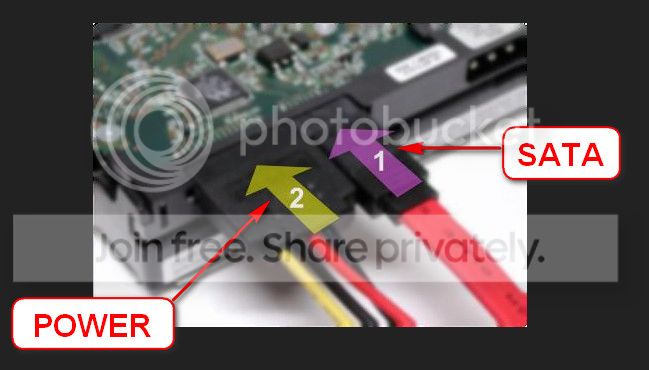
  1. Re-seat the sata and power. Alter the ports to which the SATA is connected on the motherboard; try new cables.
    72974453_zps85c47d93.jpg
  2. Run chkdsk /f/r, following the option two of the tutorial Disk Check
  3. Seatool for dos: SeaTools | Seagate download
    Burn it in a blank cd. boot from the CD, click on "Accept", wait for it to finish detecting the drives, then in the upper left corner select "Basic Tests", then select "Long Test" and let it run.
Let us know the results.
 

My Computer My Computer

At a glance

Microsoft Windows 10 Pro Insider Preview 64-bitIntel(R) Core(TM) i3-4130 CPU @ 3.40GHzCorsair Vengence 4GB x2 (8.00GB Dual-Channel ...2047MB GeForce GTS 450 (ZOTAC International)
Computer type
PC/Desktop
Computer Manufacturer/Model Number
Self Assembled
OS
Microsoft Windows 10 Pro Insider Preview 64-bit
CPU
Intel(R) Core(TM) i3-4130 CPU @ 3.40GHz
Motherboard
Gigabyte Technology Co., Ltd. B85M-D3H
Memory
Corsair Vengence 4GB x2 (8.00GB Dual-Channel DDR3 @ 798MHz)
Graphics Card(s)
2047MB GeForce GTS 450 (ZOTAC International)
Sound Card
Onboard (Realtek High Definition Audio)
Monitor(s) Displays
LG Flatron E2040T
Screen Resolution
1600x900
Hard Drives
Western Digital 1 TB
Seagate 500 GB
PSU
Corsair VS550
Case
Cooler Master K380
Cooling
Cooler Master Seidon 120V Plus
Keyboard
Logitech MK260r
Mouse
Logitech MK260r
Internet Speed
PMPL Broadband
Antivirus
Windows Defender + MBAM
Browser
Firefox
Other Info
Dell Studio 15" Laptop
Apologies for the necro thread, but I rarely get to work on this computer in question as in it doesn't belong to me. Just wanted to say thanks to Arc again! No viruses or toolkits were found, but opening up the computer revealed that the hard drive only had 1 screw holding it to the hard drive bay. So the hard drive would shake up and down during use and cause BSOD's. Adding in more screws stabilized the hard drive and no more BSOD's. The machine has a Hitachi hard drive, so I ran their hard drive repair tool to fix one sector that was damaged
 

My Computer My Computer

At a glance

Windows 7 Professional 64-bit
Computer type
PC/Desktop
Computer Manufacturer/Model Number
Custom Build
OS
Windows 7 Professional 64-bit
the hard drive only had 1 screw holding it to the hard drive bay. So the hard drive would shake up and down during use and cause BSOD's.
:shock::shock::shock:
Unfortunately the crash dump does not provide that much information :D
 

My Computer My Computer

At a glance

Microsoft Windows 10 Pro Insider Preview 64-bitIntel(R) Core(TM) i3-4130 CPU @ 3.40GHzCorsair Vengence 4GB x2 (8.00GB Dual-Channel ...2047MB GeForce GTS 450 (ZOTAC International)
Computer type
PC/Desktop
Computer Manufacturer/Model Number
Self Assembled
OS
Microsoft Windows 10 Pro Insider Preview 64-bit
CPU
Intel(R) Core(TM) i3-4130 CPU @ 3.40GHz
Motherboard
Gigabyte Technology Co., Ltd. B85M-D3H
Memory
Corsair Vengence 4GB x2 (8.00GB Dual-Channel DDR3 @ 798MHz)
Graphics Card(s)
2047MB GeForce GTS 450 (ZOTAC International)
Sound Card
Onboard (Realtek High Definition Audio)
Monitor(s) Displays
LG Flatron E2040T
Screen Resolution
1600x900
Hard Drives
Western Digital 1 TB
Seagate 500 GB
PSU
Corsair VS550
Case
Cooler Master K380
Cooling
Cooler Master Seidon 120V Plus
Keyboard
Logitech MK260r
Mouse
Logitech MK260r
Internet Speed
PMPL Broadband
Antivirus
Windows Defender + MBAM
Browser
Firefox
Other Info
Dell Studio 15" Laptop
Back
Top