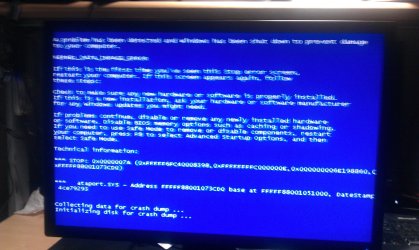
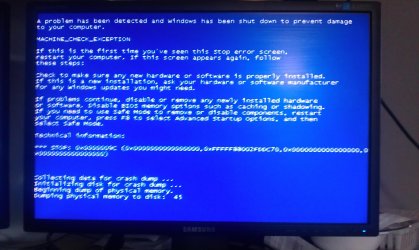
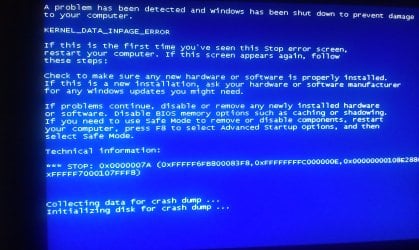
Bsod - inpage kernal error - ntfs.sys

determined

Good Lookin'
Member
Local time
2:12 PM
Messages
47
I've been getting this error a while now.

This has started to test my limits I am at a point where I now need do something myself before i pay stupid amounts of money buying parts or getting technical outlets to look at it.

Everytime this BSOD appears it screws up my boot drives and it gets stuck, so I have to re organise the priorty of the boot disks each and every time.

I have a history of pictures I have taken from my camera phone which I hope may mean something to somebody who can diagnose the issue I may be having.
 

Attachments
  • IMAG0514.jpg
    IMAG0514.jpg
    480.2 KB · Views: 24
  • IMAG0587.jpg
    IMAG0587.jpg
    692 KB · Views: 17
  • IMAG0418.jpg
    IMAG0418.jpg
    440.7 KB · Views: 12
  • IMAG0342.jpg
    IMAG0342.jpg
    478.1 KB · Views: 14

My Computer My Computer

OS
windows 7
CPU
Q6600
Motherboard
ASROCK GLAN 1333
Memory
4 GIG
Graphics Card(s)
9800 GT
Sound Card
CREATIVE SOUND BLASTER 24BIT
Monitor(s) Displays
X2
Hard Drives
500 SATA
250 IDE
PSU
650W SUPPLY
Case
CRAPPY
Cooling
TWO FANS ONE ON SIDE AND ONE AT REAR
We do need the DMP file as it contains the only record of the sequence of events leading up to the crash, what drivers were loaded, and what was responsible.

If you are overclocking STOP


We could also use some system information, which you can get easily by running msinfo32.
To do that go to start>run>type msinfo32>enter

When it is finished running go to file>save>name it and upload to us here.


You may be able to get the DMP files without crashing by booting into safe mode (F8) with networking.

To enable us to assist you with your computer's BSOD symptoms, upload the contents of your "\Windows\Minidump" folder.

The procedure:
* Copy the contents of \Windows\Minidump to another (temporary) location somewhere on your machine.
* Zip up the copy.
* Attach the ZIP archive to your post using the "paperclip" (file attachments) button.
*If the files are too large please upload them to a file sharing service like "Rapidshare" and put a link to them in your reply.
To ensure minidumps are enabled:
* Go to Start, in the Search Box type: sysdm.cpl, press Enter.
* Under the Advanced tab, click on the Startup and Recovery Settings... button.
* Ensure that Automatically restart is unchecked.
* Under the Write Debugging Information header select Small memory dump (256 kB) in the dropdown box (the 256kb varies).
* Ensure that the Small Dump Directory is listed as %systemroot%\Minidump.

* OK your way out.
* Reboot if changes have been made.
 

My Computer My Computer

Computer Manufacturer/Model Number
LAPTOP. HP Pavilion dv7-4010TX .
OS
Win 7 Ultimate 64-bit. SP1.
CPU
Intel i7 -720QM.[1.6GHz Turbo Boost 2.8GHz. 6MB Cache.]
Memory
8 DDR 3 RAM. 1066MHZ
Graphics Card(s)
ATI 1024 MB. DDR3. Radeon HD5650
Monitor(s) Displays
17.3" High Definition Brightview LCD. LED Backlit.
Screen Resolution
1600 x 900.
Hard Drives
640GB
Case
Laptop / notebook.
Mouse
Logitech Anywhere mouse. MX.
Internet Speed
ADSL [ but too slow ]
1.1 Stop Overclocking

Okay so since I had previously created this thread, I have tried to revert back to my optimised defaults. The result being that my computer would fail to get past the windows 7 logo. I tried a variety of things eventually I just given up and reinstalled Windows 7 again.

Whilst my install of Windows 7 I never had any issues, during the upgrade process it just crashed but did not revert to a BSOD. Since I have followed your instructions to setup the DMP file I have experienced one crash and i have uploaded the .DMP file.

040912-15865-01.dmp download - 2shared - Find DMP file located here. How do you extract the information from the DMP file out of interest?

I have also removed a USB PCI extension card to try and eliminate the amount of components within the machine. I do not know how you feel regarding this so please advise further.
 

My Computer My Computer

OS
windows 7
CPU
Q6600
Motherboard
ASROCK GLAN 1333
Memory
4 GIG
Graphics Card(s)
9800 GT
Sound Card
CREATIVE SOUND BLASTER 24BIT
Monitor(s) Displays
X2
Hard Drives
500 SATA
250 IDE
PSU
650W SUPPLY
Case
CRAPPY
Cooling
TWO FANS ONE ON SIDE AND ONE AT REAR

My Computer My Computer

Computer Manufacturer/Model Number
LAPTOP. HP Pavilion dv7-4010TX .
OS
Win 7 Ultimate 64-bit. SP1.
CPU
Intel i7 -720QM.[1.6GHz Turbo Boost 2.8GHz. 6MB Cache.]
Memory
8 DDR 3 RAM. 1066MHZ
Graphics Card(s)
ATI 1024 MB. DDR3. Radeon HD5650
Monitor(s) Displays
17.3" High Definition Brightview LCD. LED Backlit.
Screen Resolution
1600 x 900.
Hard Drives
640GB
Case
Laptop / notebook.
Mouse
Logitech Anywhere mouse. MX.
Internet Speed
ADSL [ but too slow ]
From the snips and the one DMP three of four crahes were related to your ataport.sys driver. That should be fixed when you update as JMH suggests.

Also please update these drivers

Code:
cxavs64.sys    6/21/2007 11:30:01 PM                              
Rt64win7.sys    2/26/2009 5:04:13 AM
How To Find Drivers:
- search Google for the name of the driver
- compare the Google results with what's installed on your system to figure out which device/program it belongs to
- visit the web site of the manufacturer of the hardware/program to get the latest drivers (DON'T use Windows Update or the Update driver function of Device Manager).
- if there are difficulties in locating them, post back with questions and someone will try and help you locate the appropriate program.
- - The most common drivers are listed on this page: Driver Reference Driver Reference
- - Driver manufacturer links are on this page: Drivers and Downloads
 

My Computer My Computer

Computer Manufacturer/Model Number
HP Pavillion dv-7 1005 Tx
OS
Win 8 Release candidate 8400
CPU
[email protected]
Memory
4 gigs
Graphics Card(s)
Nvidia 9600M
Sound Card
HD built-in
Monitor(s) Displays
17" Wxga
Screen Resolution
1440x900
Cooling
none
Internet Speed
45Mb down 5Mb up

My Computer My Computer

Computer Manufacturer/Model Number
LAPTOP. HP Pavilion dv7-4010TX .
OS
Win 7 Ultimate 64-bit. SP1.
CPU
Intel i7 -720QM.[1.6GHz Turbo Boost 2.8GHz. 6MB Cache.]
Memory
8 DDR 3 RAM. 1066MHZ
Graphics Card(s)
ATI 1024 MB. DDR3. Radeon HD5650
Monitor(s) Displays
17.3" High Definition Brightview LCD. LED Backlit.
Screen Resolution
1600 x 900.
Hard Drives
640GB
Case
Laptop / notebook.
Mouse
Logitech Anywhere mouse. MX.
Internet Speed
ADSL [ but too slow ]
1.2 SP1

Last night I managed to install all updates along with the SP1. Can confirm now that SP1 is now installed.

I must say that I really think that I am experiencing hardware issues, maybe as I had overclocked this machine it is starting to fail all over the place. Whilst installing a TV card I had experienced boot failures, it was prompting me with a message suggesting that the boot disk manager had failed insert operating disc and at the start the bios wouldn't be able to trace and IDE drives. After a few reboots I decided to just switch it off for a while and then turn it back on between a few minutes and then holy crap it started again.

Another DMP file 041012-11466-01.dmp download - 2shared

1.3 cxavs64.sys

The driver above would be related to my creative fatality champion series (you know I love saying that lol) sound card which I have just updated the drivers for prior to me posting this message. Shouldn't experience this driver problem again.

1.4 Rt64win7.sys

A google relating to this shows a few people experiencing BSOD errors, I shall investigate further.


I've already had google chrome crash on me so I shall post this and then edit.
 

My Computer My Computer

OS
windows 7
CPU
Q6600
Motherboard
ASROCK GLAN 1333
Memory
4 GIG
Graphics Card(s)
9800 GT
Sound Card
CREATIVE SOUND BLASTER 24BIT
Monitor(s) Displays
X2
Hard Drives
500 SATA
250 IDE
PSU
650W SUPPLY
Case
CRAPPY
Cooling
TWO FANS ONE ON SIDE AND ONE AT REAR

My Computer My Computer

OS
windows 7
CPU
Q6600
Motherboard
ASROCK GLAN 1333
Memory
4 GIG
Graphics Card(s)
9800 GT
Sound Card
CREATIVE SOUND BLASTER 24BIT
Monitor(s) Displays
X2
Hard Drives
500 SATA
250 IDE
PSU
650W SUPPLY
Case
CRAPPY
Cooling
TWO FANS ONE ON SIDE AND ONE AT REAR

My Computer My Computer

Computer Manufacturer/Model Number
HP Pavillion dv-7 1005 Tx
OS
Win 8 Release candidate 8400
CPU
[email protected]
Memory
4 gigs
Graphics Card(s)
Nvidia 9600M
Sound Card
HD built-in
Monitor(s) Displays
17" Wxga
Screen Resolution
1440x900
Cooling
none
Internet Speed
45Mb down 5Mb up
Back
Top