Solved BSOD instantly on entering windows

Wowdude

New member
Member
VIP
Local time
7:56 PM
Messages
98
Location
West Midlands
Hey peoples,

Yet another BSOD problem. My old PC which I donated to my in-laws suddenly started BSOD'ing for no particular reason that I can find. It boots into safe mode fine but as soon as it tried to boot into normal windows (7) it blue screens a few seconds after hitting the desktop.

Here's the dump:

Thanks for any help

Wowdude
 

My Computer My Computer

Computer Manufacturer/Model Number
Home Built
OS
Windows 7 Home Premium 64-bit, Windows 10 Home Premium 64-bit
CPU
Intel Core i5-2400 3.10GHz Quad Core
Motherboard
Asus P8H61-M LE
Memory
2 x 4Gb XMS3 DDR3
Graphics Card(s)
Asus nVidia GeForce GTX 550Ti
Sound Card
On-Board
Monitor(s) Displays
Acer S220 HQL & Hanns-G HWD191D
Screen Resolution
1920 x 1080 & 1440 x 900
Hard Drives
1Tb Seagate(Windows 7), 2Tb Western Digital & 120Gb SSD (Windows 10)
PSU
750W Alpine
Case
TTake Dokker Case
Cooling
Corsair H60 all-in-one water cooling CPU block
Keyboard
ACT K-8108 Skype multimedia keyboard
Mouse
Trust GTX 145
Internet Speed
10Mb
Antivirus
MSE
Please upload your msinfo32.nfo file. To get this: Start Menu -> Type msinfo32 into the Search programs and files box -> When it opens, go to File, Save -> Save as msinfo32.nfo and save in a place you will remember -> Let it finish the process of gathering and saving the system info -> Right click the .nfo file, click send to compressed (zipped) folder -> Upload the .zip file here.

Please upload your msinfo32.txt file. To get this: Start Menu -> Type msinfo32 into the Search programs and files box -> When it opens, go to File, Export -> Save as msinfo32.txt and save in a place you will remember -> Let it finish the process of gathering and saving the system info -> Right click the .txt file, click send to compressed (zipped) folder -> Upload the .zip file here.

Take memtest. Run for 8 passes and test each stick in a know good slot for an additional 6 passes.

The goal is to test all the RAM sticks and all the motherboard slots.

Check your motherboard manual to ensure the RAM sticks are in the recommended motherboard slots. Some motherboards have very specific slots required for the number of RAM sticks installed.

If you get errors, stop the test and continue with the next step.

1. Remove all but one stick of RAM from your computer (this will be RAM stick #1), and run Memtest86 again, for 7 passes.
*Be sure to note the RAM stick, use a piece of tape with a number, and note the motherboard slot.
If this stick passes the test then go to step #3.

2. If RAM stick #1 has errors, repeat the test with RAM stick #2 in the same motherboard slot.
*If RAM stick #2 passes, this indicates that RAM stick #1 may be bad. If you want to be absolutely sure, re-test RAM stick #1 in another known good slot.
*If RAM stick #2 has errors, this indicates another possible bad RAM stick, a possible motherboard slot failure or inadequate settings.
3. Test the next stick of RAM (stick #2) in the next motherboard slot.
*If this RAM stick has errors repeat step #2 using a known good stick if possible, or another stick.
*If this RAM stick has no errors and both sticks failed in slot#1, test RAM stick #1 in this slot.
4. If you find a stick that passes the test, test it in all the other motherboard slots.

If Part 2 testing shows errors, and all tests in Part 3 show errors, you will need to test the RAM sticks in another computer and/or test other RAM in your computer to identify the problem.

In this way, you can identify whether it is a bad stick of RAM, a bad motherboard, or incompatibility between the sticks.
:info: Errors are sometimes found after 8 passes.
:tip: Do this test overnight, before going to bed.
 

My Computer My Computer

Computer type
PC/Desktop
Computer Manufacturer/Model Number
Self assembled
OS
Windows 10 Home 64Bit
CPU
Intel Core i5 10400 @ 2.90GHz
Motherboard
Intel Corporation DG41WV (PROCESSOR)
Memory
8.00GB Single-Channel Unknown @ 1329MHz (16-20-20-38)
Sound Card
Realtek High Definition Audio
Monitor(s) Displays
DELL E170S
Screen Resolution
1280x1024 pixels
Hard Drives
931GB TOSHIBA DT01ACA100 (SATA)
238GB TEAM TM8PS7256G (SATA SSD)
Case
Nothing Fancy
Cooling
Fans
Keyboard
A4 Tech Co LTD
Mouse
A4 Tech Co Ltd/Logitech
Internet Speed
25 Mbps
Hey Koolkat!

Thanks for the fast and detailed reply.
Attached are the 2 files you asked for. I will run the memory stick testing overnight. But I've never known memeory sticks just give out for no reason. I did try them each (individually) in slots 1A and 1B and the computer still crashed with the same error. But I will try the RAM tests tonight.

Thanks

Wowdude
 

My Computer My Computer

Computer Manufacturer/Model Number
Home Built
OS
Windows 7 Home Premium 64-bit, Windows 10 Home Premium 64-bit
CPU
Intel Core i5-2400 3.10GHz Quad Core
Motherboard
Asus P8H61-M LE
Memory
2 x 4Gb XMS3 DDR3
Graphics Card(s)
Asus nVidia GeForce GTX 550Ti
Sound Card
On-Board
Monitor(s) Displays
Acer S220 HQL & Hanns-G HWD191D
Screen Resolution
1920 x 1080 & 1440 x 900
Hard Drives
1Tb Seagate(Windows 7), 2Tb Western Digital & 120Gb SSD (Windows 10)
PSU
750W Alpine
Case
TTake Dokker Case
Cooling
Corsair H60 all-in-one water cooling CPU block
Keyboard
ACT K-8108 Skype multimedia keyboard
Mouse
Trust GTX 145
Internet Speed
10Mb
Antivirus
MSE

My Computer My Computer

Computer type
PC/Desktop
Computer Manufacturer/Model Number
Self assembled
OS
Windows 10 Home 64Bit
CPU
Intel Core i5 10400 @ 2.90GHz
Motherboard
Intel Corporation DG41WV (PROCESSOR)
Memory
8.00GB Single-Channel Unknown @ 1329MHz (16-20-20-38)
Sound Card
Realtek High Definition Audio
Monitor(s) Displays
DELL E170S
Screen Resolution
1280x1024 pixels
Hard Drives
931GB TOSHIBA DT01ACA100 (SATA)
238GB TEAM TM8PS7256G (SATA SSD)
Case
Nothing Fancy
Cooling
Fans
Keyboard
A4 Tech Co LTD
Mouse
A4 Tech Co Ltd/Logitech
Internet Speed
25 Mbps
Hey koolkat,

After 1 pass there are no errors but obviously I'll be leaving it longer than that. As I said I did try both sticks in the 2 main slots in all configs and still nothing. I will upload the images tomorrow after Memtes86+ has had a good mooch.

Thanks again!

Wowdude
 

My Computer My Computer

Computer Manufacturer/Model Number
Home Built
OS
Windows 7 Home Premium 64-bit, Windows 10 Home Premium 64-bit
CPU
Intel Core i5-2400 3.10GHz Quad Core
Motherboard
Asus P8H61-M LE
Memory
2 x 4Gb XMS3 DDR3
Graphics Card(s)
Asus nVidia GeForce GTX 550Ti
Sound Card
On-Board
Monitor(s) Displays
Acer S220 HQL & Hanns-G HWD191D
Screen Resolution
1920 x 1080 & 1440 x 900
Hard Drives
1Tb Seagate(Windows 7), 2Tb Western Digital & 120Gb SSD (Windows 10)
PSU
750W Alpine
Case
TTake Dokker Case
Cooling
Corsair H60 all-in-one water cooling CPU block
Keyboard
ACT K-8108 Skype multimedia keyboard
Mouse
Trust GTX 145
Internet Speed
10Mb
Antivirus
MSE
OK. Good luck :)
 

My Computer My Computer

Computer type
PC/Desktop
Computer Manufacturer/Model Number
Self assembled
OS
Windows 10 Home 64Bit
CPU
Intel Core i5 10400 @ 2.90GHz
Motherboard
Intel Corporation DG41WV (PROCESSOR)
Memory
8.00GB Single-Channel Unknown @ 1329MHz (16-20-20-38)
Sound Card
Realtek High Definition Audio
Monitor(s) Displays
DELL E170S
Screen Resolution
1280x1024 pixels
Hard Drives
931GB TOSHIBA DT01ACA100 (SATA)
238GB TEAM TM8PS7256G (SATA SSD)
Case
Nothing Fancy
Cooling
Fans
Keyboard
A4 Tech Co LTD
Mouse
A4 Tech Co Ltd/Logitech
Internet Speed
25 Mbps
Hey koolkat77,

Attached is the picture from the CrystalDisc program. Unfortunately Speccy would not run. After installing and running it came up with an error (error 2) about not CPU dll init, then the program is terminated immediately.

Any ideas where to go next.

Thanks again,

Wowdude

P.S My PC will only boot in safe mode and is not connected to the internet atm
 

My Computer My Computer

Computer Manufacturer/Model Number
Home Built
OS
Windows 7 Home Premium 64-bit, Windows 10 Home Premium 64-bit
CPU
Intel Core i5-2400 3.10GHz Quad Core
Motherboard
Asus P8H61-M LE
Memory
2 x 4Gb XMS3 DDR3
Graphics Card(s)
Asus nVidia GeForce GTX 550Ti
Sound Card
On-Board
Monitor(s) Displays
Acer S220 HQL & Hanns-G HWD191D
Screen Resolution
1920 x 1080 & 1440 x 900
Hard Drives
1Tb Seagate(Windows 7), 2Tb Western Digital & 120Gb SSD (Windows 10)
PSU
750W Alpine
Case
TTake Dokker Case
Cooling
Corsair H60 all-in-one water cooling CPU block
Keyboard
ACT K-8108 Skype multimedia keyboard
Mouse
Trust GTX 145
Internet Speed
10Mb
Antivirus
MSE

My Computer My Computer

Computer type
PC/Desktop
Computer Manufacturer/Model Number
Self assembled
OS
Windows 10 Home 64Bit
CPU
Intel Core i5 10400 @ 2.90GHz
Motherboard
Intel Corporation DG41WV (PROCESSOR)
Memory
8.00GB Single-Channel Unknown @ 1329MHz (16-20-20-38)
Sound Card
Realtek High Definition Audio
Monitor(s) Displays
DELL E170S
Screen Resolution
1280x1024 pixels
Hard Drives
931GB TOSHIBA DT01ACA100 (SATA)
238GB TEAM TM8PS7256G (SATA SSD)
Case
Nothing Fancy
Cooling
Fans
Keyboard
A4 Tech Co LTD
Mouse
A4 Tech Co Ltd/Logitech
Internet Speed
25 Mbps
Errrm, the computer is an upgrade from OEM vista to windows 7. It was freshly installed summer 2012 so the install should be fine. I thought it might the HDD as it was my old primary but crystal HDD infor said it's health was good.

And sorry what program do you want me to use from CPUID? The PC-wizard?

Thanks,

Wowdude
 

My Computer My Computer

Computer Manufacturer/Model Number
Home Built
OS
Windows 7 Home Premium 64-bit, Windows 10 Home Premium 64-bit
CPU
Intel Core i5-2400 3.10GHz Quad Core
Motherboard
Asus P8H61-M LE
Memory
2 x 4Gb XMS3 DDR3
Graphics Card(s)
Asus nVidia GeForce GTX 550Ti
Sound Card
On-Board
Monitor(s) Displays
Acer S220 HQL & Hanns-G HWD191D
Screen Resolution
1920 x 1080 & 1440 x 900
Hard Drives
1Tb Seagate(Windows 7), 2Tb Western Digital & 120Gb SSD (Windows 10)
PSU
750W Alpine
Case
TTake Dokker Case
Cooling
Corsair H60 all-in-one water cooling CPU block
Keyboard
ACT K-8108 Skype multimedia keyboard
Mouse
Trust GTX 145
Internet Speed
10Mb
Antivirus
MSE

My Computer My Computer

Computer type
PC/Desktop
Computer Manufacturer/Model Number
Self assembled
OS
Windows 10 Home 64Bit
CPU
Intel Core i5 10400 @ 2.90GHz
Motherboard
Intel Corporation DG41WV (PROCESSOR)
Memory
8.00GB Single-Channel Unknown @ 1329MHz (16-20-20-38)
Sound Card
Realtek High Definition Audio
Monitor(s) Displays
DELL E170S
Screen Resolution
1280x1024 pixels
Hard Drives
931GB TOSHIBA DT01ACA100 (SATA)
238GB TEAM TM8PS7256G (SATA SSD)
Case
Nothing Fancy
Cooling
Fans
Keyboard
A4 Tech Co LTD
Mouse
A4 Tech Co Ltd/Logitech
Internet Speed
25 Mbps
After installing PC-wizard, it cannot function as it comes up with the error "Error initializing peripherical driver. Error: 1084" which may be because I can only boot the computer in safe mode. I also have Sisoftware Sandra lite, but as it isn't connected to the internet, it can't load from their hardware info database and doesn't load.

What is it you're looking for?
 

My Computer My Computer

Computer Manufacturer/Model Number
Home Built
OS
Windows 7 Home Premium 64-bit, Windows 10 Home Premium 64-bit
CPU
Intel Core i5-2400 3.10GHz Quad Core
Motherboard
Asus P8H61-M LE
Memory
2 x 4Gb XMS3 DDR3
Graphics Card(s)
Asus nVidia GeForce GTX 550Ti
Sound Card
On-Board
Monitor(s) Displays
Acer S220 HQL & Hanns-G HWD191D
Screen Resolution
1920 x 1080 & 1440 x 900
Hard Drives
1Tb Seagate(Windows 7), 2Tb Western Digital & 120Gb SSD (Windows 10)
PSU
750W Alpine
Case
TTake Dokker Case
Cooling
Corsair H60 all-in-one water cooling CPU block
Keyboard
ACT K-8108 Skype multimedia keyboard
Mouse
Trust GTX 145
Internet Speed
10Mb
Antivirus
MSE
Temperature of all the hardware.

Were you able to run memtest?
 

My Computer My Computer

Computer type
PC/Desktop
Computer Manufacturer/Model Number
Self assembled
OS
Windows 10 Home 64Bit
CPU
Intel Core i5 10400 @ 2.90GHz
Motherboard
Intel Corporation DG41WV (PROCESSOR)
Memory
8.00GB Single-Channel Unknown @ 1329MHz (16-20-20-38)
Sound Card
Realtek High Definition Audio
Monitor(s) Displays
DELL E170S
Screen Resolution
1280x1024 pixels
Hard Drives
931GB TOSHIBA DT01ACA100 (SATA)
238GB TEAM TM8PS7256G (SATA SSD)
Case
Nothing Fancy
Cooling
Fans
Keyboard
A4 Tech Co LTD
Mouse
A4 Tech Co Ltd/Logitech
Internet Speed
25 Mbps
Hey koolkat77,

HW Monitor has come up with a temperature of 27 degree's C. But as the computer has only just booted I imagine this will become more as the computer warms up. However before I donated the computer I installed an exhaust fan to prevent the temperature from rising too high.

Thanks,

Wowdude
 

My Computer My Computer

Computer Manufacturer/Model Number
Home Built
OS
Windows 7 Home Premium 64-bit, Windows 10 Home Premium 64-bit
CPU
Intel Core i5-2400 3.10GHz Quad Core
Motherboard
Asus P8H61-M LE
Memory
2 x 4Gb XMS3 DDR3
Graphics Card(s)
Asus nVidia GeForce GTX 550Ti
Sound Card
On-Board
Monitor(s) Displays
Acer S220 HQL & Hanns-G HWD191D
Screen Resolution
1920 x 1080 & 1440 x 900
Hard Drives
1Tb Seagate(Windows 7), 2Tb Western Digital & 120Gb SSD (Windows 10)
PSU
750W Alpine
Case
TTake Dokker Case
Cooling
Corsair H60 all-in-one water cooling CPU block
Keyboard
ACT K-8108 Skype multimedia keyboard
Mouse
Trust GTX 145
Internet Speed
10Mb
Antivirus
MSE
And memtest ran with 8 passes and no problems with the memory.
 

My Computer My Computer

Computer Manufacturer/Model Number
Home Built
OS
Windows 7 Home Premium 64-bit, Windows 10 Home Premium 64-bit
CPU
Intel Core i5-2400 3.10GHz Quad Core
Motherboard
Asus P8H61-M LE
Memory
2 x 4Gb XMS3 DDR3
Graphics Card(s)
Asus nVidia GeForce GTX 550Ti
Sound Card
On-Board
Monitor(s) Displays
Acer S220 HQL & Hanns-G HWD191D
Screen Resolution
1920 x 1080 & 1440 x 900
Hard Drives
1Tb Seagate(Windows 7), 2Tb Western Digital & 120Gb SSD (Windows 10)
PSU
750W Alpine
Case
TTake Dokker Case
Cooling
Corsair H60 all-in-one water cooling CPU block
Keyboard
ACT K-8108 Skype multimedia keyboard
Mouse
Trust GTX 145
Internet Speed
10Mb
Antivirus
MSE

My Computer My Computer

Computer type
PC/Desktop
Computer Manufacturer/Model Number
Self assembled
OS
Windows 10 Home 64Bit
CPU
Intel Core i5 10400 @ 2.90GHz
Motherboard
Intel Corporation DG41WV (PROCESSOR)
Memory
8.00GB Single-Channel Unknown @ 1329MHz (16-20-20-38)
Sound Card
Realtek High Definition Audio
Monitor(s) Displays
DELL E170S
Screen Resolution
1280x1024 pixels
Hard Drives
931GB TOSHIBA DT01ACA100 (SATA)
238GB TEAM TM8PS7256G (SATA SSD)
Case
Nothing Fancy
Cooling
Fans
Keyboard
A4 Tech Co LTD
Mouse
A4 Tech Co Ltd/Logitech
Internet Speed
25 Mbps
Sure. I will try a clean boot now to see if it can boot to windows.

Thanks,

Wowdude
 

My Computer My Computer

Computer Manufacturer/Model Number
Home Built
OS
Windows 7 Home Premium 64-bit, Windows 10 Home Premium 64-bit
CPU
Intel Core i5-2400 3.10GHz Quad Core
Motherboard
Asus P8H61-M LE
Memory
2 x 4Gb XMS3 DDR3
Graphics Card(s)
Asus nVidia GeForce GTX 550Ti
Sound Card
On-Board
Monitor(s) Displays
Acer S220 HQL & Hanns-G HWD191D
Screen Resolution
1920 x 1080 & 1440 x 900
Hard Drives
1Tb Seagate(Windows 7), 2Tb Western Digital & 120Gb SSD (Windows 10)
PSU
750W Alpine
Case
TTake Dokker Case
Cooling
Corsair H60 all-in-one water cooling CPU block
Keyboard
ACT K-8108 Skype multimedia keyboard
Mouse
Trust GTX 145
Internet Speed
10Mb
Antivirus
MSE
It failed the cleanboot test. Disabled all the non-microsoft services and it still crashed just after it loaded to the desktop.
 

My Computer My Computer

Computer Manufacturer/Model Number
Home Built
OS
Windows 7 Home Premium 64-bit, Windows 10 Home Premium 64-bit
CPU
Intel Core i5-2400 3.10GHz Quad Core
Motherboard
Asus P8H61-M LE
Memory
2 x 4Gb XMS3 DDR3
Graphics Card(s)
Asus nVidia GeForce GTX 550Ti
Sound Card
On-Board
Monitor(s) Displays
Acer S220 HQL & Hanns-G HWD191D
Screen Resolution
1920 x 1080 & 1440 x 900
Hard Drives
1Tb Seagate(Windows 7), 2Tb Western Digital & 120Gb SSD (Windows 10)
PSU
750W Alpine
Case
TTake Dokker Case
Cooling
Corsair H60 all-in-one water cooling CPU block
Keyboard
ACT K-8108 Skype multimedia keyboard
Mouse
Trust GTX 145
Internet Speed
10Mb
Antivirus
MSE
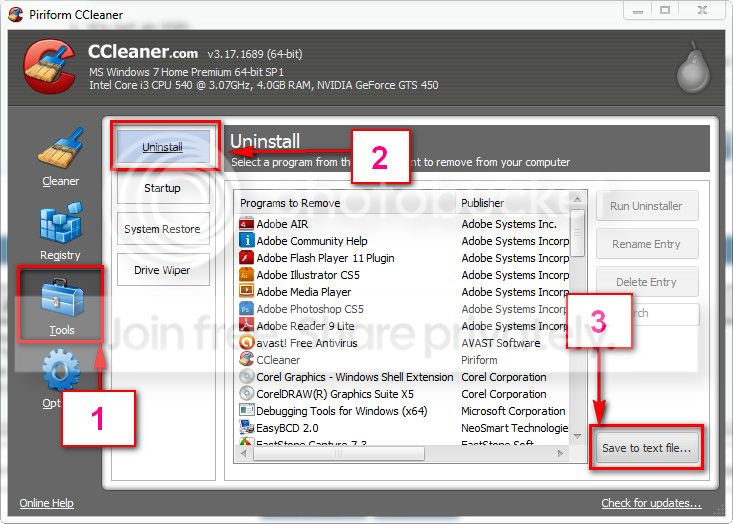
Download and install CCleaner. Then run it.
Go to "Tools" .... by default it will open the "uninstall" tab.
Click on save as text file. Save it on your desktop.
Upload the text file for us.
2012-11-02_224417.jpg
Instructions by Arc.
 

My Computer My Computer

Computer type
PC/Desktop
Computer Manufacturer/Model Number
Self assembled
OS
Windows 10 Home 64Bit
CPU
Intel Core i5 10400 @ 2.90GHz
Motherboard
Intel Corporation DG41WV (PROCESSOR)
Memory
8.00GB Single-Channel Unknown @ 1329MHz (16-20-20-38)
Sound Card
Realtek High Definition Audio
Monitor(s) Displays
DELL E170S
Screen Resolution
1280x1024 pixels
Hard Drives
931GB TOSHIBA DT01ACA100 (SATA)
238GB TEAM TM8PS7256G (SATA SSD)
Case
Nothing Fancy
Cooling
Fans
Keyboard
A4 Tech Co LTD
Mouse
A4 Tech Co Ltd/Logitech
Internet Speed
25 Mbps
My apologies for the delay. Attached is the list you requested.

Wowdude
 

My Computer My Computer

Computer Manufacturer/Model Number
Home Built
OS
Windows 7 Home Premium 64-bit, Windows 10 Home Premium 64-bit
CPU
Intel Core i5-2400 3.10GHz Quad Core
Motherboard
Asus P8H61-M LE
Memory
2 x 4Gb XMS3 DDR3
Graphics Card(s)
Asus nVidia GeForce GTX 550Ti
Sound Card
On-Board
Monitor(s) Displays
Acer S220 HQL & Hanns-G HWD191D
Screen Resolution
1920 x 1080 & 1440 x 900
Hard Drives
1Tb Seagate(Windows 7), 2Tb Western Digital & 120Gb SSD (Windows 10)
PSU
750W Alpine
Case
TTake Dokker Case
Cooling
Corsair H60 all-in-one water cooling CPU block
Keyboard
ACT K-8108 Skype multimedia keyboard
Mouse
Trust GTX 145
Internet Speed
10Mb
Antivirus
MSE
Thanks.

Do you have a spare stick of RAM? Compatible with the motherboard of this laptop?
 

My Computer My Computer

Computer type
PC/Desktop
Computer Manufacturer/Model Number
Self assembled
OS
Windows 10 Home 64Bit
CPU
Intel Core i5 10400 @ 2.90GHz
Motherboard
Intel Corporation DG41WV (PROCESSOR)
Memory
8.00GB Single-Channel Unknown @ 1329MHz (16-20-20-38)
Sound Card
Realtek High Definition Audio
Monitor(s) Displays
DELL E170S
Screen Resolution
1280x1024 pixels
Hard Drives
931GB TOSHIBA DT01ACA100 (SATA)
238GB TEAM TM8PS7256G (SATA SSD)
Case
Nothing Fancy
Cooling
Fans
Keyboard
A4 Tech Co LTD
Mouse
A4 Tech Co Ltd/Logitech
Internet Speed
25 Mbps
Back
Top