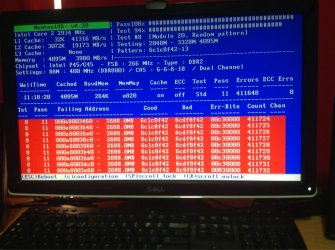
i keep getting the BSOD when ever im using my computer, i have reformatted it and it still occurs here is a copy of what windows says once it has restarted: also below is the files it lists in a .zip file any help would be appreciated
Problem signature:
Problem Event Name: BlueScreen
OS Version: 6.1.7601.2.1.0.256.48
Locale ID: 3081
Additional information about the problem:
BCCode: 3b
BCP1: 00000000C0000005
BCP2: FFFFF80002F3435F
BCP3: FFFFF8800CAC4C50
BCP4: 0000000000000000
OS Version: 6_1_7601
Service Pack: 1_0
Product: 256_1
Files that help describe the problem:
C:\Windows\Minidump\011413-21496-01.dmp
C:\Users\Daryl\AppData\Local\Temp\WER-45645-0.sysdata.xml
Ok three things that i noticed right off the bat, the crash dumps are pointing to memory corruption as the prime cause so I would like you to run through this tutorial:
Memtest86+
let it run for at least 8 passes if you can more (best to let it run overnight) then post back the results.
The second thing I noticed was your BIOS is rather out of date I would check the manufacturer's website and see if there is an update
Code:
BIOS Release Date 08/25/2009
And the third is that you have the drivers for Daemon tools, which is known to cause BSODs If you still have Daemon tools installed uninstall it and then download and run this tool if the uninstall box is grayed out then the uninstall is complete if not click the uninstall button and let the tool do its job.
My Computer
At a glance
Windows 7 enterprise 64 bit, Windows 7 Pro 64...Core i5-2400, Athlon 64 X2 6400+ ,Core i7-3632QM4GB, 4gb g.skill ddr2, 8gbRadeon HD 4550 sgb, Radeon HD 4870, NVIDIA Ge...
Computer Manufacturer/Model Number
Lenovo ThinkCenter, Custom Built PC, Acer Aspire V3-771G-9809
OS
Windows 7 enterprise 64 bit, Windows 7 Pro 64 bit ,Windows 8 64bit
CPU
Core i5-2400, Athlon 64 X2 6400+ ,Core i7-3632QM
Motherboard
ASUS M4A79 Deluxe
Memory
4GB, 4gb g.skill ddr2, 8gb
Graphics Card(s)
Radeon HD 4550 sgb, Radeon HD 4870, NVIDIA Geforce GT 650m
Monitor(s) Displays
dual samsung 22" monitors
Hard Drives
500GB, Western Digital WD Blue WD6400AAKS 640GB 7200 RPM 16MB Cache SATA 3.0Gb/s, 1TB
Case
Antec Twelve Hundred V3 Black Steel ATX Full Tower
i uninstalled deamon tools i went to the dell website and it said the bios i have is the same or newer than the current version will run memtest overnight and post back with the results
My Computer
At a glance
Windows 8.1 64BitIntel Core i7 4820K 3.7Ghz 10MB32GBGigabyte GeForce GTX 750 TI OC 2GB
Then replace the bad stick. You can get good deals on the web from google shopping view if you're sure of the specs, or go to a parts counter at a PC store or shop where they can help you spec it exactly and its easier to return if it's wrong.
Does it make the beeping noise if you remove both the sticks or just one at a time, and secondary question if you remove one and swap the other one to the slot that the first one was in does it make the beeping noise?
My Computer
At a glance
Windows 7 enterprise 64 bit, Windows 7 Pro 64...Core i5-2400, Athlon 64 X2 6400+ ,Core i7-3632QM4GB, 4gb g.skill ddr2, 8gbRadeon HD 4550 sgb, Radeon HD 4870, NVIDIA Ge...
Computer Manufacturer/Model Number
Lenovo ThinkCenter, Custom Built PC, Acer Aspire V3-771G-9809
OS
Windows 7 enterprise 64 bit, Windows 7 Pro 64 bit ,Windows 8 64bit
CPU
Core i5-2400, Athlon 64 X2 6400+ ,Core i7-3632QM
Motherboard
ASUS M4A79 Deluxe
Memory
4GB, 4gb g.skill ddr2, 8gb
Graphics Card(s)
Radeon HD 4550 sgb, Radeon HD 4870, NVIDIA Geforce GT 650m
Monitor(s) Displays
dual samsung 22" monitors
Hard Drives
500GB, Western Digital WD Blue WD6400AAKS 640GB 7200 RPM 16MB Cache SATA 3.0Gb/s, 1TB
Case
Antec Twelve Hundred V3 Black Steel ATX Full Tower
Do what these knowledgeable guys have recommended and please understand their frustration when trying to tell someone what to do to fix something and they don't seem to be following instructions. Sometimes it gets very frustrating... Gregrocker is kind enough to try and help you, so don't mistake his frustration for "bad attitude"... Hope the RAM problem is fixed soon - just replace it!
My Computer
At a glance
Microsoft Windows 8.1 Enterprise 64-bitIntel(R) Core(TM) i7-3770K CPU @ 4.7GHz (Over...32 GB 12800 DDR3 Crucial Ballistix SportNVIDIA GeForce GTX 660 SC x 2 (SLI) by EVGA
Computer type
PC/Desktop
Computer Manufacturer/Model Number
Intel DZ77GA-70K
OS
Microsoft Windows 8.1 Enterprise 64-bit
CPU
Intel(R) Core(TM) i7-3770K CPU @ 4.7GHz (Overclocked)
Motherboard
Intel Corporation DZ77GA-70K, 0066 BIOS version
Memory
32 GB 12800 DDR3 Crucial Ballistix Sport
Graphics Card(s)
NVIDIA GeForce GTX 660 SC x 2 (SLI) by EVGA
Sound Card
(1) Bluetooth Hands-free Audio (2) NVIDIA High Definition
Monitor(s) Displays
LG 27" HDMI
Screen Resolution
12920 x 1080 x 32 bits (4294967296 colors) @ 60Hz
Hard Drives
Intel 120GB SSD (ATA INTEL SSDSC2CT12 SCSI Disk Device)
Western Digital Caviar Black 64M cache 2TB 7200rpm (ATA WDC WD2002FAEX-0 SCSI Disk Device), 3 x WD 150Gb 10k Velociraptor hard drives in RAID 0 (testing)
PSU
Corsair 750w fully modular
Case
Corsair 650D with perforated side panel
Cooling
3 200mm case fans, Intel liquid cooling for CPU w 120mm fans
Keyboard
Logitech backlit
Mouse
Dell
Internet Speed
11Mbps DSL
Antivirus
Windows Defender, MalWareBytes Pro and CCleaner Pro