BSOD - latest problem: PFN_LIST_CORRUPT

repeter

New member
Local time
2:02 AM
Messages
4
Hello!

I clearly need expert help. I've tried to isolate the problem for a while, changed a bad RAM unit, thaught I had solved it and then the blue screens returned. I get quite a few diffrent BSODS and according to Blue Screen View the latest one was caused by driver AVGIDSFilter.Sys. Looking at the list of drivers causing BSODs, the most frequent one is ntoskrnl.exe

So I'm stuck. Any help would be great.

Thanks in advance!
/Peter

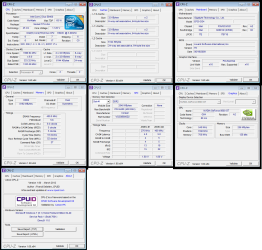
I'm enclosing some .dmp files and some pc data. Please let me know if more info is needed.
 

Attachments
  • bsods.zip
    bsods.zip
    291.6 KB · Views: 19
  • cpu-z.png
    cpu-z.png
    61.1 KB · Views: 53

My Computer

OS
Windows 7 Home Premium 64 bit
The most recent one does indeed point to AVG and I would remove and replace it with Microsoft Security Essentials, but i think the majority of these point to memory.

I note you have AVG.

AVG can be a contributing cause of BSOD'S .
Please remove and replace with Microsoft Security Essentials
AT LEAST TO TEST

Download tools and utilities | AVG Worldwide[/B]

Microsoft Security Essentials - Free Antivirus for Windows


* Did you run a FULL SYSTEM scan with Malwarebytes?


These crashes were caused by memory corruption/exception (probably a driver).
Please run these two tests to verify your memory and find which driver is causing the problem.


* If you are overclocking anything reset to default before running these tests.
In other words STOP!!!

* If you have raid update its Driver.


Memtest.
*Download a copy of Memtest86 and burn the ISO to a CD using Iso Recorder or another ISO burning program. Memtest86+ - Advanced Memory Diagnostic Tool

*Boot from the CD, and leave it running for at least 5 or 6 passes.

Just remember, any time Memtest reports errors, it can be either bad RAM or a bad motherboard slot.

Test the sticks individually, and if you find a good one, test it in all slots.

Any errors are indicative of a memory problem.

If a known good stick fails in a motherboard slot it is probably the slot.
http://www.sevenforums.com/tutorials/105647-ram-test-memtest86.html


Driver verifier

Using Driver Verifier is an iffy proposition. Most times it'll crash and it'll tell you what the driver is. But sometimes it'll crash and won't tell you the driver. Other times it'll crash before you can log in to Windows. If you can't get to Safe Mode, then you'll have to resort to offline editing of the registry to disable Driver Verifier.

So, I'd suggest that you first backup your stuff and then make sure you've got access to another computer so you can contact us if problems arise. Then make a System Restore point (so you can restore the system using the Vista/Win7 Startup Repair feature).

Then, here's the procedure:
- Go to Start and type in "verifier" (without the quotes) and press Enter
- Select "Create custom settings (for code developers)" and click "Next"
- Select "Select individual settings from a full list" and click "Next"
- Select everything EXCEPT FOR "Special Pool", "Force Pending I/O Requests" and "Low Resource Simulation" and click "Next"
- Select "Select driver names from a list" and click "Next"
Then select all drivers NOT provided by Microsoft and click "Next"
- Select "Finish" on the next page.

Reboot the system and wait for it to crash to the Blue Screen.
Continue to use your system normally, and if you know what causes the crash, do that repeatedly.
The objective here is to get the system to crash because Driver Verifier is stressing the drivers out.
If it doesn't crash for you, then let it run for at least 36 hours of continuous operation.

Reboot into Windows (after the crash) and turn off Driver Verifier by going back in and selecting "Delete existing settings" on the first page, then locate and zip up the memory dump file and upload it with your next post.

If you can't get into Windows because it crashes too soon, try it in Safe Mode.
If you can't get into Safe Mode, try using System Restore from your installation DVD to set the system back to the previous restore point that you created.
 

My Computer

Computer Manufacturer/Model Number
HP Pavillion dv-7 1005 Tx
OS
Win 8 Release candidate 8400
CPU
[email protected]
Memory
4 gigs
Graphics Card(s)
Nvidia 9600M
Sound Card
HD built-in
Monitor(s) Displays
17" Wxga
Screen Resolution
1440x900
Cooling
none
Internet Speed
45Mb down 5Mb up
Thanks a lot! I will try that asap :)
/Peter
 

My Computer

OS
Windows 7 Home Premium 64 bit

My Computer

Computer Manufacturer/Model Number
HP Pavillion dv-7 1005 Tx
OS
Win 8 Release candidate 8400
CPU
[email protected]
Memory
4 gigs
Graphics Card(s)
Nvidia 9600M
Sound Card
HD built-in
Monitor(s) Displays
17" Wxga
Screen Resolution
1440x900
Cooling
none
Internet Speed
45Mb down 5Mb up
Hello again!

I'm back after trying all of the obove:
- uninstalled AVG
- installed MS Security...
- Malwarebytes, check
- I'm not overcklocking and no raid
- Memtest ok (7)
- Just ran Driver verifier, had a crash and I enclose the latest minidump.
Looks like my favourite firewire soundcard has to go, or what do you say? I have the latest driver from what i can see. The firewire driver on the other hand might be obsolete and I have not been able to find an up to date one...

What say the expert?

Thanks!

/Peter
 

Attachments

My Computer

OS
Windows 7 Home Premium 64 bit
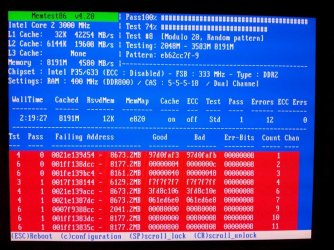
Ok, the latest news: I haven't had a crash since I provoked one with Driver verifier. Computer has been running around the clock for a few days. I decided to run the Memtest with all four RAM units at once and half the screen turned red. Since all the RAM units and slots were tested individually and passed seven or more instances of the test... I don't get it.

Greateful for any clues.

/Peter
 

Attachments

  • 20120320_010506.jpg
    20120320_010506.jpg
    154.7 KB · Views: 23

My Computer

OS
Windows 7 Home Premium 64 bit
Back
Top