That system information is a source of necessary date. It should be a part of the upload.
From the next time, upload the data in the relevant post, not altering the original post. It helps to maintain chronology.
The BSOD is caused by the Qualcomm Atheros AR5B97 Wireless Network Adapter Driver.
Code:
No Mdl: No System Buffer: Thread 00000000:  Irp stack trace.
     cmd  flg cl Device   File     Completion-Context
 [  0, 0]   0  0 00000000 00000000 00000000-00000000

            Args: 00000000 00000000 00000000 00000000
 [  0, 0]   0  0 00000000 00000000 00000000-00000000

            Args: 00000000 00000000 00000000 00000000
>[ 16, 2]   0  0 fffffa8008135050 00000000 00000000-00000000
          *** WARNING: Unable to verify timestamp for [URL="http://www.carrona.org/drivers/driver.php?id=athrx.sys"]athrx.sys[/URL]
*** ERROR: Module load completed but symbols could not be loaded for [URL="http://www.carrona.org/drivers/driver.php?id=athrx.sys"]athrx.sys[/URL]
 \Driver\athr
            Args: 00014400 00000000 00000004 00000002
 [ 16, 2]   0 e1 fffffa8007b788d0 00000000 fffff80003312200-fffffa80047eff90 Success Error Cancel pending
           \Driver\vwifibus    nt!PopSystemIrpCompletion
            Args: 00014400 00000000 00000004 00000002
 [  0, 0]   0  0 00000000 00000000 00000000-fffffa80047eff90

            Args: 00000000 00000000 00000000 00000000
But the driver is up to date.
Code:
fffff880`05a0b000 fffff880`05dda000   athrx    T (no symbols)
    Loaded symbol image file: [URL="http://www.carrona.org/drivers/driver.php?id=athrx.sys"]athrx.sys[/URL]
    Image path: [URL="http://www.carrona.org/drivers/driver.php?id=athrx.sys"]athrx.sys[/URL]
[COLOR=Red]    Image name: athrx.sys
    Timestamp:        Fri Nov 23 10:21:22 2012[/COLOR] (50AF00CA)
    CheckSum:         003B74A3
    ImageSize:        003CF000
    Translations:     0000.04b0 0000.04e4 0409.04b0 0409.04e4
It is the latest one listed in the site
Drivers for Atheros AR5B97 and Windows 7
If it have been a network related crash, I must have been lost

But fortunately it is a driver power state failure only, related to sleep. When a USB device fails the poser state during wake up with the updated device driver, better it is to check the USB host controller itself. So I checked for Renesas Electronics USB 3.0 Host Controller Driver and found that it is backdated.
Code:
fffff880`079a4000 fffff880`079d5000   nusb3xhc   (deferred)
    Image path: \SystemRoot\system32\DRIVERS\[URL="http://www.carrona.org/drivers/driver.php?id=nusb3xhc.sys"]nusb3xhc.sys[/URL]
    Image name: [URL="http://www.carrona.org/drivers/driver.php?id=nusb3xhc.sys"]nusb3xhc.sys[/URL]
    Timestamp:        [COLOR=Red]Thu Feb 10 11:22:33 2011 [/COLOR](4D537D21)
    CheckSum:         0002FA41
    ImageSize:        00031000
    Translations:     0000.04b0 0000.04e4 0409.04b0 0409.04e4
Iwould suggest you to update it from
RENESAS/NEC Drivers & Firmwares.
Also, the display driver is failing.
Code:
fffff800`00b9c540  fffff880`070a56e0Unable to load image [URL="http://www.carrona.org/drivers/driver.php?id=nvlddmkm.sys"]nvlddmkm.sys[/URL], Win32 error 0n2
*** WARNING: Unable to verify timestamp for [URL="http://www.carrona.org/drivers/driver.php?id=nvlddmkm.sys"]nvlddmkm.sys[/URL]
*** ERROR: Module load completed but symbols could not be loaded for[URL="http://www.carrona.org/drivers/driver.php?id=nvlddmkm.sys"] nvlddmkm.sys[/URL]
 nvlddmkm+0x1be6e0
It is not the most upto date.
Code:
fffff880`06e7e000 fffff880`07926000   nvlddmkm   (deferred)
    Image path: \SystemRoot\system32\DRIVERS\nvlddmkm.sys
[COLOR=Red]    Image name: nvlddmkm.sys
    Timestamp:        Sun Feb 10 04:43:08 2013[/COLOR] (5116D804)
    CheckSum:         00A90CB0
    ImageSize:        00AA8000
    Translations:     0000.04b0 0000.04e4 0409.04b0 0409.04e4
Install the latest WHQL.
- Go to Drivers - Download NVIDIA Drivers, Download 314.22 WHQL.
While installing, Select Custom (Advanced) install. In the next page, follow this settings:
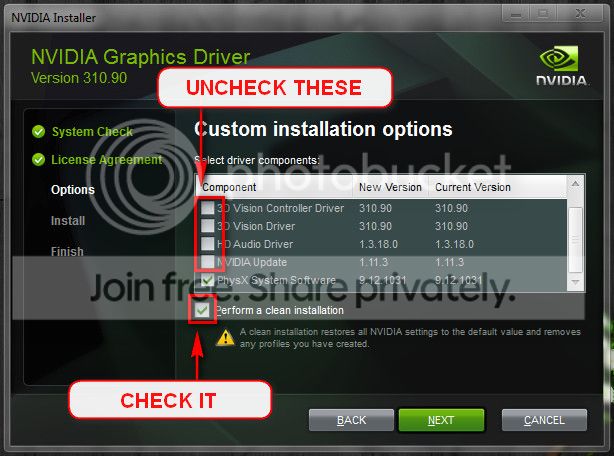
Information
Version: 314.22
Release Date for Desktops and Notebooks : March 25th 2013
In Device Manager: 9.18.13.1422
Now observe the situation. Put the computer to sleep and wake it up. Is it still crashing? If so, disable USB Selective Suspense .
Free up the startup. Windows does not need any other program to auto start with it, but the auto start programs often conflicts and causes various problems including BSODs during startup and wake up from sleep.
- Click on the Start button
- Type “msconfig (without quotes), click the resulting link. It will open the System Configuration window.
- Select the “Startup” tab.
- Deselect all items other than the antivirus.
- Apply > OK
- Accept then restart.
Let us know the results.



