BSOD multiple times during day

fehpeh

New member
Local time
4:22 PM
Messages
11
Hello, I am getting BSOD multiple times during a day for last 2 weeks, especially when i start my pc. I was using Windows 8.1 x64 when this problem started. Today I did format my drive and installed Windows 7 Ultimate x64. BSOD is still happening.

I converted my dumpfile to logfile using this method. If i did something wrong or you need something different please ask me and i will upload it.

PS: This dumpfile is 1 day old. Last time i get BSOD my pc froze during blue screen so i restarted my pc and there was no dumpfile.

Sorry for my bad English. Thanks.

View attachment 301299
 

My Computer My Computer

Computer type
PC/Desktop
OS
Microsoft Windows 7 Ultimate 64-bit 7601 Multiprocessor Free Service Pack 1
CPU
AMD Phenom(tm) II X6 1055T Processor
Motherboard
ASUSTeK Computer INC. M4A87TD/USB3
Memory
6,00 GB
Graphics Card(s)
AMD Radeon HD 5800 Series
Sound Card
(1) Razer Surround Audio Controller (2) High Definition Au
Screen Resolution
1920 x 1080 x 32 bits (4294967296 colors) @ 60 Hz
Hard Drives
(1) ST31000528AS ATA Device (2) Kingston DataTraveler G2 USB Device
Browser
Chrome

My Computer My Computer

Computer type
PC/Desktop
OS
Microsoft Windows 7 Ultimate 64-bit 7601 Multiprocessor Free Service Pack 1
CPU
AMD Phenom(tm) II X6 1055T Processor
Motherboard
ASUSTeK Computer INC. M4A87TD/USB3
Memory
6,00 GB
Graphics Card(s)
AMD Radeon HD 5800 Series
Sound Card
(1) Razer Surround Audio Controller (2) High Definition Au
Screen Resolution
1920 x 1080 x 32 bits (4294967296 colors) @ 60 Hz
Hard Drives
(1) ST31000528AS ATA Device (2) Kingston DataTraveler G2 USB Device
Browser
Chrome
Hi fehpeh.

Install Service pack 1 and all other windows updates. Otherwise the system will remain vulnerable to threats.
Code:
[COLOR=Red]Windows 7 Kernel Version 7600 MP[/COLOR] (6 procs) Free x64
Product: WinNt, suite: TerminalServer SingleUserTS
Built by: 7600.16385.amd64fre.win7_rtm.090713-1255
Learn how to install Windows 7 Service Pack 1 (SP1)
Service Pack and Update Center - Microsoft Windows

Scan the system for possible virus infection with the following programs.

Test your RAM modules for possible errors.
How to Test and Diagnose RAM Issues with Memtest86+
Run memtest for at least 8 passes, preferably overnight.

If it start showing errors/red lines, stop testing. A single error is enough to determine that something is going bad there.

If memtest dies not show any error, enable Driver Verifier to monitor the drivers.
Driver Verifier - Enable and Disable
Run Driver Verifier for 24 hours or the occurrence of the next crash, whichever is earlier.

   Information
Why Driver Verifier:
It puts a stress on the drivers, ans so it makes the unstable drivers crash. Hopefully the driver that crashes is recorded in the memory dump.

How Can we know that DV is enabled:
It will make the system bit of slow, laggy.

   Warning
Before enabling DV, make it sure that you have earlier System restore points made in your computer. You can check it easily by using CCleaner looking at Tools > System Restore.

If there is no points, make a System Restore Point manually before enabling DV.

   Tip


Let us know the results, with the subsequent crash dumps, if any.
_______________________________________________________________________________________
Code:
*******************************************************************************
*                                                                             *
*                        Bugcheck Analysis                                    *
*                                                                             *
*******************************************************************************

Use !analyze -v to get detailed debugging information.

BugCheck 3B, {c0000005, fffff80002bf68fe, fffff88005ecf720, 0}

Probably caused by : ntkrnlmp.exe ( nt!ExAllocatePoolWithTag+52e )

Followup: MachineOwner
---------

3: kd> !analyze -v
*******************************************************************************
*                                                                             *
*                        Bugcheck Analysis                                    *
*                                                                             *
*******************************************************************************

SYSTEM_SERVICE_EXCEPTION (3b)
An exception happened while executing a system service routine.
Arguments:
Arg1: 00000000c0000005, Exception code that caused the bugcheck
Arg2: fffff80002bf68fe, Address of the instruction which caused the bugcheck
Arg3: fffff88005ecf720, Address of the context record for the exception that caused the bugcheck
Arg4: 0000000000000000, zero.

Debugging Details:
------------------


EXCEPTION_CODE: (NTSTATUS) 0xc0000005 - The instruction at 0x%08lx referenced memory at 0x%08lx. The memory could not be %s.

FAULTING_IP: 
nt!ExAllocatePoolWithTag+52e
fffff800`02bf68fe 483918          cmp     qword ptr [rax],rbx

CONTEXT:  fffff88005ecf720 -- (.cxr 0xfffff88005ecf720)
rax=ffdff8a012e1fc00 rbx=fffffa8005300900 rcx=fffff8a00f17f570
rdx=0000000000000003 rsi=0000000000001000 rdi=0000000000000001
rip=fffff80002bf68fe rsp=fffff88005ed0100 rbp=fffffa80053003c0
 r8=0000000000000001  r9=fffffa8005300900 r10=fffffa80053003c8
r11=0000000000000003 r12=0000000000000041 r13=0000000000000000
r14=fffffa8005761b60 r15=000000006e664d46
iopl=0         nv up ei pl zr na po nc
cs=0010  ss=0018  ds=002b  es=002b  fs=0053  gs=002b             efl=00010246
nt!ExAllocatePoolWithTag+0x52e:
fffff800`02bf68fe 483918          cmp     qword ptr [rax],rbx ds:002b:ffdff8a0`12e1fc00=????????????????
Resetting default scope

CUSTOMER_CRASH_COUNT:  1

DEFAULT_BUCKET_ID:  VISTA_DRIVER_FAULT

BUGCHECK_STR:  0x3B

PROCESS_NAME:  TrustedInstall

CURRENT_IRQL:  0

LAST_CONTROL_TRANSFER:  from 0000000000000000 to fffff80002bf68fe

STACK_TEXT:  
fffff880`05ed0100 00000000`00000000 : 00000000`00000000 00000000`00000000 00000000`00000000 00000000`00000000 : nt!ExAllocatePoolWithTag+0x52e


FOLLOWUP_IP: 
nt!ExAllocatePoolWithTag+52e
fffff800`02bf68fe 483918          cmp     qword ptr [rax],rbx

SYMBOL_STACK_INDEX:  0

SYMBOL_NAME:  nt!ExAllocatePoolWithTag+52e

FOLLOWUP_NAME:  MachineOwner

MODULE_NAME: nt

IMAGE_NAME:  ntkrnlmp.exe

DEBUG_FLR_IMAGE_TIMESTAMP:  4a5bc600

STACK_COMMAND:  .cxr 0xfffff88005ecf720 ; kb

FAILURE_BUCKET_ID:  X64_0x3B_nt!ExAllocatePoolWithTag+52e

BUCKET_ID:  X64_0x3B_nt!ExAllocatePoolWithTag+52e

Followup: MachineOwner
---------
 

My Computer My Computer

Computer type
PC/Desktop
Computer Manufacturer/Model Number
Self Assembled
OS
Microsoft Windows 10 Pro Insider Preview 64-bit
CPU
Intel(R) Core(TM) i3-4130 CPU @ 3.40GHz
Motherboard
Gigabyte Technology Co., Ltd. B85M-D3H
Memory
Corsair Vengence 4GB x2 (8.00GB Dual-Channel DDR3 @ 798MHz)
Graphics Card(s)
2047MB GeForce GTS 450 (ZOTAC International)
Sound Card
Onboard (Realtek High Definition Audio)
Monitor(s) Displays
LG Flatron E2040T
Screen Resolution
1600x900
Hard Drives
Western Digital 1 TB
Seagate 500 GB
PSU
Corsair VS550
Case
Cooler Master K380
Cooling
Cooler Master Seidon 120V Plus
Keyboard
Logitech MK260r
Mouse
Logitech MK260r
Internet Speed
PMPL Broadband
Antivirus
Windows Defender + MBAM
Browser
Firefox
Other Info
Dell Studio 15" Laptop
Hello again.
1) I did update my OS to latest version.
2) No virus infection. View attachment 301624
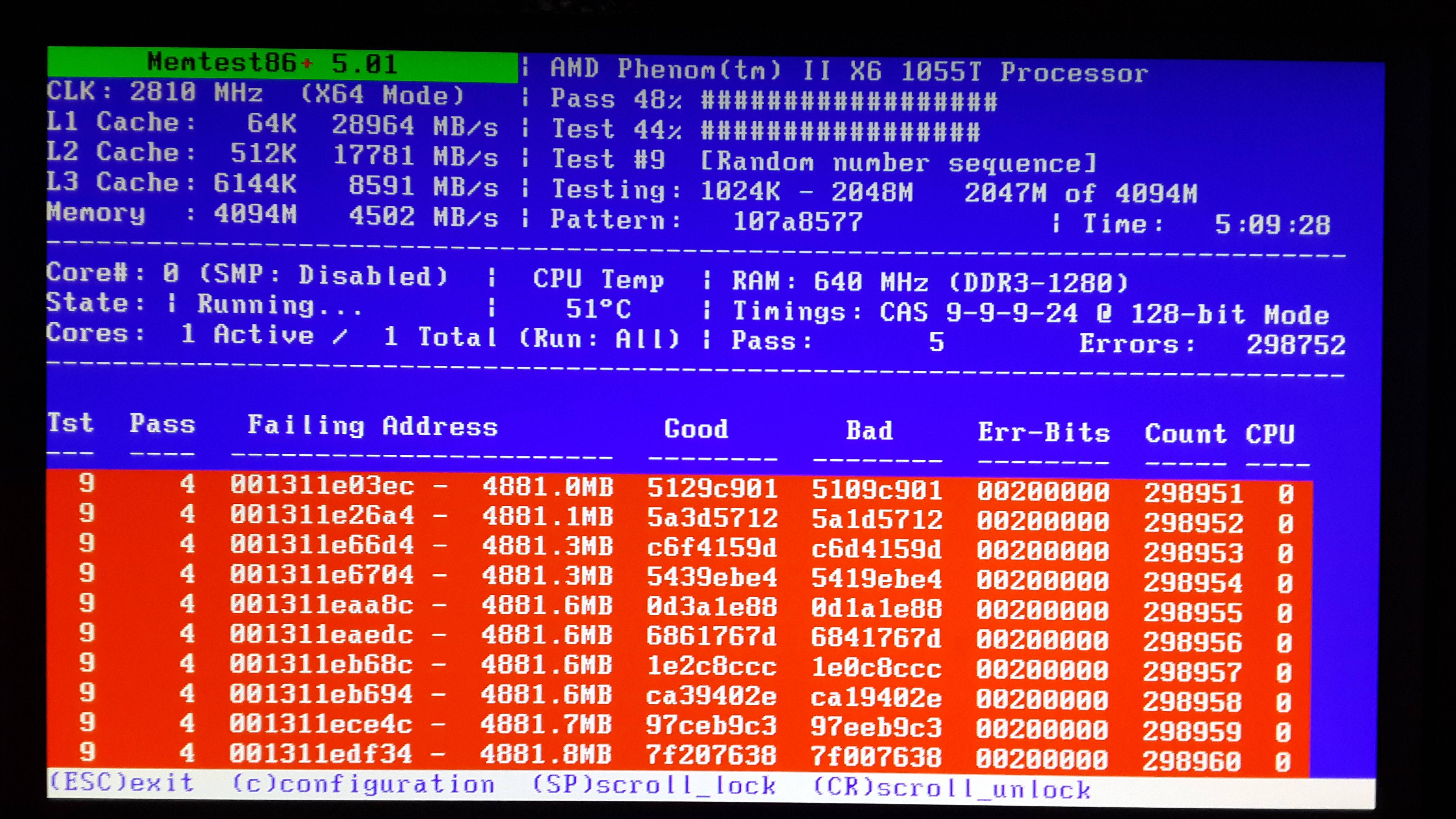
3) Last night, i opened Memtest and it passed 2 times then i went to sleep. When i woke up, my pc was crashed and my motherboards MEMOk! button light was on. I managed to start windows to check any kind of error logs about memtest but i couldn't find any. Then i downloaded "HCi Memtest Pro" to test my rams in Windows environment. While i was testing i get BSOD. And there was no errors in the log View attachment 301628
4) I enabled DV, played some games while it was on. Did 1 hour cpu and gpu stress test. no error. I think its still enabled.

Files from SF tool View attachment 301629
 

My Computer My Computer

Computer type
PC/Desktop
OS
Microsoft Windows 7 Ultimate 64-bit 7601 Multiprocessor Free Service Pack 1
CPU
AMD Phenom(tm) II X6 1055T Processor
Motherboard
ASUSTeK Computer INC. M4A87TD/USB3
Memory
6,00 GB
Graphics Card(s)
AMD Radeon HD 5800 Series
Sound Card
(1) Razer Surround Audio Controller (2) High Definition Au
Screen Resolution
1920 x 1080 x 32 bits (4294967296 colors) @ 60 Hz
Hard Drives
(1) ST31000528AS ATA Device (2) Kingston DataTraveler G2 USB Device
Browser
Chrome
The overall statement of your last reply, mostly this part .........
3) Last night, i opened Memtest and it passed 2 times then i went to sleep. When i woke up, my pc was crashed ..............
......... gives an implication of hardware failure, straight. Because when memtest is running, nothing of the computer is working.

We may put graphics/GPU in safe side, coz it is not in use at all during memtest.

Stress test the CPU.
Hardware - Stress Test With Prime95

Is the computer hot? Report us the heat of the computer after a couple of hours of your normal usage. Upload a screenshot of the summery tab of Speccy. Alternatively, you can publish a Speccy snapshot too: http://www.sevenforums.com/tutorials/311593-speccy-publish-snapshot-your-system-specs.html .

Also swap the RAM modules with other RAMs, at least on a test basis.

Let us know the results.
 

My Computer My Computer

Computer type
PC/Desktop
Computer Manufacturer/Model Number
Self Assembled
OS
Microsoft Windows 10 Pro Insider Preview 64-bit
CPU
Intel(R) Core(TM) i3-4130 CPU @ 3.40GHz
Motherboard
Gigabyte Technology Co., Ltd. B85M-D3H
Memory
Corsair Vengence 4GB x2 (8.00GB Dual-Channel DDR3 @ 798MHz)
Graphics Card(s)
2047MB GeForce GTS 450 (ZOTAC International)
Sound Card
Onboard (Realtek High Definition Audio)
Monitor(s) Displays
LG Flatron E2040T
Screen Resolution
1600x900
Hard Drives
Western Digital 1 TB
Seagate 500 GB
PSU
Corsair VS550
Case
Cooler Master K380
Cooling
Cooler Master Seidon 120V Plus
Keyboard
Logitech MK260r
Mouse
Logitech MK260r
Internet Speed
PMPL Broadband
Antivirus
Windows Defender + MBAM
Browser
Firefox
Other Info
Dell Studio 15" Laptop
Well, when i bought my pc my ram was 2x2gb kingston, a month ago i bought 2gb more. kingston, all of them 1333mhz cl9 but last sticks timing values are not exact with others. I unplugged last stick and now im running memtest with 2x2gb but im not at home atm, idk if it crashed or running. When i go home i will do things you said and keep you updated about if memtest crashed or not. Thank you for helping me.
 

My Computer My Computer

Computer type
PC/Desktop
OS
Microsoft Windows 7 Ultimate 64-bit 7601 Multiprocessor Free Service Pack 1
CPU
AMD Phenom(tm) II X6 1055T Processor
Motherboard
ASUSTeK Computer INC. M4A87TD/USB3
Memory
6,00 GB
Graphics Card(s)
AMD Radeon HD 5800 Series
Sound Card
(1) Razer Surround Audio Controller (2) High Definition Au
Screen Resolution
1920 x 1080 x 32 bits (4294967296 colors) @ 60 Hz
Hard Drives
(1) ST31000528AS ATA Device (2) Kingston DataTraveler G2 USB Device
Browser
Chrome
ZSSGpxP.jpg

Do you need any info from errors or something?
 

My Computer My Computer

Computer type
PC/Desktop
OS
Microsoft Windows 7 Ultimate 64-bit 7601 Multiprocessor Free Service Pack 1
CPU
AMD Phenom(tm) II X6 1055T Processor
Motherboard
ASUSTeK Computer INC. M4A87TD/USB3
Memory
6,00 GB
Graphics Card(s)
AMD Radeon HD 5800 Series
Sound Card
(1) Razer Surround Audio Controller (2) High Definition Au
Screen Resolution
1920 x 1080 x 32 bits (4294967296 colors) @ 60 Hz
Hard Drives
(1) ST31000528AS ATA Device (2) Kingston DataTraveler G2 USB Device
Browser
Chrome
Do you need any info from errors or something?
No, coz a single memory error is enough to decide it as bad.

Now follow the "Part 3: If You Have Errors:" of How to Test and Diagnose RAM Issues with Memtest86+

Errors/red lines means one or more RAM is faulty. But the fault may occur due to a faulty DIMM slot, too, which is a motherboard component. Using memtest86+, you can discriminate between a faulty RAM and a faulty motherboard.

How? Say you have two RAM sticks and two DIMM slots. You obtained errors at the test with all RAM sticks installed. Now, remove all the sticks but one. Test it in all the available slots, one by one. Continue the same procedure for all the available sticks.
How to make the inference that is it a RAM issue or it is a motherboard issue? Suppose you have got the result like that:

test|Slot1|Slot2
RAM1| Error | Error
RAM2|Good|Good
It is a RAM, a bad RAM.

But if you have got a result like that:

test|Slot1|Slot2
RAM1| Error |Good
RAM2| Error |Good
It is a motherboard issue. The particular slot is bad.

Otherwise, you may replace the entire kit with a new one, but the fear of bad slot will still be there.
 

My Computer My Computer

Computer type
PC/Desktop
Computer Manufacturer/Model Number
Self Assembled
OS
Microsoft Windows 10 Pro Insider Preview 64-bit
CPU
Intel(R) Core(TM) i3-4130 CPU @ 3.40GHz
Motherboard
Gigabyte Technology Co., Ltd. B85M-D3H
Memory
Corsair Vengence 4GB x2 (8.00GB Dual-Channel DDR3 @ 798MHz)
Graphics Card(s)
2047MB GeForce GTS 450 (ZOTAC International)
Sound Card
Onboard (Realtek High Definition Audio)
Monitor(s) Displays
LG Flatron E2040T
Screen Resolution
1600x900
Hard Drives
Western Digital 1 TB
Seagate 500 GB
PSU
Corsair VS550
Case
Cooler Master K380
Cooling
Cooler Master Seidon 120V Plus
Keyboard
Logitech MK260r
Mouse
Logitech MK260r
Internet Speed
PMPL Broadband
Antivirus
Windows Defender + MBAM
Browser
Firefox
Other Info
Dell Studio 15" Laptop

My Computer My Computer

Computer type
PC/Desktop
OS
Microsoft Windows 7 Ultimate 64-bit 7601 Multiprocessor Free Service Pack 1
CPU
AMD Phenom(tm) II X6 1055T Processor
Motherboard
ASUSTeK Computer INC. M4A87TD/USB3
Memory
6,00 GB
Graphics Card(s)
AMD Radeon HD 5800 Series
Sound Card
(1) Razer Surround Audio Controller (2) High Definition Au
Screen Resolution
1920 x 1080 x 32 bits (4294967296 colors) @ 60 Hz
Hard Drives
(1) ST31000528AS ATA Device (2) Kingston DataTraveler G2 USB Device
Browser
Chrome
Could heat from CPU heatsink affect DIMM_A1 ram slot?
It may, and it does, sometimes. Not to the slot, but it affects the RAM stick nearest/below the heatsink.

As you may know, I have dual kit consisting of 2 Kingston 1333MHZ. Does it matter if I plug in to different colored slots on MB?
It would be a worthy shot to try and test.
 

My Computer My Computer

Computer type
PC/Desktop
Computer Manufacturer/Model Number
Self Assembled
OS
Microsoft Windows 10 Pro Insider Preview 64-bit
CPU
Intel(R) Core(TM) i3-4130 CPU @ 3.40GHz
Motherboard
Gigabyte Technology Co., Ltd. B85M-D3H
Memory
Corsair Vengence 4GB x2 (8.00GB Dual-Channel DDR3 @ 798MHz)
Graphics Card(s)
2047MB GeForce GTS 450 (ZOTAC International)
Sound Card
Onboard (Realtek High Definition Audio)
Monitor(s) Displays
LG Flatron E2040T
Screen Resolution
1600x900
Hard Drives
Western Digital 1 TB
Seagate 500 GB
PSU
Corsair VS550
Case
Cooler Master K380
Cooling
Cooler Master Seidon 120V Plus
Keyboard
Logitech MK260r
Mouse
Logitech MK260r
Internet Speed
PMPL Broadband
Antivirus
Windows Defender + MBAM
Browser
Firefox
Other Info
Dell Studio 15" Laptop

My Computer My Computer

Computer type
PC/Desktop
OS
Microsoft Windows 7 Ultimate 64-bit 7601 Multiprocessor Free Service Pack 1
CPU
AMD Phenom(tm) II X6 1055T Processor
Motherboard
ASUSTeK Computer INC. M4A87TD/USB3
Memory
6,00 GB
Graphics Card(s)
AMD Radeon HD 5800 Series
Sound Card
(1) Razer Surround Audio Controller (2) High Definition Au
Screen Resolution
1920 x 1080 x 32 bits (4294967296 colors) @ 60 Hz
Hard Drives
(1) ST31000528AS ATA Device (2) Kingston DataTraveler G2 USB Device
Browser
Chrome
View attachment 301734

Now staright put the other RAM modules in slot4, one by one ... and see what happens.
 

My Computer My Computer

Computer type
PC/Desktop
Computer Manufacturer/Model Number
Self Assembled
OS
Microsoft Windows 10 Pro Insider Preview 64-bit
CPU
Intel(R) Core(TM) i3-4130 CPU @ 3.40GHz
Motherboard
Gigabyte Technology Co., Ltd. B85M-D3H
Memory
Corsair Vengence 4GB x2 (8.00GB Dual-Channel DDR3 @ 798MHz)
Graphics Card(s)
2047MB GeForce GTS 450 (ZOTAC International)
Sound Card
Onboard (Realtek High Definition Audio)
Monitor(s) Displays
LG Flatron E2040T
Screen Resolution
1600x900
Hard Drives
Western Digital 1 TB
Seagate 500 GB
PSU
Corsair VS550
Case
Cooler Master K380
Cooling
Cooler Master Seidon 120V Plus
Keyboard
Logitech MK260r
Mouse
Logitech MK260r
Internet Speed
PMPL Broadband
Antivirus
Windows Defender + MBAM
Browser
Firefox
Other Info
Dell Studio 15" Laptop

My Computer My Computer

Computer type
PC/Desktop
OS
Microsoft Windows 7 Ultimate 64-bit 7601 Multiprocessor Free Service Pack 1
CPU
AMD Phenom(tm) II X6 1055T Processor
Motherboard
ASUSTeK Computer INC. M4A87TD/USB3
Memory
6,00 GB
Graphics Card(s)
AMD Radeon HD 5800 Series
Sound Card
(1) Razer Surround Audio Controller (2) High Definition Au
Screen Resolution
1920 x 1080 x 32 bits (4294967296 colors) @ 60 Hz
Hard Drives
(1) ST31000528AS ATA Device (2) Kingston DataTraveler G2 USB Device
Browser
Chrome

My Computer My Computer

Computer type
PC/Desktop
Computer Manufacturer/Model Number
Self Assembled
OS
Microsoft Windows 10 Pro Insider Preview 64-bit
CPU
Intel(R) Core(TM) i3-4130 CPU @ 3.40GHz
Motherboard
Gigabyte Technology Co., Ltd. B85M-D3H
Memory
Corsair Vengence 4GB x2 (8.00GB Dual-Channel DDR3 @ 798MHz)
Graphics Card(s)
2047MB GeForce GTS 450 (ZOTAC International)
Sound Card
Onboard (Realtek High Definition Audio)
Monitor(s) Displays
LG Flatron E2040T
Screen Resolution
1600x900
Hard Drives
Western Digital 1 TB
Seagate 500 GB
PSU
Corsair VS550
Case
Cooler Master K380
Cooling
Cooler Master Seidon 120V Plus
Keyboard
Logitech MK260r
Mouse
Logitech MK260r
Internet Speed
PMPL Broadband
Antivirus
Windows Defender + MBAM
Browser
Firefox
Other Info
Dell Studio 15" Laptop
Install CPUz, Post a snip with the CPU, Memory, and SPD tabs open.

This is the preferred, best way to upload an image or a file to a post.
http://www.sevenforums.com/tutorials/9733-screenshots-files-upload-post-seven-forums.html#post93869
You may also upload a photo or image as you would a file, without using the Snipping tool.


To better help us to help you would you please add your systems specs? Here's the correct way to do it. :SystemInfo See Your System Specs Under System Manufacturer/Model Number add whether it is a desktop or laptop and whether self built. Very important

Log in to Seven Forums and you will be able to transfer the info directly to the specs page in your profile from within the System Info app.

Your System Specs here.

After doing this your specs will be available in each of your posts.
Click on My system Specs in the lower left of this post to see how it should look.:)
Full instructions are in the tutorial.
 

My Computer My Computer

Computer type
PC/Desktop
Computer Manufacturer/Model Number
Home Built Desktop By DataTech
OS
Windows 7 Ultimate X64 SP1
CPU
Intel i5-2550K, Differing ~4.4-4.8GHz No built in GPU
Motherboard
ASUS P8Z68-V PRO/GEN3
Memory
16GB G.Skill Sniper 1866MHz @ 2133MHz 2x8GB
Graphics Card(s)
ASUS GTX650TIB-DC2OC-2GD5, (650TI Boost)
Sound Card
Onboard Realtek 5-1
Monitor(s) Displays
Samsung P2570HD
Screen Resolution
1920x1080
Hard Drives
Samsung 840 Pro 256GB SSD for OS, 500GB Seagate Constellation (Enterprise drive) for Data
PSU
Corsair HX650W
Case
Inwin Dragon Rider
Cooling
Hyper 212 EVO w/two Noctua fans, push-pull, @1300 RPM
Keyboard
E-Z Eyes, bright yellow keys with large characters
Mouse
steelseries SENSEI Laser Pro Gaming
Internet Speed
48-51Mbs Mbs down, 11 Mbs up Xfinity Cable
Antivirus
Norton Internet Security 2013
Browser
IE 10, Opera, Pale Moon if needed
Other Info
4 case fans, LG BluRay-RE, ASUS DVD-RW, Mr. Fusion power supply, 1.21 gigawatts.

My Computer My Computer

Computer type
PC/Desktop
OS
Microsoft Windows 7 Ultimate 64-bit 7601 Multiprocessor Free Service Pack 1
CPU
AMD Phenom(tm) II X6 1055T Processor
Motherboard
ASUSTeK Computer INC. M4A87TD/USB3
Memory
6,00 GB
Graphics Card(s)
AMD Radeon HD 5800 Series
Sound Card
(1) Razer Surround Audio Controller (2) High Definition Au
Screen Resolution
1920 x 1080 x 32 bits (4294967296 colors) @ 60 Hz
Hard Drives
(1) ST31000528AS ATA Device (2) Kingston DataTraveler G2 USB Device
Browser
Chrome
You RAM is running at 1337.8MHz, 668.9MHzx2, since it's in Dual channel mode. It is also odd to have only 3 slots populated with RAM. The CPU can better address RAM in two slot at once, not one and two together, the single slot will get remapped into single channel mode and slow everything down. I suggest you remove one RAM module and ues the remaining two in the two slots your board's manual suggests for two sticks, boards aren't the same. Some use adjacent slots, while other use alternate ones.
 

My Computer My Computer

Computer type
PC/Desktop
Computer Manufacturer/Model Number
Home Built Desktop By DataTech
OS
Windows 7 Ultimate X64 SP1
CPU
Intel i5-2550K, Differing ~4.4-4.8GHz No built in GPU
Motherboard
ASUS P8Z68-V PRO/GEN3
Memory
16GB G.Skill Sniper 1866MHz @ 2133MHz 2x8GB
Graphics Card(s)
ASUS GTX650TIB-DC2OC-2GD5, (650TI Boost)
Sound Card
Onboard Realtek 5-1
Monitor(s) Displays
Samsung P2570HD
Screen Resolution
1920x1080
Hard Drives
Samsung 840 Pro 256GB SSD for OS, 500GB Seagate Constellation (Enterprise drive) for Data
PSU
Corsair HX650W
Case
Inwin Dragon Rider
Cooling
Hyper 212 EVO w/two Noctua fans, push-pull, @1300 RPM
Keyboard
E-Z Eyes, bright yellow keys with large characters
Mouse
steelseries SENSEI Laser Pro Gaming
Internet Speed
48-51Mbs Mbs down, 11 Mbs up Xfinity Cable
Antivirus
Norton Internet Security 2013
Browser
IE 10, Opera, Pale Moon if needed
Other Info
4 case fans, LG BluRay-RE, ASUS DVD-RW, Mr. Fusion power supply, 1.21 gigawatts.

My Computer My Computer

Computer type
PC/Desktop
OS
Microsoft Windows 7 Ultimate 64-bit 7601 Multiprocessor Free Service Pack 1
CPU
AMD Phenom(tm) II X6 1055T Processor
Motherboard
ASUSTeK Computer INC. M4A87TD/USB3
Memory
6,00 GB
Graphics Card(s)
AMD Radeon HD 5800 Series
Sound Card
(1) Razer Surround Audio Controller (2) High Definition Au
Screen Resolution
1920 x 1080 x 32 bits (4294967296 colors) @ 60 Hz
Hard Drives
(1) ST31000528AS ATA Device (2) Kingston DataTraveler G2 USB Device
Browser
Chrome
It also shows your CPU have only one core too. Try memtest again but press F@ to force multi-thread when it is starting, you have about 5 seconds.

The 5.01 version of memtest is for newer components, you might also try version 4.20 to see if it gives a different RAM reading. Not for a whole test run, just to see how it reads things.
Older versions are listed here: Memtest86+ - Advanced Memory Diagnostic Tool
 

My Computer My Computer

Computer type
PC/Desktop
Computer Manufacturer/Model Number
Home Built Desktop By DataTech
OS
Windows 7 Ultimate X64 SP1
CPU
Intel i5-2550K, Differing ~4.4-4.8GHz No built in GPU
Motherboard
ASUS P8Z68-V PRO/GEN3
Memory
16GB G.Skill Sniper 1866MHz @ 2133MHz 2x8GB
Graphics Card(s)
ASUS GTX650TIB-DC2OC-2GD5, (650TI Boost)
Sound Card
Onboard Realtek 5-1
Monitor(s) Displays
Samsung P2570HD
Screen Resolution
1920x1080
Hard Drives
Samsung 840 Pro 256GB SSD for OS, 500GB Seagate Constellation (Enterprise drive) for Data
PSU
Corsair HX650W
Case
Inwin Dragon Rider
Cooling
Hyper 212 EVO w/two Noctua fans, push-pull, @1300 RPM
Keyboard
E-Z Eyes, bright yellow keys with large characters
Mouse
steelseries SENSEI Laser Pro Gaming
Internet Speed
48-51Mbs Mbs down, 11 Mbs up Xfinity Cable
Antivirus
Norton Internet Security 2013
Browser
IE 10, Opera, Pale Moon if needed
Other Info
4 case fans, LG BluRay-RE, ASUS DVD-RW, Mr. Fusion power supply, 1.21 gigawatts.
Thank you Gary :)
 

My Computer My Computer

Computer type
PC/Desktop
Computer Manufacturer/Model Number
Self Assembled
OS
Microsoft Windows 10 Pro Insider Preview 64-bit
CPU
Intel(R) Core(TM) i3-4130 CPU @ 3.40GHz
Motherboard
Gigabyte Technology Co., Ltd. B85M-D3H
Memory
Corsair Vengence 4GB x2 (8.00GB Dual-Channel DDR3 @ 798MHz)
Graphics Card(s)
2047MB GeForce GTS 450 (ZOTAC International)
Sound Card
Onboard (Realtek High Definition Audio)
Monitor(s) Displays
LG Flatron E2040T
Screen Resolution
1600x900
Hard Drives
Western Digital 1 TB
Seagate 500 GB
PSU
Corsair VS550
Case
Cooler Master K380
Cooling
Cooler Master Seidon 120V Plus
Keyboard
Logitech MK260r
Mouse
Logitech MK260r
Internet Speed
PMPL Broadband
Antivirus
Windows Defender + MBAM
Browser
Firefox
Other Info
Dell Studio 15" Laptop
Back
Top