BSOD No Games just browsing or sometimes just sitting in idle

LisaKS

New member
Local time
7:40 AM
Messages
5
I've done so many scans, searches, uninstalls, this and that and now I'm so confused as to what my problem is I don't even know what questions to ask.
It started months ago after I had to replace my power supply in my Dell 545s running Windows 7. Since then I've been getting blue screen errors such as Page Fault something or other with the latest being IRQL_Not_Less_or_Equal and Bad_Pool_Header. At one point, with a scan from Dell I thought I needed to replace my memory, so I did that, but that did not solve the problem. So I have new power and new memory.
I think I have attached the only Mini Dump Files I can find. I'm very limited on how to do most things, so I'll need alot on hand holding. I attempted to follow the directions on how to attach these files however once the tool was finished it didn't ask how or where I wanted to store it. I think it is on the desktop but not sure which file it is?

Can anyone help?
 

My Computer My Computer

At a glance

Windows 7 Home Premium 64bit
Computer type
PC/Desktop
Computer Manufacturer/Model Number
Dell 545s
OS
Windows 7 Home Premium 64bit
Please run the DM Log Collector again, the file size of the zip is not correct.
Before uploading, check if the content is at least
  • 18 .txt,
  • 1 .nfo,
  • 1 or more dump files
If this is NOT the case, try booting in safe mode and run the tool again.
 

My Computer My Computer

At a glance

Windows 10 Proi5-650016GB DDR4 2133 Crucial Ballistix Sport LTMSI GeForce GTX 1060 GAMING X 6G
Computer type
PC/Desktop
Computer Manufacturer/Model Number
Custom build
OS
Windows 10 Pro
CPU
i5-6500
Motherboard
Gigabyte B150-HD3P-CF
Memory
16GB DDR4 2133 Crucial Ballistix Sport LT
Graphics Card(s)
MSI GeForce GTX 1060 GAMING X 6G
Sound Card
Intel Display Audio
Monitor(s) Displays
Liyama ProLite XB2483HSU-B2
Screen Resolution
1920 x 1080
Hard Drives
Crucial MX200 500GB & Toshiba DT01ACA300 3TB
PSU
Corsair RM550x
Case
Fractal Design Define S
Cooling
Cooler Master TX3 i
Keyboard
Func KB-460 (MX Red)
Mouse
Corsair Gaming M65 RGB
Antivirus
Bitdefender Total Security 2016 + MBAM Pro + MBAE Pro
Browser
Google Chrome
Other Info
Creative Sound Blaster Tactic3D Rage V2 headset
OK I think I did it this time :)
 

My Computer My Computer

At a glance

Windows 7 Home Premium 64bit
Computer type
PC/Desktop
Computer Manufacturer/Model Number
Dell 545s
OS
Windows 7 Home Premium 64bit
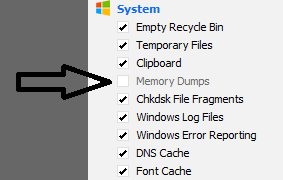
If you are using a program like Ccleaner please stop using it while troubleshooting.
This because programs like Ccleaner remove dump files that are needed to troubleshoot.
Or configure Ccleaner to not remove dump files:
a996d6272d.png


Please check {windows partition}\windows\minidump and check if there are more then 3 dump files saved.
Please make sure your pc is configured for small dump files How to configure minidump | Windows 7 tutorial
There are many dump files missing!

Please check your motherboard manufacturer for BIOS updates and driver updates!

Please update your network driver
Driver Reference Table - Rt64win7.sys
Code:
*** WARNING: Unable to verify timestamp for Rt64win7.sys
*** ERROR: Module load completed but symbols could not be loaded for Rt64win7.sys
0: kd> lmvm Rt64win7
start             end                 module name
fffff880`04a98000 fffff880`04b1d000   Rt64win7 T (no symbols)           
    Loaded symbol image file: Rt64win7.sys
    Image path: \SystemRoot\system32\DRIVERS\Rt64win7.sys
    Image name: Rt64win7.sys
    Timestamp:        [COLOR="red"]Fri Jun 10 08:33:15 2011[/COLOR] (4DF1BAAB)
    CheckSum:         0008B67F
    ImageSize:        00085000
    Translations:     0000.04b0 0000.04e4 0409.04b0 0409.04e4

Please update your Intel Graphics drivers using instructions:
Please uninstall everything of Intel Graphics using Display Driver Uninstaller and install new drivers from Intel.
Code:
fffff880`05b4f648  fffff880`0405011bUnable to load image \SystemRoot\system32\DRIVERS\igdkmd64.sys, Win32 error 0n2
*** WARNING: Unable to verify timestamp for igdkmd64.sys
*** ERROR: Module load completed but symbols could not be loaded for igdkmd64.sys
 igdkmd64+0x4911b
0: kd> lmvm igdkmd64
start             end                 module name
fffff880`04007000 fffff880`045ebfe0   igdkmd64 T (no symbols)           
    Loaded symbol image file: igdkmd64.sys
    Image path: \SystemRoot\system32\DRIVERS\igdkmd64.sys
    Image name: igdkmd64.sys
    Timestamp:        [COLOR="red"]Wed Sep 23 21:22:57 2009[/COLOR] (4ABA7591)
    CheckSum:         005EF02D
    ImageSize:        005E4FE0
    Translations:     0000.04b0 0000.04e4 0409.04b0 0409.04e4
Please update your network driver
Driver Reference Table - athrx.sys
Code:
fffff880`05b4f3b8  fffff880`02c8ca5dUnable to load image \SystemRoot\system32\DRIVERS\athrx.sys, Win32 error 0n2
*** WARNING: Unable to verify timestamp for athrx.sys
*** ERROR: Module load completed but symbols could not be loaded for athrx.sys
 athrx+0x79a5d
0: kd> lmvm athrx
start             end                 module name
fffff880`02c13000 fffff880`02d90000   athrx    T (no symbols)           
    Loaded symbol image file: athrx.sys
    Image path: \SystemRoot\system32\DRIVERS\athrx.sys
    Image name: athrx.sys
    Timestamp:        [COLOR="Red"]Sat Oct 24 03:49:44 2009[/COLOR] (4AE25D38)
    CheckSum:         0017F4D3
    ImageSize:        0017D000
    Translations:     0000.04b0 0000.04e4 0409.04b0 0409.04e4

Due to a 0x24(NTFS_FILE_SYSTEM) which is related to the hard drive, please test your hard drive


Diagnostics Test

 HDD TEST


arrow.png
Run SeaTools to check the integrity of your HDD. http://www.sevenforums.com/tutorials/313457-seatools-dos-windows-how-use.html

   Note
Do not run SeaTools on an SSD as the results will be invalid.


arrow.png
Run chkdsk http://www.sevenforums.com/tutorials/433-disk-check.html

arrow.png
Run HDTune to scan for errors, health and benchmark.
Let me know what the results are, prefered screenshots.
 

My Computer My Computer

At a glance

Windows 10 Proi5-650016GB DDR4 2133 Crucial Ballistix Sport LTMSI GeForce GTX 1060 GAMING X 6G
Computer type
PC/Desktop
Computer Manufacturer/Model Number
Custom build
OS
Windows 10 Pro
CPU
i5-6500
Motherboard
Gigabyte B150-HD3P-CF
Memory
16GB DDR4 2133 Crucial Ballistix Sport LT
Graphics Card(s)
MSI GeForce GTX 1060 GAMING X 6G
Sound Card
Intel Display Audio
Monitor(s) Displays
Liyama ProLite XB2483HSU-B2
Screen Resolution
1920 x 1080
Hard Drives
Crucial MX200 500GB & Toshiba DT01ACA300 3TB
PSU
Corsair RM550x
Case
Fractal Design Define S
Cooling
Cooler Master TX3 i
Keyboard
Func KB-460 (MX Red)
Mouse
Corsair Gaming M65 RGB
Antivirus
Bitdefender Total Security 2016 + MBAM Pro + MBAE Pro
Browser
Google Chrome
Other Info
Creative Sound Blaster Tactic3D Rage V2 headset
Wow that was a lot of homework :) But I think I got it all done. I've attached all the screen shot you asked for and maybe some that you didn't :) I saw some info in the event viewer that may be of interest, just sent a screen shot for you to see if you want anything from there.
* I fixed my CCleaner so that it doesn't remove the dump files.
* Checked for any more files in /windows/minidump and there was only the 3 is sent
* I configured for small dump files
* Checked for manufacture updates and there were none
* Updated network driver - Driver Reference Table - RT64win7.sys
* Uninstalled and reinstalled Intel graphics driver (went thru the Intel site because the link to the Display Driver Uninstaller did some crazy things. Installed Opera, a malware tool and some other things. May have clicked on something I shouldn't have.)
* The only assignment I did not accomplish is: Update Network Driver-Driver Reference Table - athrx.sys. Just couldn't figure it out:confused:
* Ran SeaTools, all tests Passed. (see screen shots)
* Ran chkdsk. (see screen shots)
* Ran HDTune, errors, health and benchmark all Passed. (see screen shots)
Haven't had any BSOD during this time, however now the computer simply shuts down and restarts its self or just goes black, in these cases I've had to power down and restart in normal mode.
But I think maybe some of the bugs have been worked out.
Thanks for all your help!!
Lisa
 

My Computer My Computer

At a glance

Windows 7 Home Premium 64bit
Computer type
PC/Desktop
Computer Manufacturer/Model Number
Dell 545s
OS
Windows 7 Home Premium 64bit
Um, I don't see SeaTools in the screenshots.
What trouble do you have with the athrx.sys?
 

My Computer My Computer

At a glance

Windows 10 Proi5-650016GB DDR4 2133 Crucial Ballistix Sport LTMSI GeForce GTX 1060 GAMING X 6G
Computer type
PC/Desktop
Computer Manufacturer/Model Number
Custom build
OS
Windows 10 Pro
CPU
i5-6500
Motherboard
Gigabyte B150-HD3P-CF
Memory
16GB DDR4 2133 Crucial Ballistix Sport LT
Graphics Card(s)
MSI GeForce GTX 1060 GAMING X 6G
Sound Card
Intel Display Audio
Monitor(s) Displays
Liyama ProLite XB2483HSU-B2
Screen Resolution
1920 x 1080
Hard Drives
Crucial MX200 500GB & Toshiba DT01ACA300 3TB
PSU
Corsair RM550x
Case
Fractal Design Define S
Cooling
Cooler Master TX3 i
Keyboard
Func KB-460 (MX Red)
Mouse
Corsair Gaming M65 RGB
Antivirus
Bitdefender Total Security 2016 + MBAM Pro + MBAE Pro
Browser
Google Chrome
Other Info
Creative Sound Blaster Tactic3D Rage V2 headset
Seatools screenshots attached now :)
When I use the link for athrx.sys I'm just lost from the first page. I clicked on "Driver Update Site: Official site: https://www.qualcomm.com/contact (scroll down for product support)" Then I'm totally lost!! So I clicked on Unofficial site: "QUALCOMM / ATHEROS drivers for Microsoft Windows (Atheros的驅動程序)" but don't see anything that looks like it is for my Dell 545s. Need to know where to go and what to click on.
In the mean time I uncheck the auto restart button, see screen shot, is that OK? Just did it so I don't know if it's working or not. But like I said before, I haven't had any blue screens since you started helping me just windows restarting all by its self.
 

My Computer My Computer

At a glance

Windows 7 Home Premium 64bit
Computer type
PC/Desktop
Computer Manufacturer/Model Number
Dell 545s
OS
Windows 7 Home Premium 64bit
Check your motherboad manufacturer for driver updates for this device
Code:
Name	[00000011] [COLOR="Red"]DW1525 (802.11n) WLAN PCIe Card[/COLOR]

What are the 3.3v, 5v and 12v values in the BIOS?
Please make sure the PSU is properly connected as with the other cables in the case.
 

My Computer My Computer

At a glance

Windows 10 Proi5-650016GB DDR4 2133 Crucial Ballistix Sport LTMSI GeForce GTX 1060 GAMING X 6G
Computer type
PC/Desktop
Computer Manufacturer/Model Number
Custom build
OS
Windows 10 Pro
CPU
i5-6500
Motherboard
Gigabyte B150-HD3P-CF
Memory
16GB DDR4 2133 Crucial Ballistix Sport LT
Graphics Card(s)
MSI GeForce GTX 1060 GAMING X 6G
Sound Card
Intel Display Audio
Monitor(s) Displays
Liyama ProLite XB2483HSU-B2
Screen Resolution
1920 x 1080
Hard Drives
Crucial MX200 500GB & Toshiba DT01ACA300 3TB
PSU
Corsair RM550x
Case
Fractal Design Define S
Cooling
Cooler Master TX3 i
Keyboard
Func KB-460 (MX Red)
Mouse
Corsair Gaming M65 RGB
Antivirus
Bitdefender Total Security 2016 + MBAM Pro + MBAE Pro
Browser
Google Chrome
Other Info
Creative Sound Blaster Tactic3D Rage V2 headset
lots of crashes again

What are the 3.3v, 5v and 12v values in the BIOS? Is this something I need to do with a meter?

Back to mostly BSOD and not so many windows restarts. I've attached the file, maybe since there are so many this time something will jump out.
Thank you for all your help :)
 

My Computer My Computer

At a glance

Windows 7 Home Premium 64bit
Computer type
PC/Desktop
Computer Manufacturer/Model Number
Dell 545s
OS
Windows 7 Home Premium 64bit
You can find read those values simply in your BIOS, the BIOS can be accessed at boot before Windows loads.
 

My Computer My Computer

At a glance

Windows 10 Proi5-650016GB DDR4 2133 Crucial Ballistix Sport LTMSI GeForce GTX 1060 GAMING X 6G
Computer type
PC/Desktop
Computer Manufacturer/Model Number
Custom build
OS
Windows 10 Pro
CPU
i5-6500
Motherboard
Gigabyte B150-HD3P-CF
Memory
16GB DDR4 2133 Crucial Ballistix Sport LT
Graphics Card(s)
MSI GeForce GTX 1060 GAMING X 6G
Sound Card
Intel Display Audio
Monitor(s) Displays
Liyama ProLite XB2483HSU-B2
Screen Resolution
1920 x 1080
Hard Drives
Crucial MX200 500GB & Toshiba DT01ACA300 3TB
PSU
Corsair RM550x
Case
Fractal Design Define S
Cooling
Cooler Master TX3 i
Keyboard
Func KB-460 (MX Red)
Mouse
Corsair Gaming M65 RGB
Antivirus
Bitdefender Total Security 2016 + MBAM Pro + MBAE Pro
Browser
Google Chrome
Other Info
Creative Sound Blaster Tactic3D Rage V2 headset
Back
Top