
Solved BSOD - ntoskml.exe + different errors

Spagnum

New member
Local time
5:08 AM
Messages
19
Location
Denmark
Hi guys...

I'm having problems with different BSOD’s. They appear quit randomly, but running heaver programs like VMware or games seems to trick the problem in particular.

I tried different driver for my Nvidea Gforce 550 ti, since the error seems related to ntoskml.exe and I read it often was driver reladed. I also tried running a memory test with Memtest86+ to check my RAM, but I passed all the tests wit on errors.

Any help would be appreciated.
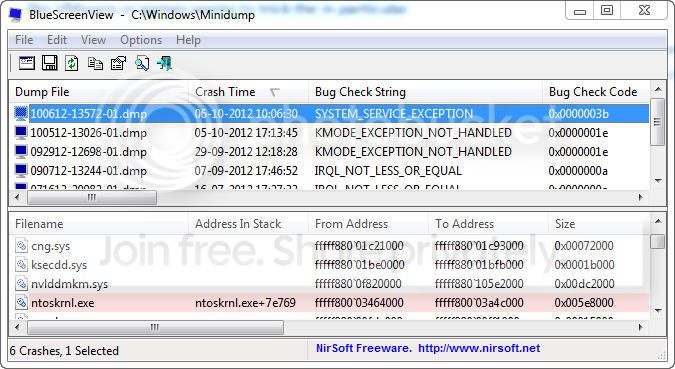


help.jpg
 

My Computer

OS
Microsoft Windows 7 Professional 64-bit 7601 Multiprocessor Free Service Pack 1
CPU
Intel(R) Core(TM)2 Quad CPU Q6700 @ 2.66GHz
Motherboard
Gigabyte Technology Co., Ltd. P35C-DS3R
Memory
8,00 GB
Graphics Card(s)
NVIDIA GeForce GTX 550 Ti
Sound Card
(1) NVIDIA High Definition Audio (2) NVIDIA High Definitio
Screen Resolution
1920 x 1200 x 32 bits (4294967296 colors) @ 59 Hz
Hard Drives
(1) INTEL SSDSA2M160G2GC ATA Device (2) SAMSUNG HD103UJ ATA Device (3) SAMSUNG HD103UJ ATA Device
Your crash is caused bt Klif Mini-Filter fre_wnet_x86 (Kaspersky).
Code:
fffff880`0abdeae0  fffff880`0494710cUnable to load image \SystemRoot\system32\DRIVERS\klif.sys, Win32 error 0n2
*** [COLOR=Red]WARNING: Unable to verify timestamp for klif.sys
*** ERROR: Module load completed but symbols could not be loaded for klif.sys
 klif+0x8810c[/COLOR]
Uninstall Kaspersky and use Microsoft Security Essentials - Free Antivirus for Windows. Let us know the results.
 

My Computer

Computer type
PC/Desktop
Computer Manufacturer/Model Number
Self Assembled
OS
Microsoft Windows 10 Pro Insider Preview 64-bit
CPU
Intel(R) Core(TM) i3-4130 CPU @ 3.40GHz
Motherboard
Gigabyte Technology Co., Ltd. B85M-D3H
Memory
Corsair Vengence 4GB x2 (8.00GB Dual-Channel DDR3 @ 798MHz)
Graphics Card(s)
2047MB GeForce GTS 450 (ZOTAC International)
Sound Card
Onboard (Realtek High Definition Audio)
Monitor(s) Displays
LG Flatron E2040T
Screen Resolution
1600x900
Hard Drives
Western Digital 1 TB
Seagate 500 GB
PSU
Corsair VS550
Case
Cooler Master K380
Cooling
Cooler Master Seidon 120V Plus
Keyboard
Logitech MK260r
Mouse
Logitech MK260r
Internet Speed
PMPL Broadband
Antivirus
Windows Defender + MBAM
Browser
Firefox
Other Info
Dell Studio 15" Laptop
Thank you very much, I'll try that, and report back here.
I'm curious where you found this information. I have been looking though the minidump with debugging tools to try to find a hint, but did not come anywhere near that...
 

My Computer

OS
Microsoft Windows 7 Professional 64-bit 7601 Multiprocessor Free Service Pack 1
CPU
Intel(R) Core(TM)2 Quad CPU Q6700 @ 2.66GHz
Motherboard
Gigabyte Technology Co., Ltd. P35C-DS3R
Memory
8,00 GB
Graphics Card(s)
NVIDIA GeForce GTX 550 Ti
Sound Card
(1) NVIDIA High Definition Audio (2) NVIDIA High Definitio
Screen Resolution
1920 x 1200 x 32 bits (4294967296 colors) @ 59 Hz
Hard Drives
(1) INTEL SSDSA2M160G2GC ATA Device (2) SAMSUNG HD103UJ ATA Device (3) SAMSUNG HD103UJ ATA Device
I'm curious where you found this information. I have been looking though the minidump with debugging tools to try to find a hint, but did not come anywhere near that...
You are to see the full stack.
 

My Computer

Computer type
PC/Desktop
Computer Manufacturer/Model Number
Self Assembled
OS
Microsoft Windows 10 Pro Insider Preview 64-bit
CPU
Intel(R) Core(TM) i3-4130 CPU @ 3.40GHz
Motherboard
Gigabyte Technology Co., Ltd. B85M-D3H
Memory
Corsair Vengence 4GB x2 (8.00GB Dual-Channel DDR3 @ 798MHz)
Graphics Card(s)
2047MB GeForce GTS 450 (ZOTAC International)
Sound Card
Onboard (Realtek High Definition Audio)
Monitor(s) Displays
LG Flatron E2040T
Screen Resolution
1600x900
Hard Drives
Western Digital 1 TB
Seagate 500 GB
PSU
Corsair VS550
Case
Cooler Master K380
Cooling
Cooler Master Seidon 120V Plus
Keyboard
Logitech MK260r
Mouse
Logitech MK260r
Internet Speed
PMPL Broadband
Antivirus
Windows Defender + MBAM
Browser
Firefox
Other Info
Dell Studio 15" Laptop
I'm curious where you found this information. I have been looking though the minidump with debugging tools to try to find a hint, but did not come anywhere near that...
You are to see the full stack.


I'll need to read up in debugging I guess:p
I did not remove Kasperksy right away because my system seemed to run okay, but since I just got another BSOD today I removed it and installed MS security essentials. I will report back later with the results.
 

My Computer

OS
Microsoft Windows 7 Professional 64-bit 7601 Multiprocessor Free Service Pack 1
CPU
Intel(R) Core(TM)2 Quad CPU Q6700 @ 2.66GHz
Motherboard
Gigabyte Technology Co., Ltd. P35C-DS3R
Memory
8,00 GB
Graphics Card(s)
NVIDIA GeForce GTX 550 Ti
Sound Card
(1) NVIDIA High Definition Audio (2) NVIDIA High Definitio
Screen Resolution
1920 x 1200 x 32 bits (4294967296 colors) @ 59 Hz
Hard Drives
(1) INTEL SSDSA2M160G2GC ATA Device (2) SAMSUNG HD103UJ ATA Device (3) SAMSUNG HD103UJ ATA Device
Take your time. :D

Removing Kaspersky is the enough step to make your system free from this particular type of crashes. I wish you will not have the same issue again :)
 

My Computer

Computer type
PC/Desktop
Computer Manufacturer/Model Number
Self Assembled
OS
Microsoft Windows 10 Pro Insider Preview 64-bit
CPU
Intel(R) Core(TM) i3-4130 CPU @ 3.40GHz
Motherboard
Gigabyte Technology Co., Ltd. B85M-D3H
Memory
Corsair Vengence 4GB x2 (8.00GB Dual-Channel DDR3 @ 798MHz)
Graphics Card(s)
2047MB GeForce GTS 450 (ZOTAC International)
Sound Card
Onboard (Realtek High Definition Audio)
Monitor(s) Displays
LG Flatron E2040T
Screen Resolution
1600x900
Hard Drives
Western Digital 1 TB
Seagate 500 GB
PSU
Corsair VS550
Case
Cooler Master K380
Cooling
Cooler Master Seidon 120V Plus
Keyboard
Logitech MK260r
Mouse
Logitech MK260r
Internet Speed
PMPL Broadband
Antivirus
Windows Defender + MBAM
Browser
Firefox
Other Info
Dell Studio 15" Laptop
Crap... just had three BSOD in a row. dammit I thought removing kaspersky would do it.

Here's the three last minidump files, any suggestions?
 

My Computer

OS
Microsoft Windows 7 Professional 64-bit 7601 Multiprocessor Free Service Pack 1
CPU
Intel(R) Core(TM)2 Quad CPU Q6700 @ 2.66GHz
Motherboard
Gigabyte Technology Co., Ltd. P35C-DS3R
Memory
8,00 GB
Graphics Card(s)
NVIDIA GeForce GTX 550 Ti
Sound Card
(1) NVIDIA High Definition Audio (2) NVIDIA High Definitio
Screen Resolution
1920 x 1200 x 32 bits (4294967296 colors) @ 59 Hz
Hard Drives
(1) INTEL SSDSA2M160G2GC ATA Device (2) SAMSUNG HD103UJ ATA Device (3) SAMSUNG HD103UJ ATA Device
How many passes did you take memtest for?
What's the age of all your hardware?
When was the last time you installed windows?
 

My Computer

Computer type
PC/Desktop
Computer Manufacturer/Model Number
Self assembled
OS
Windows 10 Home 64Bit
CPU
Intel Core i5 10400 @ 2.90GHz
Motherboard
Intel Corporation DG41WV (PROCESSOR)
Memory
8.00GB Single-Channel Unknown @ 1329MHz (16-20-20-38)
Sound Card
Realtek High Definition Audio
Monitor(s) Displays
DELL E170S
Screen Resolution
1280x1024 pixels
Hard Drives
931GB TOSHIBA DT01ACA100 (SATA)
238GB TEAM TM8PS7256G (SATA SSD)
Case
Nothing Fancy
Cooling
Fans
Keyboard
A4 Tech Co LTD
Mouse
A4 Tech Co Ltd/Logitech
Internet Speed
25 Mbps
How many passes did you take memtest for?
What's the age of all your hardware?
When was the last time you installed windows?

Think it was 4 passes with memtest.
Hard to say, some older then other.
About half a year ago.

Update
My computer started turning off randomly, so I'm planing trying with another power supply, when I get the chance.
 
Last edited:

My Computer

OS
Microsoft Windows 7 Professional 64-bit 7601 Multiprocessor Free Service Pack 1
CPU
Intel(R) Core(TM)2 Quad CPU Q6700 @ 2.66GHz
Motherboard
Gigabyte Technology Co., Ltd. P35C-DS3R
Memory
8,00 GB
Graphics Card(s)
NVIDIA GeForce GTX 550 Ti
Sound Card
(1) NVIDIA High Definition Audio (2) NVIDIA High Definitio
Screen Resolution
1920 x 1200 x 32 bits (4294967296 colors) @ 59 Hz
Hard Drives
(1) INTEL SSDSA2M160G2GC ATA Device (2) SAMSUNG HD103UJ ATA Device (3) SAMSUNG HD103UJ ATA Device

My Computer

Computer type
PC/Desktop
Computer Manufacturer/Model Number
Self assembled
OS
Windows 10 Home 64Bit
CPU
Intel Core i5 10400 @ 2.90GHz
Motherboard
Intel Corporation DG41WV (PROCESSOR)
Memory
8.00GB Single-Channel Unknown @ 1329MHz (16-20-20-38)
Sound Card
Realtek High Definition Audio
Monitor(s) Displays
DELL E170S
Screen Resolution
1280x1024 pixels
Hard Drives
931GB TOSHIBA DT01ACA100 (SATA)
238GB TEAM TM8PS7256G (SATA SSD)
Case
Nothing Fancy
Cooling
Fans
Keyboard
A4 Tech Co LTD
Mouse
A4 Tech Co Ltd/Logitech
Internet Speed
25 Mbps

My Computer

OS
Microsoft Windows 7 Professional 64-bit 7601 Multiprocessor Free Service Pack 1
CPU
Intel(R) Core(TM)2 Quad CPU Q6700 @ 2.66GHz
Motherboard
Gigabyte Technology Co., Ltd. P35C-DS3R
Memory
8,00 GB
Graphics Card(s)
NVIDIA GeForce GTX 550 Ti
Sound Card
(1) NVIDIA High Definition Audio (2) NVIDIA High Definitio
Screen Resolution
1920 x 1200 x 32 bits (4294967296 colors) @ 59 Hz
Hard Drives
(1) INTEL SSDSA2M160G2GC ATA Device (2) SAMSUNG HD103UJ ATA Device (3) SAMSUNG HD103UJ ATA Device

My Computer

Computer type
PC/Desktop
Computer Manufacturer/Model Number
Self assembled
OS
Windows 10 Home 64Bit
CPU
Intel Core i5 10400 @ 2.90GHz
Motherboard
Intel Corporation DG41WV (PROCESSOR)
Memory
8.00GB Single-Channel Unknown @ 1329MHz (16-20-20-38)
Sound Card
Realtek High Definition Audio
Monitor(s) Displays
DELL E170S
Screen Resolution
1280x1024 pixels
Hard Drives
931GB TOSHIBA DT01ACA100 (SATA)
238GB TEAM TM8PS7256G (SATA SSD)
Case
Nothing Fancy
Cooling
Fans
Keyboard
A4 Tech Co LTD
Mouse
A4 Tech Co Ltd/Logitech
Internet Speed
25 Mbps
Use the above as requested, SpeedFan is unreliable.
Some hardware tests to run.

Graphics card:
http://www.sevenforums.com/tutorials/100356-video-card-stress-test-furmark.html#post866972


Hard drive(s):
Pick one for your HDD brand or use Seatools.
7 Free Hard Drive Testing Software Tools


RAM (memory):
This will require memtest on a bootable CD or USB stick.
http://www.sevenforums.com/tutorials/105647-ram-test-memtest86.html


Also as requested.

To help us help you would you please add your systems specs? Here's how: http://www.sevenforums.com/tutorials/180324-system-info-see-your-system-specs.html#post1530002
Under System Manufacturer/Model Number add whether it is a desktop or laptop and whether self built.

Log in to Seven Forums and you will be able to transfer the info directly to the specs page in your profile from within the System Info app.
After doing this your specs will be available in each of your posts. Click on mine in the lower left to see how it should look.:)
Full instructions in the tutorial.
 

My Computer

Computer type
PC/Desktop
Computer Manufacturer/Model Number
Home Built Desktop By DataTech
OS
Windows 7 Ultimate X64 SP1
CPU
Intel i5-2550K, Differing ~4.4-4.8GHz No built in GPU
Motherboard
ASUS P8Z68-V PRO/GEN3
Memory
16GB G.Skill Sniper 1866MHz @ 2133MHz 2x8GB
Graphics Card(s)
ASUS GTX650TIB-DC2OC-2GD5, (650TI Boost)
Sound Card
Onboard Realtek 5-1
Monitor(s) Displays
Samsung P2570HD
Screen Resolution
1920x1080
Hard Drives
Samsung 840 Pro 256GB SSD for OS, 500GB Seagate Constellation (Enterprise drive) for Data
PSU
Corsair HX650W
Case
Inwin Dragon Rider
Cooling
Hyper 212 EVO w/two Noctua fans, push-pull, @1300 RPM
Keyboard
E-Z Eyes, bright yellow keys with large characters
Mouse
steelseries SENSEI Laser Pro Gaming
Internet Speed
48-51Mbs Mbs down, 11 Mbs up Xfinity Cable
Antivirus
Norton Internet Security 2013
Browser
IE 10, Opera, Pale Moon if needed
Other Info
4 case fans, LG BluRay-RE, ASUS DVD-RW, Mr. Fusion power supply, 1.21 gigawatts.
As I wrote before my computer can't stay turned on long enough to install any of those programs.
 

My Computer

OS
Microsoft Windows 7 Professional 64-bit 7601 Multiprocessor Free Service Pack 1
CPU
Intel(R) Core(TM)2 Quad CPU Q6700 @ 2.66GHz
Motherboard
Gigabyte Technology Co., Ltd. P35C-DS3R
Memory
8,00 GB
Graphics Card(s)
NVIDIA GeForce GTX 550 Ti
Sound Card
(1) NVIDIA High Definition Audio (2) NVIDIA High Definitio
Screen Resolution
1920 x 1200 x 32 bits (4294967296 colors) @ 59 Hz
Hard Drives
(1) INTEL SSDSA2M160G2GC ATA Device (2) SAMSUNG HD103UJ ATA Device (3) SAMSUNG HD103UJ ATA Device
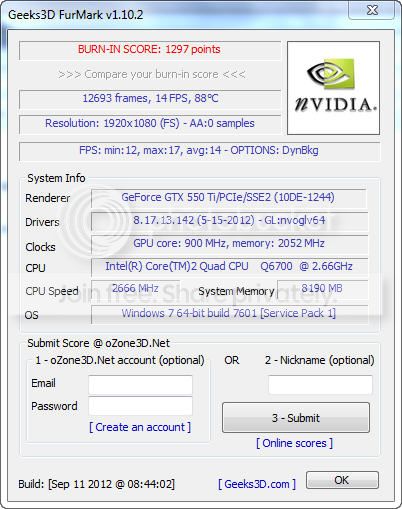
Update:

I got a power supply from work and plugged it in. Everything seems to be running smooth. :D No randomly turning off and no BSODs. So I am pretty sure that the system shutting off part was related to that.

I checked the temperatures with the recommended software, they seemed fine. When under pressure, my graphic card get around to 87C (the maximum is 100 C) so I'm guessing thats okay.

burn-inscore.jpg


The only problem is that the power supply I got does not fit in my casing, so I need to find one that does. I will test out with the one I got for a couple of days before I go by a new one.

My (hopefully) last question in this tread, could the BSOD I experienced earlier also be related to the broken power supply, or could it be something else?
 

My Computer

OS
Microsoft Windows 7 Professional 64-bit 7601 Multiprocessor Free Service Pack 1
CPU
Intel(R) Core(TM)2 Quad CPU Q6700 @ 2.66GHz
Motherboard
Gigabyte Technology Co., Ltd. P35C-DS3R
Memory
8,00 GB
Graphics Card(s)
NVIDIA GeForce GTX 550 Ti
Sound Card
(1) NVIDIA High Definition Audio (2) NVIDIA High Definitio
Screen Resolution
1920 x 1200 x 32 bits (4294967296 colors) @ 59 Hz
Hard Drives
(1) INTEL SSDSA2M160G2GC ATA Device (2) SAMSUNG HD103UJ ATA Device (3) SAMSUNG HD103UJ ATA Device
A poor PSU can cause BSODs. With the borrowed supply it all seems well so apparently yours was poor. A standard ATX version PSU should work in your case unless it's a Dell.
The GPU temp is just fine.
 

My Computer

Computer type
PC/Desktop
Computer Manufacturer/Model Number
Home Built Desktop By DataTech
OS
Windows 7 Ultimate X64 SP1
CPU
Intel i5-2550K, Differing ~4.4-4.8GHz No built in GPU
Motherboard
ASUS P8Z68-V PRO/GEN3
Memory
16GB G.Skill Sniper 1866MHz @ 2133MHz 2x8GB
Graphics Card(s)
ASUS GTX650TIB-DC2OC-2GD5, (650TI Boost)
Sound Card
Onboard Realtek 5-1
Monitor(s) Displays
Samsung P2570HD
Screen Resolution
1920x1080
Hard Drives
Samsung 840 Pro 256GB SSD for OS, 500GB Seagate Constellation (Enterprise drive) for Data
PSU
Corsair HX650W
Case
Inwin Dragon Rider
Cooling
Hyper 212 EVO w/two Noctua fans, push-pull, @1300 RPM
Keyboard
E-Z Eyes, bright yellow keys with large characters
Mouse
steelseries SENSEI Laser Pro Gaming
Internet Speed
48-51Mbs Mbs down, 11 Mbs up Xfinity Cable
Antivirus
Norton Internet Security 2013
Browser
IE 10, Opera, Pale Moon if needed
Other Info
4 case fans, LG BluRay-RE, ASUS DVD-RW, Mr. Fusion power supply, 1.21 gigawatts.
Finally got a new PSU and got it plugged in. Everything seem to work:)

Thanks guys for helping me crack this.
 

My Computer

OS
Microsoft Windows 7 Professional 64-bit 7601 Multiprocessor Free Service Pack 1
CPU
Intel(R) Core(TM)2 Quad CPU Q6700 @ 2.66GHz
Motherboard
Gigabyte Technology Co., Ltd. P35C-DS3R
Memory
8,00 GB
Graphics Card(s)
NVIDIA GeForce GTX 550 Ti
Sound Card
(1) NVIDIA High Definition Audio (2) NVIDIA High Definitio
Screen Resolution
1920 x 1200 x 32 bits (4294967296 colors) @ 59 Hz
Hard Drives
(1) INTEL SSDSA2M160G2GC ATA Device (2) SAMSUNG HD103UJ ATA Device (3) SAMSUNG HD103UJ ATA Device
Good new to hear! Thanks for letting us know. :D
 

My Computer

Computer type
PC/Desktop
Computer Manufacturer/Model Number
Home Built Desktop By DataTech
OS
Windows 7 Ultimate X64 SP1
CPU
Intel i5-2550K, Differing ~4.4-4.8GHz No built in GPU
Motherboard
ASUS P8Z68-V PRO/GEN3
Memory
16GB G.Skill Sniper 1866MHz @ 2133MHz 2x8GB
Graphics Card(s)
ASUS GTX650TIB-DC2OC-2GD5, (650TI Boost)
Sound Card
Onboard Realtek 5-1
Monitor(s) Displays
Samsung P2570HD
Screen Resolution
1920x1080
Hard Drives
Samsung 840 Pro 256GB SSD for OS, 500GB Seagate Constellation (Enterprise drive) for Data
PSU
Corsair HX650W
Case
Inwin Dragon Rider
Cooling
Hyper 212 EVO w/two Noctua fans, push-pull, @1300 RPM
Keyboard
E-Z Eyes, bright yellow keys with large characters
Mouse
steelseries SENSEI Laser Pro Gaming
Internet Speed
48-51Mbs Mbs down, 11 Mbs up Xfinity Cable
Antivirus
Norton Internet Security 2013
Browser
IE 10, Opera, Pale Moon if needed
Other Info
4 case fans, LG BluRay-RE, ASUS DVD-RW, Mr. Fusion power supply, 1.21 gigawatts.
Back
Top