BSOD on Dell Vostro 1500

mac173

New member
Member
Local time
8:52 AM
Messages
85
I have been experiencing an increase in BSOD's over the last month. From the minidump file, it seems I was averaging about 2 per month, but it has gone up fast this month. I upgraded to Windows 7 in late November of '09, with a clean install of the 64 bit version. I upgraded all my drivers at that time.

The crash errors I see at the time of the BSOD make me think I have driver problems, but I have recently discovered that Dell does not provide support for Win 7, OR 64 bit operating systems in this model. I think I have all 32 bit Vista drivers.

I have attached the minidumps, and a .txt file of a new CPUZ report in case that would be informative. I hope you can tell me what the problem is, and how I can find the proper drivers.

Thanks.
 

My Computer My Computer

At a glance

Windows 7 Home PremiumIntel Core i7-3770 Ivy Bridge 3.4GHzCORSAIR Vengeance 16GB (4 x 4GB) DDR3 SDRAM D...EVGA GeForce GTX 660 FTW Signature 2
Computer Manufacturer/Model Number
Self Built
OS
Windows 7 Home Premium
CPU
Intel Core i7-3770 Ivy Bridge 3.4GHz
Motherboard
Asrock Z77 Extreme 4
Memory
CORSAIR Vengeance 16GB (4 x 4GB) DDR3 SDRAM DDR3 1600
Graphics Card(s)
EVGA GeForce GTX 660 FTW Signature 2
Sound Card
Onboard
Monitor(s) Displays
Samsung 24in LCD
Hard Drives
Samsung 840 EVO-Series 500GB 2.5-Inch SATA III Solid State Drive
HITACHI Deskstar 2TB 7200 RPM SATA 6.0Gb/s
PSU
Thermaltake Smart Series 850W PSU
Case
NZXT M59
Cooling
COOLER MASTER Hyper 212 EVO RR-212E and five 120mm case fans
Keyboard
Logitech G110 Gaming Keyboard
Mouse
Razer DeathAdder Mouse & Razer Destructor 2 Hard Mouse Mat
Internet Speed
Cable @ 18Gbps
CPUZ

For some reason, the .txt file would not attach, here it is in zip.
 

My Computer My Computer

At a glance

Windows 7 Home PremiumIntel Core i7-3770 Ivy Bridge 3.4GHzCORSAIR Vengeance 16GB (4 x 4GB) DDR3 SDRAM D...EVGA GeForce GTX 660 FTW Signature 2
Computer Manufacturer/Model Number
Self Built
OS
Windows 7 Home Premium
CPU
Intel Core i7-3770 Ivy Bridge 3.4GHz
Motherboard
Asrock Z77 Extreme 4
Memory
CORSAIR Vengeance 16GB (4 x 4GB) DDR3 SDRAM DDR3 1600
Graphics Card(s)
EVGA GeForce GTX 660 FTW Signature 2
Sound Card
Onboard
Monitor(s) Displays
Samsung 24in LCD
Hard Drives
Samsung 840 EVO-Series 500GB 2.5-Inch SATA III Solid State Drive
HITACHI Deskstar 2TB 7200 RPM SATA 6.0Gb/s
PSU
Thermaltake Smart Series 850W PSU
Case
NZXT M59
Cooling
COOLER MASTER Hyper 212 EVO RR-212E and five 120mm case fans
Keyboard
Logitech G110 Gaming Keyboard
Mouse
Razer DeathAdder Mouse & Razer Destructor 2 Hard Mouse Mat
Internet Speed
Cable @ 18Gbps
This looks like a driver tried to free a kernel pool address that had already been freed (double-free). The stack has the pool tag as "0", which is bogus, so there could be other problems here as well with whatever driver is doing this. You're going to need to enable special pool and pool tracking in Driver Verifier to catch this one.

Start > Run > verifier

  1. Create custom settings
  2. Select individual settings from a full list
  3. Check "Special pool" and "Pool tracking"
  4. Select driver names from a list
  5. Sort by Provider, and select anything NOT listed as provided by Microsoft Corporation, and also do NOT select secdrv.sys and amdxdata.sys
  6. Finish

Reboot, and hope the next crash dump points to the culprit.
 

My Computer My Computer

At a glance

Windows 10 Pro x64Intel Core i7 4790K @ 4.5GHz32GB DDR3Nvidia GeForce GTX970
Computer type
PC/Desktop
Computer Manufacturer/Model Number
Custom
OS
Windows 10 Pro x64
CPU
Intel Core i7 4790K @ 4.5GHz
Motherboard
Asus Maximus Hero VII
Memory
32GB DDR3
Graphics Card(s)
Nvidia GeForce GTX970
Sound Card
Realtek HD Audio
Screen Resolution
1920x1200
Hard Drives
1x Samsung 250GB SSD
4x WD RE 2TB (RAIDZ)
PSU
Corsair AX760i
Case
Fractal Design Define R4
Cooling
Noctua NH-D15
Did that, and crashed.

Ok, I created a restore point, and followed your instructions. I crashed after logging back into my desktop, while the HHD was still running loading all the background stuff. I have attached the new dump.
 

My Computer My Computer

At a glance

Windows 7 Home PremiumIntel Core i7-3770 Ivy Bridge 3.4GHzCORSAIR Vengeance 16GB (4 x 4GB) DDR3 SDRAM D...EVGA GeForce GTX 660 FTW Signature 2
Computer Manufacturer/Model Number
Self Built
OS
Windows 7 Home Premium
CPU
Intel Core i7-3770 Ivy Bridge 3.4GHz
Motherboard
Asrock Z77 Extreme 4
Memory
CORSAIR Vengeance 16GB (4 x 4GB) DDR3 SDRAM DDR3 1600
Graphics Card(s)
EVGA GeForce GTX 660 FTW Signature 2
Sound Card
Onboard
Monitor(s) Displays
Samsung 24in LCD
Hard Drives
Samsung 840 EVO-Series 500GB 2.5-Inch SATA III Solid State Drive
HITACHI Deskstar 2TB 7200 RPM SATA 6.0Gb/s
PSU
Thermaltake Smart Series 850W PSU
Case
NZXT M59
Cooling
COOLER MASTER Hyper 212 EVO RR-212E and five 120mm case fans
Keyboard
Logitech G110 Gaming Keyboard
Mouse
Razer DeathAdder Mouse & Razer Destructor 2 Hard Mouse Mat
Internet Speed
Cable @ 18Gbps
Well, this one says win32k.sys is corrupt on your system:
Code:
0: kd> !chkimg -lo 50 -d !win32k
    fffff96000018000-fffff96000018003  4 bytes - win32k!EngCreatePalette+10
	[ 44 8b 94 24:00 00 00 00 ]
4 errors : !win32k (fffff96000018000-fffff96000018003)

// Not surprisingly, running that function caused the crash:
0: kd> .cxr 0xfffff88006b95d00
rax=fffff88006b96728 rbx=0000000000000000 rcx=0000000000000002
rdx=0000000000000000 rsi=0000000000000001 rdi=0000000000000000
rip=fffff96000018007 rsp=fffff88006b966d0 rbp=fffff88006b96ca0
 r8=0000000000000000  r9=0000000000ff0000 r10=fffff80002a18000
r11=fffff88006b966f8 r12=0000000000000000 r13=0000000000ff0000
r14=0000000000000000 r15=fffffa8004441051
iopl=0         nv up ei pl nz na po nc
cs=0010  ss=0018  ds=002b  es=002b  fs=0053  gs=002b             efl=00010206
win32k!EngCreatePalette+0x17:
fffff960`00018007 0033            add     byte ptr [rbx],dh ds:002b:00000000`00000000=??

0: kd> k
  *** Stack trace for last set context - .thread/.cxr resets it
Child-SP          RetAddr           Call Site
fffff880`06b966d0 00000000`00000000 win32k!EngCreatePalette+0x17
At this point, I'd suggest running sfc /scannow in the hopes it resolves it.
 

My Computer My Computer

At a glance

Windows 10 Pro x64Intel Core i7 4790K @ 4.5GHz32GB DDR3Nvidia GeForce GTX970
Computer type
PC/Desktop
Computer Manufacturer/Model Number
Custom
OS
Windows 10 Pro x64
CPU
Intel Core i7 4790K @ 4.5GHz
Motherboard
Asus Maximus Hero VII
Memory
32GB DDR3
Graphics Card(s)
Nvidia GeForce GTX970
Sound Card
Realtek HD Audio
Screen Resolution
1920x1200
Hard Drives
1x Samsung 250GB SSD
4x WD RE 2TB (RAIDZ)
PSU
Corsair AX760i
Case
Fractal Design Define R4
Cooling
Noctua NH-D15
Did it.

I set the machine to run sfc, and left it at work to run. I will post the results when I get to work in the morning.

Thanks for the help.
 

My Computer My Computer

At a glance

Windows 7 Home PremiumIntel Core i7-3770 Ivy Bridge 3.4GHzCORSAIR Vengeance 16GB (4 x 4GB) DDR3 SDRAM D...EVGA GeForce GTX 660 FTW Signature 2
Computer Manufacturer/Model Number
Self Built
OS
Windows 7 Home Premium
CPU
Intel Core i7-3770 Ivy Bridge 3.4GHz
Motherboard
Asrock Z77 Extreme 4
Memory
CORSAIR Vengeance 16GB (4 x 4GB) DDR3 SDRAM DDR3 1600
Graphics Card(s)
EVGA GeForce GTX 660 FTW Signature 2
Sound Card
Onboard
Monitor(s) Displays
Samsung 24in LCD
Hard Drives
Samsung 840 EVO-Series 500GB 2.5-Inch SATA III Solid State Drive
HITACHI Deskstar 2TB 7200 RPM SATA 6.0Gb/s
PSU
Thermaltake Smart Series 850W PSU
Case
NZXT M59
Cooling
COOLER MASTER Hyper 212 EVO RR-212E and five 120mm case fans
Keyboard
Logitech G110 Gaming Keyboard
Mouse
Razer DeathAdder Mouse & Razer Destructor 2 Hard Mouse Mat
Internet Speed
Cable @ 18Gbps
If SFC says no errors you are done.

If it shows that it corrected some errors but could not fix all. Run it again. It can only fix a few at a time.
 

My Computer My Computer

At a glance

Windows 10, Home Clean InstallIntel Core2 processsor Q8200(2.33Ghz 1333FSB)...6 gbATI Radeon 256MB HD3650
Computer type
PC/Desktop
Computer Manufacturer/Model Number
Dell XPS 420
OS
Windows 10, Home Clean Install
CPU
Intel Core2 processsor Q8200(2.33Ghz 1333FSB) Quad Core Tech
Motherboard
Dell
Memory
6 gb
Graphics Card(s)
ATI Radeon 256MB HD3650
Sound Card
Intergrated 7.1 Channel Audio
Monitor(s) Displays
Dell SP2009W 20"
Hard Drives
640 GB Serial ATA Hard drive
Cooling
Fan
Keyboard
Dell USB Keyboard
Mouse
Dell Premium Optical USB
Internet Speed
DSL 2.85
Nope

Windows Resource Protection did not find any integrity violations.

That did not find anything, any other ideas?
 

My Computer My Computer

At a glance

Windows 7 Home PremiumIntel Core i7-3770 Ivy Bridge 3.4GHzCORSAIR Vengeance 16GB (4 x 4GB) DDR3 SDRAM D...EVGA GeForce GTX 660 FTW Signature 2
Computer Manufacturer/Model Number
Self Built
OS
Windows 7 Home Premium
CPU
Intel Core i7-3770 Ivy Bridge 3.4GHz
Motherboard
Asrock Z77 Extreme 4
Memory
CORSAIR Vengeance 16GB (4 x 4GB) DDR3 SDRAM DDR3 1600
Graphics Card(s)
EVGA GeForce GTX 660 FTW Signature 2
Sound Card
Onboard
Monitor(s) Displays
Samsung 24in LCD
Hard Drives
Samsung 840 EVO-Series 500GB 2.5-Inch SATA III Solid State Drive
HITACHI Deskstar 2TB 7200 RPM SATA 6.0Gb/s
PSU
Thermaltake Smart Series 850W PSU
Case
NZXT M59
Cooling
COOLER MASTER Hyper 212 EVO RR-212E and five 120mm case fans
Keyboard
Logitech G110 Gaming Keyboard
Mouse
Razer DeathAdder Mouse & Razer Destructor 2 Hard Mouse Mat
Internet Speed
Cable @ 18Gbps
Might be worth testing the RAM using memtest or the Dell utilities at this point - if sfc doesn't actually find corrupted binaries, that means they're likely being corrupted when being loaded in memory, and if driver verifier doesn't catch a driver doing it, that doesn't leave a whole host of possibilities other than bad hardware.
 

My Computer My Computer

At a glance

Windows 10 Pro x64Intel Core i7 4790K @ 4.5GHz32GB DDR3Nvidia GeForce GTX970
Computer type
PC/Desktop
Computer Manufacturer/Model Number
Custom
OS
Windows 10 Pro x64
CPU
Intel Core i7 4790K @ 4.5GHz
Motherboard
Asus Maximus Hero VII
Memory
32GB DDR3
Graphics Card(s)
Nvidia GeForce GTX970
Sound Card
Realtek HD Audio
Screen Resolution
1920x1200
Hard Drives
1x Samsung 250GB SSD
4x WD RE 2TB (RAIDZ)
PSU
Corsair AX760i
Case
Fractal Design Define R4
Cooling
Noctua NH-D15
Ok

Ok, I will reboot and run memtest now. It is a boot option, part of the boot loader from Ubuntu (I dual boot).

My real concern is that I have one or more of those bad Capacitors Dell shipped and then would not admit to. I have an extended warrenty, but what good does it do if Dell continually refuses to admit the hardware is bad? I will never buy a Dell product again.
 

My Computer My Computer

At a glance

Windows 7 Home PremiumIntel Core i7-3770 Ivy Bridge 3.4GHzCORSAIR Vengeance 16GB (4 x 4GB) DDR3 SDRAM D...EVGA GeForce GTX 660 FTW Signature 2
Computer Manufacturer/Model Number
Self Built
OS
Windows 7 Home Premium
CPU
Intel Core i7-3770 Ivy Bridge 3.4GHz
Motherboard
Asrock Z77 Extreme 4
Memory
CORSAIR Vengeance 16GB (4 x 4GB) DDR3 SDRAM DDR3 1600
Graphics Card(s)
EVGA GeForce GTX 660 FTW Signature 2
Sound Card
Onboard
Monitor(s) Displays
Samsung 24in LCD
Hard Drives
Samsung 840 EVO-Series 500GB 2.5-Inch SATA III Solid State Drive
HITACHI Deskstar 2TB 7200 RPM SATA 6.0Gb/s
PSU
Thermaltake Smart Series 850W PSU
Case
NZXT M59
Cooling
COOLER MASTER Hyper 212 EVO RR-212E and five 120mm case fans
Keyboard
Logitech G110 Gaming Keyboard
Mouse
Razer DeathAdder Mouse & Razer Destructor 2 Hard Mouse Mat
Internet Speed
Cable @ 18Gbps
Memory good

Ran memtest for 7 1/2 hours, 10 passes, no errors. Memory is fine.

Any other ideas why the machine crashes?
 

My Computer My Computer

At a glance

Windows 7 Home PremiumIntel Core i7-3770 Ivy Bridge 3.4GHzCORSAIR Vengeance 16GB (4 x 4GB) DDR3 SDRAM D...EVGA GeForce GTX 660 FTW Signature 2
Computer Manufacturer/Model Number
Self Built
OS
Windows 7 Home Premium
CPU
Intel Core i7-3770 Ivy Bridge 3.4GHz
Motherboard
Asrock Z77 Extreme 4
Memory
CORSAIR Vengeance 16GB (4 x 4GB) DDR3 SDRAM DDR3 1600
Graphics Card(s)
EVGA GeForce GTX 660 FTW Signature 2
Sound Card
Onboard
Monitor(s) Displays
Samsung 24in LCD
Hard Drives
Samsung 840 EVO-Series 500GB 2.5-Inch SATA III Solid State Drive
HITACHI Deskstar 2TB 7200 RPM SATA 6.0Gb/s
PSU
Thermaltake Smart Series 850W PSU
Case
NZXT M59
Cooling
COOLER MASTER Hyper 212 EVO RR-212E and five 120mm case fans
Keyboard
Logitech G110 Gaming Keyboard
Mouse
Razer DeathAdder Mouse & Razer Destructor 2 Hard Mouse Mat
Internet Speed
Cable @ 18Gbps
Please remove Avast with this tool: http://files.avast.com/files/eng/aswclear5.exe

Replace with MSE: http://www.microsoft.com/security_essentials

Update your Intel graphics drivers: http://downloadcenter.intel.com/default.aspx?iid=gg_support-EN_01+home_downloadctr

If you provide us with some more info, I can get you a link. Please follow these directions: http://www.sevenforums.com/crashes-debugging/96879-blue-screen-death-bsod-posting-instructions.html

Your Broadcom drivers are old too. Again, I need more info.

...Summary of the Dumps:
Code:
[font=lucida console]
Built by: 7600.16617.amd64fre.win7_gdr.100618-1621
Debug session time: Thu Aug 26 17:02:15.651 2010 (UTC - 4:00)
System Uptime: 0 days 0:01:49.711
BugCheck 3B, {c0000005, fffff96000018007, fffff88006b95d00, 0}
Probably caused by : memory_corruption
BUGCHECK_STR:  0x3B
PROCESS_NAME:  sidebar.exe
¨¨¨¨¨¨¨¨¨¨¨¨¨¨¨¨¨¨¨¨¨¨¨¨¨¨¨¨¨¨¨¨¨¨¨¨¨¨¨¨¨¨¨¨¨¨¨¨¨¨¨¨¨¨¨¨¨¨¨¨¨¨¨¨¨¨¨¨¨¨¨¨¨¨¨¨¨¨¨¨¨¨¨¨¨¨
[/font]
 

My Computer My Computer

At a glance

Windows 7 Professional x64Intel i7 2600K OC'd @ 4620 MHz16GB GSkill Sniper 2133 Mhz (4x4GB)EVGA GeForce GTX 480 SuperClocked+
Computer Manufacturer/Model Number
Custom
OS
Windows 7 Professional x64
CPU
Intel i7 2600K OC'd @ 4620 MHz
Motherboard
Asus P8Z68-V Pro
Memory
16GB GSkill Sniper 2133 Mhz (4x4GB)
Graphics Card(s)
EVGA GeForce GTX 480 SuperClocked+
Sound Card
Realtek High Definition Audio
Monitor(s) Displays
2x Acer S273HLbmii 27"
Screen Resolution
2 x 1920x1080
Hard Drives
64GB Crucial M4 SSD

Storage: Hitachi 1TB 5400RPM, Samsung 1.5TB 5400RPM
PSU
Corsair HW Series 750w (modular)
Case
Cooler Master HAF 932 Advanced Blue Edition
Cooling
CM Hyper 212+ CPU cooler, 3x 230mm + 1x 140mm case fans
Keyboard
Logitech MK320 (wireless)
Mouse
Logitech MK320 (wireless)
Internet Speed
30 Mb/s : 2 Mb/s
Here ya go.....

Windows 7 Home Premium 64 bit
Installed November 2009 as clean install, full version.
Laptop is about 4 years old.

Reports zipped and attached as asked. I will replace the drivers you mentioned, but am reluctant to delete Avast, as it has been reliable and consistent, which I CANNOT say about any Microsoft software. It will take some convincing to make me move to Microsoft anti-virus software. As I have seen you tell just about everyone to do that as a matter of course, I take that to be a preference, not a requirement.

Sorry for the delays in between posts, I use this laptop at work and cannot monitor it all the time, and it does not to home with me till the weekend. I really appreciate the help.
 

My Computer My Computer

At a glance

Windows 7 Home PremiumIntel Core i7-3770 Ivy Bridge 3.4GHzCORSAIR Vengeance 16GB (4 x 4GB) DDR3 SDRAM D...EVGA GeForce GTX 660 FTW Signature 2
Computer Manufacturer/Model Number
Self Built
OS
Windows 7 Home Premium
CPU
Intel Core i7-3770 Ivy Bridge 3.4GHz
Motherboard
Asrock Z77 Extreme 4
Memory
CORSAIR Vengeance 16GB (4 x 4GB) DDR3 SDRAM DDR3 1600
Graphics Card(s)
EVGA GeForce GTX 660 FTW Signature 2
Sound Card
Onboard
Monitor(s) Displays
Samsung 24in LCD
Hard Drives
Samsung 840 EVO-Series 500GB 2.5-Inch SATA III Solid State Drive
HITACHI Deskstar 2TB 7200 RPM SATA 6.0Gb/s
PSU
Thermaltake Smart Series 850W PSU
Case
NZXT M59
Cooling
COOLER MASTER Hyper 212 EVO RR-212E and five 120mm case fans
Keyboard
Logitech G110 Gaming Keyboard
Mouse
Razer DeathAdder Mouse & Razer Destructor 2 Hard Mouse Mat
Internet Speed
Cable @ 18Gbps
How many BSODs will it take to convince you? Let me try my hand. I have been analyzing BSODs since about January, and I can't even give an estimate on how many I have seen caused by 3rd-party anti-virus. I have seen AVG, Norton, McAfee, ZoneAlarm, Avast, Avira, Bit Defender, Kaspersky, and older versions of ESET cause them.

On contrast, I have yet to see a single BSOD caused by MSE!.

Now, since this is a free forum, you are under no obligation to follow suggestions. If you prefer, you can take all other suggestions, but before you post back with more BSODs, be sure the Avast is gone. Feel free to update the drivers, and if it doesn't work, remove Avast.

Here is the Intel graphics driver:  Intel® Graphics Media Accelerator Driver for Windows* 7 64 (exe)

Try this Broadcom driver: Broadcom.com - Broadcom License Agreement

It looks like Vista is the latest OS Dell officially supports for your laptop.
 

My Computer My Computer

At a glance

Windows 7 Professional x64Intel i7 2600K OC'd @ 4620 MHz16GB GSkill Sniper 2133 Mhz (4x4GB)EVGA GeForce GTX 480 SuperClocked+
Computer Manufacturer/Model Number
Custom
OS
Windows 7 Professional x64
CPU
Intel i7 2600K OC'd @ 4620 MHz
Motherboard
Asus P8Z68-V Pro
Memory
16GB GSkill Sniper 2133 Mhz (4x4GB)
Graphics Card(s)
EVGA GeForce GTX 480 SuperClocked+
Sound Card
Realtek High Definition Audio
Monitor(s) Displays
2x Acer S273HLbmii 27"
Screen Resolution
2 x 1920x1080
Hard Drives
64GB Crucial M4 SSD

Storage: Hitachi 1TB 5400RPM, Samsung 1.5TB 5400RPM
PSU
Corsair HW Series 750w (modular)
Case
Cooler Master HAF 932 Advanced Blue Edition
Cooling
CM Hyper 212+ CPU cooler, 3x 230mm + 1x 140mm case fans
Keyboard
Logitech MK320 (wireless)
Mouse
Logitech MK320 (wireless)
Internet Speed
30 Mb/s : 2 Mb/s
After updating your drivers, please re-enable verifier as previously requested - these are pointing to pool de-alloc failures, meaning some driver is trying a double-free on a pool block (it's already freed it before). JK is correct that most times this is antivirus, but without verifier we can't be sure. Also, verifier is not a 100% guarantee it'll catch it either, so educated guessing is required.

I've been doing system and performance analysis on Windows and Unix systems for a living for 15 years, and I concur with JK's statements ;).
 

My Computer My Computer

At a glance

Windows 10 Pro x64Intel Core i7 4790K @ 4.5GHz32GB DDR3Nvidia GeForce GTX970
Computer type
PC/Desktop
Computer Manufacturer/Model Number
Custom
OS
Windows 10 Pro x64
CPU
Intel Core i7 4790K @ 4.5GHz
Motherboard
Asus Maximus Hero VII
Memory
32GB DDR3
Graphics Card(s)
Nvidia GeForce GTX970
Sound Card
Realtek HD Audio
Screen Resolution
1920x1200
Hard Drives
1x Samsung 250GB SSD
4x WD RE 2TB (RAIDZ)
PSU
Corsair AX760i
Case
Fractal Design Define R4
Cooling
Noctua NH-D15
Ok, ok.........

I have been analyzing BSODs since about January, and I can't even give an estimate on how many I have seen caused by 3rd-party anti-virus. I have seen AVG, Norton, McAfee, ZoneAlarm, Avast, Avira, Bit Defender, Kaspersky, and older versions of ESET cause them.

On contrast, I have yet to see a single BSOD caused by MSE!.
Ok, so you are not just telling people to use MSE as a default solution. I uninstalled Avast, and installed MSE. The latest two BSOD's happened when I uninstalled Avast (crashed on reboot at end of process) and then again while updating MSE. Definatly seems Anti-virus files are a concern.

I updated the video driver, but the broadcom download that I unzipped contained a lot of files, but no executable. I don't know how to install it without an EXE file.

I re-enabled verifier, and created the zip files which are attached.

Thanks again for the help.
 

My Computer My Computer

At a glance

Windows 7 Home PremiumIntel Core i7-3770 Ivy Bridge 3.4GHzCORSAIR Vengeance 16GB (4 x 4GB) DDR3 SDRAM D...EVGA GeForce GTX 660 FTW Signature 2
Computer Manufacturer/Model Number
Self Built
OS
Windows 7 Home Premium
CPU
Intel Core i7-3770 Ivy Bridge 3.4GHz
Motherboard
Asrock Z77 Extreme 4
Memory
CORSAIR Vengeance 16GB (4 x 4GB) DDR3 SDRAM DDR3 1600
Graphics Card(s)
EVGA GeForce GTX 660 FTW Signature 2
Sound Card
Onboard
Monitor(s) Displays
Samsung 24in LCD
Hard Drives
Samsung 840 EVO-Series 500GB 2.5-Inch SATA III Solid State Drive
HITACHI Deskstar 2TB 7200 RPM SATA 6.0Gb/s
PSU
Thermaltake Smart Series 850W PSU
Case
NZXT M59
Cooling
COOLER MASTER Hyper 212 EVO RR-212E and five 120mm case fans
Keyboard
Logitech G110 Gaming Keyboard
Mouse
Razer DeathAdder Mouse & Razer Destructor 2 Hard Mouse Mat
Internet Speed
Cable @ 18Gbps
Go to Device Manager, right-click on your Broadcom Network adapter, and select Update Driver Software. Then point it manually to those files you downloaded.

If you want, after we get these BSODs sorted out, you can try reinstalling Avast.
 

My Computer My Computer

At a glance

Windows 7 Professional x64Intel i7 2600K OC'd @ 4620 MHz16GB GSkill Sniper 2133 Mhz (4x4GB)EVGA GeForce GTX 480 SuperClocked+
Computer Manufacturer/Model Number
Custom
OS
Windows 7 Professional x64
CPU
Intel i7 2600K OC'd @ 4620 MHz
Motherboard
Asus P8Z68-V Pro
Memory
16GB GSkill Sniper 2133 Mhz (4x4GB)
Graphics Card(s)
EVGA GeForce GTX 480 SuperClocked+
Sound Card
Realtek High Definition Audio
Monitor(s) Displays
2x Acer S273HLbmii 27"
Screen Resolution
2 x 1920x1080
Hard Drives
64GB Crucial M4 SSD

Storage: Hitachi 1TB 5400RPM, Samsung 1.5TB 5400RPM
PSU
Corsair HW Series 750w (modular)
Case
Cooler Master HAF 932 Advanced Blue Edition
Cooling
CM Hyper 212+ CPU cooler, 3x 230mm + 1x 140mm case fans
Keyboard
Logitech MK320 (wireless)
Mouse
Logitech MK320 (wireless)
Internet Speed
30 Mb/s : 2 Mb/s
Windows said no

I did that and Device Manager said I already have the most up to date driver, so it did not install the new one.

I will think about Avast. I started using it on the advice of a friend that works in corporate IT security who uses it himself. I have not spoken to him in a while, so he may like MSE. I will ask him about it soon. Till then, I will give MSE a try.
 

My Computer My Computer

At a glance

Windows 7 Home PremiumIntel Core i7-3770 Ivy Bridge 3.4GHzCORSAIR Vengeance 16GB (4 x 4GB) DDR3 SDRAM D...EVGA GeForce GTX 660 FTW Signature 2
Computer Manufacturer/Model Number
Self Built
OS
Windows 7 Home Premium
CPU
Intel Core i7-3770 Ivy Bridge 3.4GHz
Motherboard
Asrock Z77 Extreme 4
Memory
CORSAIR Vengeance 16GB (4 x 4GB) DDR3 SDRAM DDR3 1600
Graphics Card(s)
EVGA GeForce GTX 660 FTW Signature 2
Sound Card
Onboard
Monitor(s) Displays
Samsung 24in LCD
Hard Drives
Samsung 840 EVO-Series 500GB 2.5-Inch SATA III Solid State Drive
HITACHI Deskstar 2TB 7200 RPM SATA 6.0Gb/s
PSU
Thermaltake Smart Series 850W PSU
Case
NZXT M59
Cooling
COOLER MASTER Hyper 212 EVO RR-212E and five 120mm case fans
Keyboard
Logitech G110 Gaming Keyboard
Mouse
Razer DeathAdder Mouse & Razer Destructor 2 Hard Mouse Mat
Internet Speed
Cable @ 18Gbps
That sounds fair.

When you get to the Device Manager 'Update driver software' screen, select "Browse my computer for driver software", and manually point it to the downloaded drivers folder.
 

My Computer My Computer

At a glance

Windows 7 Professional x64Intel i7 2600K OC'd @ 4620 MHz16GB GSkill Sniper 2133 Mhz (4x4GB)EVGA GeForce GTX 480 SuperClocked+
Computer Manufacturer/Model Number
Custom
OS
Windows 7 Professional x64
CPU
Intel i7 2600K OC'd @ 4620 MHz
Motherboard
Asus P8Z68-V Pro
Memory
16GB GSkill Sniper 2133 Mhz (4x4GB)
Graphics Card(s)
EVGA GeForce GTX 480 SuperClocked+
Sound Card
Realtek High Definition Audio
Monitor(s) Displays
2x Acer S273HLbmii 27"
Screen Resolution
2 x 1920x1080
Hard Drives
64GB Crucial M4 SSD

Storage: Hitachi 1TB 5400RPM, Samsung 1.5TB 5400RPM
PSU
Corsair HW Series 750w (modular)
Case
Cooler Master HAF 932 Advanced Blue Edition
Cooling
CM Hyper 212+ CPU cooler, 3x 230mm + 1x 140mm case fans
Keyboard
Logitech MK320 (wireless)
Mouse
Logitech MK320 (wireless)
Internet Speed
30 Mb/s : 2 Mb/s
Did that

That sounds fair.

When you get to the Device Manager 'Update driver software' screen, select "Browse my computer for driver software", and manually point it to the downloaded drivers folder.

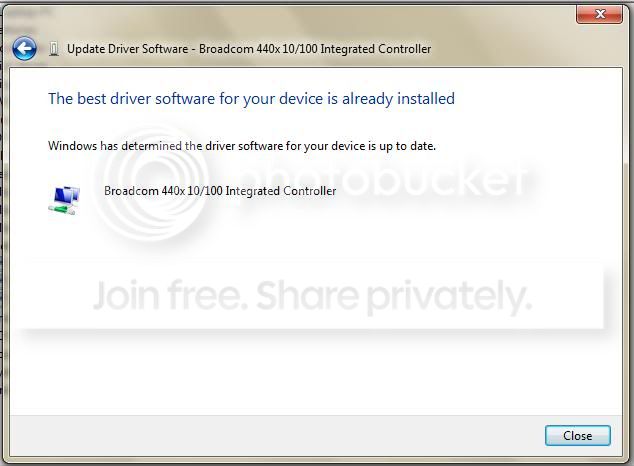
Yes, I did that. It then said I already had the most up to date drivers.

updatedriver.jpg

update%20driver.jpg
 

My Computer My Computer

At a glance

Windows 7 Home PremiumIntel Core i7-3770 Ivy Bridge 3.4GHzCORSAIR Vengeance 16GB (4 x 4GB) DDR3 SDRAM D...EVGA GeForce GTX 660 FTW Signature 2
Computer Manufacturer/Model Number
Self Built
OS
Windows 7 Home Premium
CPU
Intel Core i7-3770 Ivy Bridge 3.4GHz
Motherboard
Asrock Z77 Extreme 4
Memory
CORSAIR Vengeance 16GB (4 x 4GB) DDR3 SDRAM DDR3 1600
Graphics Card(s)
EVGA GeForce GTX 660 FTW Signature 2
Sound Card
Onboard
Monitor(s) Displays
Samsung 24in LCD
Hard Drives
Samsung 840 EVO-Series 500GB 2.5-Inch SATA III Solid State Drive
HITACHI Deskstar 2TB 7200 RPM SATA 6.0Gb/s
PSU
Thermaltake Smart Series 850W PSU
Case
NZXT M59
Cooling
COOLER MASTER Hyper 212 EVO RR-212E and five 120mm case fans
Keyboard
Logitech G110 Gaming Keyboard
Mouse
Razer DeathAdder Mouse & Razer Destructor 2 Hard Mouse Mat
Internet Speed
Cable @ 18Gbps
Back
Top