BSOD On Hibernate DRIVER_STATE_POWER_FAILURE

Marktopus

New member
Local time
11:36 PM
Messages
2
Hi forum-goers,

So I've been getting BSOD's pretty consistently whenever I close my laptop (i.e. it goes into hibernate) or when it wakes from hibernate. If it doesn't BSOD when I close it, it'll 99% BSOD when I open it again.

Something weird I've found is that if I open my disc drive and close it after I close my laptop, it will not blue screen going into hibernate or coming out of hibernate.

The laptop is about 2.5 years old, and I've been getting these blue screens infrequently for around a year. All info on the laptop is on my profile.

I've looked up a bunch of stuff on this forum and others and I've found similar stories to mine, but never saw a fix. I'm pretty sure it's a driver (or maybe a combination of a few), but I don't know which one. I came to this conclusion from a combination of the error message, the fact that it can be reproduced, and the fact that every time I've written down the memory addresses, they've been different (logically ruling out a bad RAM stick).

The output from the diagnostic tool is attached like the instructions say.
If I could get some help for this I'd be super grateful, I've been at a loss as to what to do aside from the crappy workaround that I found.

Thanks in advance!
 

My Computer My Computer

At a glance

Windows 7 Professional x64Intel i7-2630QM12 GB DDR3Nvidia Geforce 560M
Computer type
Laptop
Computer Manufacturer/Model Number
Asus
OS
Windows 7 Professional x64
CPU
Intel i7-2630QM
Motherboard
ASUSTeK G74Sx
Memory
12 GB DDR3
Graphics Card(s)
Nvidia Geforce 560M
Hard Drives
750 GB HDD 2 even partitions
Antivirus
Microsoft Security Essentials
Browser
Google Chrome
Something weird I've found is that if I open my disc drive and close it after I close my laptop, it will not blue screen going into hibernate or coming out of hibernate.
That is not weird now, as .....
Code:
Probably caused by : PxHlpa64.sys ( PxHlpa64+2f74 )
This driver monitors the physical ODD. A lot of programs (mostly the DVD playing/writing/encoding programs) use that driver. Do you know which one of those programs installed this driver there? If you are not sure, upload two stuff.

Upload your MSINFO32.nfo file.

  1. Click on the start button
  2. Type "msinfo32" (without quotes) in the search bar of the start menu, click the resulting link. It will open the System Information window.
  3. File>Save. In the "File Name" filed, put "MSINFO32" (without Quote), give the save location to desktop, and click the "save" button.
  4. Give the time for processing, it will save a .nfo file on your desktop.
  5. Zip it, and upload it following the instruction.
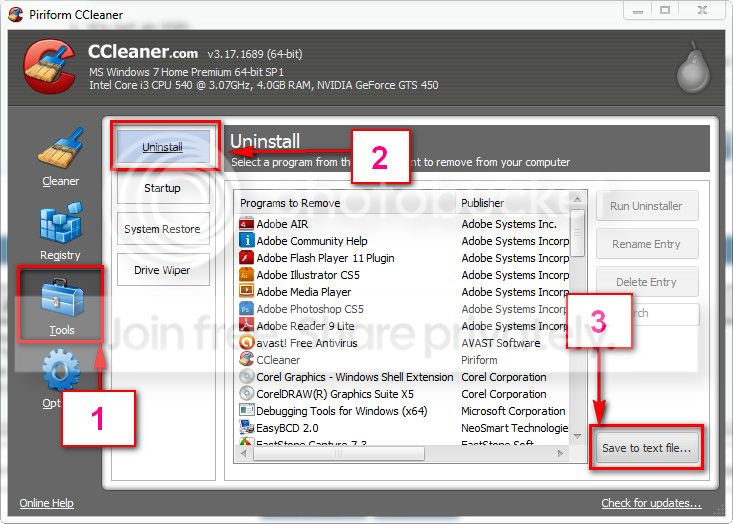
Download and install CCleaner. Then run it.
Go to "Tools" .... by default it will open the "uninstall" tab.
Click on save as text file. Save it on your desktop.
Upload the text file for us.
2012-11-02_224417.jpg


Then we may try to search for the source of that driver.
 

My Computer My Computer

At a glance

Microsoft Windows 10 Pro Insider Preview 64-bitIntel(R) Core(TM) i3-4130 CPU @ 3.40GHzCorsair Vengence 4GB x2 (8.00GB Dual-Channel ...2047MB GeForce GTS 450 (ZOTAC International)
Computer type
PC/Desktop
Computer Manufacturer/Model Number
Self Assembled
OS
Microsoft Windows 10 Pro Insider Preview 64-bit
CPU
Intel(R) Core(TM) i3-4130 CPU @ 3.40GHz
Motherboard
Gigabyte Technology Co., Ltd. B85M-D3H
Memory
Corsair Vengence 4GB x2 (8.00GB Dual-Channel DDR3 @ 798MHz)
Graphics Card(s)
2047MB GeForce GTS 450 (ZOTAC International)
Sound Card
Onboard (Realtek High Definition Audio)
Monitor(s) Displays
LG Flatron E2040T
Screen Resolution
1600x900
Hard Drives
Western Digital 1 TB
Seagate 500 GB
PSU
Corsair VS550
Case
Cooler Master K380
Cooling
Cooler Master Seidon 120V Plus
Keyboard
Logitech MK260r
Mouse
Logitech MK260r
Internet Speed
PMPL Broadband
Antivirus
Windows Defender + MBAM
Browser
Firefox
Other Info
Dell Studio 15" Laptop
Okay, I did as you asked. Both files are attached. As far as I know, I don't actually have any installed programs that are affiliated closely with the driver, as I don't use the disc drive much.
 

My Computer My Computer

At a glance

Windows 7 Professional x64Intel i7-2630QM12 GB DDR3Nvidia Geforce 560M
Computer type
Laptop
Computer Manufacturer/Model Number
Asus
OS
Windows 7 Professional x64
CPU
Intel i7-2630QM
Motherboard
ASUSTeK G74Sx
Memory
12 GB DDR3
Graphics Card(s)
Nvidia Geforce 560M
Hard Drives
750 GB HDD 2 even partitions
Antivirus
Microsoft Security Essentials
Browser
Google Chrome
Code:
pxhlpa64 | PxHlpa64 | c:\windows\system32\drivers\pxhlpa64.sys | Kernel Driver | Yes | [COLOR=Red]Boot[/COLOR] | Running
Free up the startup. Windows does not need any other program to auto start with it, but the auto start programs often conflicts and causes various problems including BSODs.

  1. Click on the Start button
  2. Type “msconfig (without quotes), click the resulting link. It will open the system configuration window, with the "general" tab selected.
    • Click the "startup" tab. Click "Disable all" > Apply > OK.
    • Click on "services" tab. Check the "Hide all Microsoft Services"; Click "Disable all" > Apply > OK
  3. Select the “Startup” tab.
  4. Deselect all items other than the antivirus.
  5. Apply > OK
  6. Accept then restart.
Does it change anything there? Also, you may try deleting the driver manually in c:\windows\system32\drivers\pxhlpa64.sys.
 

My Computer My Computer

At a glance

Microsoft Windows 10 Pro Insider Preview 64-bitIntel(R) Core(TM) i3-4130 CPU @ 3.40GHzCorsair Vengence 4GB x2 (8.00GB Dual-Channel ...2047MB GeForce GTS 450 (ZOTAC International)
Computer type
PC/Desktop
Computer Manufacturer/Model Number
Self Assembled
OS
Microsoft Windows 10 Pro Insider Preview 64-bit
CPU
Intel(R) Core(TM) i3-4130 CPU @ 3.40GHz
Motherboard
Gigabyte Technology Co., Ltd. B85M-D3H
Memory
Corsair Vengence 4GB x2 (8.00GB Dual-Channel DDR3 @ 798MHz)
Graphics Card(s)
2047MB GeForce GTS 450 (ZOTAC International)
Sound Card
Onboard (Realtek High Definition Audio)
Monitor(s) Displays
LG Flatron E2040T
Screen Resolution
1600x900
Hard Drives
Western Digital 1 TB
Seagate 500 GB
PSU
Corsair VS550
Case
Cooler Master K380
Cooling
Cooler Master Seidon 120V Plus
Keyboard
Logitech MK260r
Mouse
Logitech MK260r
Internet Speed
PMPL Broadband
Antivirus
Windows Defender + MBAM
Browser
Firefox
Other Info
Dell Studio 15" Laptop
Back
Top