Solved BSOD on start up every 4 or 5 days - Toshiba laptop 3 mths old

hkfish

New member
Local time
9:59 AM
Messages
19
Hi,
I get the BSOD on a Toshiba Tecra R950 Laptop and need help interpreting the dump file. I cannot recreate the blue screen at will. It only happens when I start the machine up some mornings.
I've read it will get worse so I should do something about it while I am still in warranty.
The shop where I bought it from says they can't fix unless they can replicate the problem. Is this true? I've attached the file.
I can't identify anything in connection with the BSOD that I am doing, except I do notice sometimes that when I am using an Altec Lansing speaker the sound fading in and out. But BSOD doesn't happen at these particular times though.

Many thanks
hkfish
 
Last edited:

My Computer My Computer

At a glance

Windows 7 Professional, 64 bitIntel(R) Core(TM) i5-3320M CPU @ 2.60GHz4GB DDR3 (1600Mhz)Intel Graphics Media Accelerator QM77
Computer type
Laptop
Computer Manufacturer/Model Number
Toshiba Tecra R950 PT535A-007023
OS
Windows 7 Professional, 64 bit
CPU
Intel(R) Core(TM) i5-3320M CPU @ 2.60GHz
Motherboard
Toshiba base board, Tecra R950, Version A0
Memory
4GB DDR3 (1600Mhz)
Graphics Card(s)
Intel Graphics Media Accelerator QM77
Sound Card
Realtek, Realtek High Definition Audio
Monitor(s) Displays
Toshiba
Hard Drives
640GB 7200rpm 2.5" SATA Full Disk Encryption (FDE) HDD
Antivirus
Norton Internet Security
Browser
Firefox

My Computer My Computer

At a glance

Windows 10 Home 64BitIntel Core i5 10400 @ 2.90GHz8.00GB Single-Channel Unknown @ 1329MHz (16-2...
Computer type
PC/Desktop
Computer Manufacturer/Model Number
Self assembled
OS
Windows 10 Home 64Bit
CPU
Intel Core i5 10400 @ 2.90GHz
Motherboard
Intel Corporation DG41WV (PROCESSOR)
Memory
8.00GB Single-Channel Unknown @ 1329MHz (16-20-20-38)
Sound Card
Realtek High Definition Audio
Monitor(s) Displays
DELL E170S
Screen Resolution
1280x1024 pixels
Hard Drives
931GB TOSHIBA DT01ACA100 (SATA)
238GB TEAM TM8PS7256G (SATA SSD)
Case
Nothing Fancy
Cooling
Fans
Keyboard
A4 Tech Co LTD
Mouse
A4 Tech Co Ltd/Logitech
Internet Speed
25 Mbps
Thanks koolkat77,
Do I have to perform a clean boot everyday? I don't get BSOD everyday.
Also, can I untick automatic restart as I won't know when I've had a BSOD otherwise?
 

My Computer My Computer

At a glance

Windows 7 Professional, 64 bitIntel(R) Core(TM) i5-3320M CPU @ 2.60GHz4GB DDR3 (1600Mhz)Intel Graphics Media Accelerator QM77
Computer type
Laptop
Computer Manufacturer/Model Number
Toshiba Tecra R950 PT535A-007023
OS
Windows 7 Professional, 64 bit
CPU
Intel(R) Core(TM) i5-3320M CPU @ 2.60GHz
Motherboard
Toshiba base board, Tecra R950, Version A0
Memory
4GB DDR3 (1600Mhz)
Graphics Card(s)
Intel Graphics Media Accelerator QM77
Sound Card
Realtek, Realtek High Definition Audio
Monitor(s) Displays
Toshiba
Hard Drives
640GB 7200rpm 2.5" SATA Full Disk Encryption (FDE) HDD
Antivirus
Norton Internet Security
Browser
Firefox
No need for a clean boot everyday, the tutorial to troubleshooting applications at startup is just to identify which software is causing the BSOD at your start up.
 

My Computer My Computer

At a glance

Windows 10 Home 64BitIntel Core i5 10400 @ 2.90GHz8.00GB Single-Channel Unknown @ 1329MHz (16-2...
Computer type
PC/Desktop
Computer Manufacturer/Model Number
Self assembled
OS
Windows 10 Home 64Bit
CPU
Intel Core i5 10400 @ 2.90GHz
Motherboard
Intel Corporation DG41WV (PROCESSOR)
Memory
8.00GB Single-Channel Unknown @ 1329MHz (16-20-20-38)
Sound Card
Realtek High Definition Audio
Monitor(s) Displays
DELL E170S
Screen Resolution
1280x1024 pixels
Hard Drives
931GB TOSHIBA DT01ACA100 (SATA)
238GB TEAM TM8PS7256G (SATA SSD)
Case
Nothing Fancy
Cooling
Fans
Keyboard
A4 Tech Co LTD
Mouse
A4 Tech Co Ltd/Logitech
Internet Speed
25 Mbps
Just to let you know I am still waiting on another BSOD, haven't got one since..
 

My Computer My Computer

At a glance

Windows 7 Professional, 64 bitIntel(R) Core(TM) i5-3320M CPU @ 2.60GHz4GB DDR3 (1600Mhz)Intel Graphics Media Accelerator QM77
Computer type
Laptop
Computer Manufacturer/Model Number
Toshiba Tecra R950 PT535A-007023
OS
Windows 7 Professional, 64 bit
CPU
Intel(R) Core(TM) i5-3320M CPU @ 2.60GHz
Motherboard
Toshiba base board, Tecra R950, Version A0
Memory
4GB DDR3 (1600Mhz)
Graphics Card(s)
Intel Graphics Media Accelerator QM77
Sound Card
Realtek, Realtek High Definition Audio
Monitor(s) Displays
Toshiba
Hard Drives
640GB 7200rpm 2.5" SATA Full Disk Encryption (FDE) HDD
Antivirus
Norton Internet Security
Browser
Firefox
That's nice :)

Update the thread if you get one.
 

My Computer My Computer

At a glance

Windows 10 Home 64BitIntel Core i5 10400 @ 2.90GHz8.00GB Single-Channel Unknown @ 1329MHz (16-2...
Computer type
PC/Desktop
Computer Manufacturer/Model Number
Self assembled
OS
Windows 10 Home 64Bit
CPU
Intel Core i5 10400 @ 2.90GHz
Motherboard
Intel Corporation DG41WV (PROCESSOR)
Memory
8.00GB Single-Channel Unknown @ 1329MHz (16-20-20-38)
Sound Card
Realtek High Definition Audio
Monitor(s) Displays
DELL E170S
Screen Resolution
1280x1024 pixels
Hard Drives
931GB TOSHIBA DT01ACA100 (SATA)
238GB TEAM TM8PS7256G (SATA SSD)
Case
Nothing Fancy
Cooling
Fans
Keyboard
A4 Tech Co LTD
Mouse
A4 Tech Co Ltd/Logitech
Internet Speed
25 Mbps
Hi, I've finally got another BSOD. When I did a restart though it went into windows ok without doing a repair. Switched it off and on again and restarted ok with no 2nd BSOD.

I've attached another grab for your information. I don't think I can trouble shoot because I'm not getting a 2nd BSOD though.
 

My Computer My Computer

At a glance

Windows 7 Professional, 64 bitIntel(R) Core(TM) i5-3320M CPU @ 2.60GHz4GB DDR3 (1600Mhz)Intel Graphics Media Accelerator QM77
Computer type
Laptop
Computer Manufacturer/Model Number
Toshiba Tecra R950 PT535A-007023
OS
Windows 7 Professional, 64 bit
CPU
Intel(R) Core(TM) i5-3320M CPU @ 2.60GHz
Motherboard
Toshiba base board, Tecra R950, Version A0
Memory
4GB DDR3 (1600Mhz)
Graphics Card(s)
Intel Graphics Media Accelerator QM77
Sound Card
Realtek, Realtek High Definition Audio
Monitor(s) Displays
Toshiba
Hard Drives
640GB 7200rpm 2.5" SATA Full Disk Encryption (FDE) HDD
Antivirus
Norton Internet Security
Browser
Firefox
I will check the dump in a while.

Please bump the thread if I haven't replied in 24 hours.
 

My Computer My Computer

At a glance

Windows 10 Home 64BitIntel Core i5 10400 @ 2.90GHz8.00GB Single-Channel Unknown @ 1329MHz (16-2...
Computer type
PC/Desktop
Computer Manufacturer/Model Number
Self assembled
OS
Windows 10 Home 64Bit
CPU
Intel Core i5 10400 @ 2.90GHz
Motherboard
Intel Corporation DG41WV (PROCESSOR)
Memory
8.00GB Single-Channel Unknown @ 1329MHz (16-20-20-38)
Sound Card
Realtek High Definition Audio
Monitor(s) Displays
DELL E170S
Screen Resolution
1280x1024 pixels
Hard Drives
931GB TOSHIBA DT01ACA100 (SATA)
238GB TEAM TM8PS7256G (SATA SSD)
Case
Nothing Fancy
Cooling
Fans
Keyboard
A4 Tech Co LTD
Mouse
A4 Tech Co Ltd/Logitech
Internet Speed
25 Mbps
Driver Description: Symantec /Norton
Driver Description: Norton Internet Security

Code:
fffff880`034e0678  fffff880`01421fd8Unable to load image SYMEVENT64x86.SYS, Win32 error 0n2
*** WARNING: Unable to verify timestamp for SYMEVENT64x86.SYS
*** ERROR: Module load completed but symbols could not be loaded for SYMEVENT64x86.SYS
 SYMEVENT64x86+0x21fd8
Code:
fffff880`034e0618  fffff880`04bd7ab8Unable to load image EraserUtilRebootDrv.sys, Win32 error 0n2
*** WARNING: Unable to verify timestamp for EraserUtilRebootDrv.sys
*** ERROR: Module load completed but symbols could not be loaded for EraserUtilRebootDrv.sys
 EraserUtilRebootDrv+0x2ab8
Norton is causing the BSOD's for you. Please remove it using its removal tool from here: Uninstallers (removal tools) for common antivirus software - ESET Knowledgebase

We recommended Microsoft Security Essentials from a strict BSOD perspective. Is most compatible & provides most stability compared to other antivirus app/Internet Security Software.
   Warning
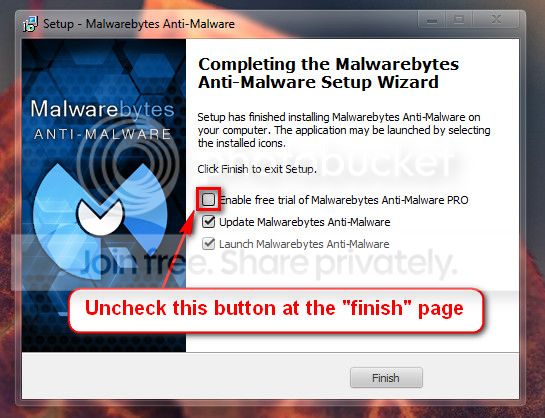
Do not start the free trial of Malware Bytes; remember to deselect that option when prompted.

2013-03-09_224312_zps62dc7c23.jpg

Run a full scan with both (separately) once downloaded, installed and updated.
Perform a System File Check to check the integrity of all protected Windows 7 :
  1. Click on the start :orb:
  2. Type CMD on Search
  3. Left click and Run as Administrator
  4. Type
    Code:
    SFC /scannow
Full tutorial here:
Check your hard drive(s) for errors by running chkdsk
Number down items at start-up. Keep only your anti-virus, this also improves the time for logging into windows.
Take memtest. Run for 8 passes and test each stick in a know good slot for an additional 6 passes.
   Note
Pay close attention to part 3 of the tutorial in order to rule out the faulty stick.

   Information
Errors are sometimes found after 8 passes.

   Tip
Do this test overnight, before going to bed.

Let us know the results.
 

My Computer My Computer

At a glance

Windows 10 Home 64BitIntel Core i5 10400 @ 2.90GHz8.00GB Single-Channel Unknown @ 1329MHz (16-2...
Computer type
PC/Desktop
Computer Manufacturer/Model Number
Self assembled
OS
Windows 10 Home 64Bit
CPU
Intel Core i5 10400 @ 2.90GHz
Motherboard
Intel Corporation DG41WV (PROCESSOR)
Memory
8.00GB Single-Channel Unknown @ 1329MHz (16-20-20-38)
Sound Card
Realtek High Definition Audio
Monitor(s) Displays
DELL E170S
Screen Resolution
1280x1024 pixels
Hard Drives
931GB TOSHIBA DT01ACA100 (SATA)
238GB TEAM TM8PS7256G (SATA SSD)
Case
Nothing Fancy
Cooling
Fans
Keyboard
A4 Tech Co LTD
Mouse
A4 Tech Co Ltd/Logitech
Internet Speed
25 Mbps
Hi koolkat77,
I did all of the tests you've recommended except the RAM test. All is ok, I haven't got any errors that I could see. (I think Chkdsk corrected some things)
I tried to do the RAM test but I can't get my system to boot from CD drive. I changed the boot priority in BIOS to ODD but it is still booting from HDD. I entered it and hit save and exit but it still won't boot from CD. Is there anything else I can do?
Thank you!
 

My Computer My Computer

At a glance

Windows 7 Professional, 64 bitIntel(R) Core(TM) i5-3320M CPU @ 2.60GHz4GB DDR3 (1600Mhz)Intel Graphics Media Accelerator QM77
Computer type
Laptop
Computer Manufacturer/Model Number
Toshiba Tecra R950 PT535A-007023
OS
Windows 7 Professional, 64 bit
CPU
Intel(R) Core(TM) i5-3320M CPU @ 2.60GHz
Motherboard
Toshiba base board, Tecra R950, Version A0
Memory
4GB DDR3 (1600Mhz)
Graphics Card(s)
Intel Graphics Media Accelerator QM77
Sound Card
Realtek, Realtek High Definition Audio
Monitor(s) Displays
Toshiba
Hard Drives
640GB 7200rpm 2.5" SATA Full Disk Encryption (FDE) HDD
Antivirus
Norton Internet Security
Browser
Firefox

My Computer My Computer

At a glance

Windows 10 Home 64BitIntel Core i5 10400 @ 2.90GHz8.00GB Single-Channel Unknown @ 1329MHz (16-2...
Computer type
PC/Desktop
Computer Manufacturer/Model Number
Self assembled
OS
Windows 10 Home 64Bit
CPU
Intel Core i5 10400 @ 2.90GHz
Motherboard
Intel Corporation DG41WV (PROCESSOR)
Memory
8.00GB Single-Channel Unknown @ 1329MHz (16-20-20-38)
Sound Card
Realtek High Definition Audio
Monitor(s) Displays
DELL E170S
Screen Resolution
1280x1024 pixels
Hard Drives
931GB TOSHIBA DT01ACA100 (SATA)
238GB TEAM TM8PS7256G (SATA SSD)
Case
Nothing Fancy
Cooling
Fans
Keyboard
A4 Tech Co LTD
Mouse
A4 Tech Co Ltd/Logitech
Internet Speed
25 Mbps
Hi, I finally did the memtest which reported no errors. I can actually boot from CD - worked out I had to use F8 & F7 to change order of boot sequence not just selecting it doh. I ran the test overnight and was all ok in the morning.

The Crystal info is attached but the links for the toshiba hard drive diagnostics don't work for my machine.
I have windows 7 and the dos version doesn't appear to work on SATA drives.

So I just used the diagnostic tool that came installed with the machine. I got passes on the CPU, memory, display, network, usb, cd drive, and hard disk. Not sure if this tool is good enough though.
 

My Computer My Computer

At a glance

Windows 7 Professional, 64 bitIntel(R) Core(TM) i5-3320M CPU @ 2.60GHz4GB DDR3 (1600Mhz)Intel Graphics Media Accelerator QM77
Computer type
Laptop
Computer Manufacturer/Model Number
Toshiba Tecra R950 PT535A-007023
OS
Windows 7 Professional, 64 bit
CPU
Intel(R) Core(TM) i5-3320M CPU @ 2.60GHz
Motherboard
Toshiba base board, Tecra R950, Version A0
Memory
4GB DDR3 (1600Mhz)
Graphics Card(s)
Intel Graphics Media Accelerator QM77
Sound Card
Realtek, Realtek High Definition Audio
Monitor(s) Displays
Toshiba
Hard Drives
640GB 7200rpm 2.5" SATA Full Disk Encryption (FDE) HDD
Antivirus
Norton Internet Security
Browser
Firefox
Looks fine. Any new BSOD;s?

Let us know if you have them.
 

My Computer My Computer

At a glance

Windows 10 Home 64BitIntel Core i5 10400 @ 2.90GHz8.00GB Single-Channel Unknown @ 1329MHz (16-2...
Computer type
PC/Desktop
Computer Manufacturer/Model Number
Self assembled
OS
Windows 10 Home 64Bit
CPU
Intel Core i5 10400 @ 2.90GHz
Motherboard
Intel Corporation DG41WV (PROCESSOR)
Memory
8.00GB Single-Channel Unknown @ 1329MHz (16-20-20-38)
Sound Card
Realtek High Definition Audio
Monitor(s) Displays
DELL E170S
Screen Resolution
1280x1024 pixels
Hard Drives
931GB TOSHIBA DT01ACA100 (SATA)
238GB TEAM TM8PS7256G (SATA SSD)
Case
Nothing Fancy
Cooling
Fans
Keyboard
A4 Tech Co LTD
Mouse
A4 Tech Co Ltd/Logitech
Internet Speed
25 Mbps
no new BSOD's yet, but it does take me 4 or 5 days to get one normally. So I'll have to wait awhile. Will keep you posted.
 

My Computer My Computer

At a glance

Windows 7 Professional, 64 bitIntel(R) Core(TM) i5-3320M CPU @ 2.60GHz4GB DDR3 (1600Mhz)Intel Graphics Media Accelerator QM77
Computer type
Laptop
Computer Manufacturer/Model Number
Toshiba Tecra R950 PT535A-007023
OS
Windows 7 Professional, 64 bit
CPU
Intel(R) Core(TM) i5-3320M CPU @ 2.60GHz
Motherboard
Toshiba base board, Tecra R950, Version A0
Memory
4GB DDR3 (1600Mhz)
Graphics Card(s)
Intel Graphics Media Accelerator QM77
Sound Card
Realtek, Realtek High Definition Audio
Monitor(s) Displays
Toshiba
Hard Drives
640GB 7200rpm 2.5" SATA Full Disk Encryption (FDE) HDD
Antivirus
Norton Internet Security
Browser
Firefox
Alrighty then :)
 

My Computer My Computer

At a glance

Windows 10 Home 64BitIntel Core i5 10400 @ 2.90GHz8.00GB Single-Channel Unknown @ 1329MHz (16-2...
Computer type
PC/Desktop
Computer Manufacturer/Model Number
Self assembled
OS
Windows 10 Home 64Bit
CPU
Intel Core i5 10400 @ 2.90GHz
Motherboard
Intel Corporation DG41WV (PROCESSOR)
Memory
8.00GB Single-Channel Unknown @ 1329MHz (16-20-20-38)
Sound Card
Realtek High Definition Audio
Monitor(s) Displays
DELL E170S
Screen Resolution
1280x1024 pixels
Hard Drives
931GB TOSHIBA DT01ACA100 (SATA)
238GB TEAM TM8PS7256G (SATA SSD)
Case
Nothing Fancy
Cooling
Fans
Keyboard
A4 Tech Co LTD
Mouse
A4 Tech Co Ltd/Logitech
Internet Speed
25 Mbps
BSOD appears to be fixed

Hi koolkat77,
It's been awhile and I haven't had anymore BSOD's :). I think you may have been spot on with Norton being the culprit. That is an eye opener because I was convinced that it was hardware problem as this is what I was advised to be most likely the cause by outside experts.
Since when does supposedly good software cause BSOD's?
Do you think three weeks is enough time to wait before closing the case - I am happy to wait longer to be sure.
Thank you very much
hkfish
 

My Computer My Computer

At a glance

Windows 7 Professional, 64 bitIntel(R) Core(TM) i5-3320M CPU @ 2.60GHz4GB DDR3 (1600Mhz)Intel Graphics Media Accelerator QM77
Computer type
Laptop
Computer Manufacturer/Model Number
Toshiba Tecra R950 PT535A-007023
OS
Windows 7 Professional, 64 bit
CPU
Intel(R) Core(TM) i5-3320M CPU @ 2.60GHz
Motherboard
Toshiba base board, Tecra R950, Version A0
Memory
4GB DDR3 (1600Mhz)
Graphics Card(s)
Intel Graphics Media Accelerator QM77
Sound Card
Realtek, Realtek High Definition Audio
Monitor(s) Displays
Toshiba
Hard Drives
640GB 7200rpm 2.5" SATA Full Disk Encryption (FDE) HDD
Antivirus
Norton Internet Security
Browser
Firefox
You can allow some more time before closing the case.

For Norton you could ask them what to do about the BSOD's caused with their software: Norton Community - Norton Community
 

My Computer My Computer

At a glance

Windows 10 Home 64BitIntel Core i5 10400 @ 2.90GHz8.00GB Single-Channel Unknown @ 1329MHz (16-2...
Computer type
PC/Desktop
Computer Manufacturer/Model Number
Self assembled
OS
Windows 10 Home 64Bit
CPU
Intel Core i5 10400 @ 2.90GHz
Motherboard
Intel Corporation DG41WV (PROCESSOR)
Memory
8.00GB Single-Channel Unknown @ 1329MHz (16-20-20-38)
Sound Card
Realtek High Definition Audio
Monitor(s) Displays
DELL E170S
Screen Resolution
1280x1024 pixels
Hard Drives
931GB TOSHIBA DT01ACA100 (SATA)
238GB TEAM TM8PS7256G (SATA SSD)
Case
Nothing Fancy
Cooling
Fans
Keyboard
A4 Tech Co LTD
Mouse
A4 Tech Co Ltd/Logitech
Internet Speed
25 Mbps
Thank you koolkat77, I haven't had anymore BSOD's since taking your advice.
Kind regards
hkfish
 

My Computer My Computer

At a glance

Windows 7 Professional, 64 bitIntel(R) Core(TM) i5-3320M CPU @ 2.60GHz4GB DDR3 (1600Mhz)Intel Graphics Media Accelerator QM77
Computer type
Laptop
Computer Manufacturer/Model Number
Toshiba Tecra R950 PT535A-007023
OS
Windows 7 Professional, 64 bit
CPU
Intel(R) Core(TM) i5-3320M CPU @ 2.60GHz
Motherboard
Toshiba base board, Tecra R950, Version A0
Memory
4GB DDR3 (1600Mhz)
Graphics Card(s)
Intel Graphics Media Accelerator QM77
Sound Card
Realtek, Realtek High Definition Audio
Monitor(s) Displays
Toshiba
Hard Drives
640GB 7200rpm 2.5" SATA Full Disk Encryption (FDE) HDD
Antivirus
Norton Internet Security
Browser
Firefox
Good to hear. Be sure to post here if you have problems in future :)
 

My Computer My Computer

At a glance

Windows 10 Home 64BitIntel Core i5 10400 @ 2.90GHz8.00GB Single-Channel Unknown @ 1329MHz (16-2...
Computer type
PC/Desktop
Computer Manufacturer/Model Number
Self assembled
OS
Windows 10 Home 64Bit
CPU
Intel Core i5 10400 @ 2.90GHz
Motherboard
Intel Corporation DG41WV (PROCESSOR)
Memory
8.00GB Single-Channel Unknown @ 1329MHz (16-20-20-38)
Sound Card
Realtek High Definition Audio
Monitor(s) Displays
DELL E170S
Screen Resolution
1280x1024 pixels
Hard Drives
931GB TOSHIBA DT01ACA100 (SATA)
238GB TEAM TM8PS7256G (SATA SSD)
Case
Nothing Fancy
Cooling
Fans
Keyboard
A4 Tech Co LTD
Mouse
A4 Tech Co Ltd/Logitech
Internet Speed
25 Mbps
Hi Koolkat77,
Just one last thing if you don't mind. When I uninstalled Norton internet security software and replaced with all the others I stupidly didn't realise I was loosing real time protection. As a result i caught the Trojan.Downloader.Dofoil virus which I removed via malwarebytes 2 hours later. (I just happened to run it 2 hours later)
As a result I want to upgrade to real time monitoring and was wondering is it ok to do with the 3 systems in that they are compatible and ok to run at the same time? The free versions didn't stop me catching the virus?
e.g. Malwarebytes
Superantispyware
Microsoft security essentials
Also do you think the virus has been fully removed?
many thanks
Karen
 

My Computer My Computer

At a glance

Windows 7 Professional, 64 bitIntel(R) Core(TM) i5-3320M CPU @ 2.60GHz4GB DDR3 (1600Mhz)Intel Graphics Media Accelerator QM77
Computer type
Laptop
Computer Manufacturer/Model Number
Toshiba Tecra R950 PT535A-007023
OS
Windows 7 Professional, 64 bit
CPU
Intel(R) Core(TM) i5-3320M CPU @ 2.60GHz
Motherboard
Toshiba base board, Tecra R950, Version A0
Memory
4GB DDR3 (1600Mhz)
Graphics Card(s)
Intel Graphics Media Accelerator QM77
Sound Card
Realtek, Realtek High Definition Audio
Monitor(s) Displays
Toshiba
Hard Drives
640GB 7200rpm 2.5" SATA Full Disk Encryption (FDE) HDD
Antivirus
Norton Internet Security
Browser
Firefox
Back
Top