BSOD only after computer is "idle"...

Quailman

New member
Local time
3:42 PM
Messages
13
I'm posting from the computer right now. All's well unless I let my computer idle for ~10 minutes. (That's when I come back to a rebooted machine and a BSOD error message.)

Please let me know if I need to include any other useful/helpful information that isn't contained in the attached .zip folder. Thanks.
 

My Computer

OS
W7 x64
Welcome aboard, Quailman.

► It is Norton Internet Security.
Code:
fffff880`06e693e8  fffff880`03e81de6Unable to load image SYMEVENT64x86.SYS, Win32 error 0n2
*** WARNING: Unable to verify timestamp for SYMEVENT64x86.SYS
*** ERROR: Module load completed but symbols could not be loaded for SYMEVENT64x86.SYS
 SYMEVENT64x86+0x19de6
Uninstall Norton and all Symentec products using Norton Removal tool. Use Microsoft Security Essentials as your antivirus with windows inbuilt firewall, and free MBAM as the on demand scanner.

Download and install those, and then run full system scans with both of them, one by one.

Check your Disk Drive.

  1. Update your SSD's Firmware (Skip it, if it not a SSD; I guess it is a 1 TB HDD)
  2. Reseat the sata and power.
  3. Run chkdsk /f/r, following the option two of the tutorial Disk Check
  4. Seatool for dos: SeaTools | Seagate download
    Burn it in a blank cd. boot from the CD, click on "Accept", wait for it to finish detecting the drives, then in the upper left corner select "Basic Tests", then select "Long Test" and let it run.
Let us know the results.
 

My Computer

Computer type
PC/Desktop
Computer Manufacturer/Model Number
Self Assembled
OS
Microsoft Windows 10 Pro Insider Preview 64-bit
CPU
Intel(R) Core(TM) i3-4130 CPU @ 3.40GHz
Motherboard
Gigabyte Technology Co., Ltd. B85M-D3H
Memory
Corsair Vengence 4GB x2 (8.00GB Dual-Channel DDR3 @ 798MHz)
Graphics Card(s)
2047MB GeForce GTS 450 (ZOTAC International)
Sound Card
Onboard (Realtek High Definition Audio)
Monitor(s) Displays
LG Flatron E2040T
Screen Resolution
1600x900
Hard Drives
Western Digital 1 TB
Seagate 500 GB
PSU
Corsair VS550
Case
Cooler Master K380
Cooling
Cooler Master Seidon 120V Plus
Keyboard
Logitech MK260r
Mouse
Logitech MK260r
Internet Speed
PMPL Broadband
Antivirus
Windows Defender + MBAM
Browser
Firefox
Other Info
Dell Studio 15" Laptop
  1. Fully removed Norton.
  2. Downloaded Security Essentials and ran a full scan.
  3. Already have MBAM, and will run another full scan. (In progress)
Disk Drive Check:

1. It's SATA, so skipped. (link to my computer - I've only changed the graphics card and power supply.)
2. So just make sure everything's firmly connected and in place? As for cleaning, what's an effective way? I know spraying compressed air will do [half] the trick, but won't that just circulate the dust?
3. I tried this earlier today after reading about it elsewhere - I got hung on step 4 of 5. Ended up having to hard reboot (held button) and just ignore the scan. I'll try it again after MBAM.
4. Will run after chkdsk /f/r.


I'll update this post as I check things off. Thanks a ton for your help so far.


Last edited:

My Computer

OS
W7 x64
A little update: I did the first three things. Had to go away for a bit and came back to a rebooted machine with a blue screen error message. Scans were done and Norton had already been removed too.

I'm gonna try to do the chkdsk again in hopes that it doesn't stall again.
 

My Computer

OS
W7 x64
Ran CCleaner and a registry check. Fixed problems and went away for 10-15 minutes to see if my problem was fixed. Nope. :(

Running out of ideas here. More help would be lovely.
 

My Computer

OS
W7 x64
Is this the same BSOD?
 

My Computer

Computer Manufacturer/Model Number
CUSTOM
OS
Window 7 Ultimate x64
CPU
i7-920
Motherboard
Asus Rampage
Memory
Crucial 12gb ddr3
Graphics Card(s)
2x ATI Radeon HD 6770 2gb
Sound Card
-NONE-
Monitor(s) Displays
3 Samsung 24" displays
Hard Drives
6 256gb SSD Kingston Striped
PSU
Thermaltake 1300
Case
Thermaltake Black Widow
Cooling
Antec CPU water radiator; Air
May we see some of your latest dumps?
 

My Computer

Computer type
PC/Desktop
Computer Manufacturer/Model Number
Self Assembled
OS
Microsoft Windows 10 Pro Insider Preview 64-bit
CPU
Intel(R) Core(TM) i3-4130 CPU @ 3.40GHz
Motherboard
Gigabyte Technology Co., Ltd. B85M-D3H
Memory
Corsair Vengence 4GB x2 (8.00GB Dual-Channel DDR3 @ 798MHz)
Graphics Card(s)
2047MB GeForce GTS 450 (ZOTAC International)
Sound Card
Onboard (Realtek High Definition Audio)
Monitor(s) Displays
LG Flatron E2040T
Screen Resolution
1600x900
Hard Drives
Western Digital 1 TB
Seagate 500 GB
PSU
Corsair VS550
Case
Cooler Master K380
Cooling
Cooler Master Seidon 120V Plus
Keyboard
Logitech MK260r
Mouse
Logitech MK260r
Internet Speed
PMPL Broadband
Antivirus
Windows Defender + MBAM
Browser
Firefox
Other Info
Dell Studio 15" Laptop
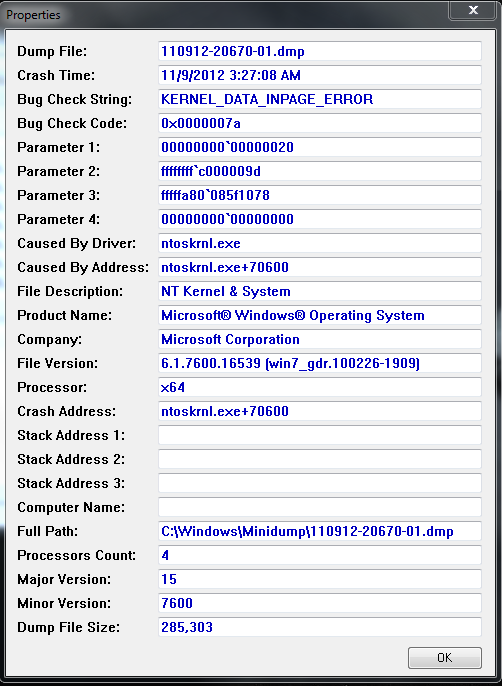
So I found something to note about the dumps. After the first initial BSOD, the bug check code changes.

Here's a picture of the initial dump:
NrbR2.png
 

My Computer

OS
W7 x64
Qualiman, not this, but the SF Diag tool output we need :)
 

My Computer

Computer type
PC/Desktop
Computer Manufacturer/Model Number
Self Assembled
OS
Microsoft Windows 10 Pro Insider Preview 64-bit
CPU
Intel(R) Core(TM) i3-4130 CPU @ 3.40GHz
Motherboard
Gigabyte Technology Co., Ltd. B85M-D3H
Memory
Corsair Vengence 4GB x2 (8.00GB Dual-Channel DDR3 @ 798MHz)
Graphics Card(s)
2047MB GeForce GTS 450 (ZOTAC International)
Sound Card
Onboard (Realtek High Definition Audio)
Monitor(s) Displays
LG Flatron E2040T
Screen Resolution
1600x900
Hard Drives
Western Digital 1 TB
Seagate 500 GB
PSU
Corsair VS550
Case
Cooler Master K380
Cooling
Cooler Master Seidon 120V Plus
Keyboard
Logitech MK260r
Mouse
Logitech MK260r
Internet Speed
PMPL Broadband
Antivirus
Windows Defender + MBAM
Browser
Firefox
Other Info
Dell Studio 15" Laptop
Qualiman,

you need to install service pack 1 and all the other updates.
Code:
[COLOR=Red]Windows 7 Kernel Version 7600 MP[/COLOR] (4 procs) Free x64
Product: WinNt, suite: TerminalServer SingleUserTS Personal
Built by: 7600.16539.amd64fre.win7_gdr.100226-1909
Do some disc checks:

  1. Update your SSD's Firmware
  2. Reseat the sata and power.
  3. Run chkdsk /f/r, following the option two of the tutorial Disk Check
  4. Seatool for dos: SeaTools | Seagate download
    Burn it in a blank cd. boot from the CD, click on "Accept", wait for it to finish detecting the drives, then in the upper left corner select "Basic Tests", then select "Long Test" and let it run.
Scan the system for possible virus infection.


My Computer

Computer type
PC/Desktop
Computer Manufacturer/Model Number
Self Assembled
OS
Microsoft Windows 10 Pro Insider Preview 64-bit
CPU
Intel(R) Core(TM) i3-4130 CPU @ 3.40GHz
Motherboard
Gigabyte Technology Co., Ltd. B85M-D3H
Memory
Corsair Vengence 4GB x2 (8.00GB Dual-Channel DDR3 @ 798MHz)
Graphics Card(s)
2047MB GeForce GTS 450 (ZOTAC International)
Sound Card
Onboard (Realtek High Definition Audio)
Monitor(s) Displays
LG Flatron E2040T
Screen Resolution
1600x900
Hard Drives
Western Digital 1 TB
Seagate 500 GB
PSU
Corsair VS550
Case
Cooler Master K380
Cooling
Cooler Master Seidon 120V Plus
Keyboard
Logitech MK260r
Mouse
Logitech MK260r
Internet Speed
PMPL Broadband
Antivirus
Windows Defender + MBAM
Browser
Firefox
Other Info
Dell Studio 15" Laptop
I don't have SP1 in my Windows Update queue, so as suggested my Microsoft, I'm downloading most of the other 'important updates' in hopes that SP1 will be there when I check for updates again.
 

My Computer

OS
W7 x64

My Computer

Computer type
PC/Desktop
Computer Manufacturer/Model Number
Self Assembled
OS
Microsoft Windows 10 Pro Insider Preview 64-bit
CPU
Intel(R) Core(TM) i3-4130 CPU @ 3.40GHz
Motherboard
Gigabyte Technology Co., Ltd. B85M-D3H
Memory
Corsair Vengence 4GB x2 (8.00GB Dual-Channel DDR3 @ 798MHz)
Graphics Card(s)
2047MB GeForce GTS 450 (ZOTAC International)
Sound Card
Onboard (Realtek High Definition Audio)
Monitor(s) Displays
LG Flatron E2040T
Screen Resolution
1600x900
Hard Drives
Western Digital 1 TB
Seagate 500 GB
PSU
Corsair VS550
Case
Cooler Master K380
Cooling
Cooler Master Seidon 120V Plus
Keyboard
Logitech MK260r
Mouse
Logitech MK260r
Internet Speed
PMPL Broadband
Antivirus
Windows Defender + MBAM
Browser
Firefox
Other Info
Dell Studio 15" Laptop
Yep, those are the steps I'm following.
Note


  • If SP1 isn't listed, you might need to install some other updates before installing SP1. Install any important updates, return to the Windows Update page, and then click Check for updates again.

If I don't have any luck finding the update, then I'll use the advance method.
 

My Computer

OS
W7 x64
Installed SP1. Left my computer on overnight and no BSOD since. Will keep testing for the next few days.

Thanks again for the help.
 

My Computer

OS
W7 x64
Let us know how it worked, and best of luck :)
 

My Computer

Computer type
PC/Desktop
Computer Manufacturer/Model Number
Self Assembled
OS
Microsoft Windows 10 Pro Insider Preview 64-bit
CPU
Intel(R) Core(TM) i3-4130 CPU @ 3.40GHz
Motherboard
Gigabyte Technology Co., Ltd. B85M-D3H
Memory
Corsair Vengence 4GB x2 (8.00GB Dual-Channel DDR3 @ 798MHz)
Graphics Card(s)
2047MB GeForce GTS 450 (ZOTAC International)
Sound Card
Onboard (Realtek High Definition Audio)
Monitor(s) Displays
LG Flatron E2040T
Screen Resolution
1600x900
Hard Drives
Western Digital 1 TB
Seagate 500 GB
PSU
Corsair VS550
Case
Cooler Master K380
Cooling
Cooler Master Seidon 120V Plus
Keyboard
Logitech MK260r
Mouse
Logitech MK260r
Internet Speed
PMPL Broadband
Antivirus
Windows Defender + MBAM
Browser
Firefox
Other Info
Dell Studio 15" Laptop
So after 3 days of no crashes, I just got one. And it wasn't from idling either. Should I upload the diag stuff or do something else?
 

My Computer

OS
W7 x64
As you have said you have got one, upload the dump.
 

My Computer

Computer type
PC/Desktop
Computer Manufacturer/Model Number
Self Assembled
OS
Microsoft Windows 10 Pro Insider Preview 64-bit
CPU
Intel(R) Core(TM) i3-4130 CPU @ 3.40GHz
Motherboard
Gigabyte Technology Co., Ltd. B85M-D3H
Memory
Corsair Vengence 4GB x2 (8.00GB Dual-Channel DDR3 @ 798MHz)
Graphics Card(s)
2047MB GeForce GTS 450 (ZOTAC International)
Sound Card
Onboard (Realtek High Definition Audio)
Monitor(s) Displays
LG Flatron E2040T
Screen Resolution
1600x900
Hard Drives
Western Digital 1 TB
Seagate 500 GB
PSU
Corsair VS550
Case
Cooler Master K380
Cooling
Cooler Master Seidon 120V Plus
Keyboard
Logitech MK260r
Mouse
Logitech MK260r
Internet Speed
PMPL Broadband
Antivirus
Windows Defender + MBAM
Browser
Firefox
Other Info
Dell Studio 15" Laptop
Back
Top