BSOD only after normal log in (ntoskrnl.exe+735c0)

D3C3n50r

New member
Local time
6:30 AM
Messages
27
Hi,

I recently got a BSOD for the first time and have been getting them since everytime I log in. I have read various forums and have updated all my drivers but the problem persists. I have tried a System Restore but it keeps failing even after I disabled my anti-virus and firewall so I gave up on that. Malwarebytes, Avast, MemTest and almost every other scan suggested to me has not picked up anything wrong.

I'm not sure if these could cause a BSOD but I'll mention them anyway:
- In Device manager I have one yellow exclamation sign next to "Security Processor Loader Driver" under Non-Plug and Play Drivers. Not sure if it has always been there.
- Also prior to the BSOD's I was getting loads of random pop ups from COMMODO HIP asking permission to allow programs to run.

So far i've had 3 bug codes starting with:
IRQL_NOT_LESS_OR_EQUAL (Most frequent)
PAGE_FAULT_IN_NONPAGED_AREA
KMODE_EXCEPTION_NOT_HANDLED

Aside from two of the bug codes all have been attributed to:
ntoskrnl.exe / ntoskrnl.exe+735c0

With fltmgr.sys and cmdguard.sys appearing once.
(according to BlueScreenView)

I have had no problems starting windows in Safe Mode and Safe Mode with Networking.

I've uploaded system info and minidumps below. If you require any more details I will be happy to provide.

Any help will be much appreciated :)
 

My Computer My Computer

At a glance

Windows 7 Home Premium 64-bit SP1Intel(R) Core(TM) i7-3612QM CPU @ 2.10GHz8.00 GBAMD Radeon HD 7650M
Computer type
Laptop
Computer Manufacturer/Model Number
Sony Vaio
OS
Windows 7 Home Premium 64-bit SP1
CPU
Intel(R) Core(TM) i7-3612QM CPU @ 2.10GHz
Motherboard
Sony Corporation VAIO
Memory
8.00 GB
Graphics Card(s)
AMD Radeon HD 7650M
Sound Card
AMD High Definition Audio Device
Screen Resolution
1920 x 1080
Hard Drives
Hitachi HTS547575A9E384
Antivirus
COMODO
Browser
Mozilla Firefox
Hi D3C3n50r,

Welcome to the 7forums.

Please test your memory with MemTest86+
Code:
Probably caused by : memory_corruption


Diagnostic Test

 RAM TEST


arrow.png
Run MemTest86+ to analyse your RAM. MemTest86+ - Test RAM - Windows 7 Forums

   Note
picture.php


MemTest86+ needs to be run for at least 8 passes for conclusive results. Set it running before you go to bed and leave it overnight. We're looking for zero errors here. Even a single error will indicate RAM failure.
 

My Computer My Computer

At a glance

Windows 10 Proi5-650016GB DDR4 2133 Crucial Ballistix Sport LTMSI GeForce GTX 1060 GAMING X 6G
Computer type
PC/Desktop
Computer Manufacturer/Model Number
Custom build
OS
Windows 10 Pro
CPU
i5-6500
Motherboard
Gigabyte B150-HD3P-CF
Memory
16GB DDR4 2133 Crucial Ballistix Sport LT
Graphics Card(s)
MSI GeForce GTX 1060 GAMING X 6G
Sound Card
Intel Display Audio
Monitor(s) Displays
Liyama ProLite XB2483HSU-B2
Screen Resolution
1920 x 1080
Hard Drives
Crucial MX200 500GB & Toshiba DT01ACA300 3TB
PSU
Corsair RM550x
Case
Fractal Design Define S
Cooling
Cooler Master TX3 i
Keyboard
Func KB-460 (MX Red)
Mouse
Corsair Gaming M65 RGB
Antivirus
Bitdefender Total Security 2016 + MBAM Pro + MBAE Pro
Browser
Google Chrome
Other Info
Creative Sound Blaster Tactic3D Rage V2 headset
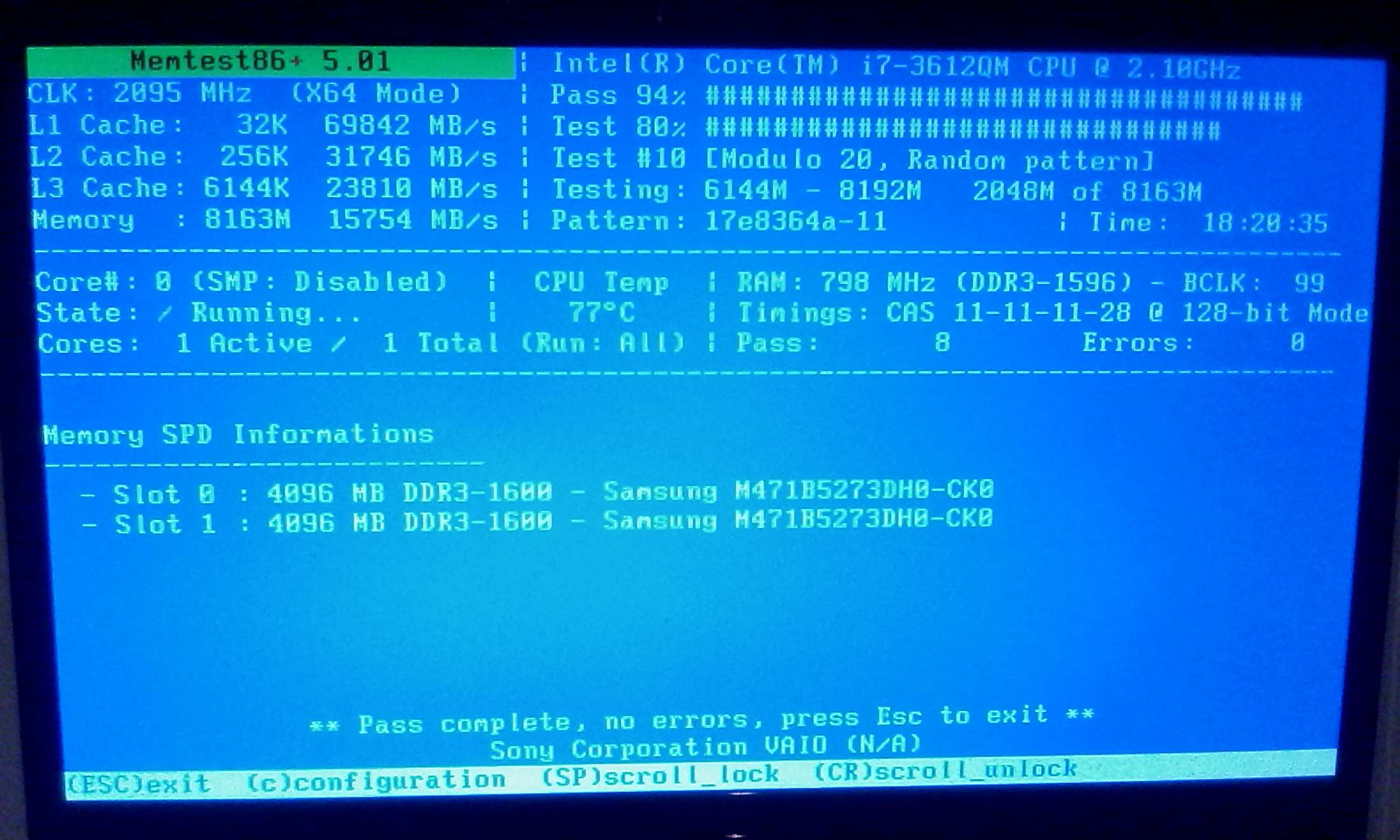
Ok after an 18 hour long wait MemTest86+ came back with 0 errors. I'm still getting BSOD after log in.

M9GEzg.jpg


What is the next step? :)
 

My Computer My Computer

At a glance

Windows 7 Home Premium 64-bit SP1Intel(R) Core(TM) i7-3612QM CPU @ 2.10GHz8.00 GBAMD Radeon HD 7650M
Computer type
Laptop
Computer Manufacturer/Model Number
Sony Vaio
OS
Windows 7 Home Premium 64-bit SP1
CPU
Intel(R) Core(TM) i7-3612QM CPU @ 2.10GHz
Motherboard
Sony Corporation VAIO
Memory
8.00 GB
Graphics Card(s)
AMD Radeon HD 7650M
Sound Card
AMD High Definition Audio Device
Screen Resolution
1920 x 1080
Hard Drives
Hitachi HTS547575A9E384
Antivirus
COMODO
Browser
Mozilla Firefox
Please run the tool again and upload the zip file.
 

My Computer My Computer

At a glance

Windows 10 Proi5-650016GB DDR4 2133 Crucial Ballistix Sport LTMSI GeForce GTX 1060 GAMING X 6G
Computer type
PC/Desktop
Computer Manufacturer/Model Number
Custom build
OS
Windows 10 Pro
CPU
i5-6500
Motherboard
Gigabyte B150-HD3P-CF
Memory
16GB DDR4 2133 Crucial Ballistix Sport LT
Graphics Card(s)
MSI GeForce GTX 1060 GAMING X 6G
Sound Card
Intel Display Audio
Monitor(s) Displays
Liyama ProLite XB2483HSU-B2
Screen Resolution
1920 x 1080
Hard Drives
Crucial MX200 500GB & Toshiba DT01ACA300 3TB
PSU
Corsair RM550x
Case
Fractal Design Define S
Cooling
Cooler Master TX3 i
Keyboard
Func KB-460 (MX Red)
Mouse
Corsair Gaming M65 RGB
Antivirus
Bitdefender Total Security 2016 + MBAM Pro + MBAE Pro
Browser
Google Chrome
Other Info
Creative Sound Blaster Tactic3D Rage V2 headset
You referring to the dump file? Sorry still new to all this.
 

My Computer My Computer

At a glance

Windows 7 Home Premium 64-bit SP1Intel(R) Core(TM) i7-3612QM CPU @ 2.10GHz8.00 GBAMD Radeon HD 7650M
Computer type
Laptop
Computer Manufacturer/Model Number
Sony Vaio
OS
Windows 7 Home Premium 64-bit SP1
CPU
Intel(R) Core(TM) i7-3612QM CPU @ 2.10GHz
Motherboard
Sony Corporation VAIO
Memory
8.00 GB
Graphics Card(s)
AMD Radeon HD 7650M
Sound Card
AMD High Definition Audio Device
Screen Resolution
1920 x 1080
Hard Drives
Hitachi HTS547575A9E384
Antivirus
COMODO
Browser
Mozilla Firefox
I am referring to the tool you can find in the BSOD Posting Instructions ;)
 

My Computer My Computer

At a glance

Windows 10 Proi5-650016GB DDR4 2133 Crucial Ballistix Sport LTMSI GeForce GTX 1060 GAMING X 6G
Computer type
PC/Desktop
Computer Manufacturer/Model Number
Custom build
OS
Windows 10 Pro
CPU
i5-6500
Motherboard
Gigabyte B150-HD3P-CF
Memory
16GB DDR4 2133 Crucial Ballistix Sport LT
Graphics Card(s)
MSI GeForce GTX 1060 GAMING X 6G
Sound Card
Intel Display Audio
Monitor(s) Displays
Liyama ProLite XB2483HSU-B2
Screen Resolution
1920 x 1080
Hard Drives
Crucial MX200 500GB & Toshiba DT01ACA300 3TB
PSU
Corsair RM550x
Case
Fractal Design Define S
Cooling
Cooler Master TX3 i
Keyboard
Func KB-460 (MX Red)
Mouse
Corsair Gaming M65 RGB
Antivirus
Bitdefender Total Security 2016 + MBAM Pro + MBAE Pro
Browser
Google Chrome
Other Info
Creative Sound Blaster Tactic3D Rage V2 headset
Ah no worries i'll attach it again. Just fyi i'm posting all this stuff in Windows Safe Mode.

See you in another 18 hours T__T
 

My Computer My Computer

At a glance

Windows 7 Home Premium 64-bit SP1Intel(R) Core(TM) i7-3612QM CPU @ 2.10GHz8.00 GBAMD Radeon HD 7650M
Computer type
Laptop
Computer Manufacturer/Model Number
Sony Vaio
OS
Windows 7 Home Premium 64-bit SP1
CPU
Intel(R) Core(TM) i7-3612QM CPU @ 2.10GHz
Motherboard
Sony Corporation VAIO
Memory
8.00 GB
Graphics Card(s)
AMD Radeon HD 7650M
Sound Card
AMD High Definition Audio Device
Screen Resolution
1920 x 1080
Hard Drives
Hitachi HTS547575A9E384
Antivirus
COMODO
Browser
Mozilla Firefox
Please disable driver verifier
  • Open an admin command prompt
  • Enter "verifier/reset" (without quotes)

The cause is the MagicISO SCSI Host Controller driver.
Likely you need to go to your manufacturer to update your drivers.
Code:
4: kd> lmvm mcdbus
start             end                 module name
fffff880`05619000 fffff880`05655880   mcdbus   T (no symbols)           
    Loaded symbol image file: mcdbus.sys
    Image path: \SystemRoot\system32\DRIVERS\mcdbus.sys
    Image name: [U]mcdbus.sys[/U]
    Timestamp:        [COLOR="Red"][U]Tue Feb 24 11:34:07 2009[/U][/COLOR] (49A3CD1F)
    CheckSum:         00041E84
    ImageSize:        0003C880
    Translations:     0000.04b0 0000.04e4 0409.04b0 0409.04e4
 

My Computer My Computer

At a glance

Windows 10 Proi5-650016GB DDR4 2133 Crucial Ballistix Sport LTMSI GeForce GTX 1060 GAMING X 6G
Computer type
PC/Desktop
Computer Manufacturer/Model Number
Custom build
OS
Windows 10 Pro
CPU
i5-6500
Motherboard
Gigabyte B150-HD3P-CF
Memory
16GB DDR4 2133 Crucial Ballistix Sport LT
Graphics Card(s)
MSI GeForce GTX 1060 GAMING X 6G
Sound Card
Intel Display Audio
Monitor(s) Displays
Liyama ProLite XB2483HSU-B2
Screen Resolution
1920 x 1080
Hard Drives
Crucial MX200 500GB & Toshiba DT01ACA300 3TB
PSU
Corsair RM550x
Case
Fractal Design Define S
Cooling
Cooler Master TX3 i
Keyboard
Func KB-460 (MX Red)
Mouse
Corsair Gaming M65 RGB
Antivirus
Bitdefender Total Security 2016 + MBAM Pro + MBAE Pro
Browser
Google Chrome
Other Info
Creative Sound Blaster Tactic3D Rage V2 headset
Ok I ran Memtest again this time for 9 passes and still 0 errors (see below)

I've disabled driver verifier. Completely forgot I did this before while reading some other forum for advice (my bad)

I uninstalled "MagicISO SCSI Host Controller driver" as I don't really need it anyway.

Also according to "Driver Booster 3" all my drivers are fully updated.

The BSOD appeared again with the same:
IRQL_NOT_LESS_OR_EQUAL
ntoskrnl.exe / ntoskrnl.exe+735c0

I should also mention that I can not seem to open up Windows Update while in Safe Mode with Networking. Also if I were to do this in Normal mode it won't be long before a BSOD appears again interupting the update.

I've also attached the latest dump file as I guess you probably want this :)

Thanks again and awaiting further instructions.


nmU6PL.jpg
 

My Computer My Computer

At a glance

Windows 7 Home Premium 64-bit SP1Intel(R) Core(TM) i7-3612QM CPU @ 2.10GHz8.00 GBAMD Radeon HD 7650M
Computer type
Laptop
Computer Manufacturer/Model Number
Sony Vaio
OS
Windows 7 Home Premium 64-bit SP1
CPU
Intel(R) Core(TM) i7-3612QM CPU @ 2.10GHz
Motherboard
Sony Corporation VAIO
Memory
8.00 GB
Graphics Card(s)
AMD Radeon HD 7650M
Sound Card
AMD High Definition Audio Device
Screen Resolution
1920 x 1080
Hard Drives
Hitachi HTS547575A9E384
Antivirus
COMODO
Browser
Mozilla Firefox
Programs that claim to update your drivers install either the wrong or corrupted drivers.
If you have installed any driver with Driver Booster 3, please remove them as it may cause trouble.
 

My Computer My Computer

At a glance

Windows 10 Proi5-650016GB DDR4 2133 Crucial Ballistix Sport LTMSI GeForce GTX 1060 GAMING X 6G
Computer type
PC/Desktop
Computer Manufacturer/Model Number
Custom build
OS
Windows 10 Pro
CPU
i5-6500
Motherboard
Gigabyte B150-HD3P-CF
Memory
16GB DDR4 2133 Crucial Ballistix Sport LT
Graphics Card(s)
MSI GeForce GTX 1060 GAMING X 6G
Sound Card
Intel Display Audio
Monitor(s) Displays
Liyama ProLite XB2483HSU-B2
Screen Resolution
1920 x 1080
Hard Drives
Crucial MX200 500GB & Toshiba DT01ACA300 3TB
PSU
Corsair RM550x
Case
Fractal Design Define S
Cooling
Cooler Master TX3 i
Keyboard
Func KB-460 (MX Red)
Mouse
Corsair Gaming M65 RGB
Antivirus
Bitdefender Total Security 2016 + MBAM Pro + MBAE Pro
Browser
Google Chrome
Other Info
Creative Sound Blaster Tactic3D Rage V2 headset
Ok back again. I only updated my drivers for the first ever time after this BSOD fiasco started. I read online that non-updated drivers can cause this problem so downloaded Gamer Booster 3.

Anyway I've rolled back all the drivers I suspect were updated by this third party program (The ones with 2015 in the date).

I'm now going to try and update drivers through official company websites only.

In the meantime is there any specific drivers I should focus on updating or should I just try and update everything? I mean I've been surviving this long without updating any drivers and never had a BSOD problem because of it xD
 

My Computer My Computer

At a glance

Windows 7 Home Premium 64-bit SP1Intel(R) Core(TM) i7-3612QM CPU @ 2.10GHz8.00 GBAMD Radeon HD 7650M
Computer type
Laptop
Computer Manufacturer/Model Number
Sony Vaio
OS
Windows 7 Home Premium 64-bit SP1
CPU
Intel(R) Core(TM) i7-3612QM CPU @ 2.10GHz
Motherboard
Sony Corporation VAIO
Memory
8.00 GB
Graphics Card(s)
AMD Radeon HD 7650M
Sound Card
AMD High Definition Audio Device
Screen Resolution
1920 x 1080
Hard Drives
Hitachi HTS547575A9E384
Antivirus
COMODO
Browser
Mozilla Firefox
Ok just a heads up I am able to run Vaio Care in Safe Mode and it says everything is fully updated.

I also went to the Sony Support website for my make and model and everything they have listed under drivers is installed already (Sony Support)
 

My Computer My Computer

At a glance

Windows 7 Home Premium 64-bit SP1Intel(R) Core(TM) i7-3612QM CPU @ 2.10GHz8.00 GBAMD Radeon HD 7650M
Computer type
Laptop
Computer Manufacturer/Model Number
Sony Vaio
OS
Windows 7 Home Premium 64-bit SP1
CPU
Intel(R) Core(TM) i7-3612QM CPU @ 2.10GHz
Motherboard
Sony Corporation VAIO
Memory
8.00 GB
Graphics Card(s)
AMD Radeon HD 7650M
Sound Card
AMD High Definition Audio Device
Screen Resolution
1920 x 1080
Hard Drives
Hitachi HTS547575A9E384
Antivirus
COMODO
Browser
Mozilla Firefox
Ok back again. I only updated my drivers for the first ever time after this BSOD fiasco started. I read online that non-updated drivers can cause this problem so downloaded Gamer Booster 3.

Anyway I've rolled back all the drivers I suspect were updated by this third party program (The ones with 2015 in the date).

I'm now going to try and update drivers through official company websites only.

In the meantime is there any specific drivers I should focus on updating or should I just try and update everything? I mean I've been surviving this long without updating any drivers and never had a BSOD problem because of it xD

That is only the case with desktops and even then you never should use such programs.

With laptops you only have to install the drivers from your manufacturer, the manufacturer alter the drivers in such a way that you are forced to install their drivers for normal functioning.
 

My Computer My Computer

At a glance

Windows 10 Proi5-650016GB DDR4 2133 Crucial Ballistix Sport LTMSI GeForce GTX 1060 GAMING X 6G
Computer type
PC/Desktop
Computer Manufacturer/Model Number
Custom build
OS
Windows 10 Pro
CPU
i5-6500
Motherboard
Gigabyte B150-HD3P-CF
Memory
16GB DDR4 2133 Crucial Ballistix Sport LT
Graphics Card(s)
MSI GeForce GTX 1060 GAMING X 6G
Sound Card
Intel Display Audio
Monitor(s) Displays
Liyama ProLite XB2483HSU-B2
Screen Resolution
1920 x 1080
Hard Drives
Crucial MX200 500GB & Toshiba DT01ACA300 3TB
PSU
Corsair RM550x
Case
Fractal Design Define S
Cooling
Cooler Master TX3 i
Keyboard
Func KB-460 (MX Red)
Mouse
Corsair Gaming M65 RGB
Antivirus
Bitdefender Total Security 2016 + MBAM Pro + MBAE Pro
Browser
Google Chrome
Other Info
Creative Sound Blaster Tactic3D Rage V2 headset
Yeah I'll keep that in mind from now on. With that being said is my only option now to do a factory reset?
 

My Computer My Computer

At a glance

Windows 7 Home Premium 64-bit SP1Intel(R) Core(TM) i7-3612QM CPU @ 2.10GHz8.00 GBAMD Radeon HD 7650M
Computer type
Laptop
Computer Manufacturer/Model Number
Sony Vaio
OS
Windows 7 Home Premium 64-bit SP1
CPU
Intel(R) Core(TM) i7-3612QM CPU @ 2.10GHz
Motherboard
Sony Corporation VAIO
Memory
8.00 GB
Graphics Card(s)
AMD Radeon HD 7650M
Sound Card
AMD High Definition Audio Device
Screen Resolution
1920 x 1080
Hard Drives
Hitachi HTS547575A9E384
Antivirus
COMODO
Browser
Mozilla Firefox
You need to try to revert back the changes made by DB.
 

My Computer My Computer

At a glance

Windows 10 Proi5-650016GB DDR4 2133 Crucial Ballistix Sport LTMSI GeForce GTX 1060 GAMING X 6G
Computer type
PC/Desktop
Computer Manufacturer/Model Number
Custom build
OS
Windows 10 Pro
CPU
i5-6500
Motherboard
Gigabyte B150-HD3P-CF
Memory
16GB DDR4 2133 Crucial Ballistix Sport LT
Graphics Card(s)
MSI GeForce GTX 1060 GAMING X 6G
Sound Card
Intel Display Audio
Monitor(s) Displays
Liyama ProLite XB2483HSU-B2
Screen Resolution
1920 x 1080
Hard Drives
Crucial MX200 500GB & Toshiba DT01ACA300 3TB
PSU
Corsair RM550x
Case
Fractal Design Define S
Cooling
Cooler Master TX3 i
Keyboard
Func KB-460 (MX Red)
Mouse
Corsair Gaming M65 RGB
Antivirus
Bitdefender Total Security 2016 + MBAM Pro + MBAE Pro
Browser
Google Chrome
Other Info
Creative Sound Blaster Tactic3D Rage V2 headset
Ok according to DB it updated 16 drivers so I looked at the list and rolled back all the ones I was able to (date order). The problem is it lists all the other drivers which are up-to-date also and I don't want to touch those.

Have I messed this up beyond repair or is there something else I can do?
 

My Computer My Computer

At a glance

Windows 7 Home Premium 64-bit SP1Intel(R) Core(TM) i7-3612QM CPU @ 2.10GHz8.00 GBAMD Radeon HD 7650M
Computer type
Laptop
Computer Manufacturer/Model Number
Sony Vaio
OS
Windows 7 Home Premium 64-bit SP1
CPU
Intel(R) Core(TM) i7-3612QM CPU @ 2.10GHz
Motherboard
Sony Corporation VAIO
Memory
8.00 GB
Graphics Card(s)
AMD Radeon HD 7650M
Sound Card
AMD High Definition Audio Device
Screen Resolution
1920 x 1080
Hard Drives
Hitachi HTS547575A9E384
Antivirus
COMODO
Browser
Mozilla Firefox
What drivers has DB updated?
Please make a list of them.
 

My Computer My Computer

At a glance

Windows 10 Proi5-650016GB DDR4 2133 Crucial Ballistix Sport LTMSI GeForce GTX 1060 GAMING X 6G
Computer type
PC/Desktop
Computer Manufacturer/Model Number
Custom build
OS
Windows 10 Pro
CPU
i5-6500
Motherboard
Gigabyte B150-HD3P-CF
Memory
16GB DDR4 2133 Crucial Ballistix Sport LT
Graphics Card(s)
MSI GeForce GTX 1060 GAMING X 6G
Sound Card
Intel Display Audio
Monitor(s) Displays
Liyama ProLite XB2483HSU-B2
Screen Resolution
1920 x 1080
Hard Drives
Crucial MX200 500GB & Toshiba DT01ACA300 3TB
PSU
Corsair RM550x
Case
Fractal Design Define S
Cooling
Cooler Master TX3 i
Keyboard
Func KB-460 (MX Red)
Mouse
Corsair Gaming M65 RGB
Antivirus
Bitdefender Total Security 2016 + MBAM Pro + MBAE Pro
Browser
Google Chrome
Other Info
Creative Sound Blaster Tactic3D Rage V2 headset
Sorry for the late reply. After your last post I was about to send a list of all drivers but my laptop would not connect to the internet. I tried to quickly send it in Normal mode but this is where things got weird. Normal mode was behaving just like Safe Mode, the display was the wrong setting and there was no audio. The wifi light was lit up but I could not connect to the internet what so ever. I tried restarting several times but exactly the same problem. Not sure if you have encountered something like this before? Anyway seeing no other choice I factory reset my laptop and so far things seem to be ok. However if the BSOD should return I'll keep you posted. Also from now on i'm only updating drivers through Windows Update, Sony Website and official websites. Thanks for the help so far :)
 

My Computer My Computer

At a glance

Windows 7 Home Premium 64-bit SP1Intel(R) Core(TM) i7-3612QM CPU @ 2.10GHz8.00 GBAMD Radeon HD 7650M
Computer type
Laptop
Computer Manufacturer/Model Number
Sony Vaio
OS
Windows 7 Home Premium 64-bit SP1
CPU
Intel(R) Core(TM) i7-3612QM CPU @ 2.10GHz
Motherboard
Sony Corporation VAIO
Memory
8.00 GB
Graphics Card(s)
AMD Radeon HD 7650M
Sound Card
AMD High Definition Audio Device
Screen Resolution
1920 x 1080
Hard Drives
Hitachi HTS547575A9E384
Antivirus
COMODO
Browser
Mozilla Firefox
Ok bad news. Just when I thought everything was fixed and back to normal the same BSOD has returned:

IRQL_NOT_LESS_OR_EQUAL
ntoskrl.exe / ntskrl.exe+74200 <--- Only this bit has changed.

Windows Update was fully updated last I checked.

I'll post minidumps now.
 

My Computer My Computer

At a glance

Windows 7 Home Premium 64-bit SP1Intel(R) Core(TM) i7-3612QM CPU @ 2.10GHz8.00 GBAMD Radeon HD 7650M
Computer type
Laptop
Computer Manufacturer/Model Number
Sony Vaio
OS
Windows 7 Home Premium 64-bit SP1
CPU
Intel(R) Core(TM) i7-3612QM CPU @ 2.10GHz
Motherboard
Sony Corporation VAIO
Memory
8.00 GB
Graphics Card(s)
AMD Radeon HD 7650M
Sound Card
AMD High Definition Audio Device
Screen Resolution
1920 x 1080
Hard Drives
Hitachi HTS547575A9E384
Antivirus
COMODO
Browser
Mozilla Firefox
If you require any more info let me know :)
 

My Computer My Computer

At a glance

Windows 7 Home Premium 64-bit SP1Intel(R) Core(TM) i7-3612QM CPU @ 2.10GHz8.00 GBAMD Radeon HD 7650M
Computer type
Laptop
Computer Manufacturer/Model Number
Sony Vaio
OS
Windows 7 Home Premium 64-bit SP1
CPU
Intel(R) Core(TM) i7-3612QM CPU @ 2.10GHz
Motherboard
Sony Corporation VAIO
Memory
8.00 GB
Graphics Card(s)
AMD Radeon HD 7650M
Sound Card
AMD High Definition Audio Device
Screen Resolution
1920 x 1080
Hard Drives
Hitachi HTS547575A9E384
Antivirus
COMODO
Browser
Mozilla Firefox
Back
Top