Solved Bsod pfn_list_corrupt

miztrniceguy

New member
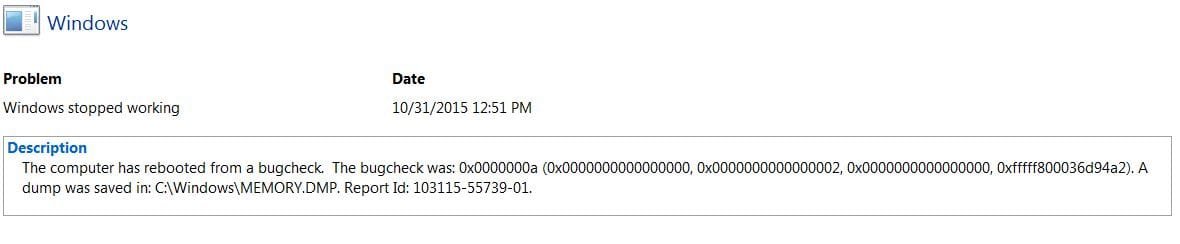
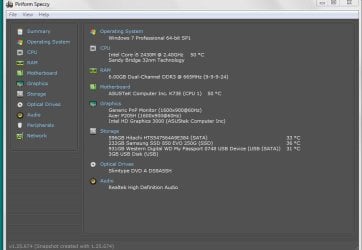
My wife's laptop has been freezing frequently, and recently had this BSOD on May 13 which I have a screenshot of. This is her older backup laptop as her TUF is being repaired by Asus. This is Asus K73E with Win 7 Pro 6GB ram and dual SSD, one for Windows, one for Data. Currently an additional one connected via USB with data from her TUF.

I ran Memtest86 with no errors on 4 passes. I've told it to run Verifier, but I don't really understand it. I did get one new BSOD but missed getting a picture of it but save to a txt file the info about the error when it gave me an option on reboot to get that. I also ran the DM log collector, but that was before the more recent BSOD.

Thanks in advance for help. I have attached screenshots and the DM log

Michael
 

Attachments
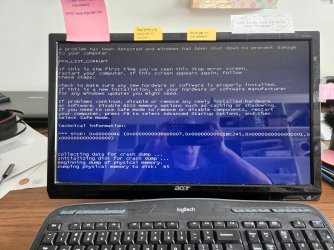
  • BSOD MAY 13.jpg
    BSOD MAY 13.jpg
    436.3 KB · Views: 1
  • bsod.txt
    bsod.txt
    488 bytes · Views: 0
  • LIZZIE_PC-Sat_05_21_2022_113453_59.zip
    LIZZIE_PC-Sat_05_21_2022_113453_59.zip
    1.9 MB · Views: 1
  • BSODerror .JPG
    BSODerror .JPG
    39.9 KB · Views: 0
  • speccy summary.JPG
    speccy summary.JPG
    67.3 KB · Views: 0
  • speccy graphics.JPG
    speccy graphics.JPG
    69.4 KB · Views: 0

My Computers

System One System Two

  • Computer type
    PC/Desktop
    Computer Manufacturer/Model Number
    Custom build
    OS
    Win 7 Pro 64 bit
    CPU
    i5-3570K
    Motherboard
    Asus P8Z77-V
    Memory
    16GB Corsair Vengeance 1866Mhz
    Graphics Card(s)
    nVidia GeForce 220
    Monitor(s) Displays
    20 " Acer
    Hard Drives
    500 GB WD D: Data
    160 GB WD:Hackintosh OSx Mountain Lion
    128 GB Samsung 840 EVO Win 7 Pro 64bit
    PSU
    Corsair CX600
    Cooling
    Cooler Master Hyper 212 EVO
    Keyboard
    Logitech usb
    Mouse
    Logitech usb
    Internet Speed
    100Mbps Roadrunner Ultimate
    Antivirus
    Malwarebutes Pro, SAS,MSE
    Browser
    Firefox
  • Antivirus
    Malwarebytes Lifetime, SAS Lifetime, MSE

My Computer

Computer type
PC/Desktop
Computer Manufacturer/Model Number
custom build
OS
Windows 8.1 Enterprise x64
CPU
Intel Core 2 Quad Q9400
Motherboard
Gigabyte EG45M-DS2H
Memory
8GB
Graphics Card(s)
NVIDIA GeForce 9600GT
Hard Drives
ADATA SP900
Seagate ST1000DM003-1ER162
Antivirus
Windows Defender
Browser
Opera
I will work on this right away. I had tried updating graphics to what i thought was the right one but must not have been. Everything I read about the PFN_LIST_CORRUPT error suggested graphics driver and/or memory failure. I will try using the links provided. will update after. Thank you.

- - - Updated - - -

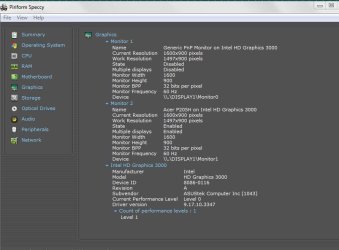
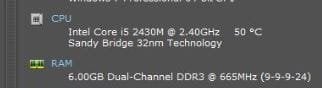
Well, went with updating graphics driver first. Unable to as that one is for 4th Gen CPU. This has i5 2430M. See attachments.

Next went to RST driver. It installed with no errors, but now my flash drive I intended to copy BIOS files is not detected. Not in diskmgmt.msc, not in Diskpart in CMD nor File Explorer. It was previously able to be detected. I used it for MEMTEST. It DOES show up in Device Manager with yellow triangle, so will uninstall the new driver and revert back to previous version, and if shows up will then proceed with BIOS update.

- - - Updated - - -

After uninstalling the Intel RST update I was able to again see my flash drive, and updated the BIOS. No triangles in Device Manager. Not sure how to proceed from here. Asus website lists Version V8.15.10.2462 as Graphics driver, but I understand that is not latest. The one installed is 9.17.10.4229 and is what is shown as the latest for 2nd Gen CPU with HD3000 for WIN 7.

Net results so far is only updated BIOS.

- - - Updated - - -

No hangs or BSOD so far during the attempts to perform the updates. The only thing successful was updating BIOS. It seems my responses using Quick Reply option were added on to previous post, not as a new comment.

I will let my wife start her day with it once she wakes up and see how things proceed. I will also watch here for new suggestions.

Thank you,
Michael
 

Attachments

  • vid driver error.JPG
    vid driver error.JPG
    20 KB · Views: 3
  • cpu i5 2430M.JPG
    cpu i5 2430M.JPG
    12.2 KB · Views: 3

My Computers

System One System Two

  • Computer type
    PC/Desktop
    Computer Manufacturer/Model Number
    Custom build
    OS
    Win 7 Pro 64 bit
    CPU
    i5-3570K
    Motherboard
    Asus P8Z77-V
    Memory
    16GB Corsair Vengeance 1866Mhz
    Graphics Card(s)
    nVidia GeForce 220
    Monitor(s) Displays
    20 " Acer
    Hard Drives
    500 GB WD D: Data
    160 GB WD:Hackintosh OSx Mountain Lion
    128 GB Samsung 840 EVO Win 7 Pro 64bit
    PSU
    Corsair CX600
    Cooling
    Cooler Master Hyper 212 EVO
    Keyboard
    Logitech usb
    Mouse
    Logitech usb
    Internet Speed
    100Mbps Roadrunner Ultimate
    Antivirus
    Malwarebutes Pro, SAS,MSE
    Browser
    Firefox
  • Antivirus
    Malwarebytes Lifetime, SAS Lifetime, MSE
My Computer

Computer type
Laptop
Computer Manufacturer/Model Number
Dell M6500 Precision Work Station
OS
Windows 7 Pro SP1 64 bit
Memory
8 GB
Screen Resolution
1920x
Internet Speed
30 Mbps
Antivirus
Norton Security
Browser
IE 11
Samsung Rapid Mode.

Thank you , I read the thread. Seems like I need to disable that, and will hit up Mr Google for that instruction. Thank you for pointing me to a possible cause. I will also check to make sure it's disabled on my own aging ROG G750, as it also has a Samsung EVO SSD, as that's all I buy. The Hitachi in my wife's came with and I added the Samsung as a secondary.

I will report back later.

Michael

- - - Updated - - -

That was easy enough to disable. Tomorrow my wife will likely use her laptop extensively. She has not today. She will let me know if it misbehaves and let me know, and I will report back. Thank you again!

- - - Updated - - -

Well, it looks like Samsung Rapid Mode was the culprit. Problem appears solved. No BSOD, no freezes, no grayed out browser as it hangs with a spinning wheel. I will mark this as resolved. Thank you very much!
 

My Computers

System One System Two

  • Computer type
    PC/Desktop
    Computer Manufacturer/Model Number
    Custom build
    OS
    Win 7 Pro 64 bit
    CPU
    i5-3570K
    Motherboard
    Asus P8Z77-V
    Memory
    16GB Corsair Vengeance 1866Mhz
    Graphics Card(s)
    nVidia GeForce 220
    Monitor(s) Displays
    20 " Acer
    Hard Drives
    500 GB WD D: Data
    160 GB WD:Hackintosh OSx Mountain Lion
    128 GB Samsung 840 EVO Win 7 Pro 64bit
    PSU
    Corsair CX600
    Cooling
    Cooler Master Hyper 212 EVO
    Keyboard
    Logitech usb
    Mouse
    Logitech usb
    Internet Speed
    100Mbps Roadrunner Ultimate
    Antivirus
    Malwarebutes Pro, SAS,MSE
    Browser
    Firefox
  • Antivirus
    Malwarebytes Lifetime, SAS Lifetime, MSE
:cool: Glad I could help.
 

My Computer

Computer type
Laptop
Computer Manufacturer/Model Number
Dell M6500 Precision Work Station
OS
Windows 7 Pro SP1 64 bit
Memory
8 GB
Screen Resolution
1920x
Internet Speed
30 Mbps
Antivirus
Norton Security
Browser
IE 11
Back
Top