BSOD - Physical Memory Dump

hell911

Banned
Local time
7:32 AM
Messages
62
guys, its been about 5 days that i have been receiving physical memory dump errors..

also, this error comes atleast 5 times a day, can any1 help me find a cure or atleast know the problem! :D
 

My Computer

OS
Windows 7 Ultimate 32bit
CPU
Intel E6850
Motherboard
Intel DQ3510J
Memory
Kingston 4GB DDR2 800mhz
Graphics Card(s)
ATI HD3870
Sound Card
Intel Onboard/Realtek HD Audio/AMD HD Audio
Monitor(s) Displays
AOC 193FW 19" Widescreen
Screen Resolution
1440x900
Hard Drives
750gb Western Digital SATA
PSU
CoolerMaster 550w Real Power SLi
Keyboard
A4Tech
Mouse
A4Tech
Internet Speed
768kbps
guys, its been about 5 days that i have been receiving physical memory dump errors..

also, this error comes atleast 5 times a day, can any1 help me find a cure or atleast know the problem! :D


To enable us to assist you with your computer's BSOD symptoms, upload the contents of your "\Windows\Minidump" folder.

The procedure:

* Copy the contents of \Windows\Minidump to another (temporary) location somewhere on your machine.
* Zip up the copy.
* Attach the ZIP archive to your post using the "paperclip" (file attachments) button.


To ensure minidumps are enabled:

Go to Start, in the Search Box type: sysdm.cpl, press Enter.
Under the Advanced tab, click on the Startup and Recovery Settings... button.
Ensure that Automatically restart is unchecked.
Under the Write Debugging Information header select Small memory dump (256 kB) in the dropdown box (the 256kb varies).
Ensure that the Small Dump Directory is listed as %systemroot%\Minidump.
OK your way out.
Reboot if changes have been made.
 

My Computer

Computer Manufacturer/Model Number
HP Pavillion dv-7 1005 Tx
OS
Win 8 Release candidate 8400
CPU
[email protected]
Memory
4 gigs
Graphics Card(s)
Nvidia 9600M
Sound Card
HD built-in
Monitor(s) Displays
17" Wxga
Screen Resolution
1440x900
Cooling
none
Internet Speed
45Mb down 5Mb up
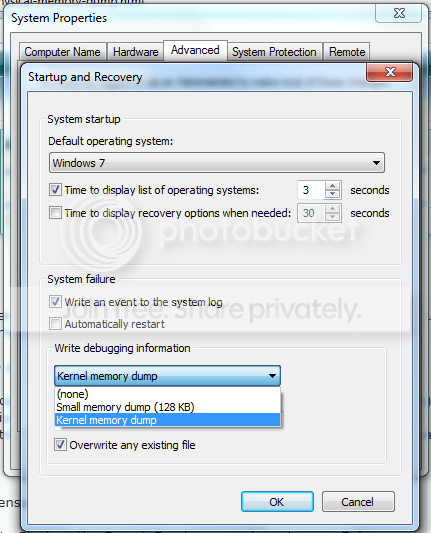
there is no "SMALL MEMORY DUMP (256 KB)"
look at this pic..
rxdyhbr67he45h6.png


btw~ here are the 2 files located in the minidump folder
>> dump files.rar
 

My Computer

OS
Windows 7 Ultimate 32bit
CPU
Intel E6850
Motherboard
Intel DQ3510J
Memory
Kingston 4GB DDR2 800mhz
Graphics Card(s)
ATI HD3870
Sound Card
Intel Onboard/Realtek HD Audio/AMD HD Audio
Monitor(s) Displays
AOC 193FW 19" Widescreen
Screen Resolution
1440x900
Hard Drives
750gb Western Digital SATA
PSU
CoolerMaster 550w Real Power SLi
Keyboard
A4Tech
Mouse
A4Tech
Internet Speed
768kbps
Memory management caused by dump_wmimmc.sys (Gameguard)

I would remove it and run memtest


Download a copy of Memtest86 and burn the ISO to a CD using Iso Recorder or another ISO burning program. Memtest86.com - Memory Diagnostic

Boot from the CD, and leave it running for at least 5 or 6 passes.

Just remember, any time Memtest reports errors, it can be either bad RAM or a bad motherboard slot.

Test the sticks individually, and if you find a good one, test it in all slots.
 

My Computer

Computer Manufacturer/Model Number
HP Pavillion dv-7 1005 Tx
OS
Win 8 Release candidate 8400
CPU
[email protected]
Memory
4 gigs
Graphics Card(s)
Nvidia 9600M
Sound Card
HD built-in
Monitor(s) Displays
17" Wxga
Screen Resolution
1440x900
Cooling
none
Internet Speed
45Mb down 5Mb up
Memory management caused by dump_wmimmc.sys (Gameguard)
I would remove it and run memtest
how to remove this?

leave it running for at least 5 or 6 passes.
what is the meaning of passes?
 

My Computer

OS
Windows 7 Ultimate 32bit
CPU
Intel E6850
Motherboard
Intel DQ3510J
Memory
Kingston 4GB DDR2 800mhz
Graphics Card(s)
ATI HD3870
Sound Card
Intel Onboard/Realtek HD Audio/AMD HD Audio
Monitor(s) Displays
AOC 193FW 19" Widescreen
Screen Resolution
1440x900
Hard Drives
750gb Western Digital SATA
PSU
CoolerMaster 550w Real Power SLi
Keyboard
A4Tech
Mouse
A4Tech
Internet Speed
768kbps
is it possible this error comes from a certain application? like if i open application A, after 20 mins there will be a BSOD?
 

My Computer

OS
Windows 7 Ultimate 32bit
CPU
Intel E6850
Motherboard
Intel DQ3510J
Memory
Kingston 4GB DDR2 800mhz
Graphics Card(s)
ATI HD3870
Sound Card
Intel Onboard/Realtek HD Audio/AMD HD Audio
Monitor(s) Displays
AOC 193FW 19" Widescreen
Screen Resolution
1440x900
Hard Drives
750gb Western Digital SATA
PSU
CoolerMaster 550w Real Power SLi
Keyboard
A4Tech
Mouse
A4Tech
Internet Speed
768kbps
Memory management caused by dump_wmimmc.sys (Gameguard)
I would remove it and run memtest
how to remove this?

Find gameguard in add/remove and remove it.

leave it running for at least 5 or 6 passes.
what is the meaning of passes?

Passes=runs
when you boot from the dvd it will show on the screen. Let it run for several hours.
 

My Computer

Computer Manufacturer/Model Number
HP Pavillion dv-7 1005 Tx
OS
Win 8 Release candidate 8400
CPU
[email protected]
Memory
4 gigs
Graphics Card(s)
Nvidia 9600M
Sound Card
HD built-in
Monitor(s) Displays
17" Wxga
Screen Resolution
1440x900
Cooling
none
Internet Speed
45Mb down 5Mb up
is it possible this error comes from a certain application? like if i open application A, after 20 mins there will be a BSOD?
 

My Computer

OS
Windows 7 Ultimate 32bit
CPU
Intel E6850
Motherboard
Intel DQ3510J
Memory
Kingston 4GB DDR2 800mhz
Graphics Card(s)
ATI HD3870
Sound Card
Intel Onboard/Realtek HD Audio/AMD HD Audio
Monitor(s) Displays
AOC 193FW 19" Widescreen
Screen Resolution
1440x900
Hard Drives
750gb Western Digital SATA
PSU
CoolerMaster 550w Real Power SLi
Keyboard
A4Tech
Mouse
A4Tech
Internet Speed
768kbps
is it possible this error comes from a certain application? like if i open application A, after 20 mins there will be a BSOD?

Anything is possible
 

My Computer

Computer Manufacturer/Model Number
HP Pavillion dv-7 1005 Tx
OS
Win 8 Release candidate 8400
CPU
[email protected]
Memory
4 gigs
Graphics Card(s)
Nvidia 9600M
Sound Card
HD built-in
Monitor(s) Displays
17" Wxga
Screen Resolution
1440x900
Cooling
none
Internet Speed
45Mb down 5Mb up
^
so i guess my "that" application is causing this, its been 150 mins. and i havent opened that application, and there is no BSOD yet!
 

My Computer

OS
Windows 7 Ultimate 32bit
CPU
Intel E6850
Motherboard
Intel DQ3510J
Memory
Kingston 4GB DDR2 800mhz
Graphics Card(s)
ATI HD3870
Sound Card
Intel Onboard/Realtek HD Audio/AMD HD Audio
Monitor(s) Displays
AOC 193FW 19" Widescreen
Screen Resolution
1440x900
Hard Drives
750gb Western Digital SATA
PSU
CoolerMaster 550w Real Power SLi
Keyboard
A4Tech
Mouse
A4Tech
Internet Speed
768kbps
^
so i guess my "that" application is causing this, its been 150 mins. and i havent opened that application, and there is no BSOD yet!

What application?
 

My Computer

Computer Manufacturer/Model Number
HP Pavillion dv-7 1005 Tx
OS
Win 8 Release candidate 8400
CPU
[email protected]
Memory
4 gigs
Graphics Card(s)
Nvidia 9600M
Sound Card
HD built-in
Monitor(s) Displays
17" Wxga
Screen Resolution
1440x900
Cooling
none
Internet Speed
45Mb down 5Mb up
as you said, this BSOD maybe is connected to gameguard, im playing ragnarok online, and it have gameguard for anti 3pp users. maybe this game is causing the BSOD.
 

My Computer

OS
Windows 7 Ultimate 32bit
CPU
Intel E6850
Motherboard
Intel DQ3510J
Memory
Kingston 4GB DDR2 800mhz
Graphics Card(s)
ATI HD3870
Sound Card
Intel Onboard/Realtek HD Audio/AMD HD Audio
Monitor(s) Displays
AOC 193FW 19" Widescreen
Screen Resolution
1440x900
Hard Drives
750gb Western Digital SATA
PSU
CoolerMaster 550w Real Power SLi
Keyboard
A4Tech
Mouse
A4Tech
Internet Speed
768kbps
as you said, this BSOD maybe is connected to gameguard, im playing ragnarok online, and it have gameguard for anti 3pp users. maybe this game is causing the BSOD.

I am not a gamer so cant tell you. It is gameguard, not the game that keeps causing the crashes.
 

My Computer

Computer Manufacturer/Model Number
HP Pavillion dv-7 1005 Tx
OS
Win 8 Release candidate 8400
CPU
[email protected]
Memory
4 gigs
Graphics Card(s)
Nvidia 9600M
Sound Card
HD built-in
Monitor(s) Displays
17" Wxga
Screen Resolution
1440x900
Cooling
none
Internet Speed
45Mb down 5Mb up
yes i know its not the game, but the gameguard with this game, cant play this game W/O gameguard, im stucked!
 

My Computer

OS
Windows 7 Ultimate 32bit
CPU
Intel E6850
Motherboard
Intel DQ3510J
Memory
Kingston 4GB DDR2 800mhz
Graphics Card(s)
ATI HD3870
Sound Card
Intel Onboard/Realtek HD Audio/AMD HD Audio
Monitor(s) Displays
AOC 193FW 19" Widescreen
Screen Resolution
1440x900
Hard Drives
750gb Western Digital SATA
PSU
CoolerMaster 550w Real Power SLi
Keyboard
A4Tech
Mouse
A4Tech
Internet Speed
768kbps
i get this file mention in the BSOD screen >> dump_wmimmc.sys
 

My Computer

OS
Windows 7 Ultimate 32bit
CPU
Intel E6850
Motherboard
Intel DQ3510J
Memory
Kingston 4GB DDR2 800mhz
Graphics Card(s)
ATI HD3870
Sound Card
Intel Onboard/Realtek HD Audio/AMD HD Audio
Monitor(s) Displays
AOC 193FW 19" Widescreen
Screen Resolution
1440x900
Hard Drives
750gb Western Digital SATA
PSU
CoolerMaster 550w Real Power SLi
Keyboard
A4Tech
Mouse
A4Tech
Internet Speed
768kbps

My Computer

Computer Manufacturer/Model Number
HP Pavillion dv-7 1005 Tx
OS
Win 8 Release candidate 8400
CPU
[email protected]
Memory
4 gigs
Graphics Card(s)
Nvidia 9600M
Sound Card
HD built-in
Monitor(s) Displays
17" Wxga
Screen Resolution
1440x900
Cooling
none
Internet Speed
45Mb down 5Mb up
can i burn the memtest into a cd (700mb)
 

My Computer

OS
Windows 7 Ultimate 32bit
CPU
Intel E6850
Motherboard
Intel DQ3510J
Memory
Kingston 4GB DDR2 800mhz
Graphics Card(s)
ATI HD3870
Sound Card
Intel Onboard/Realtek HD Audio/AMD HD Audio
Monitor(s) Displays
AOC 193FW 19" Widescreen
Screen Resolution
1440x900
Hard Drives
750gb Western Digital SATA
PSU
CoolerMaster 550w Real Power SLi
Keyboard
A4Tech
Mouse
A4Tech
Internet Speed
768kbps
can i burn the memtest into a cd (700mb)

this one.........


and, now we know it is the gameguard causing the BSOD, do i need to run memtest, coz i think it will be a waste since memory here is not the problem.
 

My Computer

OS
Windows 7 Ultimate 32bit
CPU
Intel E6850
Motherboard
Intel DQ3510J
Memory
Kingston 4GB DDR2 800mhz
Graphics Card(s)
ATI HD3870
Sound Card
Intel Onboard/Realtek HD Audio/AMD HD Audio
Monitor(s) Displays
AOC 193FW 19" Widescreen
Screen Resolution
1440x900
Hard Drives
750gb Western Digital SATA
PSU
CoolerMaster 550w Real Power SLi
Keyboard
A4Tech
Mouse
A4Tech
Internet Speed
768kbps
Back
Top