BSOD playing games

XeonraY

New member
Local time
8:23 AM
Messages
4
Hello

Since recently I've been having a couple of BSOD during games, 2 times once I was playing PlanetSide 2 (different days), once during Dishonored, and once during a browser game. It crashes at random intervals, PlanetSide 2 once crashed after 1 hour and 20 minutes, once after 20 minutes. Dishonored crashed after 3 hours or something like that...

I've recently bought a new video card (GTX 770). But when I installed it and its drivers, everything worked like a charm, it never gave a BSOD, I installed it around 3 weeks back and the BSOD have been starting to show up since last week.

It's very wierd and I can't seem to find the issue here. I'm using nVidia GeForce Experience to auto-update the videocard drivers. I've added the .zip file from the SF_Diagnostic_Tool.exe.

Thanks in advance
XeonraY
 

My Computer

Computer type
PC/Desktop
Computer Manufacturer/Model Number
Medion
OS
Windows 7 Home Premium 64 bits
CPU
i7 2600k 3,4Ghz
Motherboard
MS-7667
Memory
8GB DDR3
Graphics Card(s)
GigaByte GeForce GTX 770
Screen Resolution
1920x1080
Hard Drives
1TB Toshiba 7200rpm
2TB Western Digital 5200rpm
Keyboard
Logitech G110
Mouse
Logitech G300
Internet Speed
60mbps, soon 120mbps download, 4mbps upload
Antivirus
Norton 360
Browser
Google Chrome
I just had another crash, while playing Dishonored. I played around 2 hours and it crashed again. I've reuploaded the files from the SF_Diagnostic_Tool.exe.

Thanks
 

My Computer

Computer type
PC/Desktop
Computer Manufacturer/Model Number
Medion
OS
Windows 7 Home Premium 64 bits
CPU
i7 2600k 3,4Ghz
Motherboard
MS-7667
Memory
8GB DDR3
Graphics Card(s)
GigaByte GeForce GTX 770
Screen Resolution
1920x1080
Hard Drives
1TB Toshiba 7200rpm
2TB Western Digital 5200rpm
Keyboard
Logitech G110
Mouse
Logitech G300
Internet Speed
60mbps, soon 120mbps download, 4mbps upload
Antivirus
Norton 360
Browser
Google Chrome
Hello XeonraY. Is it crashing during games only?

It is a stop 0x124, which is specially a hardware error, apparently.

Are you overclocking? As you are getting BSODs, you should stop overclocking and run all the hardware components like CPU, GPU and RAM to their default settings. Also set the BIOS to default, too.
How To Clear CMOS (Reset BIOS)

Stress test the Graphics Card using Furmark.
Video Card - Stress Test with Furmark

Is the computer hot? Report us the heat of the computer after a couple of hours of your normal usage. Upload a screenshot of the summery tab of Speccy.

Check if the Power Supply Unit (PSU) supplying adequate power to the computer or not.
eXtreme Power Supply Calculator
At least 30% extra is safe. Also let us know about the wattage of the PSU.

Do a clean install on the display driver. Install the 314.22 WHQL only.

  • Uninstall All nvidia items in Control Panel > Programs and features
    • 3D Vision Control Driver
    • 3D Vision Driver
    • Graphics Driver
    • HD Audio Driver
    • PhysX
    • nvidia Update
    (Are you using nvidia chipset drivers? If so, dont uninstall anything other than those are listed).
  • Now follow Drivers - Clean Left over Files after Uninstalling
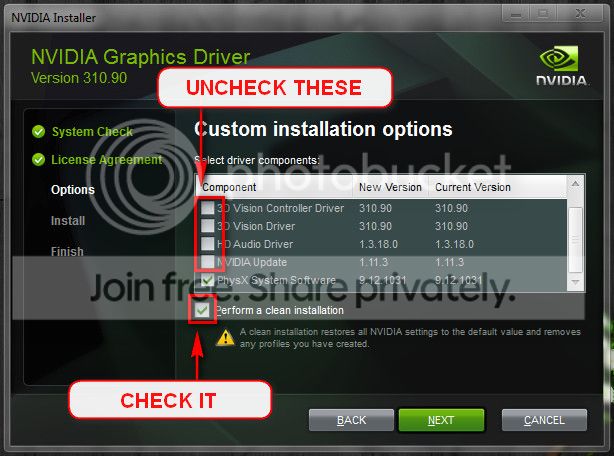
  • Boot normally now. Go to Drivers - Download NVIDIA Drivers, Download 314.22 WHQL. While installing, Select Custom (Advanced) install. In the next page, follow this settings:
Test your RAM modules for possible errors.
How to Test and Diagnose RAM Issues with Memtest86+
Run memtest for at least 8 passes, preferably overnight.

Stress test the CPU.
Hardware - Stress Test With Prime95

Let us know the results. And, let us know the brand and details of your motherboard? I am not getting enough info about MEDIAONPC MS-7667. Some BIOS update may be needed there.

Let us know the results.
______________________________________________________________________
BSOD ANALYSIS:
Code:
...............
*******************************************************************************
*                                                                             *
*                        Bugcheck Analysis                                    *
*                                                                             *
*******************************************************************************

Use !analyze -v to get detailed debugging information.

BugCheck 124, {0, fffffa800a163028, be000000, 800400}

Probably caused by : GenuineIntel

Followup: MachineOwner
---------

0: kd> !analyze -v
*******************************************************************************
*                                                                             *
*                        Bugcheck Analysis                                    *
*                                                                             *
*******************************************************************************

WHEA_UNCORRECTABLE_ERROR (124)
A fatal hardware error has occurred. Parameter 1 identifies the type of error
source that reported the error. Parameter 2 holds the address of the
WHEA_ERROR_RECORD structure that describes the error conditon.
Arguments:
Arg1: 0000000000000000, Machine Check Exception
Arg2: fffffa800a163028, Address of the WHEA_ERROR_RECORD structure.
Arg3: 00000000be000000, High order 32-bits of the MCi_STATUS value.
Arg4: 0000000000800400, Low order 32-bits of the MCi_STATUS value.

Debugging Details:
------------------


BUGCHECK_STR:  0x124_GenuineIntel

CUSTOMER_CRASH_COUNT:  1

DEFAULT_BUCKET_ID:  WIN7_DRIVER_FAULT

PROCESS_NAME:  System

CURRENT_IRQL:  f

STACK_TEXT:  
fffff800`00ba6a98 fffff800`02626a3b : 00000000`00000124 00000000`00000000 fffffa80`0a163028 00000000`be000000 : nt!KeBugCheckEx
fffff800`00ba6aa0 fffff800`027e9443 : 00000000`00000001 fffffa80`09602af0 00000000`00000000 fffffa80`09602b40 : hal!HalBugCheckSystem+0x1e3
fffff800`00ba6ae0 fffff800`02626700 : 00000000`00000728 fffffa80`09602af0 fffff800`00ba6e70 fffff800`00ba6e00 : nt!WheaReportHwError+0x263
fffff800`00ba6b40 fffff800`02626052 : fffffa80`09602af0 fffff800`00ba6e70 fffffa80`09602af0 00000000`00000000 : hal!HalpMcaReportError+0x4c
fffff800`00ba6c90 fffff800`02625f0d : 00000000`00000008 00000000`00000001 fffff800`00ba6ef0 00000000`00000000 : hal!HalpMceHandler+0x9e
fffff800`00ba6cd0 fffff800`02619e88 : fffffa80`0ae6d000 00000000`00000000 00000000`00000000 00000000`00000000 : hal!HalpMceHandlerWithRendezvous+0x55
fffff800`00ba6d00 fffff800`026d14ec : 00000000`00000000 00000000`00000000 00000000`00000000 00000000`00000000 : hal!HalHandleMcheck+0x40
fffff800`00ba6d30 fffff800`026d1353 : 00000000`00000000 00000000`00000000 00000000`00000000 00000000`00000000 : nt!KxMcheckAbort+0x6c
fffff800`00ba6e70 fffff880`05ac1158 : 00000000`00000000 00000000`00000000 00000000`00000000 00000000`00000000 : nt!KiMcheckAbort+0x153
fffff800`00b9a938 00000000`00000000 : 00000000`00000000 00000000`00000000 00000000`00000000 00000000`00000000 : dxgkrnl!DxgNotifyDpcCB


STACK_COMMAND:  kb

FOLLOWUP_NAME:  MachineOwner

MODULE_NAME: GenuineIntel

IMAGE_NAME:  GenuineIntel

DEBUG_FLR_IMAGE_TIMESTAMP:  0

FAILURE_BUCKET_ID:  X64_0x124_GenuineIntel_PROCESSOR_MAE

BUCKET_ID:  X64_0x124_GenuineIntel_PROCESSOR_MAE

Followup: MachineOwner
---------

 

My Computer

Computer type
PC/Desktop
Computer Manufacturer/Model Number
Self Assembled
OS
Microsoft Windows 10 Pro Insider Preview 64-bit
CPU
Intel(R) Core(TM) i3-4130 CPU @ 3.40GHz
Motherboard
Gigabyte Technology Co., Ltd. B85M-D3H
Memory
Corsair Vengence 4GB x2 (8.00GB Dual-Channel DDR3 @ 798MHz)
Graphics Card(s)
2047MB GeForce GTS 450 (ZOTAC International)
Sound Card
Onboard (Realtek High Definition Audio)
Monitor(s) Displays
LG Flatron E2040T
Screen Resolution
1600x900
Hard Drives
Western Digital 1 TB
Seagate 500 GB
PSU
Corsair VS550
Case
Cooler Master K380
Cooling
Cooler Master Seidon 120V Plus
Keyboard
Logitech MK260r
Mouse
Logitech MK260r
Internet Speed
PMPL Broadband
Antivirus
Windows Defender + MBAM
Browser
Firefox
Other Info
Dell Studio 15" Laptop
Quick update while I do all that stuff you said, I can't install 314.22 WHQL nvidia drivers, because the drivers are older then the card itself. When I try it, it says that there are no compatible hardware found. Drivers released on 25/03/2013, card announced on 30/05/2013. So I installed it all over again using your options, but with the 320.49 WHQL drivers.
 

My Computer

Computer type
PC/Desktop
Computer Manufacturer/Model Number
Medion
OS
Windows 7 Home Premium 64 bits
CPU
i7 2600k 3,4Ghz
Motherboard
MS-7667
Memory
8GB DDR3
Graphics Card(s)
GigaByte GeForce GTX 770
Screen Resolution
1920x1080
Hard Drives
1TB Toshiba 7200rpm
2TB Western Digital 5200rpm
Keyboard
Logitech G110
Mouse
Logitech G300
Internet Speed
60mbps, soon 120mbps download, 4mbps upload
Antivirus
Norton 360
Browser
Google Chrome
Bad for you, coz the later drivers have stability issue. Try 320.18 as an alternative.
 

My Computer

Computer type
PC/Desktop
Computer Manufacturer/Model Number
Self Assembled
OS
Microsoft Windows 10 Pro Insider Preview 64-bit
CPU
Intel(R) Core(TM) i3-4130 CPU @ 3.40GHz
Motherboard
Gigabyte Technology Co., Ltd. B85M-D3H
Memory
Corsair Vengence 4GB x2 (8.00GB Dual-Channel DDR3 @ 798MHz)
Graphics Card(s)
2047MB GeForce GTS 450 (ZOTAC International)
Sound Card
Onboard (Realtek High Definition Audio)
Monitor(s) Displays
LG Flatron E2040T
Screen Resolution
1600x900
Hard Drives
Western Digital 1 TB
Seagate 500 GB
PSU
Corsair VS550
Case
Cooler Master K380
Cooling
Cooler Master Seidon 120V Plus
Keyboard
Logitech MK260r
Mouse
Logitech MK260r
Internet Speed
PMPL Broadband
Antivirus
Windows Defender + MBAM
Browser
Firefox
Other Info
Dell Studio 15" Laptop
Hello XeonraY. Is it crashing during games only?

It is a stop 0x124, which is specially a hardware error, apparently.
For as far as I remember, it only crashes during games, except it crashed once while browsing, but there was a browser game (Anno Online, which is a Java game, I think) open in the browser.

Are you overclocking? As you are getting BSODs, you should stop overclocking and run all the hardware components like CPU, GPU and RAM to their default settings. Also set the BIOS to default, too.
How To Clear CMOS (Reset BIOS)
No, I don't overclock, everything is normal. The videocard does have a sort of factory built-in overclock system (GPU Boost 2.0), everything else is normal.

Stress test the Graphics Card using Furmark.
Video Card - Stress Test with Furmark
Stress test of the Graphics Card, it went to 79c ~ 80cish, and then it never rose, could also be because there is software installed that throttles the graphics card down when it reaches that level.
I changed it to stop at 95c, but the card still stopped at 80c, never went higher then 80c.

Is the computer hot? Report us the heat of the computer after a couple of hours of your normal usage. Upload a screenshot of the summery tab of Speccy.
No, the computer isn't running hot. GPU temp stays under 60c while running PS2, under 45c while running Dishonored.
CPU temp keeps pretty cool, max is around 56 while running PlanetSide 2, under 45c while running Dishonored.

Check if the Power Supply Unit (PSU) supplying adequate power to the computer or not.
eXtreme Power Supply Calculator
At least 30% extra is safe. Also let us know about the wattage of the PSU.
I've got a 600W PSU and the website says: Minimum PSU Wattage 434W, recommended PSU Wattage: 484W

Do a clean install on the display driver. Install the 314.22 WHQL only.

  • Uninstall All nvidia items in Control Panel > Programs and features
    • 3D Vision Control Driver
    • 3D Vision Driver
    • Graphics Driver
    • HD Audio Driver
    • PhysX
    • nvidia Update
    (Are you using nvidia chipset drivers? If so, dont uninstall anything other than those are listed).
  • Now follow Drivers - Clean Left over Files after Uninstalling
  • Boot normally now. Go to Drivers - Download NVIDIA Drivers, Download 314.22 WHQL. While installing, Select Custom (Advanced) install. In the next page, follow this settings:

  • Clean install of videocard drivers, see my previous post:
    Quick update while I do all that stuff you said, I can't install 314.22 WHQL nvidia drivers, because the drivers are older then the card itself. When I try it, it says that there are no compatible hardware found. Drivers released on 25/03/2013, card announced on 30/05/2013. So I installed it all over again using your options, but with the 320.49 WHQL drivers.


    Test your RAM modules for possible errors.
    How to Test and Diagnose RAM Issues with Memtest86+
    Run memtest for at least 8 passes, preferably overnight.
    Gonna run the memtest overnight, will post tomorrow

    No errors, everything fine, temperature never went above 70c.

    Let us know the results. And, let us know the brand and details of your motherboard? I am not getting enough info about MEDIAONPC MS-7667. Some BIOS update may be needed there.

    Let us know the results.
    Well, I don't really know the brand of the motherboard, it was in this PC when I bought it through Medion. Here is a link to the manual. I'm guessing that the motherboard is some sort of manufactured by Medion themselves.
 
Last edited:

My Computer

Computer type
PC/Desktop
Computer Manufacturer/Model Number
Medion
OS
Windows 7 Home Premium 64 bits
CPU
i7 2600k 3,4Ghz
Motherboard
MS-7667
Memory
8GB DDR3
Graphics Card(s)
GigaByte GeForce GTX 770
Screen Resolution
1920x1080
Hard Drives
1TB Toshiba 7200rpm
2TB Western Digital 5200rpm
Keyboard
Logitech G110
Mouse
Logitech G300
Internet Speed
60mbps, soon 120mbps download, 4mbps upload
Antivirus
Norton 360
Browser
Google Chrome
Download and install Speccy. Run it. Then, File > Save Snapshot. Save the snapshot on the desktop. Zip it and upload it.
http://www.sevenforums.com/tutorials/9733-screenshots-files-upload-post-seven-forums.html

BTW, if a computer that is not overclocked, not hot, not a failing GPU, not failing memory (we have to wait to know), having enough power supply, but it is still crashing during gameplay with stop 0x124; it is a failing motherboard.

So verify your results again, before blaming the board itself.
 

My Computer

Computer type
PC/Desktop
Computer Manufacturer/Model Number
Self Assembled
OS
Microsoft Windows 10 Pro Insider Preview 64-bit
CPU
Intel(R) Core(TM) i3-4130 CPU @ 3.40GHz
Motherboard
Gigabyte Technology Co., Ltd. B85M-D3H
Memory
Corsair Vengence 4GB x2 (8.00GB Dual-Channel DDR3 @ 798MHz)
Graphics Card(s)
2047MB GeForce GTS 450 (ZOTAC International)
Sound Card
Onboard (Realtek High Definition Audio)
Monitor(s) Displays
LG Flatron E2040T
Screen Resolution
1600x900
Hard Drives
Western Digital 1 TB
Seagate 500 GB
PSU
Corsair VS550
Case
Cooler Master K380
Cooling
Cooler Master Seidon 120V Plus
Keyboard
Logitech MK260r
Mouse
Logitech MK260r
Internet Speed
PMPL Broadband
Antivirus
Windows Defender + MBAM
Browser
Firefox
Other Info
Dell Studio 15" Laptop
Back
Top