BSOD playing Minecraft

Kaval

New member
Local time
10:44 AM
Messages
15
BSOD playing Minecraft *OP UPDATE

UPDATE 6/19/13 ONGOING ISSUES​

It seems that my battle with figuring out the issues with my computer are on the loosing side. All of my drivers are updated thanks to previous help from these forums.

The issues I am facing now include:

  • Slow start ups, yet my programs on start up are at a minimal (three things if I remember correctly).
  • Games such as minecraft close out unexpectedly (attached error report from that).
  • Google chrome seems to be have issues with java yet I have the updated version.
  • Chrome plugins seem to keep crashing and I frequently need to reload a page that crashes with the 'on snap' error on a tab.
  • Every time I attempt a full scan with MSE I blue screen, so I can never complete a full scan to see if there is some other issue there.
  • Every time I attempt to run driver verifier I blue screen at the starting windows stage of the reboot.


Note: I am very computer inept but can follow instructions if made clearly, please do not assume I know certain computer terminology or program functions. I apologize in advance for my ignorance on it all.


original post
I am sorry to say I am computer inept and issues of these sorts are beyond me, as far as to say what the error code is, I dont even know that. Yet, I'm not too daft to follow instructions. It simply was crashing at first with closing the client like I had exited it and giving me a hr_err report on my desktop every time it happened, but now it is resulting in a BSOD. First BSOD said 'Memory' before it auto-restarted, the latest time said abut 'NTFS' about the issue. Attached is the SF Diagnostic tool zip.

Problem signature:
Problem Event Name: BlueScreen
OS Version: 6.1.7601.2.1.0.768.3
Locale ID: 1033

Additional information about the problem:
BCCode: 50
BCP1: FFFFF8250BE51438
BCP2: 0000000000000001
BCP3: FFFFF880012DAE27
BCP4: 0000000000000005
OS Version: 6_1_7601
Service Pack: 1_0
Product: 768_1

Files that help describe the problem:
C:\Windows\Minidump\061613-37409-01.dmp
C:\Users\Overlord\AppData\Local\Temp\WER-72493-0.sysdata.xml

Read our privacy statement online:
Windows 7 Privacy Statement - Microsoft Windows

If the online privacy statement is not available, please read our privacy statement offline:
C:\Windows\system32\en-US\erofflps.txt
 
Last edited:

My Computer

Computer type
PC/Desktop
Computer Manufacturer/Model Number
Acer
OS
64 bit
CPU
AMD FX(tm)-6200 Six-Core Processor
Memory
8.00 GB
Graphics Card(s)
GeForce GTX 550 Ti
Security App

Do you have another antivirus or internet security software installed? If yes, then please remove it and replace with Microsoft Security Essentials to see if it provides more stability. Uninstallers (removal tools) for common antivirus software. Microsoft Security Essentials and Malwarebytes are recommended from a strict BSOD perspective. They do not cause blue screens on the system as other AV products do.

Microsoft Security Essentials, Free antivirus for windows and Malwarebytes Anti-Malware Free

   Information
  • :warn: Do not start the free trial of MalwareBytes, unselect that option when prompted.

    201305202124.png

  • :tip: Update and make full scans with both separately.
Scan your system with the following:

Kaspersky TDSSKiller - How to remove malware belonging to the family Rootkit.Win32.TDSS (aka Tidserv, TDSServ, Alureon)

ESET online scanner - One-time virus scanner free with ESET online scanner

Update this driver: Driver Reference Table - lvrs64.sys

   Tip
How to clean left over drivers
Sometimes drivers remain, not completely uninstalled. Follow this tutorial for complete removal of drivers of the particular program: How to Clean Left Over Driver Files with Driver Sweeper
  • Click on the Start :orb:
  • Control Panel
  • Programs
  • Uninstall a program
  • Uninstall everything related to the software
Delete remnants of its drivers/older drivers using Driver Sweeper

Hard Drive/Storage

Post disk summary using CrystalDiskInfo software: CrystalDiskInfo Standard Edition

  • :info: For how to upload a screenshot or file, read here
Make a hard drive test from the hard drive manufacturers website: Hard Drive Diagnostic Procedure

For errors on your Hard drive(s): How to Run Disk Check in Windows 7

SFC /scannow to check windows for corruption:

How to Repair Windows 7 System Files with System File Checker
1. Click Start
orb.png

2. In the search box, type Command Prompt
3. In the list that appears, right-click on cmd.exe and choose Run as administrator
4. In the command window that opens, type
sfc /scannow
and hit enter.

Memtest86+

Run Memtest86+ for at least 8-10 passes. It may take up to 20 passes to find problems. Make sure to run it once after the system has been on for a few hours and is warm, and then also run it again when the system has been off for a few hours and is cold. How to Test and Diagnose RAM Issues with Memtest86+

   Note
Pay close attention to part 3 of the tutorial in order to rule the faulty RAM stick out.

   Tip
Do this test overnight.

Start up

Keep less stuff at the start-up. Only anti-virus, this helps avoid driver conflicts and improves time to log in to windows.
Troubleshoot a Problem by Performing a Clean Startup in Windows 7 or Vista
How to Change, Add, or Remove Startup Programs in Windows 7

Let us know the results.
 

My Computer

Computer type
PC/Desktop
Computer Manufacturer/Model Number
Self assembled
OS
Windows 10 Home 64Bit
CPU
Intel Core i5 10400 @ 2.90GHz
Motherboard
Intel Corporation DG41WV (PROCESSOR)
Memory
8.00GB Single-Channel Unknown @ 1329MHz (16-20-20-38)
Sound Card
Realtek High Definition Audio
Monitor(s) Displays
DELL E170S
Screen Resolution
1280x1024 pixels
Hard Drives
931GB TOSHIBA DT01ACA100 (SATA)
238GB TEAM TM8PS7256G (SATA SSD)
Case
Nothing Fancy
Cooling
Fans
Keyboard
A4 Tech Co LTD
Mouse
A4 Tech Co Ltd/Logitech
Internet Speed
25 Mbps
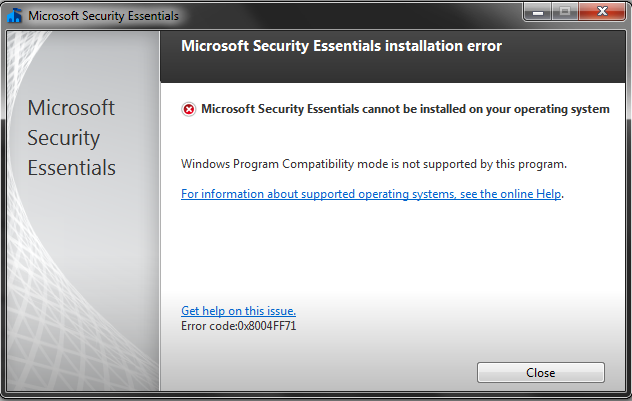
Im updating my graphics card, I use Malwarebytes but had the free trial going, ended the free trial thing. Now I have an issue with the Microsoft essentials whenever I attempt to download it. I put in the right operating system, windows 7 64, but when I try to launch the application I get this:

s9c0I8R.png
 

My Computer

Computer type
PC/Desktop
Computer Manufacturer/Model Number
Acer
OS
64 bit
CPU
AMD FX(tm)-6200 Six-Core Processor
Memory
8.00 GB
Graphics Card(s)
GeForce GTX 550 Ti
I have requested a friend to look at that.

Can you complete the rest of the steps given.
 

My Computer

Computer type
PC/Desktop
Computer Manufacturer/Model Number
Self assembled
OS
Windows 10 Home 64Bit
CPU
Intel Core i5 10400 @ 2.90GHz
Motherboard
Intel Corporation DG41WV (PROCESSOR)
Memory
8.00GB Single-Channel Unknown @ 1329MHz (16-20-20-38)
Sound Card
Realtek High Definition Audio
Monitor(s) Displays
DELL E170S
Screen Resolution
1280x1024 pixels
Hard Drives
931GB TOSHIBA DT01ACA100 (SATA)
238GB TEAM TM8PS7256G (SATA SSD)
Case
Nothing Fancy
Cooling
Fans
Keyboard
A4 Tech Co LTD
Mouse
A4 Tech Co Ltd/Logitech
Internet Speed
25 Mbps

My Computer

Computer type
PC/Desktop
Computer Manufacturer/Model Number
Build #1
OS
Windows 8.1 Pro x64
CPU
Intel i7 3770K @4.5GHz
Motherboard
ASUS P8Z77-V PRO
Memory
Corsair Vengeance 2x4GB DDR3 1600MHz Low Profile (White)
Graphics Card(s)
Gigabyte Radeon HD 7850 (2GB GDDR5)
Sound Card
Integrated on motherboard
Monitor(s) Displays
23" LG LCD/LED IPS
Screen Resolution
1920*1080
Hard Drives
Samsung EVO 128GB SSD
Seagate Barracuda 2GB 7200rpm
2x Seagate FreeAgent [500gb]
PSU
Corsair TX650W V2 (80+ Bronze)
Case
NZXT Phantom 410 White
Cooling
Corsair H100 Water Cooler
Keyboard
Microsoft Desktop 2000 Wireless Keyboard
Mouse
Microsoft Desktop 2000 Wireless Mouse
Internet Speed
95 Mb/s Download 70 Mb/s Upload
Antivirus
MSE + MBAM Pro
Browser
Firefox

My Computer

Computer type
PC/Desktop
Computer Manufacturer/Model Number
Acer
OS
64 bit
CPU
AMD FX(tm)-6200 Six-Core Processor
Memory
8.00 GB
Graphics Card(s)
GeForce GTX 550 Ti
Hi Kaval,

I would keep these entries enabled at Startup:

Code:
[LIST=1]
[*]RtHDVCpl	c:\program files\realtek\audio\hda\ravcpl64.exe -s	Public	HKLM\SOFTWARE\Microsoft\Windows\CurrentVersion\Run
[*]EvtMgr6	c:\program files\logitech\setpointp\setpoint.exe /launchgaming	Public	HKLM\SOFTWARE\Microsoft\Windows\CurrentVersion\Run
[/LIST]

I would also keep Microsoft Security Essentials enabled too, it will be listed as MSC.

To see which programs at being launched at boot, then we can check MSCONFIG, to do so, please follow these steps:
  1. Start :orb:
  2. Type: msconfig
  3. Go to the tab named: Startup
  4. You should get a windows like this:
    View attachment 272923
  5. Untick all the entries apart from the ones listed in the box (RtHDVCpl, MSC and EvtMgr6)
  6. Click Appy, and the reboot the computer.
 

My Computer

Computer type
Laptop
Thank you, I just did that. I didnt realise how many things I had on start up. Yet, right before while I had my computer do a full scan with Microsoft Security Essentials everything froze and I had to do a hard shutdown as nothing at all would respond (like ctrl+alt+del). Starting back up was very slow.
 

My Computer

Computer type
PC/Desktop
Computer Manufacturer/Model Number
Acer
OS
64 bit
CPU
AMD FX(tm)-6200 Six-Core Processor
Memory
8.00 GB
Graphics Card(s)
GeForce GTX 550 Ti
Ill let you know in a bit, right now it feels a little slow but not freezing or crashing at the moment.
 

My Computer

Computer type
PC/Desktop
Computer Manufacturer/Model Number
Acer
OS
64 bit
CPU
AMD FX(tm)-6200 Six-Core Processor
Memory
8.00 GB
Graphics Card(s)
GeForce GTX 550 Ti
My games keep crashing and freezing now but no BSOD
 

My Computer

Computer type
PC/Desktop
Computer Manufacturer/Model Number
Acer
OS
64 bit
CPU
AMD FX(tm)-6200 Six-Core Processor
Memory
8.00 GB
Graphics Card(s)
GeForce GTX 550 Ti
This crash (minecraft, shutting down like it initially did before I started having BSOD come up) left details to why it crashed in a document on my desktop, I've attached it below.
 

My Computer

Computer type
PC/Desktop
Computer Manufacturer/Model Number
Acer
OS
64 bit
CPU
AMD FX(tm)-6200 Six-Core Processor
Memory
8.00 GB
Graphics Card(s)
GeForce GTX 550 Ti
It seems that Java detected a ACCESS_VIOLATION (0xc0000005), this is usually caused by drivers referencing invalid memory addresses and accessing memory beyond pool allocation.

Run Driver Verifier to scan for any corrupted drivers which may be causing problems, this program works by running various stress tests on drivers, in order to produce a BSOD which will locate the driver; run for least 24 hours:

What do you use Java for? Java has many security flaws and security vulnerabilities.
 

My Computer

Computer type
Laptop
What do you use Java for? Java has many security flaws and security vulnerabilities.


Mainly minecraft, but I had my computer up and left for a few hours, came back just now to find out I blue screened sometime while I was out. Im going to run the driver verifier now.
 

My Computer

Computer type
PC/Desktop
Computer Manufacturer/Model Number
Acer
OS
64 bit
CPU
AMD FX(tm)-6200 Six-Core Processor
Memory
8.00 GB
Graphics Card(s)
GeForce GTX 550 Ti
Please upload the new BSOD, and have you updated the Java to the latest version? There will a update tomorrow I believe, which is designed to fix 40 different security flaws found in Java.

I would recommend disabling Java in your browser if it's not needed for any webpages or plugins you visit/use:
 

My Computer

Computer type
Laptop
Java is at the newest update, yes. And do you mean the dump file? Or the thing I had to do at the start with the diagnostics tool? I'll attach both.
 

My Computer

Computer type
PC/Desktop
Computer Manufacturer/Model Number
Acer
OS
64 bit
CPU
AMD FX(tm)-6200 Six-Core Processor
Memory
8.00 GB
Graphics Card(s)
GeForce GTX 550 Ti
Code:
[COLOR="Red"]BugCheck C9[/COLOR], {[COLOR="Blue"]23b[/COLOR], fffff88006b7b710, fffffa80092ea820, 0}

Probably caused by : HIDCLASS.SYS ( HIDCLASS!HidpMajorHandler+0 )

Interesting, it seems Windows reported a Driver Verifier initialized error, when Driver Verifier wasn't even running.

Run Driver Verifier, and then report back the results. Upload a new BSOD if it occurs.
 

My Computer

Computer type
Laptop
Alrighty, new BSOD uploaded
 

My Computer

Computer type
PC/Desktop
Computer Manufacturer/Model Number
Acer
OS
64 bit
CPU
AMD FX(tm)-6200 Six-Core Processor
Memory
8.00 GB
Graphics Card(s)
GeForce GTX 550 Ti
It seems to be the same BSOD as before for some reason :huh:

Keep Driver Verifier running, and then post a few BSODs.

Open a elevated command prompt, and then enter this command:

Code:
verifier /query

Post the results of the command.

If the command mentions something like, no drivers or settings are being verified, then Driver Verifier isn't running.
 

My Computer

Computer type
Laptop
Back
Top