BSOD playing Minecraft

Hi Kaval,

Can you try downloading and installing it from here please?

http://mse.dlservice.microsoft.com/...4-AF60-E44F6DC28BD8/enus/amd64/mseinstall.exe

Tom

Yes I can, thank you. Also I followed the previous steps and just need to update a few more things but as of yesterday I haven't blue screened or crashed. But I dont know how to manage my start up programs or what even starts at start up.

Glad to hear it!

Out of curiosity, were you running the original installer in compatibility mode? If so, why? I can't replicate this error unless I run it in compatibility mode.
 

My Computer

Computer type
PC/Desktop
Computer Manufacturer/Model Number
Build #1
OS
Windows 8.1 Pro x64
CPU
Intel i7 3770K @4.5GHz
Motherboard
ASUS P8Z77-V PRO
Memory
Corsair Vengeance 2x4GB DDR3 1600MHz Low Profile (White)
Graphics Card(s)
Gigabyte Radeon HD 7850 (2GB GDDR5)
Sound Card
Integrated on motherboard
Monitor(s) Displays
23" LG LCD/LED IPS
Screen Resolution
1920*1080
Hard Drives
Samsung EVO 128GB SSD
Seagate Barracuda 2GB 7200rpm
2x Seagate FreeAgent [500gb]
PSU
Corsair TX650W V2 (80+ Bronze)
Case
NZXT Phantom 410 White
Cooling
Corsair H100 Water Cooler
Keyboard
Microsoft Desktop 2000 Wireless Keyboard
Mouse
Microsoft Desktop 2000 Wireless Mouse
Internet Speed
95 Mb/s Download 70 Mb/s Upload
Antivirus
MSE + MBAM Pro
Browser
Firefox
It seems to be the same BSOD as before for some reason :huh:

Keep Driver Verifier running, and then post a few BSODs.

Open a elevated command prompt, and then enter this command:

Code:
verifier /query

Post the results of the command.

If the command mentions something like, no drivers or settings are being verified, then Driver Verifier isn't running.


Well, I tried to do the driver verifier, but for some reason its only showing drivers provided by Microsoft. Also, in extreme cases a co-worker mentioned to me a full reset of my computer. I dont have things on this computer I would care to save, so what would be my extreme options if this becomes something I cant fix?
 

My Computer

Computer type
PC/Desktop
Computer Manufacturer/Model Number
Acer
OS
64 bit
CPU
AMD FX(tm)-6200 Six-Core Processor
Memory
8.00 GB
Graphics Card(s)
GeForce GTX 550 Ti
Out of curiosity, were you running the original installer in compatibility mode? If so, why? I can't replicate this error unless I run it in compatibility mode.

I'm sorry, I dont know what compatibility mode is and how to check if it is enabled or not. Again, Im sorry for any frustrations but I am very computer inept.
 

My Computer

Computer type
PC/Desktop
Computer Manufacturer/Model Number
Acer
OS
64 bit
CPU
AMD FX(tm)-6200 Six-Core Processor
Memory
8.00 GB
Graphics Card(s)
GeForce GTX 550 Ti
What was the output of the command?

Could post a screenshot of Step #5 of the Driver Verifier tutorial, and then attach the screenshot in your next post using - http://www.sevenforums.com/tutorials/9733-screenshots-files-upload-post-seven-forums.html

In a extreme case, to quickly differentate between a software and a hardware cause, you can try - http://www.sevenforums.com/tutorials/219487-clean-reinstall-factory-oem-windows-7-a.html to get the perfect installation of Windows 7; read the special note for Acer users at the bottom of the page.
 

My Computer

Computer type
Laptop
Well the other drivers ended up showing after a restart, I did it, and once again I blue screened at the starting windows part. Did again, same result every time I try to use the driver verifier. Attaching the dump file from the latest blue screen.
 

My Computer

Computer type
PC/Desktop
Computer Manufacturer/Model Number
Acer
OS
64 bit
CPU
AMD FX(tm)-6200 Six-Core Processor
Memory
8.00 GB
Graphics Card(s)
GeForce GTX 550 Ti
Code:
[COLOR="Red"]BugCheck C9[/COLOR], {[COLOR="Blue"]21f[/COLOR], fffff88004393008, fffff9800a930d30, 0}

Unable to load image CtHDb.sys, Win32 error 0n2
*** WARNING: Unable to verify timestamp for CtHDb.sys
*** ERROR: Module load completed but symbols could not be loaded for CtHDb.sys
Probably caused by : [COLOR="red"]CtHDb.sys[/COLOR] ( CtHDb+9008 )

It appears that Driver Verifier managed to detect a driver which failed to fill out a dispatch routine for a IRP Major function code. A dispatch routine is how the driver handles the IRP. More Information - Writing IRP Dispatch Routines.

Code:
3: kd> [COLOR="SeaGreen"]lmvm CtHDb[/COLOR]
start             end                 module name
fffff880`0438a000 fffff880`04396000   CtHDb    T (no symbols)           
    Loaded symbol image file: CtHDb.sys
    Image path: CtHDb.sys
    Image name: CtHDb.sys
    Timestamp:        [COLOR="Red"]Mon Mar 25 03:03:17 2013[/COLOR] (514FBE75)
    CheckSum:         00008145
    ImageSize:        0000C000
    Translations:     0000.04b0 0000.04e4 0409.04b0 0409.04e4

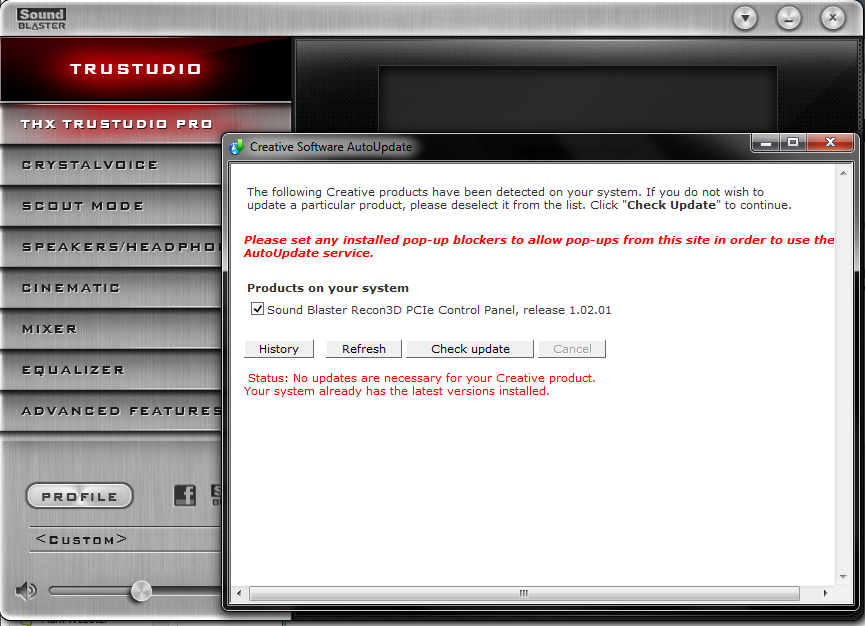
The driver seems to be caused by your SB Recon3D PCIe Audio Bus Filter, I would suggest checking for a update to the driver, is this a sound card or something?
 

My Computer

Computer type
Laptop
The driver seems to be caused by your SB Recon3D PCIe Audio Bus Filter, I would suggest checking for a update to the driver, is this a sound card or something?


yes its to my sound blaster x-fi titanium soundcard, but it says its updated.

M5IddKK.png
 

My Computer

Computer type
PC/Desktop
Computer Manufacturer/Model Number
Acer
OS
64 bit
CPU
AMD FX(tm)-6200 Six-Core Processor
Memory
8.00 GB
Graphics Card(s)
GeForce GTX 550 Ti
Out of curiosity, were you running the original installer in compatibility mode? If so, why? I can't replicate this error unless I run it in compatibility mode.

I'm sorry, I dont know what compatibility mode is and how to check if it is enabled or not. Again, Im sorry for any frustrations but I am very computer inept.

No need to apologise! :) If you don't know what it is then the chances are you didn't run it in that way, thanks! Time to investigate :)
 

My Computer

Computer type
PC/Desktop
Computer Manufacturer/Model Number
Build #1
OS
Windows 8.1 Pro x64
CPU
Intel i7 3770K @4.5GHz
Motherboard
ASUS P8Z77-V PRO
Memory
Corsair Vengeance 2x4GB DDR3 1600MHz Low Profile (White)
Graphics Card(s)
Gigabyte Radeon HD 7850 (2GB GDDR5)
Sound Card
Integrated on motherboard
Monitor(s) Displays
23" LG LCD/LED IPS
Screen Resolution
1920*1080
Hard Drives
Samsung EVO 128GB SSD
Seagate Barracuda 2GB 7200rpm
2x Seagate FreeAgent [500gb]
PSU
Corsair TX650W V2 (80+ Bronze)
Case
NZXT Phantom 410 White
Cooling
Corsair H100 Water Cooler
Keyboard
Microsoft Desktop 2000 Wireless Keyboard
Mouse
Microsoft Desktop 2000 Wireless Mouse
Internet Speed
95 Mb/s Download 70 Mb/s Upload
Antivirus
MSE + MBAM Pro
Browser
Firefox
Remove the sound card for now, and then see if the system crashes or not.
 

My Computer

Computer type
Laptop
Remove the sound card for now, and then see if the system crashes or not.

What do you mean remove it? As in remove the drivers or physically remove it? I wont be able to remove the sound card physically because I dont know how or what I would need to do. Id rather not crack open the computer only to make things worse. Also-

It seems that my battle with figuring out the issues with my computer are on the loosing side. All of my drivers are updated thanks to previous help from these forums.

The issues I am facing now include:

  • Slow start ups, yet my programs on start up are at a minimal (three things if I remember correctly).
  • Games such as minecraft close out unexpectedly (attached error report from that).
  • Google chrome seems to be have issues with java yet I have the updated version.
  • Chrome plugins seem to keep crashing and I frequently need to reload a page that crashes with the 'on snap' error on a tab.
  • Every time I attempt a full scan with MSE I blue screen, so I can never complete a full scan to see if there is some other issue there.
  • Every time I attempt to run driver verifier I blue screen at the starting windows stage of the reboot.


Note: I am very computer inept but can follow instructions if made clearly, please do not assume I know certain computer terminology or program functions. I apologize in advance for my ignorance on it all.
 

My Computer

Computer type
PC/Desktop
Computer Manufacturer/Model Number
Acer
OS
64 bit
CPU
AMD FX(tm)-6200 Six-Core Processor
Memory
8.00 GB
Graphics Card(s)
GeForce GTX 550 Ti
Notes: Okay, remove the drivers and any associated software for the sound card.

---------------------------------------------------------------------------------------

Code:
[COLOR="Red"]BugCheck 50[/COLOR], {fffff864220d85b4, [COLOR="Blue"]1[/COLOR], [COLOR="SeaGreen"]fffff88001218b4f[/COLOR], 5}

Could not read faulting driver name
Probably caused by : [COLOR="Red"]Ntfs.sys[/COLOR] ( Ntfs!NtfsRemoveClose+a3 )

Code:
Usual causes:  Defective hardware (particularly memory - but not just RAM), Faulty system service, Antivirus,  Device driver, NTFS corruption, BIOS

It seems to be more of a driver-related issue at the moment, the bugcheck indicates that the a driver has been referencing invalid memory addresses and then attempting to write to this address. We can also see that the instruction which referenced the bad memory address was the ntfs.sys driver.

Code:
2: kd> [COLOR="SeaGreen"]ln fffff88001218b4f[/COLOR]
(fffff880`01218aac)   Ntfs!NtfsRemoveClose+0xa3   |  (fffff880`01218c24)   Ntfs!NtfsFreeScbAttributeName

I would suggest testing RAM, this can often lead to many software failures.
Run Memtest86+ for least 9-10 passes, and preferably overnight as it can take a while to fully complete.

Test each RAM stick individually, if an error is found then move the same RAM stick into the next DIMM slot and test again, if errors are found for the same RAM stick in every available slot then you have a faulty RAM module. On the other hand, if no errors are found in the next slot or the other slots for the same RAM module, then you have a faulty DIMM slot.

Test each RAM stick and every motherboard DIMM slot available.

test|Slot1|Slot2
RAM1| Error | Error
RAM2|Good|Good
It is a RAM, a bad RAM.

But if you have got a result like that:
test|Slot1|Slot2
RAM1| Error |Good
RAM2| Error |Good
It is a motherboard issue. The particular slot is bad.
 

My Computer

Computer type
Laptop
Back
Top