
BSOD playing Rust, error code 0x0000000a

luminosity

New member
Local time
1:53 PM
Messages
6
I'm 90% sure it's not the ram because with just an A the end (coming from microsoft) it's ussually a software issue.


Also some things i noticed were that firefox would randomly crash like last time my ram went bad.


blue screen view results
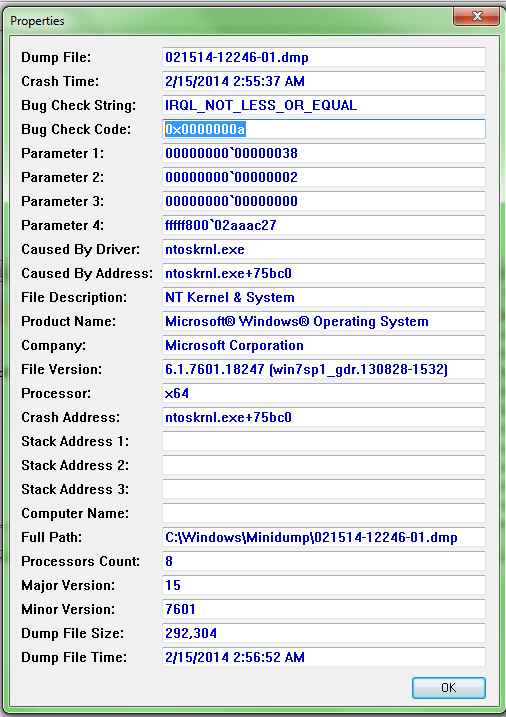
DF3UbY7.png


Hardware configuration:
8gb vengeance 1600 8gb vengeance 1866
msi 970a-g46 mobo
750w seasonic mII 12 psu
120gb pny xlr8 ssd
some random mechanical drives.
amd fx 8320 stock clocks
gtx 770 stock clocks (recently installed. Had it for like a week now?)
fresh beta drivers for the 770.


Input devices:
Blue snowball
CM Storm Recon Mouse
Corsair K70
Headphones
1080p monitor


First time receiving this bsod (happened during rust not a very graphically intense game)


Download for crash dump file:
this was my dump on media fire but i'll upload the SF_DD_MM folder as a zip.


If you need more info to help me post bellow and ill answer it.


I've already run memtest 86 for a couple passes on each stick individually. I'll run it later with every stick in at the same time. I've taken out the 1866 I have for now though.


While I was playing rust I was playing on the "Good" graphics setting and I was in the middle of talking when it cut out.


Here's the advanced debug:
* * - Pastebin.com
 

My Computer

Computer type
PC/Desktop
Computer Manufacturer/Model Number
Custom build
OS
Windows 7 home premium 64 bit
CPU
AMD FX 8320 @ 3.5ghz
Motherboard
MSI 970a-g46
Memory
16gb Vengeance (8gb of 1600 8gb of 1866)
Graphics Card(s)
PNY XLR8 GTX 770
Hard Drives
1x PNY xlr8 120gb ssd
3 random hdd's
Antivirus
MWD Pro
Browser
Firefox
Code:
*******************************************************************************
*                                                                             *
*                        Bugcheck Analysis                                    *
*                                                                             *
*******************************************************************************

Use !analyze -v to get detailed debugging information.

BugCheck A, {38, 2, 0, fffff80002aaac27}

Probably caused by : memory_corruption ( nt!MiResolveMappedFileFault+97 )

Followup: MachineOwner
---------
You need to test your RAM DIMM's/motherboard RAM slots for errors.

Run a minimum of 8 consecutive passes, preferably overnight, or until errors occur using MemTest86+.

Use this tutorial to help you use MemTest86+:
http://www.sevenforums.com/tutorials/105647-ram-test-memtest86.html
 

My Computer

Computer type
PC/Desktop
Computer Manufacturer/Model Number
Golden Mk. I.4
OS
Windows 10 Pro x64 ; Xubuntu x64
CPU
Intel i7 860 @ 2.80 GHz O/C'ed to 4.0GHz
Motherboard
Gigabyte P55A-UD3R Rev.1. Award BIOS F13
Memory
16GB Corsair Vengance DDR3 @ 661 MHz Dual Channel (9-9-9-24)
Graphics Card(s)
EVGA NVidia GTX 560 1024MB
Sound Card
Realtek Integrated
Monitor(s) Displays
Dual Samsung SyncMaster 2494HS
Screen Resolution
1920*1080 and 1920*1080
Hard Drives
1*Samsung 840 EVO 120GB SSD;
1*OCZ Vertex 2 60GB SSD;
2*Samsung F3 SpinPoint 1TB in RAID0;
1*Samsung F1 SpinPoint 1TB;
2*Western Digital 1TB External USB 3.0
1*Western Digital 500GB External USB 3.0
1*Seagate 500GB External USB 2.0
PSU
Thermaltake ToughPower QFan 750W
Case
Thermaltake Element S VK60001W2Z
Cooling
Corsair H60 Water Cooling, 2*230mm and 2*80mm case fans
Keyboard
Logitech G110
Mouse
Logitech MX518
It's got to be the mother board. Thanks for the reply. Time to upgrade.

Reason why I think this: I tested all of the ram dimms in one slot of the mobo for a few passes a couple times and none of them showed any error.
 

My Computer

Computer type
PC/Desktop
Computer Manufacturer/Model Number
Custom build
OS
Windows 7 home premium 64 bit
CPU
AMD FX 8320 @ 3.5ghz
Motherboard
MSI 970a-g46
Memory
16gb Vengeance (8gb of 1600 8gb of 1866)
Graphics Card(s)
PNY XLR8 GTX 770
Hard Drives
1x PNY xlr8 120gb ssd
3 random hdd's
Antivirus
MWD Pro
Browser
Firefox
A few passes is not sufficient....you require a minimum of 8 passes to adequately test the RAM DiMM fully.

I recommend running MemTest86+ overnight just to be sure.
 

My Computer

Computer type
PC/Desktop
Computer Manufacturer/Model Number
Golden Mk. I.4
OS
Windows 10 Pro x64 ; Xubuntu x64
CPU
Intel i7 860 @ 2.80 GHz O/C'ed to 4.0GHz
Motherboard
Gigabyte P55A-UD3R Rev.1. Award BIOS F13
Memory
16GB Corsair Vengance DDR3 @ 661 MHz Dual Channel (9-9-9-24)
Graphics Card(s)
EVGA NVidia GTX 560 1024MB
Sound Card
Realtek Integrated
Monitor(s) Displays
Dual Samsung SyncMaster 2494HS
Screen Resolution
1920*1080 and 1920*1080
Hard Drives
1*Samsung 840 EVO 120GB SSD;
1*OCZ Vertex 2 60GB SSD;
2*Samsung F3 SpinPoint 1TB in RAID0;
1*Samsung F1 SpinPoint 1TB;
2*Western Digital 1TB External USB 3.0
1*Western Digital 500GB External USB 3.0
1*Seagate 500GB External USB 2.0
PSU
Thermaltake ToughPower QFan 750W
Case
Thermaltake Element S VK60001W2Z
Cooling
Corsair H60 Water Cooling, 2*230mm and 2*80mm case fans
Keyboard
Logitech G110
Mouse
Logitech MX518
A few passes is not sufficient....you require a minimum of 8 passes to adequately test the RAM DiMM fully.

I recommend running MemTest86+ overnight just to be sure.
3 passes on each individual stick isn't sufficient? Alright I guess I'll just run it with every stick over night then.
 

My Computer

Computer type
PC/Desktop
Computer Manufacturer/Model Number
Custom build
OS
Windows 7 home premium 64 bit
CPU
AMD FX 8320 @ 3.5ghz
Motherboard
MSI 970a-g46
Memory
16gb Vengeance (8gb of 1600 8gb of 1866)
Graphics Card(s)
PNY XLR8 GTX 770
Hard Drives
1x PNY xlr8 120gb ssd
3 random hdd's
Antivirus
MWD Pro
Browser
Firefox
No, its not.

Start with all RAM DiMM's inserted as normal, then run MemTest86+. Its only necessary to test individual DiMM's if there are errors in the previous test.
 

My Computer

Computer type
PC/Desktop
Computer Manufacturer/Model Number
Golden Mk. I.4
OS
Windows 10 Pro x64 ; Xubuntu x64
CPU
Intel i7 860 @ 2.80 GHz O/C'ed to 4.0GHz
Motherboard
Gigabyte P55A-UD3R Rev.1. Award BIOS F13
Memory
16GB Corsair Vengance DDR3 @ 661 MHz Dual Channel (9-9-9-24)
Graphics Card(s)
EVGA NVidia GTX 560 1024MB
Sound Card
Realtek Integrated
Monitor(s) Displays
Dual Samsung SyncMaster 2494HS
Screen Resolution
1920*1080 and 1920*1080
Hard Drives
1*Samsung 840 EVO 120GB SSD;
1*OCZ Vertex 2 60GB SSD;
2*Samsung F3 SpinPoint 1TB in RAID0;
1*Samsung F1 SpinPoint 1TB;
2*Western Digital 1TB External USB 3.0
1*Western Digital 500GB External USB 3.0
1*Seagate 500GB External USB 2.0
PSU
Thermaltake ToughPower QFan 750W
Case
Thermaltake Element S VK60001W2Z
Cooling
Corsair H60 Water Cooling, 2*230mm and 2*80mm case fans
Keyboard
Logitech G110
Mouse
Logitech MX518
I'll report back with findings in the morning.
 

My Computer

Computer type
PC/Desktop
Computer Manufacturer/Model Number
Custom build
OS
Windows 7 home premium 64 bit
CPU
AMD FX 8320 @ 3.5ghz
Motherboard
MSI 970a-g46
Memory
16gb Vengeance (8gb of 1600 8gb of 1866)
Graphics Card(s)
PNY XLR8 GTX 770
Hard Drives
1x PNY xlr8 120gb ssd
3 random hdd's
Antivirus
MWD Pro
Browser
Firefox
:thumbsup:
 

My Computer

Computer type
PC/Desktop
Computer Manufacturer/Model Number
Golden Mk. I.4
OS
Windows 10 Pro x64 ; Xubuntu x64
CPU
Intel i7 860 @ 2.80 GHz O/C'ed to 4.0GHz
Motherboard
Gigabyte P55A-UD3R Rev.1. Award BIOS F13
Memory
16GB Corsair Vengance DDR3 @ 661 MHz Dual Channel (9-9-9-24)
Graphics Card(s)
EVGA NVidia GTX 560 1024MB
Sound Card
Realtek Integrated
Monitor(s) Displays
Dual Samsung SyncMaster 2494HS
Screen Resolution
1920*1080 and 1920*1080
Hard Drives
1*Samsung 840 EVO 120GB SSD;
1*OCZ Vertex 2 60GB SSD;
2*Samsung F3 SpinPoint 1TB in RAID0;
1*Samsung F1 SpinPoint 1TB;
2*Western Digital 1TB External USB 3.0
1*Western Digital 500GB External USB 3.0
1*Seagate 500GB External USB 2.0
PSU
Thermaltake ToughPower QFan 750W
Case
Thermaltake Element S VK60001W2Z
Cooling
Corsair H60 Water Cooling, 2*230mm and 2*80mm case fans
Keyboard
Logitech G110
Mouse
Logitech MX518
ran it for 9 hours. It only did 2 passes. It did get errors though. on pass 1 and pass 2 it got errors on test 8 but that's the only test it got errors on. It totaled in about ~150 errors. I can't remember the exact #. I did run each stick for 2 passes and they didn't show any error. So what does this mean? Should i test each stick more or?
 

My Computer

Computer type
PC/Desktop
Computer Manufacturer/Model Number
Custom build
OS
Windows 7 home premium 64 bit
CPU
AMD FX 8320 @ 3.5ghz
Motherboard
MSI 970a-g46
Memory
16gb Vengeance (8gb of 1600 8gb of 1866)
Graphics Card(s)
PNY XLR8 GTX 770
Hard Drives
1x PNY xlr8 120gb ssd
3 random hdd's
Antivirus
MWD Pro
Browser
Firefox
The fact that there are errors means that:
  • one or more RAM DiMM's are faulty; or
  • one or more motherboard RAM slots are faulty; or
  • both RAM Dimm's and motherboard slots are faulty

To check, you need to do this:

1. Take 1 RAM DiMM only and install it into motherboard RAM slot #1
2. Run MemTest86+ for a minimum of 8 passes
3. If it passes all tests, then it means that RAM DiMM and motherboard slot are good.
- Now insert that same RAM DiMM into motherboard slot #2, and run MemTest86+ again for a minimum of 8 passes
4. If the test in step 3 fails, then that RAM DiMM is faulty and can be discarded
5. Repeat the same tests for RAM DiMM #2
 

My Computer

Computer type
PC/Desktop
Computer Manufacturer/Model Number
Golden Mk. I.4
OS
Windows 10 Pro x64 ; Xubuntu x64
CPU
Intel i7 860 @ 2.80 GHz O/C'ed to 4.0GHz
Motherboard
Gigabyte P55A-UD3R Rev.1. Award BIOS F13
Memory
16GB Corsair Vengance DDR3 @ 661 MHz Dual Channel (9-9-9-24)
Graphics Card(s)
EVGA NVidia GTX 560 1024MB
Sound Card
Realtek Integrated
Monitor(s) Displays
Dual Samsung SyncMaster 2494HS
Screen Resolution
1920*1080 and 1920*1080
Hard Drives
1*Samsung 840 EVO 120GB SSD;
1*OCZ Vertex 2 60GB SSD;
2*Samsung F3 SpinPoint 1TB in RAID0;
1*Samsung F1 SpinPoint 1TB;
2*Western Digital 1TB External USB 3.0
1*Western Digital 500GB External USB 3.0
1*Seagate 500GB External USB 2.0
PSU
Thermaltake ToughPower QFan 750W
Case
Thermaltake Element S VK60001W2Z
Cooling
Corsair H60 Water Cooling, 2*230mm and 2*80mm case fans
Keyboard
Logitech G110
Mouse
Logitech MX518
Alright ill report back with findings in like 2 days then.
 

My Computer

Computer type
PC/Desktop
Computer Manufacturer/Model Number
Custom build
OS
Windows 7 home premium 64 bit
CPU
AMD FX 8320 @ 3.5ghz
Motherboard
MSI 970a-g46
Memory
16gb Vengeance (8gb of 1600 8gb of 1866)
Graphics Card(s)
PNY XLR8 GTX 770
Hard Drives
1x PNY xlr8 120gb ssd
3 random hdd's
Antivirus
MWD Pro
Browser
Firefox
Back
Top