BSOD playing World of Warcraft using Youtube, error 0X0000004E

tomkat968

New member
Local time
7:20 PM
Messages
6
Hi,
I've been having really big problems with my laptop lately. I have been getting like one BSOD a day for about a month or so. But lately it just seems to get worse. The laptop is over a year old and I have had no troubles until recently.

I installed World of Warcraft, updated my gfx card drivers changed antivirus from Norton to Avast and since then it seems to have problems but it is hard to tell what started it as it was done all at around the same time.

I have tried everything such as a memory scan using memtest86, hardrive scan using windows. I did one run through of the memory and it found nothing. The Harddrive scan found one broken cluster and fixed it but the BSOD's continue. I have tried mupltiple gfx card drivers versions for both my cards. I use NVIDIA Optimus but nothing seems to work.

The BSOD's are nearly always "PFN_LIST_CORRUPT" and I had problems creating dumpfiles but i solved that today. The BSOD's flashed to fast for me to see but the latest one I caught was 0X0000004E.
 

My Computer My Computer

At a glance

Windows 7 Home Premium 64 biti7-3610qm2x4 GB DDR3Intel HD Graphics 4000 and NVIDIA 660M
Computer type
Laptop
Computer Manufacturer/Model Number
XMG A522 (Clevo W350ET)
OS
Windows 7 Home Premium 64 bit
CPU
i7-3610qm
Motherboard
Intel HM77 (Panther Point)
Memory
2x4 GB DDR3
Graphics Card(s)
Intel HD Graphics 4000 and NVIDIA 660M
Hard Drives
Seagate Momentus XT 500GB
Antivirus
Avast
Browser
Chrome
Hi tomkat968.

Daemon Tools, Alcohol 120% and Power Archiver Pro uses SCSI Pass Through Direct (SPTD), which is a well known BSOD causer. Uninstall Daemon Tools at first. Then download SPTD standalone installer from Disk-Tools.com, and execute the downloaded file as guided below :

  • Double click to open it.
  • Click this button only:
  • 2012-12-13_224441.jpg
  • If it is grayed out, as in the picture, there is no more SPTD in your system, and you just close the window.
Also, You need to uninstall AVG.
Code:
fffff880`0f281288  fffff880`07c127c3Unable to load image avgidsdrivera.sys, Win32 error 0n2
*** WARNING: Unable to verify timestamp for avgidsdrivera.sys
[COLOR=Red]*** ERROR: Module load completed but symbols could not be loaded for avgidsdrivera.sys[/COLOR]
 avgidsdrivera+0x127c3
Uninstall AVG following http://www.avg.com/us-en/utilities . Use Microsoft Security Essentials as your antivirus with windows inbuilt firewall, and free MBAM as the on demand scanner.

Download, install and update those, and then run full system scans with both of them, one by one.

Let us know the results.
__________________________________________________________________________________________
Code:
*******************************************************************************
*                                                                             *
*                        Bugcheck Analysis                                    *
*                                                                             *
*******************************************************************************

Use !analyze -v to get detailed debugging information.

[COLOR=Red]BugCheck 4E[/COLOR], {99, a3a2b, 3, 168233}

Probably caused by : memory_corruption ( nt!MiBadShareCount+4c )

Followup: MachineOwner
---------
 

My Computer My Computer

At a glance

Microsoft Windows 10 Pro Insider Preview 64-bitIntel(R) Core(TM) i3-4130 CPU @ 3.40GHzCorsair Vengence 4GB x2 (8.00GB Dual-Channel ...2047MB GeForce GTS 450 (ZOTAC International)
Computer type
PC/Desktop
Computer Manufacturer/Model Number
Self Assembled
OS
Microsoft Windows 10 Pro Insider Preview 64-bit
CPU
Intel(R) Core(TM) i3-4130 CPU @ 3.40GHz
Motherboard
Gigabyte Technology Co., Ltd. B85M-D3H
Memory
Corsair Vengence 4GB x2 (8.00GB Dual-Channel DDR3 @ 798MHz)
Graphics Card(s)
2047MB GeForce GTS 450 (ZOTAC International)
Sound Card
Onboard (Realtek High Definition Audio)
Monitor(s) Displays
LG Flatron E2040T
Screen Resolution
1600x900
Hard Drives
Western Digital 1 TB
Seagate 500 GB
PSU
Corsair VS550
Case
Cooler Master K380
Cooling
Cooler Master Seidon 120V Plus
Keyboard
Logitech MK260r
Mouse
Logitech MK260r
Internet Speed
PMPL Broadband
Antivirus
Windows Defender + MBAM
Browser
Firefox
Other Info
Dell Studio 15" Laptop
I uninstalled Daemon tools, my antivirus as you said, installed Microsoft security essentials and malwarebytes. I did a full scan with both, they found some things I think they were false positives but I let them deal with those anyway. The BSOD's continue.

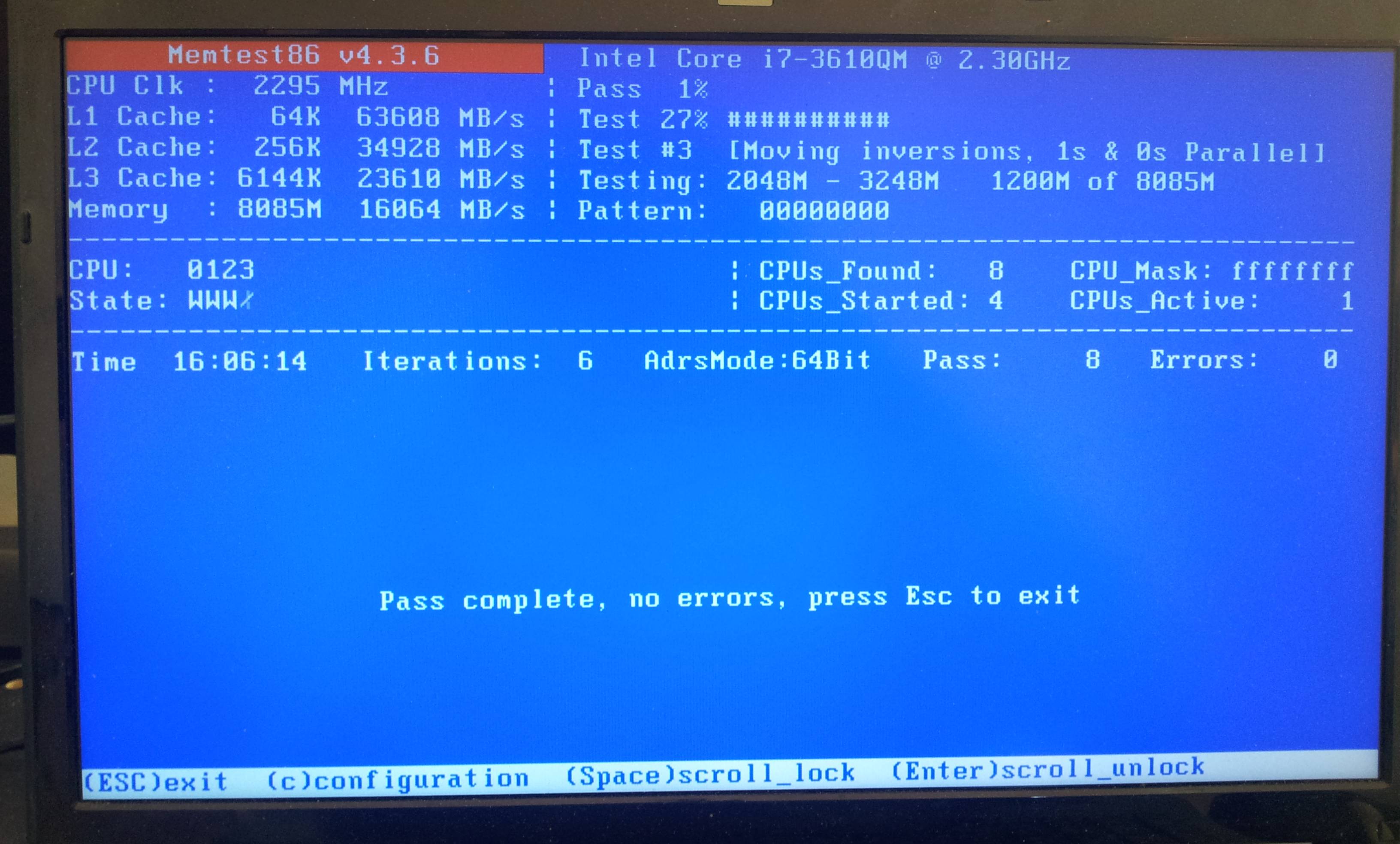
I did another memtest scan for 4 run throughs and nothing was found. I have attached another SF tools zip.
 

My Computer My Computer

At a glance

Windows 7 Home Premium 64 biti7-3610qm2x4 GB DDR3Intel HD Graphics 4000 and NVIDIA 660M
Computer type
Laptop
Computer Manufacturer/Model Number
XMG A522 (Clevo W350ET)
OS
Windows 7 Home Premium 64 bit
CPU
i7-3610qm
Motherboard
Intel HM77 (Panther Point)
Memory
2x4 GB DDR3
Graphics Card(s)
Intel HD Graphics 4000 and NVIDIA 660M
Hard Drives
Seagate Momentus XT 500GB
Antivirus
Avast
Browser
Chrome
There is a fair chance of memory corruption; and memtest is not substantially completed before 8 full consecutive passes.

Also if possible, take a camera snap of memtest when 8 passes are complete? If that give some hints about anything.

Code:
*******************************************************************************
*                                                                             *
*                        Bugcheck Analysis                                    *
*                                                                             *
*******************************************************************************

Use !analyze -v to get detailed debugging information.

BugCheck 4E, {99, 139f0, 0, f9f0}

Probably caused by : memory_corruption ( nt!MiBadShareCount+4c )

Followup: MachineOwner
---------

2: kd> !analyze -v
*******************************************************************************
*                                                                             *
*                        Bugcheck Analysis                                    *
*                                                                             *
*******************************************************************************

PFN_LIST_CORRUPT (4e)
Typically caused by drivers passing bad memory descriptor lists (ie: calling
MmUnlockPages twice with the same list, etc).  If a kernel debugger is
available get the stack trace.
Arguments:
Arg1: 0000000000000099, A PTE or PFN is corrupt
Arg2: 00000000000139f0, page frame number
Arg3: 0000000000000000, current page state
Arg4: 000000000000f9f0, 0

Debugging Details:
------------------


BUGCHECK_STR:  0x4E_99

CUSTOMER_CRASH_COUNT:  1

DEFAULT_BUCKET_ID:  WIN7_DRIVER_FAULT

PROCESS_NAME:  Wow-64.exe

CURRENT_IRQL:  2

ANALYSIS_VERSION: 6.3.9600.16384 (debuggers(dbg).130821-1623) amd64fre

LAST_CONTROL_TRANSFER:  from fffff80003169a4c to fffff800030dabc0

STACK_TEXT:  
fffff880`0a3bbe18 fffff800`03169a4c : 00000000`0000004e 00000000`00000099 00000000`000139f0 00000000`00000000 : nt!KeBugCheckEx
fffff880`0a3bbe20 fffff800`03086ec9 : 00000000`00000000 fffff680`000bab58 00000000`00000002 00000000`00000001 : nt!MiBadShareCount+0x4c
fffff880`0a3bbe60 fffff800`030aa7c3 : fffffa80`06fb6b30 fffff700`0003bf41 0000007f`fffffff8 fffff8a0`0dc097b0 : nt! ?? ::FNODOBFM::`string'+0x32421
fffff880`0a3bbef0 fffff800`030ab892 : fffffa80`06fb6b30 fffffa80`00000000 fffff880`000399d7 fffff800`00000006 : nt!MiDeleteAddressesInWorkingSet+0x307
fffff880`0a3bc7a0 fffff800`033af15a : fffff8a0`0da7b470 fffff880`0a3bcae0 00000000`00000000 fffffa80`0707e430 : nt!MmCleanProcessAddressSpace+0x96
fffff880`0a3bc7f0 fffff800`033952ed : 00000000`00000001 00000000`00000001 000007ff`fff6e000 fffffa80`07115060 : nt!PspExitThread+0x56a
fffff880`0a3bc8f0 fffff800`030cd6fa : 00000000`00000100 fffffa80`0707e4f0 00000000`00000001 fffff800`030d07fd : nt!PsExitSpecialApc+0x1d
fffff880`0a3bc920 fffff800`030cda40 : 00000000`00000000 fffff880`0a3bc9a0 fffff800`03395260 00000000`00000001 : nt!KiDeliverApc+0x2ca
fffff880`0a3bc9a0 fffff800`030d9ef7 : fffffa80`0707e430 00000000`ffffffff 00000000`00000000 fffffa80`0b8f3ef0 : nt!KiInitiateUserApc+0x70
fffff880`0a3bcae0 00000000`76f412fa : 00000000`00000000 00000000`00000000 00000000`00000000 00000000`00000000 : nt!KiSystemServiceExit+0x9c
00000000`04cafc18 00000000`00000000 : 00000000`00000000 00000000`00000000 00000000`00000000 00000000`00000000 : 0x76f412fa


STACK_COMMAND:  kb

FOLLOWUP_IP: 
nt!MiBadShareCount+4c
fffff800`03169a4c cc              int     3

SYMBOL_STACK_INDEX:  1

SYMBOL_NAME:  nt!MiBadShareCount+4c

FOLLOWUP_NAME:  MachineOwner

MODULE_NAME: nt

DEBUG_FLR_IMAGE_TIMESTAMP:  521ea035

IMAGE_VERSION:  6.1.7601.18247

IMAGE_NAME:  memory_corruption

FAILURE_BUCKET_ID:  X64_0x4E_99_nt!MiBadShareCount+4c

BUCKET_ID:  X64_0x4E_99_nt!MiBadShareCount+4c

ANALYSIS_SOURCE:  KM

FAILURE_ID_HASH_STRING:  km:x64_0x4e_99_nt!mibadsharecount+4c

FAILURE_ID_HASH:  {4c83cdad-f603-74ff-b7e1-9eb7f3029c2a}

Followup: MachineOwner
---------
 

My Computer My Computer

At a glance

Microsoft Windows 10 Pro Insider Preview 64-bitIntel(R) Core(TM) i3-4130 CPU @ 3.40GHzCorsair Vengence 4GB x2 (8.00GB Dual-Channel ...2047MB GeForce GTS 450 (ZOTAC International)
Computer type
PC/Desktop
Computer Manufacturer/Model Number
Self Assembled
OS
Microsoft Windows 10 Pro Insider Preview 64-bit
CPU
Intel(R) Core(TM) i3-4130 CPU @ 3.40GHz
Motherboard
Gigabyte Technology Co., Ltd. B85M-D3H
Memory
Corsair Vengence 4GB x2 (8.00GB Dual-Channel DDR3 @ 798MHz)
Graphics Card(s)
2047MB GeForce GTS 450 (ZOTAC International)
Sound Card
Onboard (Realtek High Definition Audio)
Monitor(s) Displays
LG Flatron E2040T
Screen Resolution
1600x900
Hard Drives
Western Digital 1 TB
Seagate 500 GB
PSU
Corsair VS550
Case
Cooler Master K380
Cooling
Cooler Master Seidon 120V Plus
Keyboard
Logitech MK260r
Mouse
Logitech MK260r
Internet Speed
PMPL Broadband
Antivirus
Windows Defender + MBAM
Browser
Firefox
Other Info
Dell Studio 15" Laptop
I believe I had 1 or 2 BSOD's before starting the tests.

CGnxRa4.jpg


Attached latest SF Diagnostic Report.
 

My Computer My Computer

At a glance

Windows 7 Home Premium 64 biti7-3610qm2x4 GB DDR3Intel HD Graphics 4000 and NVIDIA 660M
Computer type
Laptop
Computer Manufacturer/Model Number
XMG A522 (Clevo W350ET)
OS
Windows 7 Home Premium 64 bit
CPU
i7-3610qm
Motherboard
Intel HM77 (Panther Point)
Memory
2x4 GB DDR3
Graphics Card(s)
Intel HD Graphics 4000 and NVIDIA 660M
Hard Drives
Seagate Momentus XT 500GB
Antivirus
Avast
Browser
Chrome
Now enable Driver Verifier to monitor the drivers.
Driver Verifier - Enable and Disable
Run Driver Verifier for 24 hours or the occurrence of the next crash, whichever is earlier.

   Information
Why Driver Verifier:
It puts a stress on the drivers, ans so it makes the unstable drivers crash. Hopefully the driver that crashes is recorded in the memory dump.

How Can we know that DV is enabled:
It will make the system bit of slow, laggy.

   Warning
Before enabling DV, make it sure that you have earlier System restore points made in your computer. You can check it easily by using CCleaner looking at Tools > System Restore.

If there is no points, make a System Restore Point manually before enabling DV.

   Tip


Let us know the results, with the subsequent crash dumps, if any.
_______________________________________________________________________________________
Code:
*******************************************************************************
*                                                                             *
*                        Bugcheck Analysis                                    *
*                                                                             *
*******************************************************************************

Use !analyze -v to get detailed debugging information.

BugCheck 4E, {99, 153143, 2, 153133}

Probably caused by : memory_corruption ( nt!MiBadShareCount+4c )

Followup: MachineOwner
---------

2: kd> !analyze -v
*******************************************************************************
*                                                                             *
*                        Bugcheck Analysis                                    *
*                                                                             *
*******************************************************************************

PFN_LIST_CORRUPT (4e)
Typically caused by drivers passing bad memory descriptor lists (ie: calling
MmUnlockPages twice with the same list, etc).  If a kernel debugger is
available get the stack trace.
Arguments:
Arg1: 0000000000000099, A PTE or PFN is corrupt
Arg2: 0000000000153143, page frame number
Arg3: 0000000000000002, current page state
Arg4: 0000000000153133, 0

Debugging Details:
------------------


BUGCHECK_STR:  0x4E_99

CUSTOMER_CRASH_COUNT:  1

DEFAULT_BUCKET_ID:  WIN7_DRIVER_FAULT

PROCESS_NAME:  TSMApplication

CURRENT_IRQL:  2

ANALYSIS_VERSION: 6.3.9600.16384 (debuggers(dbg).130821-1623) amd64fre

LAST_CONTROL_TRANSFER:  from fffff80003105a4c to fffff80003076bc0

STACK_TEXT:  
fffff880`0ae8b088 fffff800`03105a4c : 00000000`0000004e 00000000`00000099 00000000`00153143 00000000`00000002 : nt!KeBugCheckEx
fffff880`0ae8b090 fffff800`030231d6 : 00000000`00000000 fffffa80`04f35840 0000000f`ffffffff fffff800`0309024e : nt!MiBadShareCount+0x4c
fffff880`0ae8b0d0 fffff800`0306b981 : d0900000`00000000 fffff680`000487b8 00000000`00000200 000fffff`00000001 : nt! ?? ::FNODOBFM::`string'+0x32731
fffff880`0ae8b150 fffff800`03063142 : fffffa80`0b70a480 38303836`00000000 fffffa80`0a287b30 fffffa80`0a287ec8 : nt!MiDecommitPages+0x1a1
fffff880`0ae8b9e0 fffff800`03075e53 : ffffffff`ffffffff 00000000`0008e320 00000000`0008e318 00000000`00004000 : nt!NtFreeVirtualMemory+0x382
fffff880`0ae8bae0 00000000`779e149a : 00000000`00000000 00000000`00000000 00000000`00000000 00000000`00000000 : nt!KiSystemServiceCopyEnd+0x13
00000000`0008e2e8 00000000`00000000 : 00000000`00000000 00000000`00000000 00000000`00000000 00000000`00000000 : 0x779e149a


STACK_COMMAND:  kb

FOLLOWUP_IP: 
nt!MiBadShareCount+4c
fffff800`03105a4c cc              int     3

SYMBOL_STACK_INDEX:  1

SYMBOL_NAME:  nt!MiBadShareCount+4c

FOLLOWUP_NAME:  MachineOwner

MODULE_NAME: nt

DEBUG_FLR_IMAGE_TIMESTAMP:  521ea035

IMAGE_VERSION:  6.1.7601.18247

IMAGE_NAME:  memory_corruption

FAILURE_BUCKET_ID:  X64_0x4E_99_nt!MiBadShareCount+4c

BUCKET_ID:  X64_0x4E_99_nt!MiBadShareCount+4c

ANALYSIS_SOURCE:  KM

FAILURE_ID_HASH_STRING:  km:x64_0x4e_99_nt!mibadsharecount+4c

FAILURE_ID_HASH:  {4c83cdad-f603-74ff-b7e1-9eb7f3029c2a}

Followup: MachineOwner
---------
 

My Computer My Computer

At a glance

Microsoft Windows 10 Pro Insider Preview 64-bitIntel(R) Core(TM) i3-4130 CPU @ 3.40GHzCorsair Vengence 4GB x2 (8.00GB Dual-Channel ...2047MB GeForce GTS 450 (ZOTAC International)
Computer type
PC/Desktop
Computer Manufacturer/Model Number
Self Assembled
OS
Microsoft Windows 10 Pro Insider Preview 64-bit
CPU
Intel(R) Core(TM) i3-4130 CPU @ 3.40GHz
Motherboard
Gigabyte Technology Co., Ltd. B85M-D3H
Memory
Corsair Vengence 4GB x2 (8.00GB Dual-Channel DDR3 @ 798MHz)
Graphics Card(s)
2047MB GeForce GTS 450 (ZOTAC International)
Sound Card
Onboard (Realtek High Definition Audio)
Monitor(s) Displays
LG Flatron E2040T
Screen Resolution
1600x900
Hard Drives
Western Digital 1 TB
Seagate 500 GB
PSU
Corsair VS550
Case
Cooler Master K380
Cooling
Cooler Master Seidon 120V Plus
Keyboard
Logitech MK260r
Mouse
Logitech MK260r
Internet Speed
PMPL Broadband
Antivirus
Windows Defender + MBAM
Browser
Firefox
Other Info
Dell Studio 15" Laptop
Turned on verifier had another BSOD. Posting file.
 

My Computer My Computer

At a glance

Windows 7 Home Premium 64 biti7-3610qm2x4 GB DDR3Intel HD Graphics 4000 and NVIDIA 660M
Computer type
Laptop
Computer Manufacturer/Model Number
XMG A522 (Clevo W350ET)
OS
Windows 7 Home Premium 64 bit
CPU
i7-3610qm
Motherboard
Intel HM77 (Panther Point)
Memory
2x4 GB DDR3
Graphics Card(s)
Intel HD Graphics 4000 and NVIDIA 660M
Hard Drives
Seagate Momentus XT 500GB
Antivirus
Avast
Browser
Chrome
Should I play around with the drivers?
 

My Computer My Computer

At a glance

Windows 7 Home Premium 64 biti7-3610qm2x4 GB DDR3Intel HD Graphics 4000 and NVIDIA 660M
Computer type
Laptop
Computer Manufacturer/Model Number
XMG A522 (Clevo W350ET)
OS
Windows 7 Home Premium 64 bit
CPU
i7-3610qm
Motherboard
Intel HM77 (Panther Point)
Memory
2x4 GB DDR3
Graphics Card(s)
Intel HD Graphics 4000 and NVIDIA 660M
Hard Drives
Seagate Momentus XT 500GB
Antivirus
Avast
Browser
Chrome
Turned on verifier had another BSOD. Posting file.
Checked the latest dumps ... none of them are verifier enabled. Though the latest one is the only one that is not checked earlier.
Code:
BugCheck 1A, {1236, fffffa800d6db8c0, fffffa800d6db8f0, 213e44}

Probably caused by : dxgmms1.sys ( dxgmms1!VIDMM_SEGMENT::SafeUnlockPages+65 )

Followup: MachineOwner
---------
And it is not DV enabled.
Code:
DEFAULT_BUCKET_ID:  WIN7_DRIVER_FAULT
-------------------------------------------------------
2: kd> !verifier
fffff80003297b20: Unable to get verifier list.
But it appears to be a display issue during Google Chrome running.

As a test, try it: http://www.sevenforums.com/tutorials/271264-chrome-gpu-hardware-acceleration-turn-off.html

Also let us see if there is any DV enabled crash dumps.
 

My Computer My Computer

At a glance

Microsoft Windows 10 Pro Insider Preview 64-bitIntel(R) Core(TM) i3-4130 CPU @ 3.40GHzCorsair Vengence 4GB x2 (8.00GB Dual-Channel ...2047MB GeForce GTS 450 (ZOTAC International)
Computer type
PC/Desktop
Computer Manufacturer/Model Number
Self Assembled
OS
Microsoft Windows 10 Pro Insider Preview 64-bit
CPU
Intel(R) Core(TM) i3-4130 CPU @ 3.40GHz
Motherboard
Gigabyte Technology Co., Ltd. B85M-D3H
Memory
Corsair Vengence 4GB x2 (8.00GB Dual-Channel DDR3 @ 798MHz)
Graphics Card(s)
2047MB GeForce GTS 450 (ZOTAC International)
Sound Card
Onboard (Realtek High Definition Audio)
Monitor(s) Displays
LG Flatron E2040T
Screen Resolution
1600x900
Hard Drives
Western Digital 1 TB
Seagate 500 GB
PSU
Corsair VS550
Case
Cooler Master K380
Cooling
Cooler Master Seidon 120V Plus
Keyboard
Logitech MK260r
Mouse
Logitech MK260r
Internet Speed
PMPL Broadband
Antivirus
Windows Defender + MBAM
Browser
Firefox
Other Info
Dell Studio 15" Laptop
I was unable to do that chrome test. That test is grayed out and it says it is only available for Max and Linux.
GzYpuai.png


Posting 2 additional dumps with verifier on.
 

My Computer My Computer

At a glance

Windows 7 Home Premium 64 biti7-3610qm2x4 GB DDR3Intel HD Graphics 4000 and NVIDIA 660M
Computer type
Laptop
Computer Manufacturer/Model Number
XMG A522 (Clevo W350ET)
OS
Windows 7 Home Premium 64 bit
CPU
i7-3610qm
Motherboard
Intel HM77 (Panther Point)
Memory
2x4 GB DDR3
Graphics Card(s)
Intel HD Graphics 4000 and NVIDIA 660M
Hard Drives
Seagate Momentus XT 500GB
Antivirus
Avast
Browser
Chrome
Uninstall and re-install Chrome, as a test.

Also observe if it is happening with any other browsers like firefox or IE.

The BSOD is still pointing to memory corruption.
Code:
*******************************************************************************
*                                                                             *
*                        Bugcheck Analysis                                    *
*                                                                             *
*******************************************************************************

Use !analyze -v to get detailed debugging information.

BugCheck 1A, {8885, fffffa8000626880, fffffa8000626850, 504}

[COLOR=Red]Probably caused by : memory_corruption [/COLOR]( nt!MiRelinkStandbyPage+115 )

Followup: MachineOwner
---------
Try driver verifier again, and properly.
 

My Computer My Computer

At a glance

Microsoft Windows 10 Pro Insider Preview 64-bitIntel(R) Core(TM) i3-4130 CPU @ 3.40GHzCorsair Vengence 4GB x2 (8.00GB Dual-Channel ...2047MB GeForce GTS 450 (ZOTAC International)
Computer type
PC/Desktop
Computer Manufacturer/Model Number
Self Assembled
OS
Microsoft Windows 10 Pro Insider Preview 64-bit
CPU
Intel(R) Core(TM) i3-4130 CPU @ 3.40GHz
Motherboard
Gigabyte Technology Co., Ltd. B85M-D3H
Memory
Corsair Vengence 4GB x2 (8.00GB Dual-Channel DDR3 @ 798MHz)
Graphics Card(s)
2047MB GeForce GTS 450 (ZOTAC International)
Sound Card
Onboard (Realtek High Definition Audio)
Monitor(s) Displays
LG Flatron E2040T
Screen Resolution
1600x900
Hard Drives
Western Digital 1 TB
Seagate 500 GB
PSU
Corsair VS550
Case
Cooler Master K380
Cooling
Cooler Master Seidon 120V Plus
Keyboard
Logitech MK260r
Mouse
Logitech MK260r
Internet Speed
PMPL Broadband
Antivirus
Windows Defender + MBAM
Browser
Firefox
Other Info
Dell Studio 15" Laptop
Back
Top