BSOD problem

entudi

New member
Local time
8:50 PM
Messages
5
Hello, Can you help me to solve my BSOD problem? When I saw a video on Youtube, my computer is suddenly stopped and a blue screen occurs. It is "Kernel Data Inpage Error" type and the error code is 0x000000f4. I have just run SF_Diagnostic_tool and implemented as your instruction. The file name entudi.zip is attached on this post. Thank you!
 

My Computer

Computer type
Laptop
Computer Manufacturer/Model Number
Dell
OS
Windows 7 Professional 64 bit
Antivirus
Avast Internet Security Free
Browser
Chrome, Firefox, Internet Explorer
I'm not a computer expert, but after researching, I think you might have a wrong driver for one of your PC's devices. It is most likely a problem with your graphics card driver. Try typing dxdiag and click no then click the display tab and post a screenshot of it. But if I were you, I'd wait for a pro to help you.
 

My Computer

Computer type
PC/Desktop
Computer Manufacturer/Model Number
Dell Vostro 400/Dell XPS 8700(Slightly Customized for me by Dell)/Toshiba Satellite T135
OS
Windows 7 Professional 32-bit/Windows 8 64-bit/Win7 Pro64-bit
CPU
Intel Core 2 Quad Q6600/Intel Core i7 4790/Intel Pentium
Memory
2GB/16GB/4GB
Graphics Card(s)
Intel G33/G31 Express(Vostro)/NVIDIA GeForce GTX 745(XPS)
Monitor(s) Displays
HP 2009m(Vostro)/ViewSonic VX2250wm-LED(XPS)
Screen Resolution
1600x900(Vostro)/1920x1080(XPS)
Hard Drives
Seagate ST3160815AS(Vostro)/Western Digital Blue(Satellite)
External:
Western Digital My Passport 0748
Samsung HM121HC
Keyboard
Dell L100)(Vostro)/Dell KB2133p(XPS)
Mouse
Dell M-UAV-DEL8(XPS)
Internet Speed
100 Mbit/s(Only when IPTV is plugged out)
Antivirus
Avast, Malwarebytes PRO
Browser
Internet Explorer 11
Other Info
Note: Names with slashes between two different parts mean that the left is my old desktop and the right is my old laptop and the middle is my new desktop.(Unless specified)
Ping is horrible for servers overseas in US and Europe.
New laptop:LG Gram(Not available in US) Processor:Intel Core i3 4th Gen Ultra Low Power RAM:4GB Hard Drive:SK Hynix OEM MSATA or M.2 Graphics:Intel HD
Install Service pack 1 and all other windows updates. Otherwise the system will remain vulnerable to threats.
Code:
[COLOR=Red]Windows 7 Kernel Version 7600 MP[/COLOR] (4 procs) Free x64
Product: WinNt, suite: TerminalServer SingleUserTS
Built by: 7600.16385.amd64fre.win7_rtm.090713-1255
Learn how to install Windows 7 Service Pack 1 (SP1)
Service Pack Center - Microsoft Windows

Daemon Tools, Alcohol 120% and Power Archiver Pro uses SCSI Pass Through Direct (SPTD), which is a well known BSOD causer. Uninstall Daemon Tools at first. Then download SPTD standalone installer from Disk-Tools.com, and execute the downloaded file as guided below :

  • Double click to open it.
  • Click this button only:
  • 2012-12-13_224441.jpg
  • If it is grayed out, as in the picture, there is no more SPTD in your system, and you just close the window.
Free up the startup. Windows does not need any other program to auto start with it, but the auto start programs often conflicts and causes various problems including BSODs.

  1. Click on the Start button
  2. Type “msconfig (without quotes), click the resulting link. It will open the System Configuration window.
  3. Select the “Startup” tab.
  4. Deselect all items other than the antivirus and the touchpad driver, SynTPEnh.
  5. Apply > OK
  6. Accept then restart.
Do some Disc checks.

  1. Re-seat the sata and power.
    72974453_zps85c47d93.jpg
  2. Run chkdsk /f/r, following the option two of the tutorial Disk Check
  3. Seatool for dos: SeaTools | Seagate download
    Burn it in a blank cd. boot from the CD, click on "Accept", wait for it to finish detecting the drives, then in the upper left corner select "Basic Tests", then select "Long Test" and let it run.
  4. Post a screenshot of the HDD using CrystalDiskInfo - Software - Crystal Dew World
Let us know the results.

EDIT: Avast is also causing some problems there.
Event[2201]:
Log Name: System
Source: Service Control Manager
Date: 2013-06-09T21:36:13.038
Event ID: 7026
Task: N/A
Level: Error
Opcode: N/A
Keyword: Classic
User: N/A
User Name: N/A
Computer: EntuDi-PC
Description:
The following boot-start or system-start driver(s) failed to load:
aswRvrt
aswSnx
aswSP
aswTdi
aswVmm

discache
spldr
Wanarpv6
Uninstall Avast using Avast Uninstall Utility. Use Microsoft Security Essentials as your antivirus with windows inbuilt firewall, and free MBAM as the on demand scanner.
Download, install and update those, and then run full system scans with both of them, one by one.
____________________________________________________________
BSOD ANALYSIS:
Code:
*******************************************************************************
*                                                                             *
*                        Bugcheck Analysis                                    *
*                                                                             *
*******************************************************************************

Use !analyze -v to get detailed debugging information.

BugCheck F4, {3, fffffa80076137c0, fffffa8007613aa0, fffff80002f7e240}

----- ETW minidump data unavailable-----
Probably caused by : csrss.exe

Followup: MachineOwner
---------

3: kd> !analyze -v
*******************************************************************************
*                                                                             *
*                        Bugcheck Analysis                                    *
*                                                                             *
*******************************************************************************

CRITICAL_OBJECT_TERMINATION (f4)
A process or thread crucial to system operation has unexpectedly exited or been
terminated.
Several processes and threads are necessary for the operation of the
system; when they are terminated (for any reason), the system can no
longer function.
Arguments:
Arg1: 0000000000000003, Process
Arg2: fffffa80076137c0, Terminating object
Arg3: fffffa8007613aa0, Process image file name
Arg4: fffff80002f7e240, Explanatory message (ascii)

Debugging Details:
------------------

----- ETW minidump data unavailable-----

PROCESS_OBJECT: fffffa80076137c0

IMAGE_NAME:  csrss.exe

DEBUG_FLR_IMAGE_TIMESTAMP:  0

MODULE_NAME: csrss

FAULTING_MODULE: 0000000000000000 

PROCESS_NAME:  csrss.exe

EXCEPTION_CODE: (NTSTATUS) 0xc0000006 - The instruction at 0x%p referenced memory at 0x%p. The required data was not placed into memory because of an I/O error status of 0x%x.

BUGCHECK_STR:  0xF4_IOERR

CUSTOMER_CRASH_COUNT:  1

DEFAULT_BUCKET_ID:  WIN7_DRIVER_FAULT

CURRENT_IRQL:  0

STACK_TEXT:  
fffff880`065950a8 fffff800`03001142 : 00000000`000000f4 00000000`00000003 fffffa80`076137c0 fffffa80`07613aa0 : nt!KeBugCheckEx
fffff880`065950b0 fffff800`02fad269 : ffffffff`ffffffff fffffa80`07bf2450 fffffa80`076137c0 fffffa80`076137c0 : nt!PspCatchCriticalBreak+0x92
fffff880`065950f0 fffff800`02f31c74 : ffffffff`ffffffff 00000000`00000001 fffffa80`076137c0 fffff6fb`00000008 : nt! ?? ::NNGAKEGL::`string'+0x17a06
fffff880`06595140 fffff800`02c75153 : fffffa80`076137c0 fffff800`c0000006 fffffa80`07bf2450 fffff880`06595b38 : nt!NtTerminateProcess+0xf4
fffff880`065951c0 fffff800`02c716f0 : fffff800`02cb5ada fffff880`06595b38 fffff880`06595890 fffff880`06595be0 : nt!KiSystemServiceCopyEnd+0x13
fffff880`06595358 fffff800`02cb5ada : fffff880`06595b38 fffff880`06595890 fffff880`06595be0 000007fe`fd9ba2b8 : nt!KiServiceLinkage
fffff880`06595360 fffff800`02c75542 : fffff880`06595b38 00000000`029c0000 fffff880`06595be0 000007fe`fd9bf024 : nt! ?? ::FNODOBFM::`string'+0x4619d
fffff880`06595a00 fffff800`02c740ba : 00000000`00000000 00000000`029c0000 000007fe`fd9ba201 000007fe`fd9b16e4 : nt!KiExceptionDispatch+0xc2
fffff880`06595be0 00000000`77525ac5 : 00000000`00000000 00000000`00000000 00000000`00000000 00000000`00000000 : nt!KiPageFault+0x23a
00000000`029813c0 00000000`00000000 : 00000000`00000000 00000000`00000000 00000000`00000000 00000000`00000000 : 0x77525ac5


STACK_COMMAND:  kb

FOLLOWUP_NAME:  MachineOwner

FAILURE_BUCKET_ID:  X64_0xF4_IOERR_IMAGE_csrss.exe

BUCKET_ID:  X64_0xF4_IOERR_IMAGE_csrss.exe

Followup: MachineOwner
---------

 

My Computer

Computer type
PC/Desktop
Computer Manufacturer/Model Number
Self Assembled
OS
Microsoft Windows 10 Pro Insider Preview 64-bit
CPU
Intel(R) Core(TM) i3-4130 CPU @ 3.40GHz
Motherboard
Gigabyte Technology Co., Ltd. B85M-D3H
Memory
Corsair Vengence 4GB x2 (8.00GB Dual-Channel DDR3 @ 798MHz)
Graphics Card(s)
2047MB GeForce GTS 450 (ZOTAC International)
Sound Card
Onboard (Realtek High Definition Audio)
Monitor(s) Displays
LG Flatron E2040T
Screen Resolution
1600x900
Hard Drives
Western Digital 1 TB
Seagate 500 GB
PSU
Corsair VS550
Case
Cooler Master K380
Cooling
Cooler Master Seidon 120V Plus
Keyboard
Logitech MK260r
Mouse
Logitech MK260r
Internet Speed
PMPL Broadband
Antivirus
Windows Defender + MBAM
Browser
Firefox
Other Info
Dell Studio 15" Laptop
@Arc: I did everything you said, update windows 7 into Service Pack 1, uninstall Daemon Tools, SPTD, avast, configure Start up, run chkdsk, but my computer still crash and a different BSOD problem, which is named "Kernel Data Inpage Error" and having error code to be 0x000007A, occurs. I have run SF_Diagnostic_tool and attached the output file in here. Can you help me to solve this problem? Thank you so much!
 

My Computer

Computer type
Laptop
Computer Manufacturer/Model Number
Dell
OS
Windows 7 Professional 64 bit
Antivirus
Avast Internet Security Free
Browser
Chrome, Firefox, Internet Explorer
Code:
CHKIMG_EXTENSION: !chkimg -lo 50 -d !Ntfs
    fffff88001304000-fffff8800130400f  16 bytes - Ntfs! ?? ::NNGAKEGL::`string'+2ea9
    [ 48 8b cf e8 14 df fc ff:00 00 00 00 00 00 00 00 ]
    fffff88001304011-fffff88001304022  18 bytes - Ntfs! ?? ::NNGAKEGL::`string'+2eba (+0x11)
    [ 0f b6 c3 84 db 74 57 80:00 00 00 00 00 00 00 01 ]
    fffff88001304025-fffff8800130403f  27 bytes - Ntfs! ?? ::NNGAKEGL::`string'+2ece (+0x14)
    [ 48 8b 8b 98 00 00 00 48:00 00 00 01 10 af 05 a0 ]
    fffff88001304043-fffff88001304076  52 bytes - Ntfs! ?? ::NNGAKEGL::`string'+2eec (+0x1e)
    [ eb 03 45 33 f6 48 8b 53:00 00 00 00 00 01 f0 ae ]
    fffff88001304078-fffff88001304082  11 bytes - Ntfs! ?? ::NNGAKEGL::`string'+2f21 (+0x35)
    [ 00 80 7d 64 00 75 13 48:01 70 a5 05 a0 f8 ff ff ]
    fffff88001304086-fffff88001304090  11 bytes - Ntfs! ?? ::NNGAKEGL::`string'+2f2f (+0x0e)
    [ 48 85 c0 74 07 66 44 89:00 00 01 80 9d 05 a0 f8 ]
    fffff88001304092-fffff880013040b0  31 bytes - Ntfs! ?? ::NNGAKEGL::`string'+2f3b (+0x0c)
    [ 48 83 c4 68 41 5e 5f 5d:00 00 00 00 00 00 01 c0 ]
    fffff880013040b4-fffff880013040d2  31 bytes - Ntfs! ?? ::NNGAKEGL::`string'+2f64 (+0x22)
    [ 48 8b 52 70 48 8b bd d0:00 00 00 00 01 90 9c 05 ]
    fffff880013040d6-fffff88001304112  61 bytes - Ntfs! ?? ::NNGAKEGL::`string'+2f86 (+0x22)
    [ 74 11 48 8b 95 e8 00 00:00 00 01 60 9c 05 a0 f8 ]
    fffff88001304114-fffff88001304132  31 bytes - Ntfs! ?? ::NNGAKEGL::`string'+2fc8 (+0x3e)
    [ 48 83 c4 40 5d c3 90 90:00 00 00 00 01 20 9c 05 ]
    fffff88001304136-fffff8800130414e  25 bytes - Ntfs! ?? ::NNGAKEGL::`string'+2ff2 (+0x22)
    [ e8 c5 32 f2 ff eb 00 48:00 00 01 f0 9b 05 a0 f8 ]
    fffff88001304150-fffff88001304161  18 bytes - Ntfs! ?? ::NNGAKEGL::`string'+3012 (+0x1a)
    [ 40 38 7d 52 74 18 48 8d:00 00 00 00 00 00 00 00 ]
    fffff88001304164-fffff88001304172  15 bytes - Ntfs! ?? ::NNGAKEGL::`string'+3026 (+0x14)
    [ 48 8b cb e8 18 2e fd ff:00 00 00 00 01 d0 9a 05 ]
    fffff88001304175-fffff880013041a4  48 bytes - Ntfs! ?? ::NNGAKEGL::`string'+3037 (+0x11)
    [ 39 7d 60 74 0e 45 33 c0:00 00 00 01 60 9a 05 a0 ]
    fffff880013041a8-fffff880013041ae  7 bytes - Ntfs! ?? ::NNGAKEGL::`string'+306a (+0x33)
    [ 48 8b cb e8 50 32 f2:01 50 90 05 a0 f8 ff ]
    fffff880013041b0-fffff880013041d5  38 bytes - Ntfs! ?? ::NNGAKEGL::`string'+3072 (+0x08)
    [ 40 38 7d 53 74 13 48 8b:00 00 00 00 00 00 00 00 ]
    fffff880013041d7-fffff880013041de  8 bytes - Ntfs! ?? ::NNGAKEGL::`string'+3099 (+0x27)
    [ 07 00 00 ff 15 c0 4a f5:00 01 70 8e 05 a0 f8 ff ]
    fffff880013041e0 - Ntfs! ?? ::NNGAKEGL::`string'+30a2 (+0x09)
    [ eb:00 ]
    fffff880013041e2-fffff88001304202  33 bytes - Ntfs! ?? ::NNGAKEGL::`string'+30a4 (+0x02)
    [ 48 83 c4 50 5f 5d 5b c3:00 00 00 00 00 00 01 40 ]
    fffff88001304206-fffff88001304213  14 bytes - Ntfs! ?? ::NNGAKEGL::`string'+30cd (+0x24)
    [ 48 81 c1 00 07 00 00 ff:00 00 01 20 8e 05 a0 f8 ]
    fffff88001304215-fffff88001304272  94 bytes - Ntfs! ?? ::NNGAKEGL::`string'+30dc (+0x0f)
    [ 48 83 c4 48 5d 5b c3 53:00 00 00 01 10 8e 05 a0 ]
    fffff88001304276-fffff88001304290  27 bytes - Ntfs! ?? ::NNGAKEGL::`string'+3187 (+0x61)
    [ 48 8b 9d e0 00 00 00 48:00 00 01 a0 8d 05 a0 f8 ]
    fffff88001304292-fffff880013042a4  19 bytes - Ntfs! ?? ::NNGAKEGL::`string'+31a3 (+0x1c)
    [ 74 0e 45 33 c0 33 d2 48:00 00 00 00 00 00 01 80 ]
    fffff880013042a6-fffff880013042b6  17 bytes - Ntfs! ?? ::NNGAKEGL::`string'+31b7 (+0x14)
    [ 74 0c 48 8b 55 68 48 8b:00 00 01 70 8d 05 a0 f8 ]
    fffff880013042b8-fffff880013042c0  9 bytes - Ntfs! ?? ::NNGAKEGL::`string'+31c9 (+0x12)
    [ 74 13 48 8b 4d 70 48 81:01 60 8d 05 a0 f8 ff ff ]
    fffff880013042c2 - Ntfs! ?? ::NNGAKEGL::`string'+31d3 (+0x0a)
    [ 07:00 ]
    fffff880013042c5-fffff880013042ef  43 bytes - Ntfs! ?? ::NNGAKEGL::`string'+31d6 (+0x03)
    [ ff 15 d5 49 f5 ff eb 00:00 00 00 01 50 8d 05 a0 ]
    fffff880013042f3-fffff88001304300  14 bytes - Ntfs! ?? ::NNGAKEGL::`string'+320b (+0x2e)
    [ 48 8b cb e8 05 31 f2 ff:00 00 00 00 00 01 20 8d ]
    fffff88001304304-fffff8800130430e  11 bytes - Ntfs! ?? ::NNGAKEGL::`string'+321c (+0x11)
    [ 48 8d 55 60 48 8b cb e8:00 00 00 00 01 00 8d 05 ]
    fffff88001304310 - Ntfs! ?? ::NNGAKEGL::`string'+3228 (+0x0c)
    [ eb:00 ]
    fffff88001304312-fffff88001304334  35 bytes - Ntfs! ?? ::NNGAKEGL::`string'+322a (+0x02)
    [ 48 83 c4 58 5d 5b c3 90:00 00 00 00 00 00 01 50 ]
    fffff88001304336-fffff88001304397  98 bytes - Ntfs! ?? ::NNGAKEGL::`string'+3252 (+0x24)
    [ 48 83 c4 50 5d c3 53 55:00 00 01 f0 85 05 a0 f8 ]
    fffff88001304399-fffff8800130439e  6 bytes - Ntfs! ?? ::NNGAKEGL::`string'+32c6 (+0x63)
    [ 00 00 e8 7c db fc:b0 79 05 a0 f8 ff ]
    fffff880013043a0-fffff880013043a4  5 bytes - Ntfs! ?? ::NNGAKEGL::`string'+32cd (+0x07)
    [ 48 8b 95 98 01:00 00 00 00 00 ]
    fffff880013043a7-fffff880013043af  9 bytes - Ntfs! ?? ::NNGAKEGL::`string'+32d4 (+0x07)
    [ 48 8b 52 70 48 8b 8d 90:00 01 90 79 05 a0 f8 ff ]
    fffff880013043b2-fffff880013043d4  35 bytes - Ntfs! ?? ::NNGAKEGL::`string'+32df (+0x0b)
    [ e8 49 30 f2 ff eb 00 48:00 00 00 00 00 00 01 a0 ]
    fffff880013043d7-fffff880013043ef  25 bytes - Ntfs! ?? ::NNGAKEGL::`string'+330a (+0x25)
    [ e8 24 30 f2 ff eb 00 48:00 01 50 79 05 a0 f8 ff ]
    fffff880013043f3-fffff88001304403  17 bytes - Ntfs! ?? ::NNGAKEGL::`string'+3332 (+0x1c)
    [ 48 8b 52 70 48 8b 8d 20:00 00 00 00 00 01 00 77 ]
    fffff88001304405-fffff8800130443f  59 bytes - Ntfs! ?? ::NNGAKEGL::`string'+3344 (+0x12)
    [ 48 83 c4 40 5d c3 90 53:00 00 00 01 60 74 05 a0 ]
    fffff88001304441-fffff88001304465  37 bytes - Ntfs! ?? ::NNGAKEGL::`string'+3388 (+0x3c)
    [ 48 8b 52 70 48 8b 8d 20:00 00 00 00 00 00 00 01 ]
    fffff88001304467-fffff880013044ad  71 bytes - Ntfs! ?? ::NNGAKEGL::`string'+33ae (+0x26)
    [ 48 83 c4 48 5d 5b c3 90:00 01 d0 73 05 a0 f8 ff ]
    fffff880013044af-fffff880013044c3  21 bytes - Ntfs! ?? ::NNGAKEGL::`string'+33fb (+0x48)
    [ 38 5d 52 74 11 48 8d 95:ff 00 00 00 00 00 00 00 ]
    fffff880013044c5-fffff880013044e3  31 bytes - Ntfs! ?? ::NNGAKEGL::`string'+3411 (+0x16)
    [ 48 83 c4 58 5f 5e 5d 5b:00 00 00 01 40 70 05 a0 ]
    fffff880013044e7-fffff880013044f5  15 bytes - Ntfs! ?? ::NNGAKEGL::`string'+3438 (+0x22)
    [ 48 8b 88 b0 01 00 00 48:00 01 30 6b 05 a0 f8 ff ]
    fffff880013044f8-fffff880013044fd  6 bytes - Ntfs! ?? ::NNGAKEGL::`string'+3449 (+0x11)
    [ 00 ff 15 a1 47 f5:01 b0 6a 05 a0 f8 ]
    fffff880013044ff-fffff88001304501  3 bytes - Ntfs! ?? ::NNGAKEGL::`string'+3450 (+0x07)
    [ c6 45 61:ff 00 00 ]
    fffff88001304503-fffff88001304505  3 bytes - Ntfs! ?? ::NNGAKEGL::`string'+3454 (+0x04)
    [ 80 7d 60:00 00 00 ]
    fffff88001304507-fffff88001304513  13 bytes - Ntfs! ?? ::NNGAKEGL::`string'+3458 (+0x04)
    [ 75 1d 48 8b 85 c8 00 00:00 01 c0 6a 05 a0 f8 ff ]
    fffff88001304517-fffff88001304524  14 bytes - Ntfs! ?? ::NNGAKEGL::`string'+3468 (+0x10)
    [ 48 85 c9 74 0a 45 33 ed:00 01 a0 6a 05 a0 f8 ff ]
    fffff88001304526-fffff8800130454f  42 bytes - Ntfs! ?? ::NNGAKEGL::`string'+3477 (+0x0f)
    [ 48 83 c4 68 41 5d 5d c3:00 00 01 40 6a 05 a0 f8 ]
WARNING: !chkimg output was truncated to 50 lines. Invoke !chkimg without '-lo [num_lines]' to view  entire output.
3781 errors : !Ntfs (fffff88001304000-fffff88001304fff)
What is the result of chkdsk? What is the result of of seatools? Where is the CrystalDiscInfo screenshot?

Apparently it is a HDD failure. So those are needed.
 

My Computer

Computer type
PC/Desktop
Computer Manufacturer/Model Number
Self Assembled
OS
Microsoft Windows 10 Pro Insider Preview 64-bit
CPU
Intel(R) Core(TM) i3-4130 CPU @ 3.40GHz
Motherboard
Gigabyte Technology Co., Ltd. B85M-D3H
Memory
Corsair Vengence 4GB x2 (8.00GB Dual-Channel DDR3 @ 798MHz)
Graphics Card(s)
2047MB GeForce GTS 450 (ZOTAC International)
Sound Card
Onboard (Realtek High Definition Audio)
Monitor(s) Displays
LG Flatron E2040T
Screen Resolution
1600x900
Hard Drives
Western Digital 1 TB
Seagate 500 GB
PSU
Corsair VS550
Case
Cooler Master K380
Cooling
Cooler Master Seidon 120V Plus
Keyboard
Logitech MK260r
Mouse
Logitech MK260r
Internet Speed
PMPL Broadband
Antivirus
Windows Defender + MBAM
Browser
Firefox
Other Info
Dell Studio 15" Laptop
I ran chkdsk as soon as reading your solution. I have not run seatools yet because i dont know how to make a bootable usb for seatool. I used SeaTools_Bootable_USB_Kit but it isn't work. So now i just show you the CrystalDiscInfo screenshot.
 

My Computer

Computer type
Laptop
Computer Manufacturer/Model Number
Dell
OS
Windows 7 Professional 64 bit
Antivirus
Avast Internet Security Free
Browser
Chrome, Firefox, Internet Explorer
If you dont express your problems clearly, how could we help you properly? Try SeaTools for Windows | Seagate.

As a temporary mechanism, follow it:
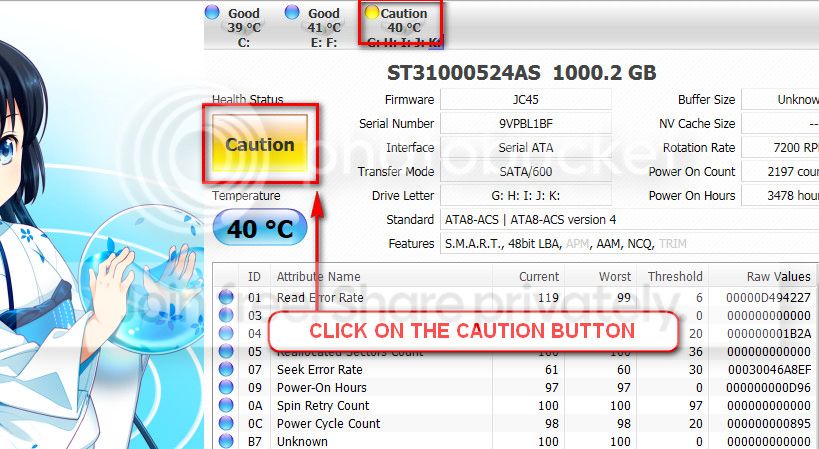
The caution indication can be converted to good using CrystalDiscInfo. Click on the caution Button, you will get another window ....
1_zps1eeadfca.jpg


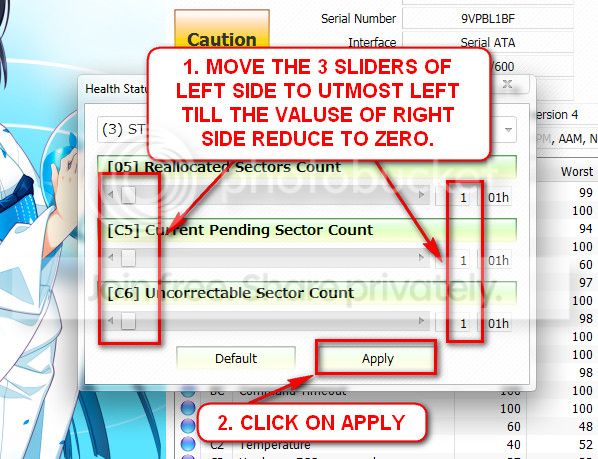
In the resulting window, there are three sliders in the left. Drag them to the ultimate left, and notice the values at the right side are converting to zeros.
2_zps50ae6eec.jpg


Now click the apply button, and notice that the caution is gone.

Back all your necessary data up externally, and send your HDD to RMA.
 

My Computer

Computer type
PC/Desktop
Computer Manufacturer/Model Number
Self Assembled
OS
Microsoft Windows 10 Pro Insider Preview 64-bit
CPU
Intel(R) Core(TM) i3-4130 CPU @ 3.40GHz
Motherboard
Gigabyte Technology Co., Ltd. B85M-D3H
Memory
Corsair Vengence 4GB x2 (8.00GB Dual-Channel DDR3 @ 798MHz)
Graphics Card(s)
2047MB GeForce GTS 450 (ZOTAC International)
Sound Card
Onboard (Realtek High Definition Audio)
Monitor(s) Displays
LG Flatron E2040T
Screen Resolution
1600x900
Hard Drives
Western Digital 1 TB
Seagate 500 GB
PSU
Corsair VS550
Case
Cooler Master K380
Cooling
Cooler Master Seidon 120V Plus
Keyboard
Logitech MK260r
Mouse
Logitech MK260r
Internet Speed
PMPL Broadband
Antivirus
Windows Defender + MBAM
Browser
Firefox
Other Info
Dell Studio 15" Laptop
Thanks for your helping with CrystalDiscInfo. The caution was converted to good. But i don't understand what you mean about the result of chkdsk and seatools. I don't see the result file to which they export. Which file do you want me to send you?
 

My Computer

Computer type
Laptop
Computer Manufacturer/Model Number
Dell
OS
Windows 7 Professional 64 bit
Antivirus
Avast Internet Security Free
Browser
Chrome, Firefox, Internet Explorer
Cannot you explain the result at least?

Your HDD is failing. Back your data up as early as possible.
 

My Computer

Computer type
PC/Desktop
Computer Manufacturer/Model Number
Self Assembled
OS
Microsoft Windows 10 Pro Insider Preview 64-bit
CPU
Intel(R) Core(TM) i3-4130 CPU @ 3.40GHz
Motherboard
Gigabyte Technology Co., Ltd. B85M-D3H
Memory
Corsair Vengence 4GB x2 (8.00GB Dual-Channel DDR3 @ 798MHz)
Graphics Card(s)
2047MB GeForce GTS 450 (ZOTAC International)
Sound Card
Onboard (Realtek High Definition Audio)
Monitor(s) Displays
LG Flatron E2040T
Screen Resolution
1600x900
Hard Drives
Western Digital 1 TB
Seagate 500 GB
PSU
Corsair VS550
Case
Cooler Master K380
Cooling
Cooler Master Seidon 120V Plus
Keyboard
Logitech MK260r
Mouse
Logitech MK260r
Internet Speed
PMPL Broadband
Antivirus
Windows Defender + MBAM
Browser
Firefox
Other Info
Dell Studio 15" Laptop
Why you said my hdd is failing? And what can I do to repair it? Need I change a new one?
 

My Computer

Computer type
Laptop
Computer Manufacturer/Model Number
Dell
OS
Windows 7 Professional 64 bit
Antivirus
Avast Internet Security Free
Browser
Chrome, Firefox, Internet Explorer
Why you said my hdd is failing? And what can I do to repair it? Need I change a new one?
Coz it is. All the information you supplies till now indicates to a failing HDD. For an attempt to repair, you need to use Seatools for Dos.
 

My Computer

Computer type
PC/Desktop
Computer Manufacturer/Model Number
Self Assembled
OS
Microsoft Windows 10 Pro Insider Preview 64-bit
CPU
Intel(R) Core(TM) i3-4130 CPU @ 3.40GHz
Motherboard
Gigabyte Technology Co., Ltd. B85M-D3H
Memory
Corsair Vengence 4GB x2 (8.00GB Dual-Channel DDR3 @ 798MHz)
Graphics Card(s)
2047MB GeForce GTS 450 (ZOTAC International)
Sound Card
Onboard (Realtek High Definition Audio)
Monitor(s) Displays
LG Flatron E2040T
Screen Resolution
1600x900
Hard Drives
Western Digital 1 TB
Seagate 500 GB
PSU
Corsair VS550
Case
Cooler Master K380
Cooling
Cooler Master Seidon 120V Plus
Keyboard
Logitech MK260r
Mouse
Logitech MK260r
Internet Speed
PMPL Broadband
Antivirus
Windows Defender + MBAM
Browser
Firefox
Other Info
Dell Studio 15" Laptop
Back
Top