
BSOD randomly appearing, BCCode 1000007e

andyITA

New member
Local time
9:33 PM
Messages
4
Hello,
I have bought a laptop Acer Aspire 5551 SH 2 months ago and it worked like a charm till yesterday when I started experiencing very odd screen freeze and then BSOD and restart.

Windows has come up with this error:
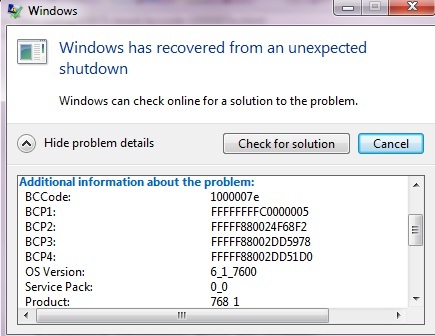

I don`t suspect it overheating because coretemp indicates a max of 52 degrees Celsius when I am running more programs simultaneously.
I have not changed anything lately on my laptop regarding hardware nor drivers or anything....

Any ideas regarding my issue from what windows shows in it-s error ?
For example now the laptop is running perfectly normal for like 50 mins.....and out of nowhere I may get that screen freeze followed by BSOD and restart.

Please help guys...
 

My Computer My Computer

Computer Manufacturer/Model Number
ACER 5551 Aspire laptop
OS
Windows 7 home premium 64bit
CPU
AMD Athlon II 2.1ghz dual core
Motherboard
No idea
Memory
3GB ram DDR3
Graphics Card(s)
ATI mobility RADEON HD 4250 256 dedicated
Sound Card
no idea
Monitor(s) Displays
Full HD LED
Hard Drives
250GB
PSU
no idea
Case
no idea
Cooling
no idea

My Computer My Computer

Computer Manufacturer/Model Number
Samsung NP530U4B-S02IN
OS
Windows® 8 Pro (64-bit)
CPU
Intel® Core™ i5 Processor 2467M (1.60GHz, 3MB L3 Cache)
Motherboard
Samsung Electronics
Memory
6GB DDR3 System Memory at 1,333MHz (on BD 4GB + 2GB x 1)
Graphics Card(s)
AMD Radeon™ HD7550M 1GB DDR3 (Ext. Graphic)
Sound Card
Realtek High Definition Audio
Monitor(s) Displays
35.56cm (14.0) SuperBright 300nit HD LED Display
Screen Resolution
1366x768
Hard Drives
1TB S-ATA II Hard Drive (5400RPM) with ExpressCache 16GB SSD
Internet Speed
sucks
Antivirus
Microsoft Security Essentials
Browser
Google Chrome (Sync enabled)
Okey I read the instructions and attached the info needed.
 

My Computer My Computer

Computer Manufacturer/Model Number
ACER 5551 Aspire laptop
OS
Windows 7 home premium 64bit
CPU
AMD Athlon II 2.1ghz dual core
Motherboard
No idea
Memory
3GB ram DDR3
Graphics Card(s)
ATI mobility RADEON HD 4250 256 dedicated
Sound Card
no idea
Monitor(s) Displays
Full HD LED
Hard Drives
250GB
PSU
no idea
Case
no idea
Cooling
no idea
Remove Eset Antivirus, it's causing BSOD-s for you:
If the removal tool does not work, use the free version of Revo Uninstaller to uninstall Eset:
Microsoft Security Essentials.

Recommended from a strict BSOD perspective, compatibility & stability compared to other antiviruses/internet security software. It is free and lightweight:-
   Warning
:ar: Do not start the free trial of Malware Bytes; remember to deselect that option when prompted.

Run a full scan with both (separately) once downloaded, installed and updated.

Perform a System File Check to check the integrity of all protected Windows 7 :
  1. Click on the start :orb:
  2. Type CMD on Search
  3. Left click and Run as Administrator
  4. Type SFC /scannow
Full tutorial here:
Disk Check on your hard drive for file system errors and bad sectors on it.
Reduce items at start-up. Nothing except anti-virus is required plus improves the time for logging in windows.
Code:
Version	6.1.7600 Build 7600
Install all updates including Service Pack 1:
Daemon Tools:
Code:
Start Menu\Programs\DAEMON Tools Lite	Public:Start Menu\Programs\DAEMON Tools Lite	Public
Please uninstall DAEMON Tools. It uses a driver called sptd.sys which is known to cause BSODs in Windows 7. Uninstall the software using Add/Remove Programs. Reboot the system. Once the program is uninstalled, run sptd.sys uninstaller to remove the driver from your system.

As an alternative, many people recommend the use of Total Mounter or Magic ISO
Let us know the results and further BSOD reports.

BSOD BUGCHECK SUMMARY

Code:
**********************SF_10-02-2013\021013-20186-01.dmp*************************
*** WARNING: Unable to verify timestamp for eamonm.sys
*** ERROR: Module load completed but symbols could not be loaded for eamonm.sys
*******************************************************************************
*                                                                             *
*                        Bugcheck Analysis                                    *
*                                                                             *
*******************************************************************************

Use !analyze -v to get detailed debugging information.

BugCheck 1000007E, {ffffffffc0000005, fffff8800810f8f2, fffff8800312b978, fffff8800312b1d0}

Probably caused by : eamonm.sys ( eamonm+78f2 )

Followup: MachineOwner
---------
¨¨¨¨¨¨¨¨¨¨¨¨¨¨¨¨¨¨¨¨¨¨¨¨¨¨¨¨¨¨¨¨¨¨¨¨¨¨¨¨¨¨¨¨¨¨¨¨¨¨¨¨¨¨¨¨¨¨¨¨¨¨¨¨¨¨¨¨¨¨¨¨¨¨¨¨¨¨¨¨¨¨¨¨¨¨``
**********************SF_10-02-2013\021013-20030-01.dmp***********************
*** WARNING: Unable to verify timestamp for eamonm.sys
*** ERROR: Module load completed but symbols could not be loaded for eamonm.sys
*******************************************************************************
*                                                                             *
*                        Bugcheck Analysis                                    *
*                                                                             *
*******************************************************************************

Use !analyze -v to get detailed debugging information.

BugCheck 1000007E, {ffffffffc0000005, fffff880024f68f2, fffff88002dd5978, fffff88002dd51d0}

*** ERROR: Symbol file could not be found.  Defaulted to export symbols for fltmgr.sys - 
Probably caused by : eamonm.sys ( eamonm+78f2 )

Followup: MachineOwner
---------
¨¨¨¨¨¨¨¨¨¨¨¨¨¨¨¨¨¨¨¨¨¨¨¨¨¨¨¨¨¨¨¨¨¨¨¨¨¨¨¨¨¨¨¨¨¨¨¨¨¨¨¨¨¨¨¨¨¨¨¨¨¨¨¨¨¨¨¨¨¨¨¨¨¨¨¨¨¨¨¨¨¨¨¨¨¨``
************************SF_10-02-2013\011313-19640-01.dmp*************************
*** WARNING: Unable to verify timestamp for eamonm.sys
*** ERROR: Module load completed but symbols could not be loaded for eamonm.sys
*******************************************************************************
*                                                                             *
*                        Bugcheck Analysis                                    *
*                                                                             *
*******************************************************************************

Use !analyze -v to get detailed debugging information.

BugCheck 1000007E, {ffffffffc0000005, fffff880024e98f2, fffff88002db9978, fffff88002db91d0}

Probably caused by : eamonm.sys ( eamonm+78f2 )

Followup: MachineOwner
---------
¨¨¨¨¨¨¨¨¨¨¨¨¨¨¨¨¨¨¨¨¨¨¨¨¨¨¨¨¨¨¨¨¨¨¨¨¨¨¨¨¨¨¨¨¨¨¨¨¨¨¨¨¨¨¨¨¨¨¨¨¨¨¨¨¨¨¨¨¨¨¨¨¨¨¨¨¨¨¨¨¨¨¨¨¨¨``
 

My Computer My Computer

Computer type
PC/Desktop
Computer Manufacturer/Model Number
Self assembled
OS
Windows 10 Home 64Bit
CPU
Intel Core i5 10400 @ 2.90GHz
Motherboard
Intel Corporation DG41WV (PROCESSOR)
Memory
8.00GB Single-Channel Unknown @ 1329MHz (16-20-20-38)
Sound Card
Realtek High Definition Audio
Monitor(s) Displays
DELL E170S
Screen Resolution
1280x1024 pixels
Hard Drives
931GB TOSHIBA DT01ACA100 (SATA)
238GB TEAM TM8PS7256G (SATA SSD)
Case
Nothing Fancy
Cooling
Fans
Keyboard
A4 Tech Co LTD
Mouse
A4 Tech Co Ltd/Logitech
Internet Speed
25 Mbps
thank you a lot for the help....I really really appreciate your effort. The best support forum ever !
 

My Computer My Computer

Computer Manufacturer/Model Number
ACER 5551 Aspire laptop
OS
Windows 7 home premium 64bit
CPU
AMD Athlon II 2.1ghz dual core
Motherboard
No idea
Memory
3GB ram DDR3
Graphics Card(s)
ATI mobility RADEON HD 4250 256 dedicated
Sound Card
no idea
Monitor(s) Displays
Full HD LED
Hard Drives
250GB
PSU
no idea
Case
no idea
Cooling
no idea
Good luck and keep us posted.
 

My Computer My Computer

Computer type
PC/Desktop
Computer Manufacturer/Model Number
Self assembled
OS
Windows 10 Home 64Bit
CPU
Intel Core i5 10400 @ 2.90GHz
Motherboard
Intel Corporation DG41WV (PROCESSOR)
Memory
8.00GB Single-Channel Unknown @ 1329MHz (16-20-20-38)
Sound Card
Realtek High Definition Audio
Monitor(s) Displays
DELL E170S
Screen Resolution
1280x1024 pixels
Hard Drives
931GB TOSHIBA DT01ACA100 (SATA)
238GB TEAM TM8PS7256G (SATA SSD)
Case
Nothing Fancy
Cooling
Fans
Keyboard
A4 Tech Co LTD
Mouse
A4 Tech Co Ltd/Logitech
Internet Speed
25 Mbps
well what can I say....my laptop is working perfectly now....I can`t thank you enough
 

My Computer My Computer

Computer Manufacturer/Model Number
ACER 5551 Aspire laptop
OS
Windows 7 home premium 64bit
CPU
AMD Athlon II 2.1ghz dual core
Motherboard
No idea
Memory
3GB ram DDR3
Graphics Card(s)
ATI mobility RADEON HD 4250 256 dedicated
Sound Card
no idea
Monitor(s) Displays
Full HD LED
Hard Drives
250GB
PSU
no idea
Case
no idea
Cooling
no idea
That's great :)

Wait for 1 more week before marking the thread as solved.
 

My Computer My Computer

Computer type
PC/Desktop
Computer Manufacturer/Model Number
Self assembled
OS
Windows 10 Home 64Bit
CPU
Intel Core i5 10400 @ 2.90GHz
Motherboard
Intel Corporation DG41WV (PROCESSOR)
Memory
8.00GB Single-Channel Unknown @ 1329MHz (16-20-20-38)
Sound Card
Realtek High Definition Audio
Monitor(s) Displays
DELL E170S
Screen Resolution
1280x1024 pixels
Hard Drives
931GB TOSHIBA DT01ACA100 (SATA)
238GB TEAM TM8PS7256G (SATA SSD)
Case
Nothing Fancy
Cooling
Fans
Keyboard
A4 Tech Co LTD
Mouse
A4 Tech Co Ltd/Logitech
Internet Speed
25 Mbps
   Tip

  • If your problem is solved please use the
    tickh.png
    Mark this thread as solved link at the top of your thread or down on the left corner
    solvebutton.gif

Be sure to post should there be any issues :)
 

My Computer My Computer

Computer type
PC/Desktop
Computer Manufacturer/Model Number
Self assembled
OS
Windows 10 Home 64Bit
CPU
Intel Core i5 10400 @ 2.90GHz
Motherboard
Intel Corporation DG41WV (PROCESSOR)
Memory
8.00GB Single-Channel Unknown @ 1329MHz (16-20-20-38)
Sound Card
Realtek High Definition Audio
Monitor(s) Displays
DELL E170S
Screen Resolution
1280x1024 pixels
Hard Drives
931GB TOSHIBA DT01ACA100 (SATA)
238GB TEAM TM8PS7256G (SATA SSD)
Case
Nothing Fancy
Cooling
Fans
Keyboard
A4 Tech Co LTD
Mouse
A4 Tech Co Ltd/Logitech
Internet Speed
25 Mbps
Back
Top