BSOD recovering from sleep with Samsung EVO 840

j0ker

New member
Local time
2:57 PM
Messages
17
Hi!

So the recent change I've made which I think is the responsible for this problem is the 512GB SSD Samsung EVO 840. I've been experiencing this BSOD / crash reboot only when waking up the computer from sleep (which is very common in my workflow, bummer).

When it reboots by itself, starting windows pops up the classical "Window has recovered from an unexpected shutdown" with this text:

Code:
Problem signature:
  Problem Event Name:	BlueScreen
  OS Version:	6.1.7601.2.1.0.256.48
  Locale ID:	1034

Additional information about the problem:
  BCCode:	f4
  BCP1:	0000000000000003
  BCP2:	FFFFFA800C310B30
  BCP3:	FFFFFA800C310E10
  BCP4:	FFFFF80003792DB0
  OS Version:	6_1_7601
  Service Pack:	1_0
  Product:	256_1

Files that help describe the problem:
  C:\Windows\Minidump\100614-15615-01.dmp
  C:\Users\Neithan\AppData\Local\Temp\WER-19546-0.sysdata.xml

Read our privacy statement online:
  http://go.microsoft.com/fwlink/?linkid=104288&clcid=0x0409

If the online privacy statement is not available, please read our privacy statement offline:
  C:\Windows\system32\en-US\erofflps.txt

I haven't had any problem besides this, I hope it's easy to fix :\

I attach that *.dmp.

Thanks!
 

My Computer My Computer

At a glance

Win7
OS
Win7
Hi j0ker.
So the recent change I've made which I think is the responsible for this problem is the 512GB SSD Samsung EVO 840.
What you stated there is true .... a stop 0xF4 is basically a storage related BSOD.

Make it sure that the SSD is running with the latest firmware.
How to Upgrade Samsung SSD Firmware | StorageReview.com - Storage Reviews

SSDs perform well with the newest version of the BIOS. As your BIOS is old (0402), get Version 1502 from ROG - RAMPAGE III EXTREME - ASUS

Also, follow http://www.sevenforums.com/tutorials/778-power-plan-settings-change.html .... When you are on Step 5. (B), Set the Disc to "never" go to sleep. It is designed in this way that some SSD are not for sleep.

Let us know for any further BSOD.
 

My Computer My Computer

At a glance

Microsoft Windows 10 Pro Insider Preview 64-bitIntel(R) Core(TM) i3-4130 CPU @ 3.40GHzCorsair Vengence 4GB x2 (8.00GB Dual-Channel ...2047MB GeForce GTS 450 (ZOTAC International)
Computer type
PC/Desktop
Computer Manufacturer/Model Number
Self Assembled
OS
Microsoft Windows 10 Pro Insider Preview 64-bit
CPU
Intel(R) Core(TM) i3-4130 CPU @ 3.40GHz
Motherboard
Gigabyte Technology Co., Ltd. B85M-D3H
Memory
Corsair Vengence 4GB x2 (8.00GB Dual-Channel DDR3 @ 798MHz)
Graphics Card(s)
2047MB GeForce GTS 450 (ZOTAC International)
Sound Card
Onboard (Realtek High Definition Audio)
Monitor(s) Displays
LG Flatron E2040T
Screen Resolution
1600x900
Hard Drives
Western Digital 1 TB
Seagate 500 GB
PSU
Corsair VS550
Case
Cooler Master K380
Cooling
Cooler Master Seidon 120V Plus
Keyboard
Logitech MK260r
Mouse
Logitech MK260r
Internet Speed
PMPL Broadband
Antivirus
Windows Defender + MBAM
Browser
Firefox
Other Info
Dell Studio 15" Laptop
Hi j0ker.
So the recent change I've made which I think is the responsible for this problem is the 512GB SSD Samsung EVO 840.
What you stated there is true .... a stop 0xF4 is basically a storage related BSOD.

Make it sure that the SSD is running with the latest firmware.
How to Upgrade Samsung SSD Firmware | StorageReview.com - Storage Reviews

SSDs perform well with the newest version of the BIOS. As your BIOS is old (0402), get Version 1502 from ROG - RAMPAGE III EXTREME - ASUS

Also, follow http://www.sevenforums.com/tutorials/778-power-plan-settings-change.html .... When you are on Step 5. (B), Set the Disc to "never" go to sleep. It is designed in this way that some SSD are not for sleep.

Let us know for any further BSOD.

Before doing anything, I've noticed that these BSOD are intermitent (always after wake up though).

My energy setting is already how you said it should.

I'm a bit afraid of updating the BIOS, as it sounds it could get ****ed and I can't skip a day without this computer. Is it risky?

Similar worries with the SSD firmware, particularly after reading:
the first step before performing any firmware update should still be to backup important data on your drive. Errors and faults can happen that may render your data inaccessible. Sometimes, updates are destructive, but in those cases users will be warned.

Thanks for your help.
 

My Computer My Computer

At a glance

Win7
OS
Win7
The BIOS update is really risky. If the process is interrupted then it will convert to the motherboard to a brick only.

But SSD firmware update is not that risky ... at least nobody reported something like that till date. Still if you are afraid, you may backup your data before doing the update.

I am seeking for more help in your thread .... if anyone more experienced can handle your issue.
 

My Computer My Computer

At a glance

Microsoft Windows 10 Pro Insider Preview 64-bitIntel(R) Core(TM) i3-4130 CPU @ 3.40GHzCorsair Vengence 4GB x2 (8.00GB Dual-Channel ...2047MB GeForce GTS 450 (ZOTAC International)
Computer type
PC/Desktop
Computer Manufacturer/Model Number
Self Assembled
OS
Microsoft Windows 10 Pro Insider Preview 64-bit
CPU
Intel(R) Core(TM) i3-4130 CPU @ 3.40GHz
Motherboard
Gigabyte Technology Co., Ltd. B85M-D3H
Memory
Corsair Vengence 4GB x2 (8.00GB Dual-Channel DDR3 @ 798MHz)
Graphics Card(s)
2047MB GeForce GTS 450 (ZOTAC International)
Sound Card
Onboard (Realtek High Definition Audio)
Monitor(s) Displays
LG Flatron E2040T
Screen Resolution
1600x900
Hard Drives
Western Digital 1 TB
Seagate 500 GB
PSU
Corsair VS550
Case
Cooler Master K380
Cooling
Cooler Master Seidon 120V Plus
Keyboard
Logitech MK260r
Mouse
Logitech MK260r
Internet Speed
PMPL Broadband
Antivirus
Windows Defender + MBAM
Browser
Firefox
Other Info
Dell Studio 15" Laptop
An update on this thread:

Yesterday night while I was working in Illustrator my computer freezed up and shortly after rebooted itself with no visible errors the first time, and a BSOD (with the 0xF4 thing) the second time. I lost almost 2 hours of work :(

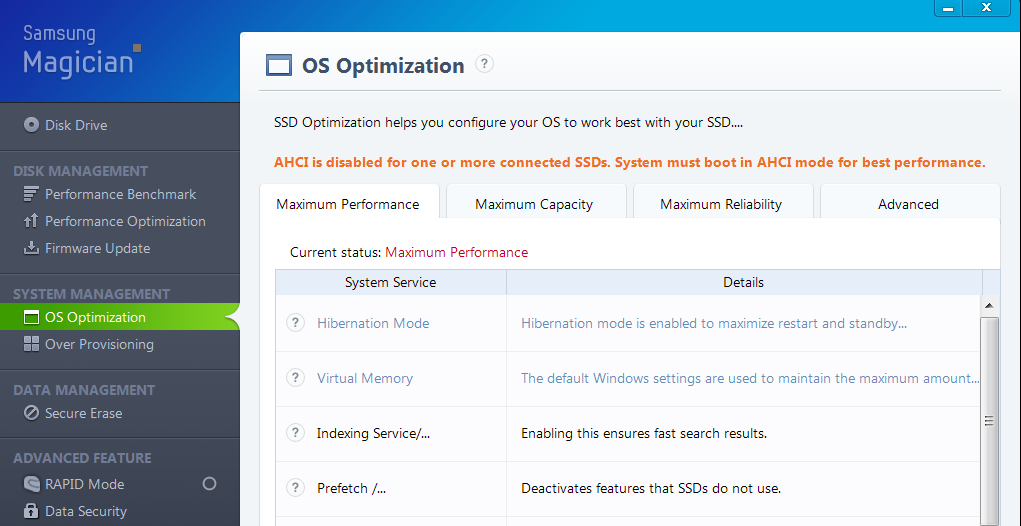
According to Samsung Magician I have the latest SSD firmware. So, unless there's something else I can do, the last thing to try is updating the BIOS as you said?

One thing though:

U56xOIM.png


I think I tried setting AHCI in the BIOS and then it didn't recognize the device or something, can't remember for sure. Should anything be done about that warning?

There must be something else...
 

My Computer My Computer

At a glance

Win7
OS
Win7

My Computer My Computer

At a glance

Microsoft Windows 10 Pro Insider Preview 64-bitIntel(R) Core(TM) i3-4130 CPU @ 3.40GHzCorsair Vengence 4GB x2 (8.00GB Dual-Channel ...2047MB GeForce GTS 450 (ZOTAC International)
Computer type
PC/Desktop
Computer Manufacturer/Model Number
Self Assembled
OS
Microsoft Windows 10 Pro Insider Preview 64-bit
CPU
Intel(R) Core(TM) i3-4130 CPU @ 3.40GHz
Motherboard
Gigabyte Technology Co., Ltd. B85M-D3H
Memory
Corsair Vengence 4GB x2 (8.00GB Dual-Channel DDR3 @ 798MHz)
Graphics Card(s)
2047MB GeForce GTS 450 (ZOTAC International)
Sound Card
Onboard (Realtek High Definition Audio)
Monitor(s) Displays
LG Flatron E2040T
Screen Resolution
1600x900
Hard Drives
Western Digital 1 TB
Seagate 500 GB
PSU
Corsair VS550
Case
Cooler Master K380
Cooling
Cooler Master Seidon 120V Plus
Keyboard
Logitech MK260r
Mouse
Logitech MK260r
Internet Speed
PMPL Broadband
Antivirus
Windows Defender + MBAM
Browser
Firefox
Other Info
Dell Studio 15" Laptop
Sure, here it is.

Just now, before entering the forum (after waking up the system) yet another BSOD on my face, this time it wasn't the usual 0xF4 though. It said something about win32k.sys. The dump should be in the ZIP i'm uploading.

Thank you!
 

My Computer My Computer

At a glance

Win7
OS
Win7
It is a different thing.
Code:
[COLOR=Red]BugCheck 50[/COLOR], {fffff900c30f9608, 0, fffff960002a1d12, 0}

*** WARNING: Unable to verify timestamp for win32k.sys
*** ERROR: Module load completed but symbols could not be loaded for win32k.sys

Could not read faulting driver name
Probably caused by : win32k.sys ( win32k+201d12 )

Followup: MachineOwner
---------
A stop 0x50 is usually a memory error. Either the physical memory is not doing its job properly or any driver is passing bad information to the memory. But the crash dump is not very precious about the probable cause. Let us check both the possibilities one by one.

Test your RAM modules for possible errors.Run memtest86+ for at least 8 consecutive passes.

If it start showing errors/red lines, stop testing. A single error is enough to determine that something is going bad there.

If it does not show any error, enable Driver Verifier to monitor the drivers.Run Driver Verifier for 24 hours or the occurrence of the next crash, whichever is earlier.

   Information
Why Driver Verifier:
It puts a stress on the drivers, ans so it makes the unstable drivers crash. Hopefully the driver that crashes is recorded in the memory dump.

How Can we know that DV is enabled:
It will make the system bit of slow, laggy.

   Warning
Before enabling DV, make it sure that you have earlier System restore points made in your computer. You can check it easily by using CCleaner looking at Tools > System Restore.

If there is no points, make a System Restore Point manually before enabling DV.

   Tip


Let us know the results, with the subsequent crash dumps, if any.
 

My Computer My Computer

At a glance

Microsoft Windows 10 Pro Insider Preview 64-bitIntel(R) Core(TM) i3-4130 CPU @ 3.40GHzCorsair Vengence 4GB x2 (8.00GB Dual-Channel ...2047MB GeForce GTS 450 (ZOTAC International)
Computer type
PC/Desktop
Computer Manufacturer/Model Number
Self Assembled
OS
Microsoft Windows 10 Pro Insider Preview 64-bit
CPU
Intel(R) Core(TM) i3-4130 CPU @ 3.40GHz
Motherboard
Gigabyte Technology Co., Ltd. B85M-D3H
Memory
Corsair Vengence 4GB x2 (8.00GB Dual-Channel DDR3 @ 798MHz)
Graphics Card(s)
2047MB GeForce GTS 450 (ZOTAC International)
Sound Card
Onboard (Realtek High Definition Audio)
Monitor(s) Displays
LG Flatron E2040T
Screen Resolution
1600x900
Hard Drives
Western Digital 1 TB
Seagate 500 GB
PSU
Corsair VS550
Case
Cooler Master K380
Cooling
Cooler Master Seidon 120V Plus
Keyboard
Logitech MK260r
Mouse
Logitech MK260r
Internet Speed
PMPL Broadband
Antivirus
Windows Defender + MBAM
Browser
Firefox
Other Info
Dell Studio 15" Laptop
Back
Top