BSOD right after boot, even in Safe Mode

SwizzzzZ

New member
Local time
10:47 AM
Messages
19
- x86 (32-bit) or x64 ? x64
- the original installed OS on the system? Yes
- an OEM or full retail version? Full - What is the age of system (hardware)? 2-3 years
- What is the age of OS installation (have you re-installed the OS?) 2-3 years

I don't know how to supply the info dumps when It crashes right after booting as well as in safe mode. It started last night with a random one and now it does it within 30sec to a min after booting, sometimes while booting. I didn't install / download / change anything new within the past few days. And I was on youtube, fantasy baseball and itunes when it first happened.... So I really don't know where to start as far as fixing it. Any help is appreciated.

I've gotten these BSOD errors and some more:

Pen List Corrupt
Irql not less or equal


My Computer My Computer

At a glance

Windows 7 Pro 64Intel E7500G.Skill 4gb 1066XFX HD 5750
OS
Windows 7 Pro 64
CPU
Intel E7500
Motherboard
Gigabyte EP45-UD3L
Memory
G.Skill 4gb 1066
Graphics Card(s)
XFX HD 5750
Hard Drives
WD 640gb Black
PSU
OCZ ModxStream 600w
Case
Antec 300


We do need the DMP file as it contains the only record of the sequence of events leading up to the crash, what drivers were loaded, and what was responsible.

If you are overclocking STOP


We could also use some system information, which you can get easily by running msinfo32.
To do that go to start>run>type msinfo32>enter

When it is finished running go to file>save>name it and upload to us here.


You may be able to get the DMP files without crashing by booting into safe mode (F8) with networking.

To enable us to assist you with your computer's BSOD symptoms, upload the contents of your "\Windows\Minidump" folder.

The procedure:
* Copy the contents of \Windows\Minidump to another (temporary) location somewhere on your machine.
* Zip up the copy.
* Attach the ZIP archive to your post using the "paperclip" (file attachments) button.
*If the files are too large please upload them to a file sharing service like "Rapidshare" and put a link to them in your reply.


To ensure minidumps are enabled:
* Go to Start, in the Search Box type: sysdm.cpl, press Enter.
* Under the Advanced tab, click on the Startup and Recovery Settings... button.
* Ensure that Automatically restart is unchecked.
* Under the Write Debugging Information header select Small memory dump (256 kB) in the dropdown box (the 256kb varies).
* Ensure that the Small Dump Directory is listed as %systemroot%\Minidump.
* OK your way out.
* Reboot if changes have been made.
 

My Computer My Computer

At a glance

Win 8 Release candidate 8400[email protected]4 gigsNvidia 9600M
Computer Manufacturer/Model Number
HP Pavillion dv-7 1005 Tx
OS
Win 8 Release candidate 8400
CPU
[email protected]
Memory
4 gigs
Graphics Card(s)
Nvidia 9600M
Sound Card
HD built-in
Monitor(s) Displays
17" Wxga
Screen Resolution
1440x900
Cooling
none
Internet Speed
45Mb down 5Mb up
heres the msinfo32 before it bsod again...im working on the other stuff
 

My Computer My Computer

At a glance

Windows 7 Pro 64Intel E7500G.Skill 4gb 1066XFX HD 5750
OS
Windows 7 Pro 64
CPU
Intel E7500
Motherboard
Gigabyte EP45-UD3L
Memory
G.Skill 4gb 1066
Graphics Card(s)
XFX HD 5750
Hard Drives
WD 640gb Black
PSU
OCZ ModxStream 600w
Case
Antec 300
Once again nothing changed and I can't even boot now. Not normal boot, safe mode, or safe mode w/ networking. I get BSOD on all of them. And safe modes stop loading at windows/system32/CI.dll
 

My Computer My Computer

At a glance

Windows 7 Pro 64Intel E7500G.Skill 4gb 1066XFX HD 5750
OS
Windows 7 Pro 64
CPU
Intel E7500
Motherboard
Gigabyte EP45-UD3L
Memory
G.Skill 4gb 1066
Graphics Card(s)
XFX HD 5750
Hard Drives
WD 640gb Black
PSU
OCZ ModxStream 600w
Case
Antec 300
Once again nothing changed and I can't even boot now. Not normal boot, safe mode, or safe mode w/ networking. I get BSOD on all of them. And safe modes stop loading at windows/system32/CI.dll

Do you have the win 7 dvd?

have you run a recent malware scan?
 

My Computer My Computer

At a glance

Win 8 Release candidate 8400[email protected]4 gigsNvidia 9600M
Computer Manufacturer/Model Number
HP Pavillion dv-7 1005 Tx
OS
Win 8 Release candidate 8400
CPU
[email protected]
Memory
4 gigs
Graphics Card(s)
Nvidia 9600M
Sound Card
HD built-in
Monitor(s) Displays
17" Wxga
Screen Resolution
1440x900
Cooling
none
Internet Speed
45Mb down 5Mb up
Yes, I have a Win7 disc. I tried to run a malware scan a few times when I was able to boot, but a few seconds into it it would BSOD.
 

My Computer My Computer

At a glance

Windows 7 Pro 64Intel E7500G.Skill 4gb 1066XFX HD 5750
OS
Windows 7 Pro 64
CPU
Intel E7500
Motherboard
Gigabyte EP45-UD3L
Memory
G.Skill 4gb 1066
Graphics Card(s)
XFX HD 5750
Hard Drives
WD 640gb Black
PSU
OCZ ModxStream 600w
Case
Antec 300

My Computer My Computer

At a glance

Windows 7 Home Premium 64 BitIntel(R) Core(TM)2 Quad CPU Q9550 @ 2.83GHz6.00 GB Hundai HMT125U6BFR8C-H9ATI Radeon HD 4850
Computer Manufacturer/Model Number
HP Pavilion e9110t
OS
Windows 7 Home Premium 64 Bit
CPU
Intel(R) Core(TM)2 Quad CPU Q9550 @ 2.83GHz
Motherboard
Pegatron IPIEL-LA3
Memory
6.00 GB Hundai HMT125U6BFR8C-H9
Graphics Card(s)
ATI Radeon HD 4850
Sound Card
Realtek High Definition Audio/ATI High Definition Audio
Monitor(s) Displays
Acer AL2216W
Screen Resolution
1680x1050
Hard Drives
Hitachi HDP725050GLA360 ATA Device 500 GB
PSU
Unknown/installed by HP
Case
HP generic case
Cooling
Intel Stock Cooling
Keyboard
HP Keyboard
Mouse
HP Mouse
Internet Speed
Download: 19.15 Mbps Upload: 1.67 Mbps
Other Info
Network Adapter Realtek RTL8168D/8111D Family PCI-E Gigabit Ethernet NIC (NDIS 6.20)
Network Adapter 802.11n Wireless PCI Express Card LAN Adapter
It worked all the way up until it starting to scan. I get an error 'Windows Defender Offline couldn't scan your PC'
With error code: 0x800106ba
 

My Computer My Computer

At a glance

Windows 7 Pro 64Intel E7500G.Skill 4gb 1066XFX HD 5750
OS
Windows 7 Pro 64
CPU
Intel E7500
Motherboard
Gigabyte EP45-UD3L
Memory
G.Skill 4gb 1066
Graphics Card(s)
XFX HD 5750
Hard Drives
WD 640gb Black
PSU
OCZ ModxStream 600w
Case
Antec 300
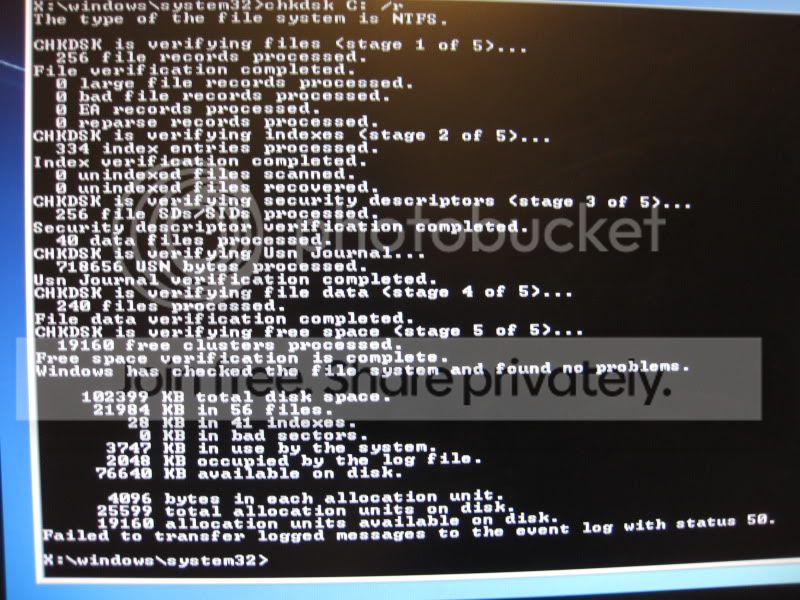
I also tried to run chkdsk C: /r and I get a error:

'Failed to transfer logged message to the event log with status 50.'
 

My Computer My Computer

At a glance

Windows 7 Pro 64Intel E7500G.Skill 4gb 1066XFX HD 5750
OS
Windows 7 Pro 64
CPU
Intel E7500
Motherboard
Gigabyte EP45-UD3L
Memory
G.Skill 4gb 1066
Graphics Card(s)
XFX HD 5750
Hard Drives
WD 640gb Black
PSU
OCZ ModxStream 600w
Case
Antec 300
The error with chkdsk is normal. What were the results? Were any problems found with the file system/did Windows make corrections to the file system.

Not sure why Windows Defender Offline failed... Try one of these FREE Bootable AntiVirus Rescue CDs.
 

My Computer My Computer

At a glance

Windows 7 Home Premium 64 BitIntel(R) Core(TM)2 Quad CPU Q9550 @ 2.83GHz6.00 GB Hundai HMT125U6BFR8C-H9ATI Radeon HD 4850
Computer Manufacturer/Model Number
HP Pavilion e9110t
OS
Windows 7 Home Premium 64 Bit
CPU
Intel(R) Core(TM)2 Quad CPU Q9550 @ 2.83GHz
Motherboard
Pegatron IPIEL-LA3
Memory
6.00 GB Hundai HMT125U6BFR8C-H9
Graphics Card(s)
ATI Radeon HD 4850
Sound Card
Realtek High Definition Audio/ATI High Definition Audio
Monitor(s) Displays
Acer AL2216W
Screen Resolution
1680x1050
Hard Drives
Hitachi HDP725050GLA360 ATA Device 500 GB
PSU
Unknown/installed by HP
Case
HP generic case
Cooling
Intel Stock Cooling
Keyboard
HP Keyboard
Mouse
HP Mouse
Internet Speed
Download: 19.15 Mbps Upload: 1.67 Mbps
Other Info
Network Adapter Realtek RTL8168D/8111D Family PCI-E Gigabit Ethernet NIC (NDIS 6.20)
Network Adapter 802.11n Wireless PCI Express Card LAN Adapter
Here's what it says when I run chkdsk:

IMG_2232.jpg


I also downloaded and burned a Kaspersky Rescue Disk. I've been running it for 3.5hrs so far and it's only at 1% scanned....this is gonna take days. Is this normal?
 

My Computer My Computer

At a glance

Windows 7 Pro 64Intel E7500G.Skill 4gb 1066XFX HD 5750
OS
Windows 7 Pro 64
CPU
Intel E7500
Motherboard
Gigabyte EP45-UD3L
Memory
G.Skill 4gb 1066
Graphics Card(s)
XFX HD 5750
Hard Drives
WD 640gb Black
PSU
OCZ ModxStream 600w
Case
Antec 300
Disk check looks clean.

The Kaspersky scan should not be that slow... Is it still progressing at a snail's pace? If so, try the Bitdefender rescue CD: Index of /rescue_cd
 

My Computer My Computer

At a glance

Windows 7 Home Premium 64 BitIntel(R) Core(TM)2 Quad CPU Q9550 @ 2.83GHz6.00 GB Hundai HMT125U6BFR8C-H9ATI Radeon HD 4850
Computer Manufacturer/Model Number
HP Pavilion e9110t
OS
Windows 7 Home Premium 64 Bit
CPU
Intel(R) Core(TM)2 Quad CPU Q9550 @ 2.83GHz
Motherboard
Pegatron IPIEL-LA3
Memory
6.00 GB Hundai HMT125U6BFR8C-H9
Graphics Card(s)
ATI Radeon HD 4850
Sound Card
Realtek High Definition Audio/ATI High Definition Audio
Monitor(s) Displays
Acer AL2216W
Screen Resolution
1680x1050
Hard Drives
Hitachi HDP725050GLA360 ATA Device 500 GB
PSU
Unknown/installed by HP
Case
HP generic case
Cooling
Intel Stock Cooling
Keyboard
HP Keyboard
Mouse
HP Mouse
Internet Speed
Download: 19.15 Mbps Upload: 1.67 Mbps
Other Info
Network Adapter Realtek RTL8168D/8111D Family PCI-E Gigabit Ethernet NIC (NDIS 6.20)
Network Adapter 802.11n Wireless PCI Express Card LAN Adapter
I scanned with BitDefender and got 1 threat in 2 items:

Exploit.CVE.2007-0071.Gen

I removed both.

Still getting BSOD right after it says Starting Windows...
 

My Computer My Computer

At a glance

Windows 7 Pro 64Intel E7500G.Skill 4gb 1066XFX HD 5750
OS
Windows 7 Pro 64
CPU
Intel E7500
Motherboard
Gigabyte EP45-UD3L
Memory
G.Skill 4gb 1066
Graphics Card(s)
XFX HD 5750
Hard Drives
WD 640gb Black
PSU
OCZ ModxStream 600w
Case
Antec 300

My Computer My Computer

At a glance

Windows 7 Home Premium 64 BitIntel(R) Core(TM)2 Quad CPU Q9550 @ 2.83GHz6.00 GB Hundai HMT125U6BFR8C-H9ATI Radeon HD 4850
Computer Manufacturer/Model Number
HP Pavilion e9110t
OS
Windows 7 Home Premium 64 Bit
CPU
Intel(R) Core(TM)2 Quad CPU Q9550 @ 2.83GHz
Motherboard
Pegatron IPIEL-LA3
Memory
6.00 GB Hundai HMT125U6BFR8C-H9
Graphics Card(s)
ATI Radeon HD 4850
Sound Card
Realtek High Definition Audio/ATI High Definition Audio
Monitor(s) Displays
Acer AL2216W
Screen Resolution
1680x1050
Hard Drives
Hitachi HDP725050GLA360 ATA Device 500 GB
PSU
Unknown/installed by HP
Case
HP generic case
Cooling
Intel Stock Cooling
Keyboard
HP Keyboard
Mouse
HP Mouse
Internet Speed
Download: 19.15 Mbps Upload: 1.67 Mbps
Other Info
Network Adapter Realtek RTL8168D/8111D Family PCI-E Gigabit Ethernet NIC (NDIS 6.20)
Network Adapter 802.11n Wireless PCI Express Card LAN Adapter
I did the sfc scannow. It said:

'Beginning system scan. This process will take some time.

Windows Resource Protection could not perform the requested operation.'
 

My Computer My Computer

At a glance

Windows 7 Pro 64Intel E7500G.Skill 4gb 1066XFX HD 5750
OS
Windows 7 Pro 64
CPU
Intel E7500
Motherboard
Gigabyte EP45-UD3L
Memory
G.Skill 4gb 1066
Graphics Card(s)
XFX HD 5750
Hard Drives
WD 640gb Black
PSU
OCZ ModxStream 600w
Case
Antec 300
Are you sure you used the correct drive letter? It may not be C: and could be D:, E:, F:, or even G: depending on your partition layout. To determine which drive it is, you want to find the drive containing the Windows folder. The following commands will help in this regard:
C:
dir
D:
dir
E:
dir
F:
dir
G:
dir​
 

My Computer My Computer

At a glance

Windows 7 Home Premium 64 BitIntel(R) Core(TM)2 Quad CPU Q9550 @ 2.83GHz6.00 GB Hundai HMT125U6BFR8C-H9ATI Radeon HD 4850
Computer Manufacturer/Model Number
HP Pavilion e9110t
OS
Windows 7 Home Premium 64 Bit
CPU
Intel(R) Core(TM)2 Quad CPU Q9550 @ 2.83GHz
Motherboard
Pegatron IPIEL-LA3
Memory
6.00 GB Hundai HMT125U6BFR8C-H9
Graphics Card(s)
ATI Radeon HD 4850
Sound Card
Realtek High Definition Audio/ATI High Definition Audio
Monitor(s) Displays
Acer AL2216W
Screen Resolution
1680x1050
Hard Drives
Hitachi HDP725050GLA360 ATA Device 500 GB
PSU
Unknown/installed by HP
Case
HP generic case
Cooling
Intel Stock Cooling
Keyboard
HP Keyboard
Mouse
HP Mouse
Internet Speed
Download: 19.15 Mbps Upload: 1.67 Mbps
Other Info
Network Adapter Realtek RTL8168D/8111D Family PCI-E Gigabit Ethernet NIC (NDIS 6.20)
Network Adapter 802.11n Wireless PCI Express Card LAN Adapter
Yea I made that mistake the first time I ran chkdsk. But I figured out my drive letter is D. So I re-ran chkdsk and it took a few hours, everything was good.

I just ran sfc /scannow /offbootdir=d:\ /offwindir=d:\windows for the 2nd time and still get 'Windows Resource Protection could not perform the requested operation.'
 

My Computer My Computer

At a glance

Windows 7 Pro 64Intel E7500G.Skill 4gb 1066XFX HD 5750
OS
Windows 7 Pro 64
CPU
Intel E7500
Motherboard
Gigabyte EP45-UD3L
Memory
G.Skill 4gb 1066
Graphics Card(s)
XFX HD 5750
Hard Drives
WD 640gb Black
PSU
OCZ ModxStream 600w
Case
Antec 300
Unfortunately, that may mean you have a corrupted Windows installation that even SFC repairs cannot fix. :( It may be time to backup your data and do a http://www.sevenforums.com/tutorials/219487-clean-reinstall-factory-oem-windows-7-a.html#post1839164. Some of the steps will not apply since you do not have a pre-manufactured system, but just disregard anything that applies to such systems. That tutorial is still the best method for a re-install.

For backing up your system: http://www.sevenforums.com/tutorials/93347-copy-paste-windows-recovery-console.html


Before attempting the re-install, you could try the steps for http://www.sevenforums.com/tutorials/219533-troubleshooting-windows-7-failure-boot.html (some you have already done, so skip those steps that you already did).
 
Last edited:

My Computer My Computer

At a glance

Windows 7 Home Premium 64 BitIntel(R) Core(TM)2 Quad CPU Q9550 @ 2.83GHz6.00 GB Hundai HMT125U6BFR8C-H9ATI Radeon HD 4850
Computer Manufacturer/Model Number
HP Pavilion e9110t
OS
Windows 7 Home Premium 64 Bit
CPU
Intel(R) Core(TM)2 Quad CPU Q9550 @ 2.83GHz
Motherboard
Pegatron IPIEL-LA3
Memory
6.00 GB Hundai HMT125U6BFR8C-H9
Graphics Card(s)
ATI Radeon HD 4850
Sound Card
Realtek High Definition Audio/ATI High Definition Audio
Monitor(s) Displays
Acer AL2216W
Screen Resolution
1680x1050
Hard Drives
Hitachi HDP725050GLA360 ATA Device 500 GB
PSU
Unknown/installed by HP
Case
HP generic case
Cooling
Intel Stock Cooling
Keyboard
HP Keyboard
Mouse
HP Mouse
Internet Speed
Download: 19.15 Mbps Upload: 1.67 Mbps
Other Info
Network Adapter Realtek RTL8168D/8111D Family PCI-E Gigabit Ethernet NIC (NDIS 6.20)
Network Adapter 802.11n Wireless PCI Express Card LAN Adapter
Ok question for backing up my data. Since I only have 1 hard drive, would it be easier to buy another hard drive and do what it says in that back-up tutorial. Or buy a external HDD enclosure and put my current one into that, hook it up to a laptop, back up the data, then put it back in my computer, reformat and reinstall windows on it?
 

My Computer My Computer

At a glance

Windows 7 Pro 64Intel E7500G.Skill 4gb 1066XFX HD 5750
OS
Windows 7 Pro 64
CPU
Intel E7500
Motherboard
Gigabyte EP45-UD3L
Memory
G.Skill 4gb 1066
Graphics Card(s)
XFX HD 5750
Hard Drives
WD 640gb Black
PSU
OCZ ModxStream 600w
Case
Antec 300
It would probably be easier to get an external. We actually recommend backing up data on a regular basis anyway, so if you get an external, you can have peace of mind in the future that you have your data backed up. You can even create system images so you can restore your system to a point in time prior to issues that arise (after backing up the current data since the system image will overwrite it). There is a forum in SevenForums to this end: Backup and Restore - Windows 7 Forums and you are welcome to start a thread there to find out more about backing up and restoring your system.
 

My Computer My Computer

At a glance

Windows 7 Home Premium 64 BitIntel(R) Core(TM)2 Quad CPU Q9550 @ 2.83GHz6.00 GB Hundai HMT125U6BFR8C-H9ATI Radeon HD 4850
Computer Manufacturer/Model Number
HP Pavilion e9110t
OS
Windows 7 Home Premium 64 Bit
CPU
Intel(R) Core(TM)2 Quad CPU Q9550 @ 2.83GHz
Motherboard
Pegatron IPIEL-LA3
Memory
6.00 GB Hundai HMT125U6BFR8C-H9
Graphics Card(s)
ATI Radeon HD 4850
Sound Card
Realtek High Definition Audio/ATI High Definition Audio
Monitor(s) Displays
Acer AL2216W
Screen Resolution
1680x1050
Hard Drives
Hitachi HDP725050GLA360 ATA Device 500 GB
PSU
Unknown/installed by HP
Case
HP generic case
Cooling
Intel Stock Cooling
Keyboard
HP Keyboard
Mouse
HP Mouse
Internet Speed
Download: 19.15 Mbps Upload: 1.67 Mbps
Other Info
Network Adapter Realtek RTL8168D/8111D Family PCI-E Gigabit Ethernet NIC (NDIS 6.20)
Network Adapter 802.11n Wireless PCI Express Card LAN Adapter
Back
Top