BSOD (RSOD) playing WoW, Multiple Crashes.

Frontear

New member
Local time
10:54 PM
Messages
11
Hi,

I've been having multiple crashes (usually screen will flash white/grey and freeze) usually whilst playing WoW and/or having other things open.

Problem signature:
Problem Event Name: BlueScreen
OS Version: 6.1.7601.2.1.0.768.3
Locale ID: 3081

Additional information about the problem:
BCCode: 116
BCP1: FFFFFA8006B0C010
BCP2: FFFFF8800FF45828
BCP3: FFFFFFFFC000009A
BCP4: 0000000000000004
OS Version: 6_1_7601
Service Pack: 1_0
Product: 768_1

Files that help describe the problem:
C:\Windows\Minidump\121414-6302-01.dmp
C:\Users\Bart\AppData\Local\Temp\WER-9578-0.sysdata.xml

Read our privacy statement online:
Windows 7 Privacy Statement - Microsoft Windows

If the online privacy statement is not available, please read our privacy statement offline:
C:\Windows\system32\en-US\erofflps.txt

I have attached the SF Diag tool zip.

Any help would be appreciated.

Thanks,
Bart
 

My Computer

Computer type
PC/Desktop
Computer Manufacturer/Model Number
Custom Build
OS
Windows 7 Home Premium 64Bit SP1
CPU
Intel Core i5 3570K @ 3.4GHz
Motherboard
Gigabyte Z77X-D3H
Memory
8G DDR3
Graphics Card(s)
2Gb NVIDIA GeForce GTX 670
Hard Drives
180Gb Intel SSD
2TB Seagate Sata HDD
Antivirus
AVG Free 2014
Browser
Google Chrome
Any assistance with this?

It has just happened again twice...

Thanks,
Bart
 

My Computer

Computer type
PC/Desktop
Computer Manufacturer/Model Number
Custom Build
OS
Windows 7 Home Premium 64Bit SP1
CPU
Intel Core i5 3570K @ 3.4GHz
Motherboard
Gigabyte Z77X-D3H
Memory
8G DDR3
Graphics Card(s)
2Gb NVIDIA GeForce GTX 670
Hard Drives
180Gb Intel SSD
2TB Seagate Sata HDD
Antivirus
AVG Free 2014
Browser
Google Chrome
Frontear, welcome to Seven Forums, I will try to help if I can. You have dump files dating back to 5/2014, all with the same problem. They stopped in June this year and started again this month. What happened during those months where there were no dump files?

Your description od what you are seeing are classic signs of a Video driver problem or a video card going out. What you are experiencing is a classic video TDR error. That means your drivers are crashing but not recoverind in the time given by the OS so Windows assumes it is a video failure. TDR means Time delay and Recovery.

Code:
Use !analyze -v to get detailed debugging information.
BugCheck 116, {fffffa800e61e200, fffff8800fdc2828, ffffffffc000009a, 4}
Unable to load image \SystemRoot\system32\DRIVERS\nvlddmkm.sys, Win32 error 0n2
*** WARNING: Unable to verify timestamp for nvlddmkm.sys
*** ERROR: Module load completed but symbols could not be loaded for nvlddmkm.sys
[COLOR=red]Probably caused by : nvlddmkm.sys[/COLOR] ( nvlddmkm+921828 )
Followup: MachineOwner

Code:
 nvlddmkm
start             end                 module name
fffff880`0f66a000 fffff880`1034a000   nvlddmkm T (no symbols)           
    Loaded symbol image file: nvlddmkm.sys
    Image path: \SystemRoot\system32\DRIVERS\nvlddmkm.sys
    Image name: [COLOR=red]nvlddmkm.sys[/COLOR]
    Timestamp:        Wed Nov 12 14:51:31 2014 (5463C853)
    CheckSum:         00CA4D59
    ImageSize:        00CE0000
    Translations:     0000.04b0 0000.04e4 0409.04b0 0409.04e4

Please try to update your video driver using the method described here http://www.sevenforums.com/tutorials/327414-nvidia-drivers-avoid-problems.html
 

My Computers

System One System Two

  • Computer type
    PC/Desktop
    Computer Manufacturer/Model Number
    ALWAYS UNDER CONSTRUCTION
    OS
    Windows 11 Pro
    CPU
    Ryzen 9 5900X
    Motherboard
    Asus X570 Crosshair Viii Hero
    Memory
    32GB G Skill DDR4-3600
    Graphics Card(s)
    EVGA RTX 3080 FTW 3 Ultra
    Sound Card
    On Board/Sennheiser PC37X Headset
    Monitor(s) Displays
    3 X Asus 27"
    Screen Resolution
    2560x1440
    Hard Drives
    2 X 1 TB NVME drives
    PSU
    EVGA 850
    Case
    Phanteks Eclipse P400A
    Cooling
    EVGA 280 AIO
    Keyboard
    Logitech G510s/ Logitech G13
    Mouse
    Logitech G502
    Internet Speed
    24/1
    Antivirus
    ESET/MBAM Pro/SAS Pro
    Browser
    Chrome/ Firefox/ Edge
  • Computer type
    Laptop
    System Manufacturer/Model Number
    Dell 16 Plus
    OS
    Windows 11 Pro
    CPU
    Intel Ultra 9 288V
    Memory
    32 GB LPDDR5X 8533
    Monitor(s) Displays
    16" Mini-LED HDR600 Touch 90 Hz
    Screen Resolution
    2560X1600
    Hard Drives
    1 TB NVME
Well I was on hiatus from playing World of Warcraft during that period. It is only when I play the game that the random freezes occur.

I will follow the Nvidia driver guide and give you an update.
 

My Computer

Computer type
PC/Desktop
Computer Manufacturer/Model Number
Custom Build
OS
Windows 7 Home Premium 64Bit SP1
CPU
Intel Core i5 3570K @ 3.4GHz
Motherboard
Gigabyte Z77X-D3H
Memory
8G DDR3
Graphics Card(s)
2Gb NVIDIA GeForce GTX 670
Hard Drives
180Gb Intel SSD
2TB Seagate Sata HDD
Antivirus
AVG Free 2014
Browser
Google Chrome
The issue with this video card is that it started occurring back when I first purchased it.

The issue disappeared with a driver update (or at least seemed to) but then when the next driver update came, it kept crashing again.
 

My Computer

Computer type
PC/Desktop
Computer Manufacturer/Model Number
Custom Build
OS
Windows 7 Home Premium 64Bit SP1
CPU
Intel Core i5 3570K @ 3.4GHz
Motherboard
Gigabyte Z77X-D3H
Memory
8G DDR3
Graphics Card(s)
2Gb NVIDIA GeForce GTX 670
Hard Drives
180Gb Intel SSD
2TB Seagate Sata HDD
Antivirus
AVG Free 2014
Browser
Google Chrome
Driver version in the folders didn't match the version on the nvidia control panel.

Clean install and everything matching.

Hopefully fixes the issue.

Will update with a log if I get another crash.

Thanks essenbe.

Bart
 

My Computer

Computer type
PC/Desktop
Computer Manufacturer/Model Number
Custom Build
OS
Windows 7 Home Premium 64Bit SP1
CPU
Intel Core i5 3570K @ 3.4GHz
Motherboard
Gigabyte Z77X-D3H
Memory
8G DDR3
Graphics Card(s)
2Gb NVIDIA GeForce GTX 670
Hard Drives
180Gb Intel SSD
2TB Seagate Sata HDD
Antivirus
AVG Free 2014
Browser
Google Chrome
Well 5 mins into playing, the same error occurred.

Zip log attached.
 

My Computer

Computer type
PC/Desktop
Computer Manufacturer/Model Number
Custom Build
OS
Windows 7 Home Premium 64Bit SP1
CPU
Intel Core i5 3570K @ 3.4GHz
Motherboard
Gigabyte Z77X-D3H
Memory
8G DDR3
Graphics Card(s)
2Gb NVIDIA GeForce GTX 670
Hard Drives
180Gb Intel SSD
2TB Seagate Sata HDD
Antivirus
AVG Free 2014
Browser
Google Chrome
Same thing

Code:
VIDEO_TDR_FAILURE (116)
Attempt to reset the display driver and recover from timeout failed.
Arguments:
Arg1: fffffa800a363100, Optional pointer to internal TDR recovery context (TDR_RECOVERY_CONTEXT).
Arg2: fffff8800fb87828, The pointer into responsible device driver module (e.g. owner tag).
Arg3: ffffffffc000009a, Optional error code (NTSTATUS) of the last failed operation.
Arg4: 0000000000000004, Optional internal context dependent data.

Code:
nvlddmkm
start             end                 module name
fffff880`0f265000 fffff880`0ff46000   nvlddmkm T (no symbols)           
    Loaded symbol image file: nvlddmkm.sys
    Image path: \SystemRoot\system32\DRIVERS\nvlddmkm.sys
    Image name: nvlddmkm.sys
    Timestamp:        Thu Nov 20 17:01:23 2014 (546E72C3)
    CheckSum:         00C9D354
    ImageSize:        00CE1000
    Translations:     0000.04b0 0000.04e4 0409.04b0 0409.04e4

Try uninstalling just like you did last time, then follow this http://www.sevenforums.com/tutorials/83814-drivers-clean-left-over-files-after-uninstalling.html Just be sure to only select Nvidia Display and PhysX, nothing else. Then follow the first tutorial in installing drivers and select only the Display Driver and PhysX.
 

My Computers

System One System Two

  • Computer type
    PC/Desktop
    Computer Manufacturer/Model Number
    ALWAYS UNDER CONSTRUCTION
    OS
    Windows 11 Pro
    CPU
    Ryzen 9 5900X
    Motherboard
    Asus X570 Crosshair Viii Hero
    Memory
    32GB G Skill DDR4-3600
    Graphics Card(s)
    EVGA RTX 3080 FTW 3 Ultra
    Sound Card
    On Board/Sennheiser PC37X Headset
    Monitor(s) Displays
    3 X Asus 27"
    Screen Resolution
    2560x1440
    Hard Drives
    2 X 1 TB NVME drives
    PSU
    EVGA 850
    Case
    Phanteks Eclipse P400A
    Cooling
    EVGA 280 AIO
    Keyboard
    Logitech G510s/ Logitech G13
    Mouse
    Logitech G502
    Internet Speed
    24/1
    Antivirus
    ESET/MBAM Pro/SAS Pro
    Browser
    Chrome/ Firefox/ Edge
  • Computer type
    Laptop
    System Manufacturer/Model Number
    Dell 16 Plus
    OS
    Windows 11 Pro
    CPU
    Intel Ultra 9 288V
    Memory
    32 GB LPDDR5X 8533
    Monitor(s) Displays
    16" Mini-LED HDR600 Touch 90 Hz
    Screen Resolution
    2560X1600
    Hard Drives
    1 TB NVME
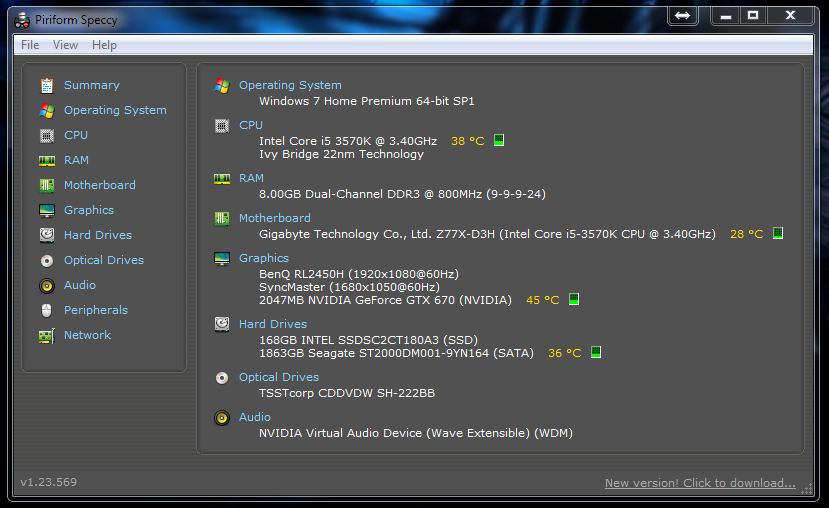
Please use a utility and log the temps for your CPU and GPU or keep an eye on it and tell me what they are during your game.
 

My Computers

System One System Two

  • Computer type
    PC/Desktop
    Computer Manufacturer/Model Number
    ALWAYS UNDER CONSTRUCTION
    OS
    Windows 11 Pro
    CPU
    Ryzen 9 5900X
    Motherboard
    Asus X570 Crosshair Viii Hero
    Memory
    32GB G Skill DDR4-3600
    Graphics Card(s)
    EVGA RTX 3080 FTW 3 Ultra
    Sound Card
    On Board/Sennheiser PC37X Headset
    Monitor(s) Displays
    3 X Asus 27"
    Screen Resolution
    2560x1440
    Hard Drives
    2 X 1 TB NVME drives
    PSU
    EVGA 850
    Case
    Phanteks Eclipse P400A
    Cooling
    EVGA 280 AIO
    Keyboard
    Logitech G510s/ Logitech G13
    Mouse
    Logitech G502
    Internet Speed
    24/1
    Antivirus
    ESET/MBAM Pro/SAS Pro
    Browser
    Chrome/ Firefox/ Edge
  • Computer type
    Laptop
    System Manufacturer/Model Number
    Dell 16 Plus
    OS
    Windows 11 Pro
    CPU
    Intel Ultra 9 288V
    Memory
    32 GB LPDDR5X 8533
    Monitor(s) Displays
    16" Mini-LED HDR600 Touch 90 Hz
    Screen Resolution
    2560X1600
    Hard Drives
    1 TB NVME
two things.
1. the reason I asked about logging temps or at least a utility that will tell us the high and low is because I found this in you event log
Code:
Event[1]:
  Log Name: System
  Source: Microsoft-Windows-Kernel-Power
  Date: 2014-01-15T17:20:06.715
  Event ID: 89
  Task: N/A
  Level: Information
  Opcode: Info
  Keyword: N/A
  User: S-1-5-18
  User Name: NT AUTHORITY\SYSTEM
  Computer: Bart-PC
  Description: 
[COLOR=red]ACPI thermal zone ACPI\ThermalZone\TZ01 has been enumerated.[/COLOR]             
_PSV = 379K             
_TC1 = 1             
_TC2 = 5             
_TSP = 1000ms             
_AC0 = 0K             
_AC1 = 0K             
_AC2 = 0K             
_AC3 = 0K             
_AC4 = 0K             
_AC5 = 0K             
_AC6 = 0K             
_AC7 = 0K             
_AC8 = 0K             
_AC9 = 0K             
_CRT = 379K             
_HOT = 0K             
_PSL - see event data.

2. Would you please open an elevated command prompt ( click start, type cmd in the search box, right click on the cmd entry and select run as administrator) in the black box that opens, copy/paste sfc /scannow. If you decide to type it, notice the space between the sfc and the /. It is a system file checker which will scan your system files and attempt to correct any missing or corrupt files. What we want are the results to say windows found no integrity violations. If it says files were found but could not be repaired, close the box, reboot and run it again, after opening the administrative command prompt. You may have to reboot and run it three times for it to repair all system files. If it can't repair them after 3 reboots, let us know.
 

My Computers

System One System Two

  • Computer type
    PC/Desktop
    Computer Manufacturer/Model Number
    ALWAYS UNDER CONSTRUCTION
    OS
    Windows 11 Pro
    CPU
    Ryzen 9 5900X
    Motherboard
    Asus X570 Crosshair Viii Hero
    Memory
    32GB G Skill DDR4-3600
    Graphics Card(s)
    EVGA RTX 3080 FTW 3 Ultra
    Sound Card
    On Board/Sennheiser PC37X Headset
    Monitor(s) Displays
    3 X Asus 27"
    Screen Resolution
    2560x1440
    Hard Drives
    2 X 1 TB NVME drives
    PSU
    EVGA 850
    Case
    Phanteks Eclipse P400A
    Cooling
    EVGA 280 AIO
    Keyboard
    Logitech G510s/ Logitech G13
    Mouse
    Logitech G502
    Internet Speed
    24/1
    Antivirus
    ESET/MBAM Pro/SAS Pro
    Browser
    Chrome/ Firefox/ Edge
  • Computer type
    Laptop
    System Manufacturer/Model Number
    Dell 16 Plus
    OS
    Windows 11 Pro
    CPU
    Intel Ultra 9 288V
    Memory
    32 GB LPDDR5X 8533
    Monitor(s) Displays
    16" Mini-LED HDR600 Touch 90 Hz
    Screen Resolution
    2560X1600
    Hard Drives
    1 TB NVME
Mw5LYlp.png


XxSMsiR.png


No issue from what I can see with temps and the integrity scan....

I guess this video card may have been a lemon when I first purchased it perhaps....
 

My Computer

Computer type
PC/Desktop
Computer Manufacturer/Model Number
Custom Build
OS
Windows 7 Home Premium 64Bit SP1
CPU
Intel Core i5 3570K @ 3.4GHz
Motherboard
Gigabyte Z77X-D3H
Memory
8G DDR3
Graphics Card(s)
2Gb NVIDIA GeForce GTX 670
Hard Drives
180Gb Intel SSD
2TB Seagate Sata HDD
Antivirus
AVG Free 2014
Browser
Google Chrome
Which brand is it? I have an EVGA SC 670 4 GB and it works fantastic. Runs cool and no problems. I have it in an extra machine, which I am fixing to take out and put my old EVGA780 Classified in. I'll be building another though. I', sure I'll find some use for it, but it is a good card.
 

My Computers

System One System Two

  • Computer type
    PC/Desktop
    Computer Manufacturer/Model Number
    ALWAYS UNDER CONSTRUCTION
    OS
    Windows 11 Pro
    CPU
    Ryzen 9 5900X
    Motherboard
    Asus X570 Crosshair Viii Hero
    Memory
    32GB G Skill DDR4-3600
    Graphics Card(s)
    EVGA RTX 3080 FTW 3 Ultra
    Sound Card
    On Board/Sennheiser PC37X Headset
    Monitor(s) Displays
    3 X Asus 27"
    Screen Resolution
    2560x1440
    Hard Drives
    2 X 1 TB NVME drives
    PSU
    EVGA 850
    Case
    Phanteks Eclipse P400A
    Cooling
    EVGA 280 AIO
    Keyboard
    Logitech G510s/ Logitech G13
    Mouse
    Logitech G502
    Internet Speed
    24/1
    Antivirus
    ESET/MBAM Pro/SAS Pro
    Browser
    Chrome/ Firefox/ Edge
  • Computer type
    Laptop
    System Manufacturer/Model Number
    Dell 16 Plus
    OS
    Windows 11 Pro
    CPU
    Intel Ultra 9 288V
    Memory
    32 GB LPDDR5X 8533
    Monitor(s) Displays
    16" Mini-LED HDR600 Touch 90 Hz
    Screen Resolution
    2560X1600
    Hard Drives
    1 TB NVME
Inno 3D
 

My Computer

Computer type
PC/Desktop
Computer Manufacturer/Model Number
Custom Build
OS
Windows 7 Home Premium 64Bit SP1
CPU
Intel Core i5 3570K @ 3.4GHz
Motherboard
Gigabyte Z77X-D3H
Memory
8G DDR3
Graphics Card(s)
2Gb NVIDIA GeForce GTX 670
Hard Drives
180Gb Intel SSD
2TB Seagate Sata HDD
Antivirus
AVG Free 2014
Browser
Google Chrome

My Computers

System One System Two

  • Computer type
    PC/Desktop
    Computer Manufacturer/Model Number
    ALWAYS UNDER CONSTRUCTION
    OS
    Windows 11 Pro
    CPU
    Ryzen 9 5900X
    Motherboard
    Asus X570 Crosshair Viii Hero
    Memory
    32GB G Skill DDR4-3600
    Graphics Card(s)
    EVGA RTX 3080 FTW 3 Ultra
    Sound Card
    On Board/Sennheiser PC37X Headset
    Monitor(s) Displays
    3 X Asus 27"
    Screen Resolution
    2560x1440
    Hard Drives
    2 X 1 TB NVME drives
    PSU
    EVGA 850
    Case
    Phanteks Eclipse P400A
    Cooling
    EVGA 280 AIO
    Keyboard
    Logitech G510s/ Logitech G13
    Mouse
    Logitech G502
    Internet Speed
    24/1
    Antivirus
    ESET/MBAM Pro/SAS Pro
    Browser
    Chrome/ Firefox/ Edge
  • Computer type
    Laptop
    System Manufacturer/Model Number
    Dell 16 Plus
    OS
    Windows 11 Pro
    CPU
    Intel Ultra 9 288V
    Memory
    32 GB LPDDR5X 8533
    Monitor(s) Displays
    16" Mini-LED HDR600 Touch 90 Hz
    Screen Resolution
    2560X1600
    Hard Drives
    1 TB NVME
Back
Top