BSOD shortly after startup, error 0x0000007e event 1001, BugCheck

hamarthas

New member
Local time
11:33 AM
Messages
11
The computer has rebooted from a bugcheck. The bugcheck was: 0x0000007e (0xffffffffc0000005, 0xfffff880014c4734, 0xfffff880041c27e8, 0xfffff880041c2040). A dump was saved in: C:\Windows\MEMORY.DMP. Report Id: 090214-11154-02.

- <Event xmlns="http://schemas.microsoft.com/win/2004/08/events/event">
- <System>
<Provider Name="Microsoft-Windows-WER-SystemErrorReporting" Guid="{ABCE23E7-DE45-4366-8631-84FA6C525952}" EventSourceName="BugCheck" />
<EventID Qualifiers="16384">1001</EventID>
<Version>0</Version>
<Level>2</Level>
<Task>0</Task>
<Opcode>0</Opcode>
<Keywords>0x80000000000000</Keywords>
<TimeCreated SystemTime="2014-09-03T01:10:32.000000000Z" />
<EventRecordID>125839</EventRecordID>
<Correlation />
<Execution ProcessID="0" ThreadID="0" />
<Channel>System</Channel>
<Computer>Joe-PC</Computer>
<Security />
</System>
- <EventData>
<Data Name="param1">0x0000007e (0xffffffffc0000005, 0xfffff880014c4734, 0xfffff880041c27e8, 0xfffff880041c2040)</Data>
<Data Name="param2">C:\Windows\MEMORY.DMP</Data>
<Data Name="param3">090214-11154-02</Data>
</EventData>
</Event>
 

My Computer My Computer

At a glance

64
Computer type
Laptop
Computer Manufacturer/Model Number
Dell
OS
64
Please don't bump the thread, not only is it against forum rules but it actually has
the opposite effect making the thread look busy as if some other member is taking the lead on it.

Now to the bugchecks.
The bugchecks appear to be due to iaStorA.sys looping, this is somewhat common.
I didn't see any suggestion that you have a raid setup in some manner but I want to make sure,
do you happen to know if you do?

Code:
BugCheck 1000007E, {ffffffffc0000005, fffff880014b7734, fffff880041c27e8, fffff880041c2040}

Probably caused by : iaStorA.sys ( iaStorA+61734 )
 

My Computer My Computer

At a glance

Windows 10Intel Core i5 3570K16GB 1600Mhz G.SkillGigabyte GTX 970 G1-Gaming
Computer type
PC/Desktop
OS
Windows 10
CPU
Intel Core i5 3570K
Motherboard
Asus P8Z77V-PRO
Memory
16GB 1600Mhz G.Skill
Graphics Card(s)
Gigabyte GTX 970 G1-Gaming
PSU
Seasonic 1000W Platinum
Case
Fractal Design Define R4
Cooling
Noctua NH-D14
Oh im sorry i didnt't realize that was against the rules. TO your question i dont think there is a raid setup as there is just a C drive so i would assume no raid setup but im not entierly sure. If there is no raid setup how do i procede on fixing the problem. Thanks for the response.

P.S. I cant currently update the driver because i was troubleshooting and found a potential problem could be with ram so the computer is going through the memtest86. It is currently on 4 passes with 0 errors, but if the problem is a dirver could i end it?

thanks for the response
 

My Computer My Computer

At a glance

64
Computer type
Laptop
Computer Manufacturer/Model Number
Dell
OS
64
Please follow these steps in removing IRST:

Arc said:
Get rid of intel rapid storage. First uninstall it from Control Panel > Programs and Features.
Then Uninstall the driver from device manager.

  1. Right click on "my computer" icon and click "manage" on the context menu.
  2. It will open the "computer management" window.
  3. Select "Device Manager" in the left pane, It will list all the existing devices up.
  4. Expand "IDE ATA/ATAPI controllers" by clicking on the triangle in front of it.
  5. Select one Intel device item under it, right click, uninstall.
  6. Continue the process for all Intel items under "IDE ATA/ATAPI controllers"
  7. Now restart the computer. At restart, windows will auto configure the appropriate native system driver.
 

My Computer My Computer

At a glance

Windows 10Intel Core i5 3570K16GB 1600Mhz G.SkillGigabyte GTX 970 G1-Gaming
Computer type
PC/Desktop
OS
Windows 10
CPU
Intel Core i5 3570K
Motherboard
Asus P8Z77V-PRO
Memory
16GB 1600Mhz G.Skill
Graphics Card(s)
Gigabyte GTX 970 G1-Gaming
PSU
Seasonic 1000W Platinum
Case
Fractal Design Define R4
Cooling
Noctua NH-D14
Ok so there are some problems. I went to uninstall IRST from the control panel > programs and features and it wasnt there. Then i went to check and see if the driver still was but IDE ATA/ATAPI controllers were not in the device manager. But i then noticed there were 2 disk drives a SSD PM830 mSATA SCSI Disk Device and the other ST 1000LMO24 HN-SCSI Disk Device but im certain there is only one hard drive. It saying there are 2 doesnt make sense since there is only a 1TB HDD. There is also a Intel(R) Mobile express chipset SATA RAID controller under storage controller. So im a bit stumped on whats is causing the problem.
 

My Computer My Computer

At a glance

64
Computer type
Laptop
Computer Manufacturer/Model Number
Dell
OS
64
Don't be :) .

You do have two storage devices, I believe that the 8GB mSATA device is used for speeding
up the HDD via acting as a cache.

Code:
Description    Disk drive
Model    SSD PM830 mSATA SCSI Disk Device
Media Type    Fixed hard disk
Size    8.00 GB (8,587,192,320 bytes)
Partition    Disk #1, Partition #0

------------------

Description    Disk drive
Model    ST1000LM024 HN- SCSI Disk Device
Media Type    Fixed hard disk
Size    931.51 GB (1,000,202,273,280 bytes)
Partition    Disk #0, Partition #0

iaStorA.sys is being used by that same SATA controller you pointed out,
"Intel Mobile express chipset SATA RAID controller" , I have asked for more eyes on this
subject before we continue onwards. They should be here soon hang tight :) .
 

My Computer My Computer

At a glance

Windows 10Intel Core i5 3570K16GB 1600Mhz G.SkillGigabyte GTX 970 G1-Gaming
Computer type
PC/Desktop
OS
Windows 10
CPU
Intel Core i5 3570K
Motherboard
Asus P8Z77V-PRO
Memory
16GB 1600Mhz G.Skill
Graphics Card(s)
Gigabyte GTX 970 G1-Gaming
PSU
Seasonic 1000W Platinum
Case
Fractal Design Define R4
Cooling
Noctua NH-D14
Hi hamarthas.

As Intel Rapid Storage is used as the RAID driver there (for memory caching to the 8 GB mSATA SSD), you will not be able to uninstall IRST following the above method. You have to disable it in BIOS.

Boot into the BIOS, advanced settings. Change the storage controller mode to AHCI or ATA/IDE whichever is available. Also disable anything like Intel Smart Response or Intel Rapid Storage. Save and Exit from the BIOS ... try to boot back to windows.

There is a huge possibility that Windows will refuse to boot after changing the storage controller mode. In that cause, you will need to perform a clean reinstall.

Hectic and time consuming, but that is the way to not use the iaStor drivers when used as RAID driver.

We may suggest an update to this driver, but that will not work for a long run.
 

My Computer My Computer

At a glance

Microsoft Windows 10 Pro Insider Preview 64-bitIntel(R) Core(TM) i3-4130 CPU @ 3.40GHzCorsair Vengence 4GB x2 (8.00GB Dual-Channel ...2047MB GeForce GTS 450 (ZOTAC International)
Computer type
PC/Desktop
Computer Manufacturer/Model Number
Self Assembled
OS
Microsoft Windows 10 Pro Insider Preview 64-bit
CPU
Intel(R) Core(TM) i3-4130 CPU @ 3.40GHz
Motherboard
Gigabyte Technology Co., Ltd. B85M-D3H
Memory
Corsair Vengence 4GB x2 (8.00GB Dual-Channel DDR3 @ 798MHz)
Graphics Card(s)
2047MB GeForce GTS 450 (ZOTAC International)
Sound Card
Onboard (Realtek High Definition Audio)
Monitor(s) Displays
LG Flatron E2040T
Screen Resolution
1600x900
Hard Drives
Western Digital 1 TB
Seagate 500 GB
PSU
Corsair VS550
Case
Cooler Master K380
Cooling
Cooler Master Seidon 120V Plus
Keyboard
Logitech MK260r
Mouse
Logitech MK260r
Internet Speed
PMPL Broadband
Antivirus
Windows Defender + MBAM
Browser
Firefox
Other Info
Dell Studio 15" Laptop
Hello Arc thanks for responding to my problem. So what would you suggest i do? First backup things i would want to keep on my computer. Then make a win 7 reinstall disk just in case the computer wont work after disabling those drivers.

Thanks for the response
 

My Computer My Computer

At a glance

64
Computer type
Laptop
Computer Manufacturer/Model Number
Dell
OS
64
All your questions are nicely answered in http://www.sevenforums.com/tutorials/219487-clean-reinstall-factory-oem-windows-7-a.html ... you may have a look.

My guru essenbe suggests that you should follow http://www.sevenforums.com/tutorials/61869-ahci-enable-windows-7-vista.html .... here is what he advised me on your issue, if you want to have a look.
Arc, if he can't boot into Windows, before a clean install try this http://www.sevenforums.com/tutorials/61869-ahci-enable-windows-7-vista.html. I have never tried it before in this situation. However, no matter which mode you are changing, the end result is the same, you are forcing the OS to install an AHCI driver. I don't see why it wouldn't work. I may be 'all wet', but it is worth a try. IaStor contains the Intel AHCI driver. If it was disabled in services, the AHCI driver would remain.
 

My Computer My Computer

At a glance

Microsoft Windows 10 Pro Insider Preview 64-bitIntel(R) Core(TM) i3-4130 CPU @ 3.40GHzCorsair Vengence 4GB x2 (8.00GB Dual-Channel ...2047MB GeForce GTS 450 (ZOTAC International)
Computer type
PC/Desktop
Computer Manufacturer/Model Number
Self Assembled
OS
Microsoft Windows 10 Pro Insider Preview 64-bit
CPU
Intel(R) Core(TM) i3-4130 CPU @ 3.40GHz
Motherboard
Gigabyte Technology Co., Ltd. B85M-D3H
Memory
Corsair Vengence 4GB x2 (8.00GB Dual-Channel DDR3 @ 798MHz)
Graphics Card(s)
2047MB GeForce GTS 450 (ZOTAC International)
Sound Card
Onboard (Realtek High Definition Audio)
Monitor(s) Displays
LG Flatron E2040T
Screen Resolution
1600x900
Hard Drives
Western Digital 1 TB
Seagate 500 GB
PSU
Corsair VS550
Case
Cooler Master K380
Cooling
Cooler Master Seidon 120V Plus
Keyboard
Logitech MK260r
Mouse
Logitech MK260r
Internet Speed
PMPL Broadband
Antivirus
Windows Defender + MBAM
Browser
Firefox
Other Info
Dell Studio 15" Laptop
I'm still a bit unsure on what you want to do. Essenbe said if i cant boot into windows try his suggestion, but if i cant boot into windows how to i go through the process of enabling AHCI or do you want me to enable this before going into the bios and changing the storage controller mode to AHCI,

Sorry for all the questions. First time fixing a BSOD.
 

My Computer My Computer

At a glance

64
Computer type
Laptop
Computer Manufacturer/Model Number
Dell
OS
64
OK after reading through Essenbe's link again i answered my own question. He meant for me to do his suggestion first. Not sure how i missed that the first time reading through. SOrry for inconvience.
 

My Computer My Computer

At a glance

64
Computer type
Laptop
Computer Manufacturer/Model Number
Dell
OS
64
Hello again, I just tried to do what Essenbe said but windows still could not boot when i changed the storage controller to AHCI in the bios. When i went to enable AHCI in the regedit i modified the start value from 3 to 0 for both msachi and iaStorV but still wasnt able to boot into windows using AHCI storage controller. I was just prompted to restore the computer to a earlier date or change the SATA operation back to Intel smart response technology. So i guess a clean reinstall is needed and im currently going through that process.
 

My Computer My Computer

At a glance

64
Computer type
Laptop
Computer Manufacturer/Model Number
Dell
OS
64
hamarthas, What I gave Arc was just a suggestion to try as a last resort. Apparently it didn't work, so I suggest you proceed with Arc's suggestion. His will work.
 

My Computers My Computers

  • At a glance

    Windows 11 ProRyzen 9 5900X32GB G Skill DDR4-3600EVGA RTX 3080 FTW 3 Ultra
    Computer type
    PC/Desktop
    Computer Manufacturer/Model Number
    ALWAYS UNDER CONSTRUCTION
    OS
    Windows 11 Pro
    CPU
    Ryzen 9 5900X
    Motherboard
    Asus X570 Crosshair Viii Hero
    Memory
    32GB G Skill DDR4-3600
    Graphics Card(s)
    EVGA RTX 3080 FTW 3 Ultra
    Sound Card
    On Board/Sennheiser PC37X Headset
    Monitor(s) Displays
    3 X Asus 27"
    Screen Resolution
    2560x1440
    Hard Drives
    2 X 1 TB NVME drives
    PSU
    EVGA 850
    Case
    Phanteks Eclipse P400A
    Cooling
    EVGA 280 AIO
    Keyboard
    Logitech G510s/ Logitech G13
    Mouse
    Logitech G502
    Internet Speed
    24/1
    Antivirus
    ESET/MBAM Pro/SAS Pro
    Browser
    Chrome/ Firefox/ Edge
  • At a glance

    Windows 11 ProIntel Ultra 9 288V32 GB LPDDR5X 8533
    Computer type
    Laptop
    System Manufacturer/Model Number
    Dell 16 Plus
    OS
    Windows 11 Pro
    CPU
    Intel Ultra 9 288V
    Memory
    32 GB LPDDR5X 8533
    Monitor(s) Displays
    16" Mini-LED HDR600 Touch 90 Hz
    Screen Resolution
    2560X1600
    Hard Drives
    1 TB NVME
Hi i am doing the clean reinstall but i came into the problem of formatting the hard drives. Im also not sure on how to partition them. I have the forum post open on how to do it but the question im having is that the hard drives were together as a raid setup i think that being the reason i had the intel rapid storage driver, but now that i have booted it as AHCI is the way of formatting different?
 

My Computer My Computer

At a glance

64
Computer type
Laptop
Computer Manufacturer/Model Number
Dell
OS
64
What do you want to do?
 

My Computers My Computers

  • At a glance

    Windows 11 ProRyzen 9 5900X32GB G Skill DDR4-3600EVGA RTX 3080 FTW 3 Ultra
    Computer type
    PC/Desktop
    Computer Manufacturer/Model Number
    ALWAYS UNDER CONSTRUCTION
    OS
    Windows 11 Pro
    CPU
    Ryzen 9 5900X
    Motherboard
    Asus X570 Crosshair Viii Hero
    Memory
    32GB G Skill DDR4-3600
    Graphics Card(s)
    EVGA RTX 3080 FTW 3 Ultra
    Sound Card
    On Board/Sennheiser PC37X Headset
    Monitor(s) Displays
    3 X Asus 27"
    Screen Resolution
    2560x1440
    Hard Drives
    2 X 1 TB NVME drives
    PSU
    EVGA 850
    Case
    Phanteks Eclipse P400A
    Cooling
    EVGA 280 AIO
    Keyboard
    Logitech G510s/ Logitech G13
    Mouse
    Logitech G502
    Internet Speed
    24/1
    Antivirus
    ESET/MBAM Pro/SAS Pro
    Browser
    Chrome/ Firefox/ Edge
  • At a glance

    Windows 11 ProIntel Ultra 9 288V32 GB LPDDR5X 8533
    Computer type
    Laptop
    System Manufacturer/Model Number
    Dell 16 Plus
    OS
    Windows 11 Pro
    CPU
    Intel Ultra 9 288V
    Memory
    32 GB LPDDR5X 8533
    Monitor(s) Displays
    16" Mini-LED HDR600 Touch 90 Hz
    Screen Resolution
    2560X1600
    Hard Drives
    1 TB NVME
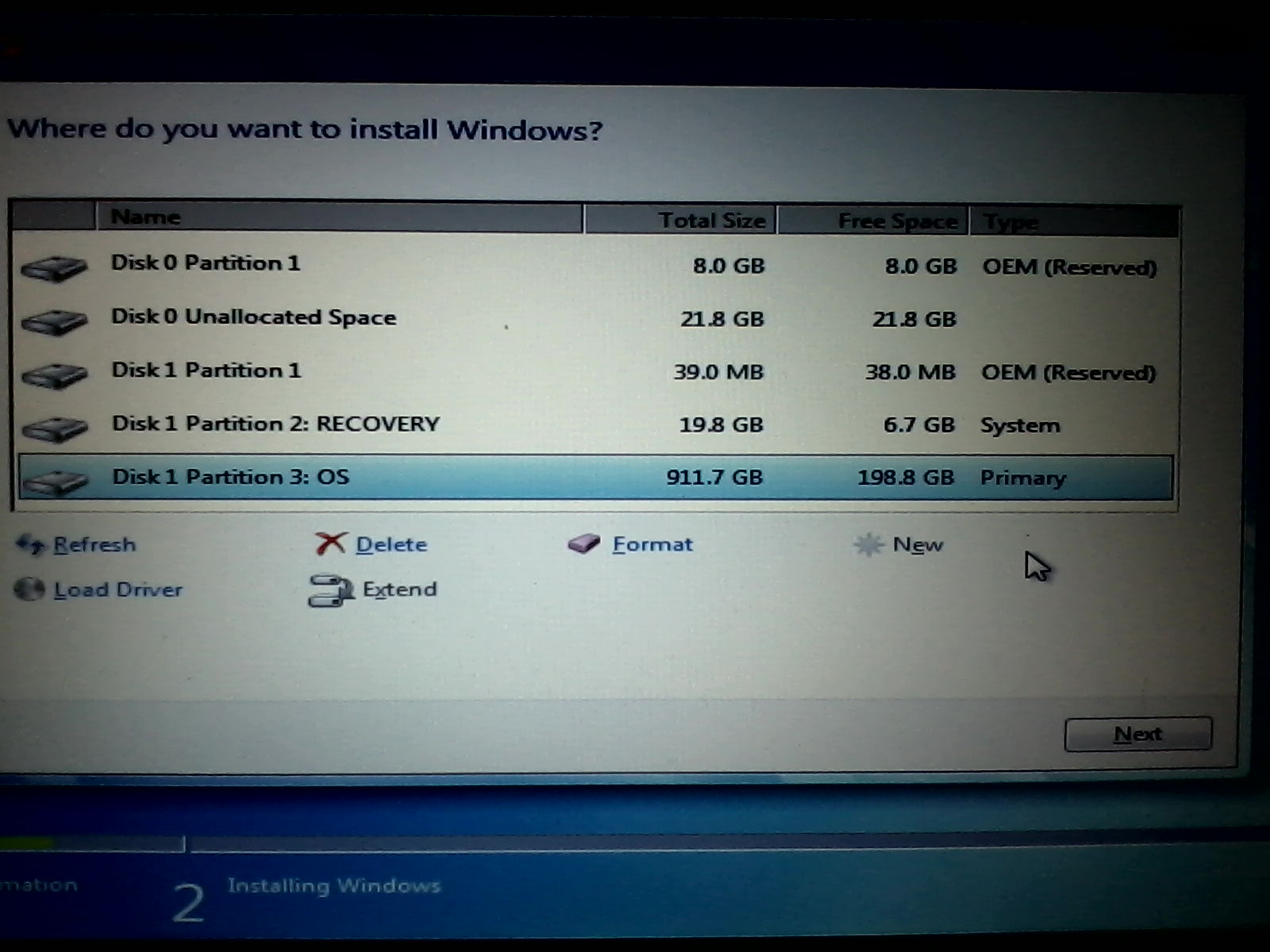
Ok this is where im stuck
imgur: the simple image sharer

Are the way the hard drives are partitioned in the imgur meant for use with the intel rapid storage driver? But now i am going to use AHCI storage driver so would the way i have to format the hard drives be different? Or from here should i delete all the partitions and just install windows on Disk1 and ignore the other? Or should i Delete all the partitions and repartition the hard drives the same way they were originally?

Im clueless on how this needs to be any insight would be greatly appreciated.
 
Last edited:

My Computer My Computer

At a glance

64
Computer type
Laptop
Computer Manufacturer/Model Number
Dell
OS
64
You are trying to format the Disc 1 Partition 3: OS.

Select it (it is already selected). Then click on "Delete". It will delete this partition and leave an unallocated space of the same size.

Now, select the unallocated space newly created, click on "New". The partition will be created.

Now, to install windows, follow the tutorial link.

y65pG9g.jpg
 

My Computer My Computer

At a glance

Microsoft Windows 10 Pro Insider Preview 64-bitIntel(R) Core(TM) i3-4130 CPU @ 3.40GHzCorsair Vengence 4GB x2 (8.00GB Dual-Channel ...2047MB GeForce GTS 450 (ZOTAC International)
Computer type
PC/Desktop
Computer Manufacturer/Model Number
Self Assembled
OS
Microsoft Windows 10 Pro Insider Preview 64-bit
CPU
Intel(R) Core(TM) i3-4130 CPU @ 3.40GHz
Motherboard
Gigabyte Technology Co., Ltd. B85M-D3H
Memory
Corsair Vengence 4GB x2 (8.00GB Dual-Channel DDR3 @ 798MHz)
Graphics Card(s)
2047MB GeForce GTS 450 (ZOTAC International)
Sound Card
Onboard (Realtek High Definition Audio)
Monitor(s) Displays
LG Flatron E2040T
Screen Resolution
1600x900
Hard Drives
Western Digital 1 TB
Seagate 500 GB
PSU
Corsair VS550
Case
Cooler Master K380
Cooling
Cooler Master Seidon 120V Plus
Keyboard
Logitech MK260r
Mouse
Logitech MK260r
Internet Speed
PMPL Broadband
Antivirus
Windows Defender + MBAM
Browser
Firefox
Other Info
Dell Studio 15" Laptop
Thanks for the response Arc

So i want to keep DIsc 1 as 3 different partitions?
and what should i do about the other sections?
Should i make any changes to Disk 0?
Should I delete Disk 1 Partition 2: Recovery and make a new recover section?
Should i change Disk 1 partition 1 at all?
 

My Computer My Computer

At a glance

64
Computer type
Laptop
Computer Manufacturer/Model Number
Dell
OS
64
Disc 0 is the mSATA SSD. Keep it untouched for now (you may format it later, after the installation is done).

After doing a clean install, there is no valid ground to keep the factory partitions. So you may delete them all. But as it is your first attempt, better you keep them intact. Delete the OS partition only.

About the recovery partition, that is the System and Active partition. The master bootloader will be installed there automatically.

Apparently you need not to make any other changes right now.
 

My Computer My Computer

At a glance

Microsoft Windows 10 Pro Insider Preview 64-bitIntel(R) Core(TM) i3-4130 CPU @ 3.40GHzCorsair Vengence 4GB x2 (8.00GB Dual-Channel ...2047MB GeForce GTS 450 (ZOTAC International)
Computer type
PC/Desktop
Computer Manufacturer/Model Number
Self Assembled
OS
Microsoft Windows 10 Pro Insider Preview 64-bit
CPU
Intel(R) Core(TM) i3-4130 CPU @ 3.40GHz
Motherboard
Gigabyte Technology Co., Ltd. B85M-D3H
Memory
Corsair Vengence 4GB x2 (8.00GB Dual-Channel DDR3 @ 798MHz)
Graphics Card(s)
2047MB GeForce GTS 450 (ZOTAC International)
Sound Card
Onboard (Realtek High Definition Audio)
Monitor(s) Displays
LG Flatron E2040T
Screen Resolution
1600x900
Hard Drives
Western Digital 1 TB
Seagate 500 GB
PSU
Corsair VS550
Case
Cooler Master K380
Cooling
Cooler Master Seidon 120V Plus
Keyboard
Logitech MK260r
Mouse
Logitech MK260r
Internet Speed
PMPL Broadband
Antivirus
Windows Defender + MBAM
Browser
Firefox
Other Info
Dell Studio 15" Laptop
Back
Top