BSOD, Then random computer crashes when playing, freezes on startup.

krisp018

New member
Local time
4:56 AM
Messages
20
Hello,

Lately there are weird things going on with my computer.

Firstly, on the 07/01/2014 I had a BSOD. Details below :
71d3160702ca3f91376bc753df0c5547.png (unfortunately my MiniDump folder is empty, so this is all I can provide)

And ever since then every time I come home, and turn my computer on, I log in and after approximately 5-10 minutes, the computer shuts it self down, or freezes and I have to boot it.

Usually, my computer shuts down when I start playing a game, and freezes when I just sit on the desktop, writing on skype etc.

I have completed a SFdebugFiles and I am attaching below (It doesnt let me upload msinfo32 file)
 

My Computer My Computer

At a glance

English
Computer type
PC/Desktop
OS
English
Also, would reinstalling windows system be a solution ? I was thinking about doing it anyways
 

My Computer My Computer

At a glance

English
Computer type
PC/Desktop
OS
English
View attachment 301653

A stop 0xD1 is mostly a driver issue.

The failing driver is the display driver here, and the 327.23 WHQL is not a good stable one, as far as I can say.

Before doing anything else, do a clean install of the display driver with the latest one .... 332.21 WHQL
:ar: Drivers - Download NVIDIA Drivers

If the situation is the same with the latest one too (as it is very new, it is not widely used and tested), install the NVIDIA DRIVERS 314.22WHQL only.

  • Uninstall All nvidia items in Control Panel > Programs and features
    • 3D Vision Control Driver
    • 3D Vision Driver
    • Graphics Driver
    • HD Audio Driver
    • PhysX
    • nvidia Update
    (Are you using nvidia chipset drivers? If so, dont uninstall anything other than those are listed).
  • Now follow Drivers - Clean Left over Files after Uninstalling
  • Download 314.22 WHQL. While installing, Select Custom (Advanced) install. In the next page, follow this settings:

Let us know the results.
 

My Computer My Computer

At a glance

Microsoft Windows 10 Pro Insider Preview 64-bitIntel(R) Core(TM) i3-4130 CPU @ 3.40GHzCorsair Vengence 4GB x2 (8.00GB Dual-Channel ...2047MB GeForce GTS 450 (ZOTAC International)
Computer type
PC/Desktop
Computer Manufacturer/Model Number
Self Assembled
OS
Microsoft Windows 10 Pro Insider Preview 64-bit
CPU
Intel(R) Core(TM) i3-4130 CPU @ 3.40GHz
Motherboard
Gigabyte Technology Co., Ltd. B85M-D3H
Memory
Corsair Vengence 4GB x2 (8.00GB Dual-Channel DDR3 @ 798MHz)
Graphics Card(s)
2047MB GeForce GTS 450 (ZOTAC International)
Sound Card
Onboard (Realtek High Definition Audio)
Monitor(s) Displays
LG Flatron E2040T
Screen Resolution
1600x900
Hard Drives
Western Digital 1 TB
Seagate 500 GB
PSU
Corsair VS550
Case
Cooler Master K380
Cooling
Cooler Master Seidon 120V Plus
Keyboard
Logitech MK260r
Mouse
Logitech MK260r
Internet Speed
PMPL Broadband
Antivirus
Windows Defender + MBAM
Browser
Firefox
Other Info
Dell Studio 15" Laptop
Did as you said, I didn't have any freeze, or crash yet, and I started playing. However it is too early to say.

I will play for about 4 hours now, and start up tomorrow evening, like everyday to see if everything works fine.
 

My Computer My Computer

At a glance

English
Computer type
PC/Desktop
OS
English
hello, I would like to think that the problem is solved but its not.
Now I can play and do everything, but my computer crashes on boot/start-up.
Its not a BSOD, it crashes and 'going into power-save mode' shows up on my screen, even though I disabled all of the power saving settings. I am unsure what causes this particular problem as there is no actual BSOD and I dont have any dump files.

However, After one or two NOTsuccessful boots, it works normally and I can work/play as much as I want.
 

My Computer My Computer

At a glance

English
Computer type
PC/Desktop
OS
English
Can you boot into safe mode? If so, upload your MSINFO32.nfo file.

  1. Click on the start button
  2. Type "msinfo32" (without quotes) in the search bar of the start menu, click the resulting link. It will open the System Information window.
  3. File>Save. In the "File Name" filed, put "MSINFO32" (without Quote), give the save location to desktop, and click the "save" button.
  4. Give the time for processing, it will save a .nfo file on your desktop.
  5. Zip it, and upload it following the instruction.
 

My Computer My Computer

At a glance

Microsoft Windows 10 Pro Insider Preview 64-bitIntel(R) Core(TM) i3-4130 CPU @ 3.40GHzCorsair Vengence 4GB x2 (8.00GB Dual-Channel ...2047MB GeForce GTS 450 (ZOTAC International)
Computer type
PC/Desktop
Computer Manufacturer/Model Number
Self Assembled
OS
Microsoft Windows 10 Pro Insider Preview 64-bit
CPU
Intel(R) Core(TM) i3-4130 CPU @ 3.40GHz
Motherboard
Gigabyte Technology Co., Ltd. B85M-D3H
Memory
Corsair Vengence 4GB x2 (8.00GB Dual-Channel DDR3 @ 798MHz)
Graphics Card(s)
2047MB GeForce GTS 450 (ZOTAC International)
Sound Card
Onboard (Realtek High Definition Audio)
Monitor(s) Displays
LG Flatron E2040T
Screen Resolution
1600x900
Hard Drives
Western Digital 1 TB
Seagate 500 GB
PSU
Corsair VS550
Case
Cooler Master K380
Cooling
Cooler Master Seidon 120V Plus
Keyboard
Logitech MK260r
Mouse
Logitech MK260r
Internet Speed
PMPL Broadband
Antivirus
Windows Defender + MBAM
Browser
Firefox
Other Info
Dell Studio 15" Laptop
Sorry for the late reply, had some rough time obtaining the MSINFO32 file, since I had the freezes even on Safe Mode, but finally got it and here it is.

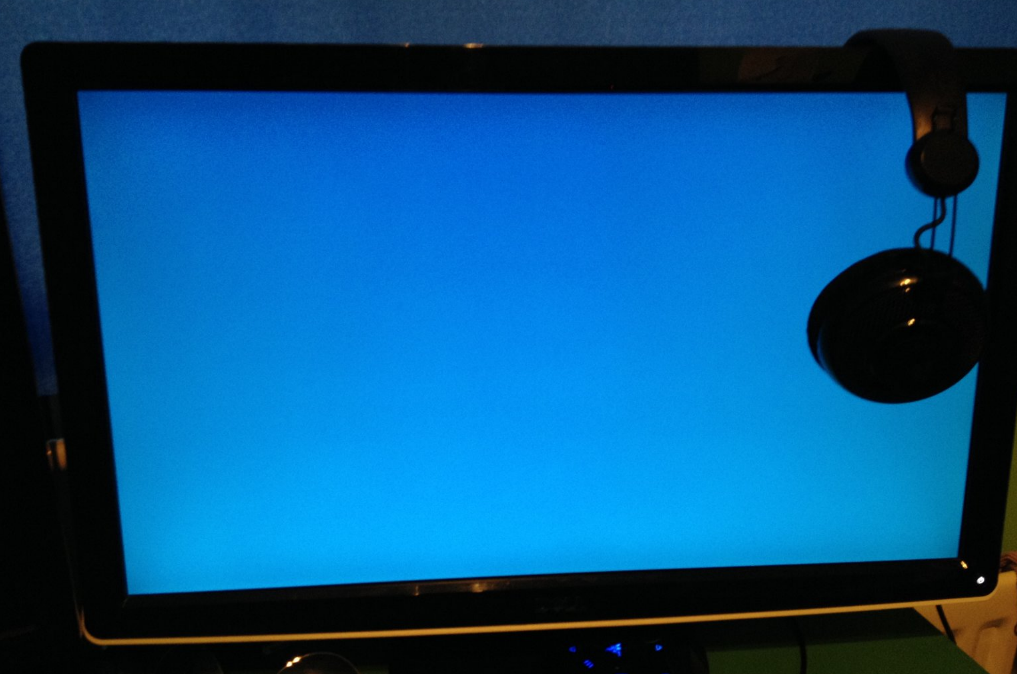
Also today after school, this weird thing happened to me , Tried to play a game, and my screen turned light-blue (sky-blue) colour. I made a picture of it with my phone, and here it is : fe1253f3781d24ebfb36f6441a5a93cd.png
 

My Computer My Computer

At a glance

English
Computer type
PC/Desktop
OS
English
fe1253f3781d24ebfb36f6441a5a93cd.png


It looks like a total display failure to me, but I will ask our hardware experts for their opinion on it.
 

My Computer My Computer

At a glance

Microsoft Windows 10 Pro Insider Preview 64-bitIntel(R) Core(TM) i3-4130 CPU @ 3.40GHzCorsair Vengence 4GB x2 (8.00GB Dual-Channel ...2047MB GeForce GTS 450 (ZOTAC International)
Computer type
PC/Desktop
Computer Manufacturer/Model Number
Self Assembled
OS
Microsoft Windows 10 Pro Insider Preview 64-bit
CPU
Intel(R) Core(TM) i3-4130 CPU @ 3.40GHz
Motherboard
Gigabyte Technology Co., Ltd. B85M-D3H
Memory
Corsair Vengence 4GB x2 (8.00GB Dual-Channel DDR3 @ 798MHz)
Graphics Card(s)
2047MB GeForce GTS 450 (ZOTAC International)
Sound Card
Onboard (Realtek High Definition Audio)
Monitor(s) Displays
LG Flatron E2040T
Screen Resolution
1600x900
Hard Drives
Western Digital 1 TB
Seagate 500 GB
PSU
Corsair VS550
Case
Cooler Master K380
Cooling
Cooler Master Seidon 120V Plus
Keyboard
Logitech MK260r
Mouse
Logitech MK260r
Internet Speed
PMPL Broadband
Antivirus
Windows Defender + MBAM
Browser
Firefox
Other Info
Dell Studio 15" Laptop
Not a total display failure, that would be a black screen. The display screen is working and the graphics chip is active, but it is not sending out any data. Seems like the driver problem continues, or the card is defective.
 

My Computer My Computer

At a glance

Windows 7 64 Bit Home Premium SP1i7-3820GSkill F3-14900CL9Q - 16GBEVGA GeForce GTX660 - Driver 352.86
Computer type
PC/Desktop
Computer Manufacturer/Model Number
Home Built - Jan 2013
OS
Windows 7 64 Bit Home Premium SP1
CPU
i7-3820
Motherboard
Asus P9X79-PRO - Bios 4608
Memory
GSkill F3-14900CL9Q - 16GB
Graphics Card(s)
EVGA GeForce GTX660 - Driver 352.86
Sound Card
On board Realtek ALC898
Monitor(s) Displays
Acer S271HL
Screen Resolution
1920 x 1080
Hard Drives
#1- Samsung 840 Pro Series
#2- Western Digital WD1002FAEX Sata3 Black
#3- Western Digital WD1002FAEX Sata3 Black
PSU
Corsair CMPSU-850TX-V2 - 850 watt (by Seasonic)
Case
Corsair Obsidian 550D
Cooling
Standard 3 120mm case fans, Cooler Master Hyper 212 EVO
Keyboard
MS KC-0405
Mouse
Intellimouse 5-button
Internet Speed
56 Mbits/Sec (on a good day)
Antivirus
Avast & Malwarebytes
Browser
Firefox
Other Info
Asus DVD - DRW-24B1ST 24X
Anyway to fix the driver problem? would re-installing windows OS be helpful?
 

My Computer My Computer

At a glance

English
Computer type
PC/Desktop
OS
English
That is the nuclear option. If you are sure you have done a true clean install of the 314 drivers that might be your final option.

You could try a manual clean install:

  • Go into Windows Explorer and in the C: drive find the nVidia or Program Files > ATI folder (inside will be Drivers > your driver version) and delete it (the whole folder).
  • Go into Start > Control Panel > Remove Programs and uninstall all programs for the video card. For nVidia, do PhysX and the Vision drivers first, then the main driver. The control panel will uninstall with the driver. For ATI, select “ATI Catalyst Install Manager” and click on “Change”, then “Uninstall All Components”.
  • Restart the computer > go immediately into Safe Mode
  • Run DriverSweeper to uninstall all video remnants Guru3D - Driver Sweeper . (install beforehand, of course)
  • Restart the computer.
  • When it reaches the desktop Windows will find new hardware and will install it's own WDDM1.1 driver. Let it. You will be asked to restart. Do it.
  • Once back on the desktop you can now install the nVidia/ATI driver package for your card.
But here's the thing: instead of immediately installing the nVidia driver, run it on that generic Windows driver for a while. Just to see if the nVidia driver is the problem.
 

My Computer My Computer

At a glance

Windows 7 64 Bit Home Premium SP1i7-3820GSkill F3-14900CL9Q - 16GBEVGA GeForce GTX660 - Driver 352.86
Computer type
PC/Desktop
Computer Manufacturer/Model Number
Home Built - Jan 2013
OS
Windows 7 64 Bit Home Premium SP1
CPU
i7-3820
Motherboard
Asus P9X79-PRO - Bios 4608
Memory
GSkill F3-14900CL9Q - 16GB
Graphics Card(s)
EVGA GeForce GTX660 - Driver 352.86
Sound Card
On board Realtek ALC898
Monitor(s) Displays
Acer S271HL
Screen Resolution
1920 x 1080
Hard Drives
#1- Samsung 840 Pro Series
#2- Western Digital WD1002FAEX Sata3 Black
#3- Western Digital WD1002FAEX Sata3 Black
PSU
Corsair CMPSU-850TX-V2 - 850 watt (by Seasonic)
Case
Corsair Obsidian 550D
Cooling
Standard 3 120mm case fans, Cooler Master Hyper 212 EVO
Keyboard
MS KC-0405
Mouse
Intellimouse 5-button
Internet Speed
56 Mbits/Sec (on a good day)
Antivirus
Avast & Malwarebytes
Browser
Firefox
Other Info
Asus DVD - DRW-24B1ST 24X
Do you mean delete the "DisplayDriver" folder, or the actual version of the driver.

Inside the "DisplayDriver" there is 3 different driver versions
 

My Computer My Computer

At a glance

English
Computer type
PC/Desktop
OS
English
I also noticed that whenever my computer successfuly boots up, my mouse cursor is not in the middle of the screen.

Also, when my screen freezes and I have to hard boot the computer, it starts up, and shuts down like 1, or 2 or sometimes 3 times and this is even before anything comes up on the monitor. I can just hear it starting up, bam, silence, and starts up again automatically
 

My Computer My Computer

At a glance

English
Computer type
PC/Desktop
OS
English
Do you mean delete the "DisplayDriver" folder, or the actual version of the driver.

Inside the "DisplayDriver" there is 3 different driver versions

You delete the entire NVIDIA folder and everything in it.
View attachment 302293

A new folder will be created when you install the nVidia drivers.

When you perform a clean install from within the nVidia installer program this folder will be deleted also. The fact that you have different versions still there is curious. It could be that you never had a truly clean installation.
 

My Computer My Computer

At a glance

Windows 7 64 Bit Home Premium SP1i7-3820GSkill F3-14900CL9Q - 16GBEVGA GeForce GTX660 - Driver 352.86
Computer type
PC/Desktop
Computer Manufacturer/Model Number
Home Built - Jan 2013
OS
Windows 7 64 Bit Home Premium SP1
CPU
i7-3820
Motherboard
Asus P9X79-PRO - Bios 4608
Memory
GSkill F3-14900CL9Q - 16GB
Graphics Card(s)
EVGA GeForce GTX660 - Driver 352.86
Sound Card
On board Realtek ALC898
Monitor(s) Displays
Acer S271HL
Screen Resolution
1920 x 1080
Hard Drives
#1- Samsung 840 Pro Series
#2- Western Digital WD1002FAEX Sata3 Black
#3- Western Digital WD1002FAEX Sata3 Black
PSU
Corsair CMPSU-850TX-V2 - 850 watt (by Seasonic)
Case
Corsair Obsidian 550D
Cooling
Standard 3 120mm case fans, Cooler Master Hyper 212 EVO
Keyboard
MS KC-0405
Mouse
Intellimouse 5-button
Internet Speed
56 Mbits/Sec (on a good day)
Antivirus
Avast & Malwarebytes
Browser
Firefox
Other Info
Asus DVD - DRW-24B1ST 24X
I also noticed that whenever my computer successfuly boots up, my mouse cursor is not in the middle of the screen.

Also, when my screen freezes and I have to hard boot the computer, it starts up, and shuts down like 1, or 2 or sometimes 3 times and this is even before anything comes up on the monitor. I can just hear it starting up, bam, silence, and starts up again automatically

It is important to know where in the startup process this happens.
The normal startup routine can be divided into 3 basic parts:

  • BIOS Boot: the part where the manufacturer logo and black screen writing takes place.
  • Starting Windows: Black screen with the coalescing squares
  • Welcome: Blue screen just before the desktop appears.
If this restart occurs immediately in the startup process, before you see any BIOS screens or the Windows screens then that indicates a hardware problem.

Playing with Windows or drivers will just be a waste of time if this is the case, because these do not engage until later in the process.
 

My Computer My Computer

At a glance

Windows 7 64 Bit Home Premium SP1i7-3820GSkill F3-14900CL9Q - 16GBEVGA GeForce GTX660 - Driver 352.86
Computer type
PC/Desktop
Computer Manufacturer/Model Number
Home Built - Jan 2013
OS
Windows 7 64 Bit Home Premium SP1
CPU
i7-3820
Motherboard
Asus P9X79-PRO - Bios 4608
Memory
GSkill F3-14900CL9Q - 16GB
Graphics Card(s)
EVGA GeForce GTX660 - Driver 352.86
Sound Card
On board Realtek ALC898
Monitor(s) Displays
Acer S271HL
Screen Resolution
1920 x 1080
Hard Drives
#1- Samsung 840 Pro Series
#2- Western Digital WD1002FAEX Sata3 Black
#3- Western Digital WD1002FAEX Sata3 Black
PSU
Corsair CMPSU-850TX-V2 - 850 watt (by Seasonic)
Case
Corsair Obsidian 550D
Cooling
Standard 3 120mm case fans, Cooler Master Hyper 212 EVO
Keyboard
MS KC-0405
Mouse
Intellimouse 5-button
Internet Speed
56 Mbits/Sec (on a good day)
Antivirus
Avast & Malwarebytes
Browser
Firefox
Other Info
Asus DVD - DRW-24B1ST 24X
This happens before "BIOS BOOT"

it occurs immediately in the startup process before I see any screens.

Is it possible to identify the hardware problem?
 

My Computer My Computer

At a glance

English
Computer type
PC/Desktop
OS
English
Yes!
When we build a new system for ourselves, we sometimes run into a situation where after everything is assembled and the power is turned on the system does not boot. So this is how we would figure out which new component was causing the problem:

New System Failure Diagnostic

Basic diagnostic procedure is to uninstall the entire build and start over.


The Test (power off, power cord unplugged):

  • Disconnect everything externally connected except the mouse and keyboard (printers, USB devices, etc). If you are not using a wired mouse and keyboard see if you can borrow one. The wireless device is just another component you have to deal with.
  • Disconnect the power and data cables from all the drives inside the computer (Hard drives, DVD/CD drives, etc).
  • Remove all the cards installed in the expansion slots (PCI/PCI-e) including the video card. (Be careful handling them - use proper anti-static precautions - and place them on a non conductive surface while testing).
  • Remove all the RAM sticks (same rules as above).
Now connect the power cord and turn the PC on.

  • The motherboard should start beeping. You should get a beep code that tells you there is no memory. This is good, it means the processor is functioning and the motherboard is good so far.
  • Now add one stick of memory in Slot A1 and power on. More beeping: "no video card" beep code. This is good.
  • Then add the video card and connect it to the monitor. You should get no beeping and you should see the BIOS start screens, ending with the message that there is no boot device.
  • If you get no video then switch the one memory stick installed for another one and test.
  • If you do get video then start adding components back, one at a time, until the system fails to boot. The last component you added is then the problem component.

Your situation is the same so this would work for you also.
Are you comfortable working inside a computer case?
 

My Computer My Computer

At a glance

Windows 7 64 Bit Home Premium SP1i7-3820GSkill F3-14900CL9Q - 16GBEVGA GeForce GTX660 - Driver 352.86
Computer type
PC/Desktop
Computer Manufacturer/Model Number
Home Built - Jan 2013
OS
Windows 7 64 Bit Home Premium SP1
CPU
i7-3820
Motherboard
Asus P9X79-PRO - Bios 4608
Memory
GSkill F3-14900CL9Q - 16GB
Graphics Card(s)
EVGA GeForce GTX660 - Driver 352.86
Sound Card
On board Realtek ALC898
Monitor(s) Displays
Acer S271HL
Screen Resolution
1920 x 1080
Hard Drives
#1- Samsung 840 Pro Series
#2- Western Digital WD1002FAEX Sata3 Black
#3- Western Digital WD1002FAEX Sata3 Black
PSU
Corsair CMPSU-850TX-V2 - 850 watt (by Seasonic)
Case
Corsair Obsidian 550D
Cooling
Standard 3 120mm case fans, Cooler Master Hyper 212 EVO
Keyboard
MS KC-0405
Mouse
Intellimouse 5-button
Internet Speed
56 Mbits/Sec (on a good day)
Antivirus
Avast & Malwarebytes
Browser
Firefox
Other Info
Asus DVD - DRW-24B1ST 24X
Seems complicated. I never really worked inside a computer case either.
But if thats the only option to fix the freezes, and BIOS Boot crashes than I guess I will have to do that

Most of it seems ok, but the ram/video card seems a little bit harder.
 

My Computer My Computer

At a glance

English
Computer type
PC/Desktop
OS
English
I will also capture a video of what happens when I turn on my computer, with the camera aimed at the monitor so that everything is clear.

Also, It seems weird that It only happens during boot, and sometimes 5 minutes after I logged in. However, after 2 or 3 boots when its normal my computer can run for 24hours
 

My Computer My Computer

At a glance

English
Computer type
PC/Desktop
OS
English
Could very well be a power supply problem, with symptoms like that.
Unfortunately, the PS is the base component - you can't test anything else without it. And testing a power supply is not really possible without some expensive equipment.

Sometimes you can borrow a supply to test with.
 

My Computer My Computer

At a glance

Windows 7 64 Bit Home Premium SP1i7-3820GSkill F3-14900CL9Q - 16GBEVGA GeForce GTX660 - Driver 352.86
Computer type
PC/Desktop
Computer Manufacturer/Model Number
Home Built - Jan 2013
OS
Windows 7 64 Bit Home Premium SP1
CPU
i7-3820
Motherboard
Asus P9X79-PRO - Bios 4608
Memory
GSkill F3-14900CL9Q - 16GB
Graphics Card(s)
EVGA GeForce GTX660 - Driver 352.86
Sound Card
On board Realtek ALC898
Monitor(s) Displays
Acer S271HL
Screen Resolution
1920 x 1080
Hard Drives
#1- Samsung 840 Pro Series
#2- Western Digital WD1002FAEX Sata3 Black
#3- Western Digital WD1002FAEX Sata3 Black
PSU
Corsair CMPSU-850TX-V2 - 850 watt (by Seasonic)
Case
Corsair Obsidian 550D
Cooling
Standard 3 120mm case fans, Cooler Master Hyper 212 EVO
Keyboard
MS KC-0405
Mouse
Intellimouse 5-button
Internet Speed
56 Mbits/Sec (on a good day)
Antivirus
Avast & Malwarebytes
Browser
Firefox
Other Info
Asus DVD - DRW-24B1ST 24X
Back
Top