
BSOD three different error codes, and random timing.

brandoninthesky

New member
Local time
4:37 PM
Messages
8
Hi,

My name is brandon.
My Asus U46e has been BSOD on me lately.
When it first started, i replaced my ram. it worked, but then it happened again a few weeks ago.
My harddrive was not even a 1/4 of the way full, and it keeps dumping when i search in it. (it seems)
I have defragged my computer, and i have completely restored back to factory settings, but still happens.
i get Memory_manager error
i get nonpage fault error
and i another one i cant think of at the moment.

I want to know, if there is software to fix the problem, or if i need to buy a new hard drive, or something else.
Please help.

thank you for your time.
brandon.
 
Last edited:

My Computer

Computer Manufacturer/Model Number
Asus U46e
OS
Windows 7 Home Premium 64bit
CPU
Intel i7 2620
Screen Resolution
HD HXGA
Hard Drives
750gb 7200rpm sata i
Mouse
Razer Naga Epic
Internet Speed
Standard 18mbps (sometimes lower because of users)
Welcome aboard, brandoninthesky.
Code:
BugCheck 50, {fffff6b3ff7e8348, 0, fffff800030bc99b, 5}
Could not read faulting driver name
Probably caused by : memory_corruption ( nt!MiAgeWorkingSet+1d1 )
-----------------------------------------------------------------------------------------------
BugCheck A, {fffffa808714e510, 2, 0, fffff8000313efef}
Probably caused by : memory_corruption ( nt!MiIdentifyPfn+23f )
-----------------------------------------------------------------------------------------------
BugCheck 50, {ffffe8a004216200, 0, fffff880012edcf3, 7}
Could not read faulting driver name
Probably caused by : Ntfs.sys ( Ntfs!NtfsFcbTableCompare+3 )
-----------------------------------------------------------------------------------------------
BugCheck 1A, {31, fffffa800ca07170, fffff88002de1000, fffff8a001b8fb5a}
Probably caused by : ntkrnlmp.exe ( nt! ?? ::NNGAKEGL::`string'+7271 )
-----------------------------------------------------------------------------------------------
BugCheck 3B, {c0000005, fffff80003166ec5, fffff88005640b40, 0}
Probably caused by : memory_corruption ( nt!MiGetTopLevelPfn+65 )
Test your RAM modules for possible errors.
How to Test and Diagnose RAM Issues with Memtest86+
Run memtest for at least 8 passes, preferably overnight, per RAM module per slot.

Uninstall all the Asus programs, either came as pre-installed or bundled with the motherboards driver disc.

Uninstall Trend Micro Internet Security.
Code:
fffff880`05640958  fffff880`03cee4d9Unable to load image \SystemRoot\system32\DRIVERS\tmcomm.sys, Win32 error 0n2
*** WARNING: Unable to verify timestamp for tmcomm.sys
*** ERROR: Module load completed but symbols could not be loaded for tmcomm.sys
 tmcomm+0x74d9
---------------------------------------------------------------------------------------------
fffff880`056409c8  fffff880`03d169a3Unable to load image \SystemRoot\system32\DRIVERS\tmevtmgr.sys, Win32 error 0n2
*** WARNING: Unable to verify timestamp for tmevtmgr.sys
*** ERROR: Module load completed but symbols could not be loaded for tmevtmgr.sys
 tmevtmgr+0x89a3
fffff880`056409d0  fffff880`056409f0
fffff880`056409d8  fffff880`03cee4c0 tmcomm+0x74c0
Use Microsoft Security Essentials as your antivirus with windows inbuilt firewall, and free MBAM as the on demand scanner.
Download and install those, and then run full system scans with both of them, one by one.

Update Intel Graphics driver.
Code:
fffff880`05640538  fffff880`04a7f974Unable to load image \SystemRoot\system32\DRIVERS\igdkmd64.sys, Win32 error 0n2
*** WARNING: Unable to verify timestamp for igdkmd64.sys
*** ERROR: Module load completed but symbols could not be loaded for igdkmd64.sys
 igdkmd64+0x6f974
-----------------------------------------------------------------------------------------------
fffff880`04a10000 fffff880`055c4700   igdkmd64 T (no symbols)           
    Loaded symbol image file: igdkmd64.sys
    Image path: \SystemRoot\system32\DRIVERS\igdkmd64.sys
    Image name: igdkmd64.sys
    Timestamp:        Thu Jan 27 22:27:05 2011 (4D41A3E1)
    CheckSum:         00BC2892
    ImageSize:        00BB4700
    Translations:     0000.04b0 0000.04e4 0409.04b0 0409.04e4
Get it from Intel Download Center.

Free up the startup.

  1. Click on the Start button
  2. Type “msconfig (without quotes), click the resulting link. It will open the System Configuration window.
  3. Select the “Startup” tab.
  4. Deselect all items other than the antivirus.
  5. Apply > OK
  6. Accept the restart.
Let us know the results.

** Next time, upload your MSINFO32.nfo file.

  1. Click on the start button
  2. Type "msinfo32" (without quotes) in the search bar of the start menu, click the resulting link. It will open the System Information window.
  3. File>Save. In the "File Name" filed, put "MSINFO32" (without Quote), give the save location to desktop, and click the "save" button.
  4. Give the time for processing, it will save a .nfo file on your desktop.
  5. Zip it, and upload it following the instruction.
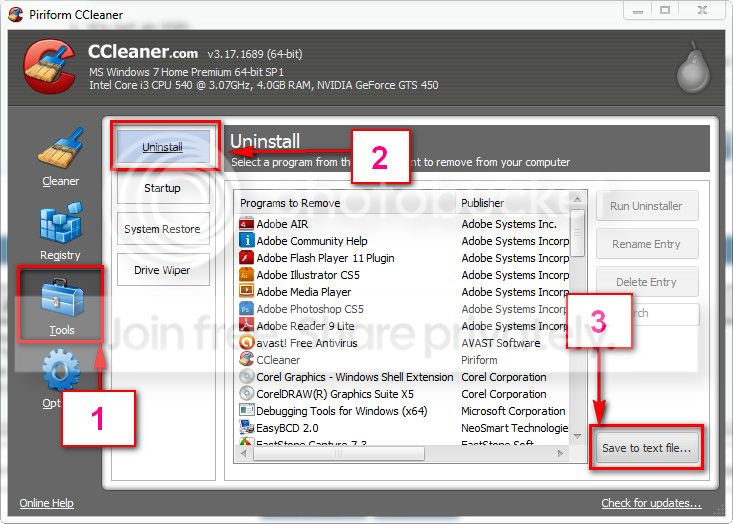
And, Download and install CCleaner. Then run it.
Go to "Tools" .... by default it will open the "uninstall" tab.
Click on save as text file. Save it on your desktop.
Upload the text file for us.
2012-11-02_224417.jpg


We need to know what are the programs you have to installed. How many bloatwares are there, is there multiple antivirus installed, and which program you use to defrag disc etc.
 

My Computer

Computer type
PC/Desktop
Computer Manufacturer/Model Number
Self Assembled
OS
Microsoft Windows 10 Pro Insider Preview 64-bit
CPU
Intel(R) Core(TM) i3-4130 CPU @ 3.40GHz
Motherboard
Gigabyte Technology Co., Ltd. B85M-D3H
Memory
Corsair Vengence 4GB x2 (8.00GB Dual-Channel DDR3 @ 798MHz)
Graphics Card(s)
2047MB GeForce GTS 450 (ZOTAC International)
Sound Card
Onboard (Realtek High Definition Audio)
Monitor(s) Displays
LG Flatron E2040T
Screen Resolution
1600x900
Hard Drives
Western Digital 1 TB
Seagate 500 GB
PSU
Corsair VS550
Case
Cooler Master K380
Cooling
Cooler Master Seidon 120V Plus
Keyboard
Logitech MK260r
Mouse
Logitech MK260r
Internet Speed
PMPL Broadband
Antivirus
Windows Defender + MBAM
Browser
Firefox
Other Info
Dell Studio 15" Laptop
So I uninstalled trendmicro, installed MSE MBAM and Ccleaner.

I have saved the memtest for after this post.

I had 4 more BSOD since running the scans, which they found nothing.

Ill upload the requested info.

Thank you for your help, its much appreciated.

Brandon
 
Last edited:

My Computer

Computer Manufacturer/Model Number
Asus U46e
OS
Windows 7 Home Premium 64bit
CPU
Intel i7 2620
Screen Resolution
HD HXGA
Hard Drives
750gb 7200rpm sata i
Mouse
Razer Naga Epic
Internet Speed
Standard 18mbps (sometimes lower because of users)
Upload a screenshot of Speccy's summery tab, after a reasonable time of the computer usage. It crashed on the latest version of the graphics driver too... so the next thing to check is the system heat.

Get rid of intel rapid storage.

  1. Right click on "my computer" icon and click "manage" on the context menu.
  2. It will open the "computer management" window.
  3. Select "Device Manager" in the left pane, It will list all the existing devices up.
  4. Expand "Disc Drives" by clicking on the triangle in front of it.
  5. Select one item under it, right click, uninstall.
  6. Continue the process for all items under "Disc Drives"
  7. Now restart the computer. At restart, windows will auto configure the appropriate system driver, msahci.sys.
Do you have windows installer Disc, BTW?
 

My Computer

Computer type
PC/Desktop
Computer Manufacturer/Model Number
Self Assembled
OS
Microsoft Windows 10 Pro Insider Preview 64-bit
CPU
Intel(R) Core(TM) i3-4130 CPU @ 3.40GHz
Motherboard
Gigabyte Technology Co., Ltd. B85M-D3H
Memory
Corsair Vengence 4GB x2 (8.00GB Dual-Channel DDR3 @ 798MHz)
Graphics Card(s)
2047MB GeForce GTS 450 (ZOTAC International)
Sound Card
Onboard (Realtek High Definition Audio)
Monitor(s) Displays
LG Flatron E2040T
Screen Resolution
1600x900
Hard Drives
Western Digital 1 TB
Seagate 500 GB
PSU
Corsair VS550
Case
Cooler Master K380
Cooling
Cooler Master Seidon 120V Plus
Keyboard
Logitech MK260r
Mouse
Logitech MK260r
Internet Speed
PMPL Broadband
Antivirus
Windows Defender + MBAM
Browser
Firefox
Other Info
Dell Studio 15" Laptop
Rapid share is gone.

I uninstalled the disk drive.

I ran memtest last night and yesterday, passed 4 times first no errors, last night passed 6 times no errors.

I have the screen shot. Do you think that it could be my internal fan? or just my laptop should not be on my lap.. because it gets it too hot.

thanks again for taking your time to help

brandon.
 

My Computer

Computer Manufacturer/Model Number
Asus U46e
OS
Windows 7 Home Premium 64bit
CPU
Intel i7 2620
Screen Resolution
HD HXGA
Hard Drives
750gb 7200rpm sata i
Mouse
Razer Naga Epic
Internet Speed
Standard 18mbps (sometimes lower because of users)
I also noticed that my ram, even though what i bought was 2x4gb 1333mhz ram, its only running at 667mhz... is that bad?
 

My Computer

Computer Manufacturer/Model Number
Asus U46e
OS
Windows 7 Home Premium 64bit
CPU
Intel i7 2620
Screen Resolution
HD HXGA
Hard Drives
750gb 7200rpm sata i
Mouse
Razer Naga Epic
Internet Speed
Standard 18mbps (sometimes lower because of users)
I also noticed that my ram, even though what i bought was 2x4gb 1333mhz ram, its only running at 667mhz... is that bad?
Good point.

As there is a confusion, test your RAM modules for possible errors.
How to Test and Diagnose RAM Issues with Memtest86+
Run memtest for at least 8 passes, preferably overnight, per RAM module per slot.

If you feel the laptop hot, you should use a cooling pad for it. The temps that speccy disclosed are not that bad, though. But if it shows a increasing tendency with the usage time, it is bad, for sure.
 

My Computer

Computer type
PC/Desktop
Computer Manufacturer/Model Number
Self Assembled
OS
Microsoft Windows 10 Pro Insider Preview 64-bit
CPU
Intel(R) Core(TM) i3-4130 CPU @ 3.40GHz
Motherboard
Gigabyte Technology Co., Ltd. B85M-D3H
Memory
Corsair Vengence 4GB x2 (8.00GB Dual-Channel DDR3 @ 798MHz)
Graphics Card(s)
2047MB GeForce GTS 450 (ZOTAC International)
Sound Card
Onboard (Realtek High Definition Audio)
Monitor(s) Displays
LG Flatron E2040T
Screen Resolution
1600x900
Hard Drives
Western Digital 1 TB
Seagate 500 GB
PSU
Corsair VS550
Case
Cooler Master K380
Cooling
Cooler Master Seidon 120V Plus
Keyboard
Logitech MK260r
Mouse
Logitech MK260r
Internet Speed
PMPL Broadband
Antivirus
Windows Defender + MBAM
Browser
Firefox
Other Info
Dell Studio 15" Laptop
I ran my Memtest last night and no errors after 6 passes. i was going to wait for 8 but 9 1/2 hours into it i figured it was okay. ( i ran in the previous day, no errors as well)

So, if my computer is over heating, why would it blue screen with errors like memory_manager, cache_manager and what not, just wondering :] ...

If cooling is my only problem, then that is awesome.

Do you know of a way to increase my fan speed with in my laptop??

thanks

brandon
 

My Computer

Computer Manufacturer/Model Number
Asus U46e
OS
Windows 7 Home Premium 64bit
CPU
Intel i7 2620
Screen Resolution
HD HXGA
Hard Drives
750gb 7200rpm sata i
Mouse
Razer Naga Epic
Internet Speed
Standard 18mbps (sometimes lower because of users)
Brandon, to me, your problem is one or more device driver/s. A device driver may cause miss-reading of the memory data, so it may be appear as a memory corruption. and, heat may force the graphics driver to fail.

We have identified two device drivers those failed till now. And, heat is also be a real issue, if it is tending to increase over the user time; monitor using Speccy.

Observation and time will tell us how good we are going. Give it a time.

you may try SpeedFan - Access temperature sensor in your computer.
 

My Computer

Computer type
PC/Desktop
Computer Manufacturer/Model Number
Self Assembled
OS
Microsoft Windows 10 Pro Insider Preview 64-bit
CPU
Intel(R) Core(TM) i3-4130 CPU @ 3.40GHz
Motherboard
Gigabyte Technology Co., Ltd. B85M-D3H
Memory
Corsair Vengence 4GB x2 (8.00GB Dual-Channel DDR3 @ 798MHz)
Graphics Card(s)
2047MB GeForce GTS 450 (ZOTAC International)
Sound Card
Onboard (Realtek High Definition Audio)
Monitor(s) Displays
LG Flatron E2040T
Screen Resolution
1600x900
Hard Drives
Western Digital 1 TB
Seagate 500 GB
PSU
Corsair VS550
Case
Cooler Master K380
Cooling
Cooler Master Seidon 120V Plus
Keyboard
Logitech MK260r
Mouse
Logitech MK260r
Internet Speed
PMPL Broadband
Antivirus
Windows Defender + MBAM
Browser
Firefox
Other Info
Dell Studio 15" Laptop
I only had one device driver to uninstall. there is two?
If i blue screen again, or should i say when, do i uninstall the device driver and reboot as a troubleshoot again?

I went and found speedfan, after i noticed on speccy im running kind of hot.
How hot is too hot? The temps for my CPU and motherboard peak at 60-61 Celsius.
I have noticed my computer has been running better lately, and i thank you for that.
thanks,
brandon

******
Just shortly after this i had a BSOD with
irql_not_less_or_equal

I am going to upload the mini dump files.
When it BSOD i was on a online game, command and conquer tiberium alliances. with the league of legends client in the background.
i was monitoring the heat, but hadn't in the 5 mins i was on the online game.
 
Last edited:

My Computer

Computer Manufacturer/Model Number
Asus U46e
OS
Windows 7 Home Premium 64bit
CPU
Intel i7 2620
Screen Resolution
HD HXGA
Hard Drives
750gb 7200rpm sata i
Mouse
Razer Naga Epic
Internet Speed
Standard 18mbps (sometimes lower because of users)
Your crash dumps are not showing any finite probable cause. In such a situation, it is better to enable Driver Verifier to monitor the drivers.
Driver Verifier - Enable and Disable
Run Driver Verifier for 24 hours or the occurrence of the next crash, whichever is earlier.

   Information
Why Driver Verifier:
It puts a stress on the drivers, ans so it makes the unstable drivers crash. Hopefully the driver that crashes is recorded in the memory dump.

How Can we know that DV is enabled:
It will make the system bit of slow, laggy.

   Warning
Before enabling DV, make it sure that you have earlier System restore points made in your computer. You can check it easily by using CCleaner looking at Tools > System Restore.

If there is no points, make a System Restore Point manually before enabling DV.

   Tip


Let us know the results, with the subsequent crash dumps, if any.
 

My Computer

Computer type
PC/Desktop
Computer Manufacturer/Model Number
Self Assembled
OS
Microsoft Windows 10 Pro Insider Preview 64-bit
CPU
Intel(R) Core(TM) i3-4130 CPU @ 3.40GHz
Motherboard
Gigabyte Technology Co., Ltd. B85M-D3H
Memory
Corsair Vengence 4GB x2 (8.00GB Dual-Channel DDR3 @ 798MHz)
Graphics Card(s)
2047MB GeForce GTS 450 (ZOTAC International)
Sound Card
Onboard (Realtek High Definition Audio)
Monitor(s) Displays
LG Flatron E2040T
Screen Resolution
1600x900
Hard Drives
Western Digital 1 TB
Seagate 500 GB
PSU
Corsair VS550
Case
Cooler Master K380
Cooling
Cooler Master Seidon 120V Plus
Keyboard
Logitech MK260r
Mouse
Logitech MK260r
Internet Speed
PMPL Broadband
Antivirus
Windows Defender + MBAM
Browser
Firefox
Other Info
Dell Studio 15" Laptop
Sorry for the two week delay.
I have verifier running right now, because my computer is BSODing again. it was running fine until the last week.
my malwarebyte ran out of free trial. i have a 2011 norton anti virus running, (its 2011 because i got a free code for it, been trying to upgrade it to 2013 but its actually not that simple figuring out if my code works for that.)
When i installed norton, it made me uninstall MSE as well.
 

My Computer

Computer Manufacturer/Model Number
Asus U46e
OS
Windows 7 Home Premium 64bit
CPU
Intel i7 2620
Screen Resolution
HD HXGA
Hard Drives
750gb 7200rpm sata i
Mouse
Razer Naga Epic
Internet Speed
Standard 18mbps (sometimes lower because of users)
BSOD many Different codes. random timing

So, I have tried to fix my BSOD for a while.

I have had a previous thread, Where I download MSE and CCleaner and MBAM, I've SFC, and ran MEMTEST86.

MSE expired and everything. My memtest was 8 passes and no errors. SFC runs and changes something sometimes.

I have finally after a good deal of time finally caught a BSOD while verifier was up. I have waited 24hrs then as soon as I turn off verifier in that restart, I blue screen. I have blue screens quite a lot, but NEVER when verifier is open until just now.

I will upload the the SF folder, that I just created.

Someone please help me. I need to figure out if I need to buy a new hard drive. (the computer says it's 100% healthy)

thank you for your time.

Brandon
 

My Computer

Computer Manufacturer/Model Number
Asus U46e
OS
Windows 7 Home Premium 64bit
CPU
Intel i7 2620
Screen Resolution
HD HXGA
Hard Drives
750gb 7200rpm sata i
Mouse
Razer Naga Epic
Internet Speed
Standard 18mbps (sometimes lower because of users)
Code:
BugCheck 50, {fffffc0004d3f7ab, 0, fffff800032bbbef, 7}


Could not read faulting driver name
Probably caused by : memory_corruption ( nt!MiAgeWorkingSet+425 )

Followup: MachineOwner
---------
MM_INTERNAL_CODE:  7

CUSTOMER_CRASH_COUNT:  1

DEFAULT_BUCKET_ID:  VERIFIER_ENABLED_VISTA_MINIDUMP

BUGCHECK_STR:  0x50

PROCESS_NAME:  ccsvchst.exe

CURRENT_IRQL:  0
===========================================================================
BugCheck 1A, {31, fffffa800c9b3810, fffff88009657000, fffff8a004975203}

Probably caused by : ntkrnlmp.exe ( nt! ?? ::NNGAKEGL::`string'+7271 )

Followup: MachineOwner
===========================================================================
BugCheck 50, {ffffd8a002b9eca0, 1, fffff880016b0c2f, 7}


Could not read faulting driver name
Probably caused by : Ntfs.sys ( Ntfs!TxfAccessCheck+9f )

Followup: MachineOwner
---------
Scan the system for possible virus infection.

As a test, uninstall Norton and all Symentec products using Norton Removal tool. We have seen a nice number of similar issues with Norton installed, both memory and Ntfs corruption. If you want arguments I can supply; but your dumps till now are saying noting against it. Suggesting it based on my experience only.

Use Microsoft Security Essentials as your antivirus with windows inbuilt firewall, and free MBAM as the on demand scanner.
Download, install and update those, and then run full system scans with both of them, one by one.

Test your RAM modules for possible errors.
How to Test and Diagnose RAM Issues with Memtest86+
Run memtest for at least 8 passes, preferably overnight.

Let us know the results.
 

My Computer

Computer type
PC/Desktop
Computer Manufacturer/Model Number
Self Assembled
OS
Microsoft Windows 10 Pro Insider Preview 64-bit
CPU
Intel(R) Core(TM) i3-4130 CPU @ 3.40GHz
Motherboard
Gigabyte Technology Co., Ltd. B85M-D3H
Memory
Corsair Vengence 4GB x2 (8.00GB Dual-Channel DDR3 @ 798MHz)
Graphics Card(s)
2047MB GeForce GTS 450 (ZOTAC International)
Sound Card
Onboard (Realtek High Definition Audio)
Monitor(s) Displays
LG Flatron E2040T
Screen Resolution
1600x900
Hard Drives
Western Digital 1 TB
Seagate 500 GB
PSU
Corsair VS550
Case
Cooler Master K380
Cooling
Cooler Master Seidon 120V Plus
Keyboard
Logitech MK260r
Mouse
Logitech MK260r
Internet Speed
PMPL Broadband
Antivirus
Windows Defender + MBAM
Browser
Firefox
Other Info
Dell Studio 15" Laptop
Back
Top