BSOD using PS3 Media Server(ataport.sys & ntoskrnl.exe)

JaysinXero

New member
Local time
5:26 PM
Messages
16
I get the BSOD most commonly if I'm streaming a video file to my PS3 via PS3 Media Server.

I've never had to deal with a problem like this before, so I'm hoping I get can get some help without having to reinstall windows altogether. I put the two required reports in a zip like the Posting Instructions thread said to do.

- x64
- I upgraded to Windows 7 from Vista
- Full Retail
- The laptop is a few years old. Not sure on the exact age. I got it from my dad

Also, even though the PERFMON says that I don't have an anti virus program, I have Malware Bytes...
 

My Computer My Computer

OS
Windows 7 Ultimate x64

These crashes were caused by memory corruption probably a driver.
Please run these two tests to verify your memory and find which driver is causing the problem.


* If you are overclocking anything reset to default before running these tests.
In other words STOP!!!

* If you have a Raid update its Driver.


Memtest.
*Download a copy of Memtest86 and burn the ISO to a CD using Iso Recorder or another ISO burning program. Memtest86+ - Advanced Memory Diagnostic Tool

*Boot from the CD, and leave it running for at least 5-7 passes.

Just remember, any time Memtest reports errors, it can be either bad RAM or a bad motherboard slot.

Test the sticks individually, and if you find a good one, test it in all slots.

Any errors are indicative of a memory problem.

If a known good stick fails in a motherboard slot it is probably the slot.


http://www.sevenforums.com/tutorials/105647-ram-test-memtest86.html


Driver Verifier

Using Driver Verifier is an iffy proposition.
Most times it'll crash and it'll tell you what the driver is.
But sometimes it'll crash and won't tell you the driver.
Other times it'll crash before you can log in to Windows.
If you can't get to Safe Mode, then you'll have to resort to offline editing of the registry to disable Driver Verifier.

I'd suggest that you first backup your stuff and then make sure you've got access to another computer so you can contact us if problems arise.
Then make a System Restore point (so you can restore the system using the Vista/Win7 Startup Repair feature).

In Windows 7 you can make a Startup Repair disk by going to Start....All Programs...Maintenance...Create a System Repair Disc - with Windows Vista you'll have to use your installation disk or the "Repair your computer" option at the top of the Safe Mode menu .

Then, here's the procedure:
- Go to Start and type in "verifier" (without the quotes) and press Enter
- Select "Create custom settings (for code developers)" and click "Next"
- Select "Select individual settings from a full list" and click "Next"
- Select everything EXCEPT FOR "Low Resource Simulation"IRP Logging and Force Pending I/O Requests. and click "Next"
NOTE: You can use Low Resource Simulation if you'd like.
From my limited experimentation it makes the BSOD's come faster.
- Select "Select driver names from a list" and click "Next"
Then select all drivers NOT provided by Microsoft and click "Next"
- Select "Finish" on the next page.

If you are using win 8 add these

- Concurrency Stress Test
- DDI compliance checking

Reboot the system and wait for it to crash to the Blue Screen.
Continue to use your system normally, and if you know what causes the crash, do that repeatedly.
The objective here is to get the system to crash because Driver Verifier is stressing the drivers out.
If it doesn't crash for you, then let it run for at least 36 hours of continuous operation.
Reboot into Windows (after the crash) and turn off Driver Verifier by going back in and selecting "Delete existing settings" on the first page, then locate and zip up the memory dump file and upload it with your next post.


If you can't get into Windows because it crashes too soon, try it in Safe Mode.
If you can't get into Safe Mode, try using System Restore from your installation DVD to set the system back to the previous restore point that you created.

Thanks to JCGriff2 & Usasma.

Sysnative Forums

Driver Reference Table (DRT)

Using Driver Verifier to identify issues with Windows drivers for advanced users

Driver Verifier

Using Driver Verifier (Windows Drivers)
 

My Computer My Computer

Computer Manufacturer/Model Number
HP Pavillion dv-7 1005 Tx
OS
Win 8 Release candidate 8400
CPU
[email protected]
Memory
4 gigs
Graphics Card(s)
Nvidia 9600M
Sound Card
HD built-in
Monitor(s) Displays
17" Wxga
Screen Resolution
1440x900
Cooling
none
Internet Speed
45Mb down 5Mb up
Well I did the MEMtest and it said there were no errors, but now I can't even log into windows. I can't login to safe mode either. It crashes at the windows loading screen
 

My Computer My Computer

OS
Windows 7 Ultimate x64
I took a picture with my phone of the blue screen I'm getting when I try to go to Start Up Repair. I still can't boot Windows or in Safe Mode. I can't do anything.
 

My Computer My Computer

OS
Windows 7 Ultimate x64

My Computer My Computer

Computer Manufacturer/Model Number
HP Pavilion e9110t
OS
Windows 7 Home Premium 64 Bit
CPU
Intel(R) Core(TM)2 Quad CPU Q9550 @ 2.83GHz
Motherboard
Pegatron IPIEL-LA3
Memory
6.00 GB Hundai HMT125U6BFR8C-H9
Graphics Card(s)
ATI Radeon HD 4850
Sound Card
Realtek High Definition Audio/ATI High Definition Audio
Monitor(s) Displays
Acer AL2216W
Screen Resolution
1680x1050
Hard Drives
Hitachi HDP725050GLA360 ATA Device 500 GB
PSU
Unknown/installed by HP
Case
HP generic case
Cooling
Intel Stock Cooling
Keyboard
HP Keyboard
Mouse
HP Mouse
Internet Speed
Download: 19.15 Mbps Upload: 1.67 Mbps
Other Info
Network Adapter Realtek RTL8168D/8111D Family PCI-E Gigabit Ethernet NIC (NDIS 6.20)
Network Adapter 802.11n Wireless PCI Express Card LAN Adapter
I was doing the SFC Scannow steps and now I can't even boot to safe mode or anything. It tells me ntoskrnl.exe is missing or currupt. It tells me to do Start Up Repair with my Windows 7 disc, but that tells me it can't fix the problem or it tells me it can't find a problem...
 

My Computer My Computer

OS
Windows 7 Ultimate x64
Still haven't been able to boot and I'm getting an error saying that ntoskrnl.exe is missing or corrupt. I followed the directions it gave me, which was use the Start Up Repair from my Windows 7 disc, but it didn't do anything.
 

My Computer My Computer

OS
Windows 7 Ultimate x64
You may have to move to steps 9-10...
 

My Computer My Computer

Computer Manufacturer/Model Number
HP Pavilion e9110t
OS
Windows 7 Home Premium 64 Bit
CPU
Intel(R) Core(TM)2 Quad CPU Q9550 @ 2.83GHz
Motherboard
Pegatron IPIEL-LA3
Memory
6.00 GB Hundai HMT125U6BFR8C-H9
Graphics Card(s)
ATI Radeon HD 4850
Sound Card
Realtek High Definition Audio/ATI High Definition Audio
Monitor(s) Displays
Acer AL2216W
Screen Resolution
1680x1050
Hard Drives
Hitachi HDP725050GLA360 ATA Device 500 GB
PSU
Unknown/installed by HP
Case
HP generic case
Cooling
Intel Stock Cooling
Keyboard
HP Keyboard
Mouse
HP Mouse
Internet Speed
Download: 19.15 Mbps Upload: 1.67 Mbps
Other Info
Network Adapter Realtek RTL8168D/8111D Family PCI-E Gigabit Ethernet NIC (NDIS 6.20)
Network Adapter 802.11n Wireless PCI Express Card LAN Adapter
You may have to move to steps 9-10...

Will I be able to make a bootable flash drive ofthe Partition Wizard on a Mac? It's the only other computer I have access too and I'm not even remotely experienced with Macs.
 

My Computer My Computer

OS
Windows 7 Ultimate x64
I am not sure. I have never used a MAC outside of checking my e-mail. I have asked others who may have experience to take a look at this thread.
 

My Computer My Computer

Computer Manufacturer/Model Number
HP Pavilion e9110t
OS
Windows 7 Home Premium 64 Bit
CPU
Intel(R) Core(TM)2 Quad CPU Q9550 @ 2.83GHz
Motherboard
Pegatron IPIEL-LA3
Memory
6.00 GB Hundai HMT125U6BFR8C-H9
Graphics Card(s)
ATI Radeon HD 4850
Sound Card
Realtek High Definition Audio/ATI High Definition Audio
Monitor(s) Displays
Acer AL2216W
Screen Resolution
1680x1050
Hard Drives
Hitachi HDP725050GLA360 ATA Device 500 GB
PSU
Unknown/installed by HP
Case
HP generic case
Cooling
Intel Stock Cooling
Keyboard
HP Keyboard
Mouse
HP Mouse
Internet Speed
Download: 19.15 Mbps Upload: 1.67 Mbps
Other Info
Network Adapter Realtek RTL8168D/8111D Family PCI-E Gigabit Ethernet NIC (NDIS 6.20)
Network Adapter 802.11n Wireless PCI Express Card LAN Adapter
I ended up trying to make the bootable flash drive on the Mac to no avail. I'm hoping to get access to another computer tomorrow otherwise I feel I maybe screwed
 

My Computer My Computer

OS
Windows 7 Ultimate x64
Apparently Vista was still installed or something or other. I was able to boot to Vista so I'm attempting to do steps 8 and 9 next. I'll get back to you guys with the results. Hopefully, it'll fix it.
 

My Computer My Computer

OS
Windows 7 Ultimate x64
Well I have a problem...

It won't let me make a bootable disc with Partition Wizard. The section in the toolbar(taskbar?) of the program. The part with the buttons for FAQ, Help, Bootable CD, Donate!, and Contact Us. None of that stuff seems to actually do anything. Even if I try to do it from a separate menu.
 

My Computer My Computer

OS
Windows 7 Ultimate x64
Are you talking about trying to download the bootable iso file from the website?
 

My Computer My Computer

OS
Windows 7 Ultimate x64

My Computer My Computer

Computer Manufacturer/Model Number
HP Pavilion e9110t
OS
Windows 7 Home Premium 64 Bit
CPU
Intel(R) Core(TM)2 Quad CPU Q9550 @ 2.83GHz
Motherboard
Pegatron IPIEL-LA3
Memory
6.00 GB Hundai HMT125U6BFR8C-H9
Graphics Card(s)
ATI Radeon HD 4850
Sound Card
Realtek High Definition Audio/ATI High Definition Audio
Monitor(s) Displays
Acer AL2216W
Screen Resolution
1680x1050
Hard Drives
Hitachi HDP725050GLA360 ATA Device 500 GB
PSU
Unknown/installed by HP
Case
HP generic case
Cooling
Intel Stock Cooling
Keyboard
HP Keyboard
Mouse
HP Mouse
Internet Speed
Download: 19.15 Mbps Upload: 1.67 Mbps
Other Info
Network Adapter Realtek RTL8168D/8111D Family PCI-E Gigabit Ethernet NIC (NDIS 6.20)
Network Adapter 802.11n Wireless PCI Express Card LAN Adapter
I need bootable flash drive, not CD. According to their website I can do that but it won't let me
 

My Computer My Computer

OS
Windows 7 Ultimate x64

My Computer My Computer

Computer Manufacturer/Model Number
HP Pavilion e9110t
OS
Windows 7 Home Premium 64 Bit
CPU
Intel(R) Core(TM)2 Quad CPU Q9550 @ 2.83GHz
Motherboard
Pegatron IPIEL-LA3
Memory
6.00 GB Hundai HMT125U6BFR8C-H9
Graphics Card(s)
ATI Radeon HD 4850
Sound Card
Realtek High Definition Audio/ATI High Definition Audio
Monitor(s) Displays
Acer AL2216W
Screen Resolution
1680x1050
Hard Drives
Hitachi HDP725050GLA360 ATA Device 500 GB
PSU
Unknown/installed by HP
Case
HP generic case
Cooling
Intel Stock Cooling
Keyboard
HP Keyboard
Mouse
HP Mouse
Internet Speed
Download: 19.15 Mbps Upload: 1.67 Mbps
Other Info
Network Adapter Realtek RTL8168D/8111D Family PCI-E Gigabit Ethernet NIC (NDIS 6.20)
Network Adapter 802.11n Wireless PCI Express Card LAN Adapter
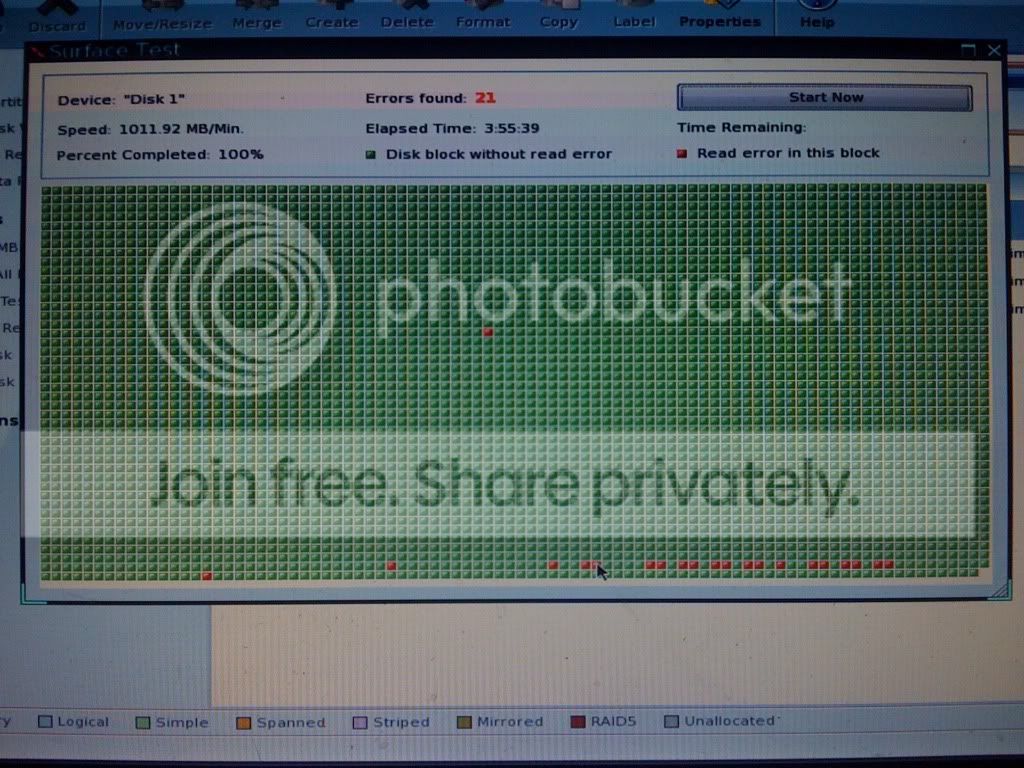
I needed a bootable USB because I had no blank CDs or DVDs. I found one, and made a bootable cd and I did a surface test since was one of the only things it'd let me do. This was the result

26f2ae6a.jpg
 

My Computer My Computer

OS
Windows 7 Ultimate x64
How does that drive look when you run diagnosics on it. It would be good to run the program supplied by the manufacturer, but this one is recognized to work well with most brands/models: SeaTools | Seagate
 

My Computer My Computer

OS
Windows 7 Ultimate x64
Back
Top