BSOD Using Python 2.7, error 0x000000f4

Frey

New member
Local time
6:31 PM
Messages
4
Hello sevenforums,

I have been having a BSOD problem on my Asus laptop running Windows 7, processor is core-i5. The BSOD occurs somewhat randomly when attempting to run python scripts using VIDLE for Python 2.7. The problem usually occurs after around 2 - 10 times of running a script, and it does not depend whatsoever on the contents of the script, as I have seen it BSOD while running a completely blank script. The BSOD does not seem to happen during any other activity on the computer (which is mostly using the internet, some other Physics related programs, and some games).

The error code is 0x000000f4, and BlueScreenViewer is telling me that the likely culprits are discache.sys and ntoskrnl.dll. I've attached my SF Diagnostic Tool log.

Any help would be greatly appreciated.
Thanks
 

My Computer My Computer

At a glance

Windows 7 64-bitcore i5 2.3GHz6 GB DDR3GeForce GT 520M
Computer type
PC/Desktop
Computer Manufacturer/Model Number
Asus
OS
Windows 7 64-bit
CPU
core i5 2.3GHz
Memory
6 GB DDR3
Graphics Card(s)
GeForce GT 520M
Hard Drives
500GB SATA
Antivirus
Microsoft Security Essentials
Hello Frey.

Free up the startup. Windows does not need any other program to auto start with it, but the auto start programs often conflicts and causes various problems including BSODs.

  1. Click on the Start button
  2. Type “msconfig (without quotes), click the resulting link. It will open the System Configuration window.
  3. Select the “Startup” tab.
  4. Deselect all items other than the antivirus and the touchpad driver, SynTPEnh.
  5. Apply > OK
  6. Accept then restart.
Get rid of intel rapid storage. First uninstall it from Control Panel > Programs and Features. Then Uninstall the driver from device manager.

  1. Right click on "my computer" icon and click "manage" on the context menu.
  2. It will open the "computer management" window.
  3. Select "Device Manager" in the left pane, It will list all the existing devices up.
  4. Expand "IDE ATA/ATAPI controllers" by clicking on the triangle in front of it.
  5. Select one Intel device item under it, right click, uninstall.
  6. Continue the process for all Intel items under "IDE ATA/ATAPI controllers"
  7. Now restart the computer. At restart, windows will auto configure the appropriate native system driver.
Seatool for dos: SeaTools | Seagate download

  • Burn it in a blank cd. boot from the CD, click on "Accept", wait for it to finish detecting the drives, then in the upper left corner select "Basic Tests", then select "Long Test" and let it run.
Post a screenshot of your HDD using CrystalDiscInfo.

Uninstall the following Bloatware.

  • Start Menu\Programs\ASUS
  • Start Menu\Programs\ASUS\ASUS WebStorage
  • Start Menu\Programs\ASUS Utility
  • Start Menu\Programs\ASUS Utility\ASUS Splendid Utility
  • Start Menu\Programs\ASUS Utility\SmartLogon
Let us know the results.
__________________________________________________________________________
BSOD ANALYSIS:
Code:
*******************************************************************************
*                                                                             *
*                        Bugcheck Analysis                                    *
*                                                                             *
*******************************************************************************

Use !analyze -v to get detailed debugging information.

BugCheck F4, {3, fffffa800a374b30, fffffa800a374e10, fffff8000338b350}

----- ETW minidump data unavailable-----
Probably caused by : wininit.exe

Followup: MachineOwner
---------

2: kd> !analyze -v
*******************************************************************************
*                                                                             *
*                        Bugcheck Analysis                                    *
*                                                                             *
*******************************************************************************

CRITICAL_OBJECT_TERMINATION (f4)
A process or thread crucial to system operation has unexpectedly exited or been
terminated.
Several processes and threads are necessary for the operation of the
system; when they are terminated (for any reason), the system can no
longer function.
Arguments:
Arg1: 0000000000000003, Process
Arg2: fffffa800a374b30, Terminating object
Arg3: fffffa800a374e10, Process image file name
Arg4: fffff8000338b350, Explanatory message (ascii)

Debugging Details:
------------------

----- ETW minidump data unavailable-----

KERNEL_LOG_FAILING_PROCESS:  (null)

PROCESS_OBJECT: fffffa800a374b30

IMAGE_NAME:  wininit.exe

DEBUG_FLR_IMAGE_TIMESTAMP:  0

MODULE_NAME: wininit

FAULTING_MODULE: 0000000000000000 

PROCESS_NAME:  pythonw.exe

BUGCHECK_STR:  0xF4_pythonw.exe

CUSTOMER_CRASH_COUNT:  1

DEFAULT_BUCKET_ID:  WIN7_DRIVER_FAULT

CURRENT_IRQL:  0

LAST_CONTROL_TRANSFER:  from fffff80003412d22 to fffff80003084c00

STACK_TEXT:  
fffff880`0b7069c8 fffff800`03412d22 : 00000000`000000f4 00000000`00000003 fffffa80`0a374b30 fffffa80`0a374e10 : nt!KeBugCheckEx
fffff880`0b7069d0 fffff800`033bf08b : ffffffff`ffffffff fffffa80`05cf6b50 fffffa80`0a374b30 fffffa80`05c28b30 : nt!PspCatchCriticalBreak+0x92
fffff880`0b706a10 fffff800`0333f144 : ffffffff`ffffffff 00000000`00000001 fffffa80`0a374b30 00000000`00000008 : nt! ?? ::NNGAKEGL::`string'+0x17486
fffff880`0b706a60 fffff800`03083e93 : fffffa80`0a374b30 fffff880`0000000f fffffa80`05cf6b50 00000000`00000f90 : nt!NtTerminateProcess+0xf4
fffff880`0b706ae0 00000000`772b15da : 00000000`00000000 00000000`00000000 00000000`00000000 00000000`00000000 : nt!KiSystemServiceCopyEnd+0x13
00000000`0008e318 00000000`00000000 : 00000000`00000000 00000000`00000000 00000000`00000000 00000000`00000000 : 0x772b15da


STACK_COMMAND:  kb

FOLLOWUP_NAME:  MachineOwner

FAILURE_BUCKET_ID:  X64_0xF4_pythonw.exe_IMAGE_wininit.exe

BUCKET_ID:  X64_0xF4_pythonw.exe_IMAGE_wininit.exe

Followup: MachineOwner
---------
 

My Computer My Computer

At a glance

Microsoft Windows 10 Pro Insider Preview 64-bitIntel(R) Core(TM) i3-4130 CPU @ 3.40GHzCorsair Vengence 4GB x2 (8.00GB Dual-Channel ...2047MB GeForce GTS 450 (ZOTAC International)
Computer type
PC/Desktop
Computer Manufacturer/Model Number
Self Assembled
OS
Microsoft Windows 10 Pro Insider Preview 64-bit
CPU
Intel(R) Core(TM) i3-4130 CPU @ 3.40GHz
Motherboard
Gigabyte Technology Co., Ltd. B85M-D3H
Memory
Corsair Vengence 4GB x2 (8.00GB Dual-Channel DDR3 @ 798MHz)
Graphics Card(s)
2047MB GeForce GTS 450 (ZOTAC International)
Sound Card
Onboard (Realtek High Definition Audio)
Monitor(s) Displays
LG Flatron E2040T
Screen Resolution
1600x900
Hard Drives
Western Digital 1 TB
Seagate 500 GB
PSU
Corsair VS550
Case
Cooler Master K380
Cooling
Cooler Master Seidon 120V Plus
Keyboard
Logitech MK260r
Mouse
Logitech MK260r
Internet Speed
PMPL Broadband
Antivirus
Windows Defender + MBAM
Browser
Firefox
Other Info
Dell Studio 15" Laptop
Thanks for your response Arc,

I changed my startup settings so that only the touchpad and antivurs begin at startup, and I got rid of intel rapid storage. I also uninstalled all of Asus's crapware, something which I should have done right when I got the computer but never got around to.

I'm not able to make a boot cd since my computer has not cd drive to boot from, but I have attached both the complete copy of CDinfo and a screenshot of the main page.

Interestingly, after doing all of these things, I tried running a blank python script over and over again to reproduce the BSOD. However, the first thing that happened was that the computer simply froze for a moment, and then forced me back to the Windows login screen. After a second set of running the script repeatedly I was able to reproduce the BSOD again.

I should also mention that the computer will BSOD not only on running the script, but also quite often on closing the python shell (where the scripts are actually run).
 

My Computer My Computer

At a glance

Windows 7 64-bitcore i5 2.3GHz6 GB DDR3GeForce GT 520M
Computer type
PC/Desktop
Computer Manufacturer/Model Number
Asus
OS
Windows 7 64-bit
CPU
core i5 2.3GHz
Memory
6 GB DDR3
Graphics Card(s)
GeForce GT 520M
Hard Drives
500GB SATA
Antivirus
Microsoft Security Essentials
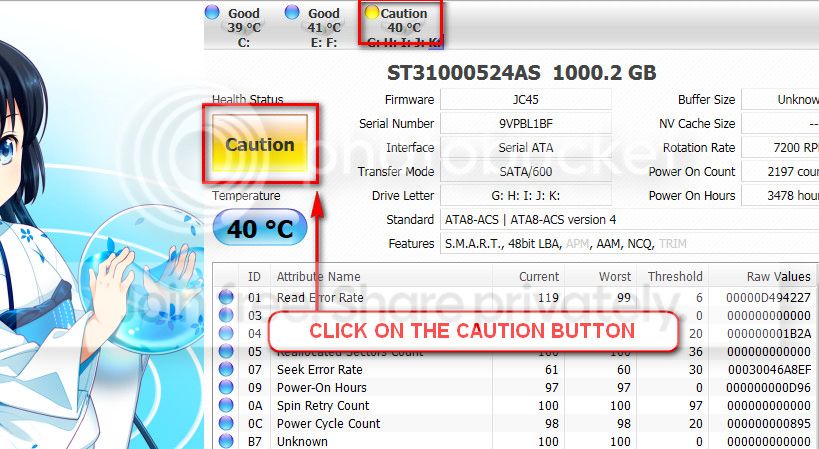
The caution indication can be converted to good using CrystalDiscInfo. Click on the caution Button, you will get another window ....
1_zps1eeadfca.jpg


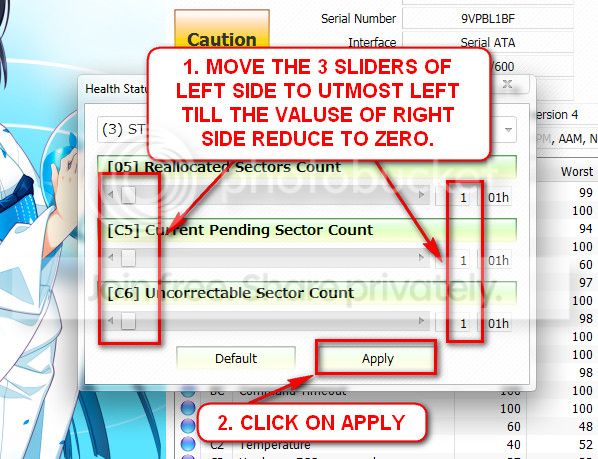
In the resulting window, there are three sliders in the left. Drag them to the ultimate left, and notice the values at the right side are converting to zeros.
2_zps50ae6eec.jpg


Now click the apply button, and notice that the caution is gone.

I suggest you to run seatools for windows if you cannot make a bootable CD. It is necessary. Also, if possible, back up your important data externally.

Next time, when there will be a BSOD, post it following the Blue Screen of Death (BSOD) Posting Instructions.
 

My Computer My Computer

At a glance

Microsoft Windows 10 Pro Insider Preview 64-bitIntel(R) Core(TM) i3-4130 CPU @ 3.40GHzCorsair Vengence 4GB x2 (8.00GB Dual-Channel ...2047MB GeForce GTS 450 (ZOTAC International)
Computer type
PC/Desktop
Computer Manufacturer/Model Number
Self Assembled
OS
Microsoft Windows 10 Pro Insider Preview 64-bit
CPU
Intel(R) Core(TM) i3-4130 CPU @ 3.40GHz
Motherboard
Gigabyte Technology Co., Ltd. B85M-D3H
Memory
Corsair Vengence 4GB x2 (8.00GB Dual-Channel DDR3 @ 798MHz)
Graphics Card(s)
2047MB GeForce GTS 450 (ZOTAC International)
Sound Card
Onboard (Realtek High Definition Audio)
Monitor(s) Displays
LG Flatron E2040T
Screen Resolution
1600x900
Hard Drives
Western Digital 1 TB
Seagate 500 GB
PSU
Corsair VS550
Case
Cooler Master K380
Cooling
Cooler Master Seidon 120V Plus
Keyboard
Logitech MK260r
Mouse
Logitech MK260r
Internet Speed
PMPL Broadband
Antivirus
Windows Defender + MBAM
Browser
Firefox
Other Info
Dell Studio 15" Laptop
I am at work right now and I don't have time to run the full scan at the moment, but I will do that when I get home and post the results.

As for the BSOD report, I included it in my first post, although I have included another one in this post.
 

My Computer My Computer

At a glance

Windows 7 64-bitcore i5 2.3GHz6 GB DDR3GeForce GT 520M
Computer type
PC/Desktop
Computer Manufacturer/Model Number
Asus
OS
Windows 7 64-bit
CPU
core i5 2.3GHz
Memory
6 GB DDR3
Graphics Card(s)
GeForce GT 520M
Hard Drives
500GB SATA
Antivirus
Microsoft Security Essentials
Ok, do it when you have time. No hurry :)
I will have to work 12 hours tomorrow :(
 

My Computer My Computer

At a glance

Microsoft Windows 10 Pro Insider Preview 64-bitIntel(R) Core(TM) i3-4130 CPU @ 3.40GHzCorsair Vengence 4GB x2 (8.00GB Dual-Channel ...2047MB GeForce GTS 450 (ZOTAC International)
Computer type
PC/Desktop
Computer Manufacturer/Model Number
Self Assembled
OS
Microsoft Windows 10 Pro Insider Preview 64-bit
CPU
Intel(R) Core(TM) i3-4130 CPU @ 3.40GHz
Motherboard
Gigabyte Technology Co., Ltd. B85M-D3H
Memory
Corsair Vengence 4GB x2 (8.00GB Dual-Channel DDR3 @ 798MHz)
Graphics Card(s)
2047MB GeForce GTS 450 (ZOTAC International)
Sound Card
Onboard (Realtek High Definition Audio)
Monitor(s) Displays
LG Flatron E2040T
Screen Resolution
1600x900
Hard Drives
Western Digital 1 TB
Seagate 500 GB
PSU
Corsair VS550
Case
Cooler Master K380
Cooling
Cooler Master Seidon 120V Plus
Keyboard
Logitech MK260r
Mouse
Logitech MK260r
Internet Speed
PMPL Broadband
Antivirus
Windows Defender + MBAM
Browser
Firefox
Other Info
Dell Studio 15" Laptop
Thanks for your help Arc, but I believe I have solved the problem (or at least found a workaround). If I run the program using my Nvidia graphics driver there is no problem. I'll just keep doing this for now, although Im still going to run a harddrive test just in case.
 

My Computer My Computer

At a glance

Windows 7 64-bitcore i5 2.3GHz6 GB DDR3GeForce GT 520M
Computer type
PC/Desktop
Computer Manufacturer/Model Number
Asus
OS
Windows 7 64-bit
CPU
core i5 2.3GHz
Memory
6 GB DDR3
Graphics Card(s)
GeForce GT 520M
Hard Drives
500GB SATA
Antivirus
Microsoft Security Essentials
Its good :) Let us know how it is working after some days.

I suggested all those, as technically a Stop 0xF4 is a storage related issue, and there were reasons to believe from your uploaded data that the storage is under problem anyhow, which was supported by the CrystalDisc Info Screenshot.

Still, if your solution works, it is most welcome :)
 

My Computer My Computer

At a glance

Microsoft Windows 10 Pro Insider Preview 64-bitIntel(R) Core(TM) i3-4130 CPU @ 3.40GHzCorsair Vengence 4GB x2 (8.00GB Dual-Channel ...2047MB GeForce GTS 450 (ZOTAC International)
Computer type
PC/Desktop
Computer Manufacturer/Model Number
Self Assembled
OS
Microsoft Windows 10 Pro Insider Preview 64-bit
CPU
Intel(R) Core(TM) i3-4130 CPU @ 3.40GHz
Motherboard
Gigabyte Technology Co., Ltd. B85M-D3H
Memory
Corsair Vengence 4GB x2 (8.00GB Dual-Channel DDR3 @ 798MHz)
Graphics Card(s)
2047MB GeForce GTS 450 (ZOTAC International)
Sound Card
Onboard (Realtek High Definition Audio)
Monitor(s) Displays
LG Flatron E2040T
Screen Resolution
1600x900
Hard Drives
Western Digital 1 TB
Seagate 500 GB
PSU
Corsair VS550
Case
Cooler Master K380
Cooling
Cooler Master Seidon 120V Plus
Keyboard
Logitech MK260r
Mouse
Logitech MK260r
Internet Speed
PMPL Broadband
Antivirus
Windows Defender + MBAM
Browser
Firefox
Other Info
Dell Studio 15" Laptop
Back
Top