
Hi,
I need you guys' help again !
This time with XP.. I tried to install xp on my Win 7 HP Desktop computer at certain point BSOD pop up and abort the installation to prevent harming my computer.
BSOD at Same Point when the copying files of installation cd have completed and about to start up the installation Windows.
I was guessing because of HARDWARE PROBLEM..may be because of BIOS SATA. But in which My pc has the only one option available "IDE" Mode. Nothing else! Though IDE mode suppose to be OK with XP, Right?:huh:
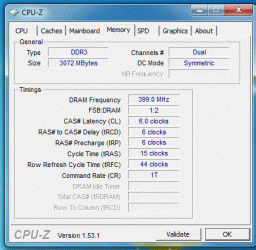
And My physical RAM is 3 GB.. So it's about OK ??
My Knowledge's again exceeded here for this matter.. SO I truly appreciate ur help.. Please, Guide me if I need to install RAID SATA when I install XP from CD or Slipstreaming methods ??
I got no Floppy Drive on PC..
My computer Specs are here:
Pavilion HP p6205uk
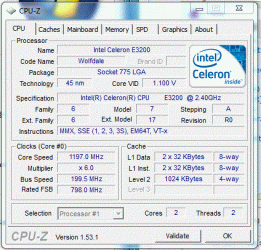
Inter(R)Celeron(R) CPU E3200 @ 2.4 GHz
Installed Memory (RAM) 3 GB
64 Bit Win 7 Operating System
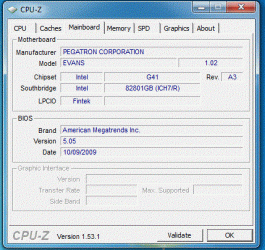
Please see my attached screen shot for Other specifications of My PC motherboard and others..
Once again, thank you for your time for my case...
PS: I've seen the thread of Common Problems with Installation from here..
http://www.sevenforums.com/installation-setup/34853-common-installation-problems.html
But I still need your hlep.. I've been HP Support and even XP help support ..but no use..Here is the only one place I find it solution..
I need you guys' help again !
This time with XP.. I tried to install xp on my Win 7 HP Desktop computer at certain point BSOD pop up and abort the installation to prevent harming my computer.
BSOD at Same Point when the copying files of installation cd have completed and about to start up the installation Windows.
I was guessing because of HARDWARE PROBLEM..may be because of BIOS SATA. But in which My pc has the only one option available "IDE" Mode. Nothing else! Though IDE mode suppose to be OK with XP, Right?:huh:
And My physical RAM is 3 GB.. So it's about OK ??
My Knowledge's again exceeded here for this matter.. SO I truly appreciate ur help.. Please, Guide me if I need to install RAID SATA when I install XP from CD or Slipstreaming methods ??
I got no Floppy Drive on PC..
My computer Specs are here:
Pavilion HP p6205uk
Inter(R)Celeron(R) CPU E3200 @ 2.4 GHz
Installed Memory (RAM) 3 GB
64 Bit Win 7 Operating System
Please see my attached screen shot for Other specifications of My PC motherboard and others..
Once again, thank you for your time for my case...
PS: I've seen the thread of Common Problems with Installation from here..
http://www.sevenforums.com/installation-setup/34853-common-installation-problems.html
But I still need your hlep
.. I've been HP Support and even XP help support ..but no use..Here is the only one place I find it solution..Attachments

Last edited:
My Computer
- Computer Manufacturer/Model Number
- HP,
- OS
- windows 7
- CPU
- interl R, celeron r CPU e3200 2.4 ghz
- Memory
- 2.96 ghz


