BSOD when leaving computer on for a little while

rubbersoul

New member
Local time
9:21 AM
Messages
2
I've been getting some BSOD errors relatively frequently recently. This is on a recent (week or two) fresh windows 7 install. x64 full retail version (MSDNAA). My hardware is about 4 years old or so; I've written the hardware details into my profile.

I've upgraded the GPU, SSD, Audio card, RAM, and network card over the years. It appears everything is working hardware-wise, except for the new network card (Intel PRO/1000 GT Desktop Adaptor). The device manager says it's working, but It won't allow me to connect to the internet through the card. I know the hardware is functional however, because I was able to connect with it using an ubuntu live disc. The reason I wanted to upgrade the card was because the motherboard network connection wasn't allowing me to connect at Gb speeds (despite being labeled as NVIDIA nForce 10/100/1000 Mbps Ethernet). I have also upgraded my Intel SSD with the latest firmware. I'm not sure the problem has anything to do with this, but I figure more information can't hurt.

Hopefully this information will help you help me, I appreciate your time and assistance.

Thank you.
 

My Computer My Computer

At a glance

windows 7AMD athlon 64 x2 dual core processor 4200+ 2....4 GB DDR2NVIDIA GeForce 8500 GT
Computer Manufacturer/Model Number
hp pavillion a1710n
OS
windows 7
CPU
AMD athlon 64 x2 dual core processor 4200+ 2.20 GHz
Motherboard
ASUS A8M2N-LA NodusM3-GL8E
Memory
4 GB DDR2
Graphics Card(s)
NVIDIA GeForce 8500 GT
Sound Card
Envy24 Family Audio Controller WDM
Monitor(s) Displays
SyncMaster 2220WM/G22pW/220WM
Hard Drives
Intel SS DSA2M080G2GC SCSI
I've been getting some BSOD errors relatively frequently recently. This is on a recent (week or two) fresh windows 7 install. x64 full retail version (MSDNAA). My hardware is about 4 years old or so; I've written the hardware details into my profile.

I've upgraded the GPU, SSD, Audio card, RAM, and network card over the years. It appears everything is working hardware-wise, except for the new network card (Intel PRO/1000 GT Desktop Adaptor). The device manager says it's working, but It won't allow me to connect to the internet through the card. I know the hardware is functional however, because I was able to connect with it using an ubuntu live disc. The reason I wanted to upgrade the card was because the motherboard network connection wasn't allowing me to connect at Gb speeds (despite being labeled as NVIDIA nForce 10/100/1000 Mbps Ethernet). I have also upgraded my Intel SSD with the latest firmware. I'm not sure the problem has anything to do with this, but I figure more information can't hurt.

Hopefully this information will help you help me, I appreciate your time and assistance.

Thank you.

This crash was caused by your video driver. You have verifier enabled and it named the video driver as the cause.

When upgrading your graphic driver you MUST remove all traces of the current driver. In order to do that we recommend using Guru3D - Driver Sweeper

When it is removed then download and install the fresh copy.


Also you should turn off driver verifier to test the new driver.


Let us know if you need help

Ken
 

My Computer My Computer

At a glance

Win 8 Release candidate 8400[email protected]4 gigsNvidia 9600M
Computer Manufacturer/Model Number
HP Pavillion dv-7 1005 Tx
OS
Win 8 Release candidate 8400
CPU
[email protected]
Memory
4 gigs
Graphics Card(s)
Nvidia 9600M
Sound Card
HD built-in
Monitor(s) Displays
17" Wxga
Screen Resolution
1440x900
Cooling
none
Internet Speed
45Mb down 5Mb up
Thank you ken,

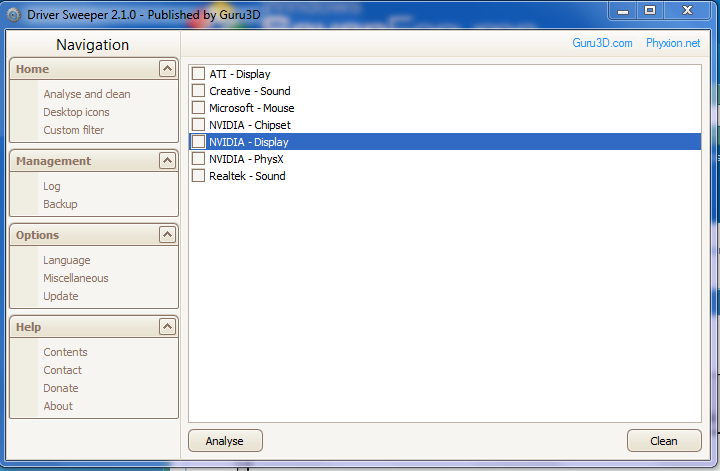
I've deleted my existing verifier settings, downloaded the latest drivers from the NVIDIA website, and was about to clear the old drivers with your suggested software but just wanted to make sure I select the correct ones. There are a few NVIDIA drivers listed:

70c2fd2d6e183acd2f419b74574886c6.png


Should I do the NVIDIA display and PhysX only, or the ATI display as well?

Thanks again : )

EDIT: Also, should I re-enable verifier after installing the new driver?
 
Last edited:

My Computer My Computer

At a glance

windows 7AMD athlon 64 x2 dual core processor 4200+ 2....4 GB DDR2NVIDIA GeForce 8500 GT
Computer Manufacturer/Model Number
hp pavillion a1710n
OS
windows 7
CPU
AMD athlon 64 x2 dual core processor 4200+ 2.20 GHz
Motherboard
ASUS A8M2N-LA NodusM3-GL8E
Memory
4 GB DDR2
Graphics Card(s)
NVIDIA GeForce 8500 GT
Sound Card
Envy24 Family Audio Controller WDM
Monitor(s) Displays
SyncMaster 2220WM/G22pW/220WM
Hard Drives
Intel SS DSA2M080G2GC SCSI

My Computer My Computer

At a glance

Microsoft Window 7 Professional 32 bitIntel Centrino2 vPro2GB DDR3ATI Radeon 3400
Computer Manufacturer/Model Number
Lenovo T400 2767 2JU
OS
Microsoft Window 7 Professional 32 bit
CPU
Intel Centrino2 vPro
Memory
2GB DDR3
Graphics Card(s)
ATI Radeon 3400
Sound Card
Conexant 20561 SmartAudio HD
Monitor(s) Displays
Thinkpad Display
Screen Resolution
1280x800x49 hertz
Case
Magnisium, Fe, etc..
Keyboard
embeded
Mouse
Logitech
Internet Speed
54Kb/s
Back
Top