Bsod when open certain video

Mano

New member
Member
Local time
2:09 PM
Messages
52
On my laptop whenever i open a TV series show subbed by X group by media player i get a bsod with any episode. Other shows subbed by that X group work fine for me. On my desktop i have no problem at all playing those video.
 

My Computer

OS
Windows 7
CPU
i7 920
Motherboard
Evga x58 SLI LE
Memory
2x2GB G.Skill 1333
Graphics Card(s)
Gigabyte GTX 670
Monitor(s) Displays
Dell 2711
Screen Resolution
2560x1440
PSU
Seasonic M12-620W
Case
naked
Hello Mano .

As it is seen, the cause of your crashes are win32k.sys (C:\Windows\system32\win32k.sys) which is usually obtained from windows updates.

I would suggest you to run http://www.sevenforums.com/tutorials/1538-sfc-scannow-command-system-file-checker.html , and accept the repairs.

At the same time, I would also suggest you to run Memtest for a reasonably long time .
http://www.sevenforums.com/tutorials/105647-ram-test-memtest86.html

and, download and install Speccy , and notice the temperature generated by the system. If it is generating a high temperature, revert back from any overclocking.

Most important, update your codecs. Download and install http://shark007.net/ , the latest version.
 

My Computer

Computer type
PC/Desktop
Computer Manufacturer/Model Number
Self Assembled
OS
Microsoft Windows 10 Pro Insider Preview 64-bit
CPU
Intel(R) Core(TM) i3-4130 CPU @ 3.40GHz
Motherboard
Gigabyte Technology Co., Ltd. B85M-D3H
Memory
Corsair Vengence 4GB x2 (8.00GB Dual-Channel DDR3 @ 798MHz)
Graphics Card(s)
2047MB GeForce GTS 450 (ZOTAC International)
Sound Card
Onboard (Realtek High Definition Audio)
Monitor(s) Displays
LG Flatron E2040T
Screen Resolution
1600x900
Hard Drives
Western Digital 1 TB
Seagate 500 GB
PSU
Corsair VS550
Case
Cooler Master K380
Cooling
Cooler Master Seidon 120V Plus
Keyboard
Logitech MK260r
Mouse
Logitech MK260r
Internet Speed
PMPL Broadband
Antivirus
Windows Defender + MBAM
Browser
Firefox
Other Info
Dell Studio 15" Laptop
Thanks for the analyse.
Sfc scan said it didnt find any integrity violation and it is on my laptop so i did not overclock. Will post memtest result later.
 

My Computer

OS
Windows 7
CPU
i7 920
Motherboard
Evga x58 SLI LE
Memory
2x2GB G.Skill 1333
Graphics Card(s)
Gigabyte GTX 670
Monitor(s) Displays
Dell 2711
Screen Resolution
2560x1440
PSU
Seasonic M12-620W
Case
naked
So now, upgrade your codec . First uninstall if you have any , using Revo Uninstaller Freeware in advanced mode.

Then download the codec linked in the previous post, and install it. http://shark007.net/

Hopefully the issue might be solved.
 

My Computer

Computer type
PC/Desktop
Computer Manufacturer/Model Number
Self Assembled
OS
Microsoft Windows 10 Pro Insider Preview 64-bit
CPU
Intel(R) Core(TM) i3-4130 CPU @ 3.40GHz
Motherboard
Gigabyte Technology Co., Ltd. B85M-D3H
Memory
Corsair Vengence 4GB x2 (8.00GB Dual-Channel DDR3 @ 798MHz)
Graphics Card(s)
2047MB GeForce GTS 450 (ZOTAC International)
Sound Card
Onboard (Realtek High Definition Audio)
Monitor(s) Displays
LG Flatron E2040T
Screen Resolution
1600x900
Hard Drives
Western Digital 1 TB
Seagate 500 GB
PSU
Corsair VS550
Case
Cooler Master K380
Cooling
Cooler Master Seidon 120V Plus
Keyboard
Logitech MK260r
Mouse
Logitech MK260r
Internet Speed
PMPL Broadband
Antivirus
Windows Defender + MBAM
Browser
Firefox
Other Info
Dell Studio 15" Laptop
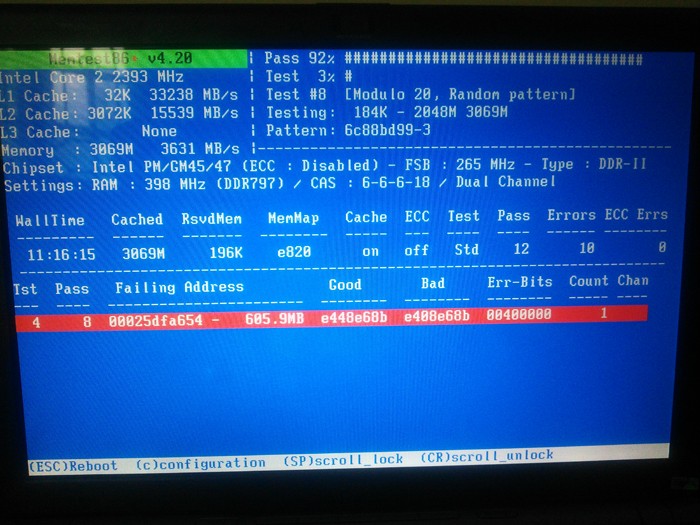
overnight memtest result

So ram is faulty?

rPpeT.jpg
 

My Computer

OS
Windows 7
CPU
i7 920
Motherboard
Evga x58 SLI LE
Memory
2x2GB G.Skill 1333
Graphics Card(s)
Gigabyte GTX 670
Monitor(s) Displays
Dell 2711
Screen Resolution
2560x1440
PSU
Seasonic M12-620W
Case
naked
Back
Top