Hi krfuge.
Checked 4 of your latest BSODs.
One is stop 0xA; two are stop 0x3B and one is stop 0x124.
So it gives a mixed impression overall.
Anyway, avast is contributing to the BSODs.
Code:
fffff880`06e4c498  fffff880`045b4940Unable to load image \SystemRoot\System32\Drivers\aswSP.SYS, Win32 error 0n2
*** WARNING: Unable to verify timestamp for [URL="http://www.carrona.org/drivers/driver.php?id=aswSP.SYS"]aswSP.SYS[/URL]
*** ERROR: Module load completed but symbols could not be loaded for [URL="http://www.carrona.org/drivers/driver.php?id=aswSP.SYS"]aswSP.SYS[/URL]
 aswSP+0x2f940
Description here:
Driver Reference Table - aswSP.SYS
Uninstall Avast using
Avast Uninstall Utility. Use
Microsoft Security Essentials as your antivirus with windows inbuilt firewall, and
free MBAM as the on demand scanner.
Download, install and update those, and then run full system scans with both of them, one by one.
And the display driver, too.
Code:
fffff880`06e4c318  fffff880`058ef7eaUnable to load image \SystemRoot\system32\DRIVERS\nvlddmkm.sys, Win32 error 0n2
*** WARNING: Unable to verify timestamp for nvlddmkm.sys
*** ERROR: Module load completed but symbols could not be loaded for nvlddmkm.sys
 nvlddmkm+0x2717ea
Install the
NVIDIA DRIVERS 314.22WHQL only.
- Uninstall All nvidia items in Control Panel > Programs and features
- 3D Vision Control Driver
- 3D Vision Driver
- Graphics Driver
- HD Audio Driver
- PhysX
- nvidia Update
(Are you using nvidia chipset drivers? If so, dont uninstall anything other than those are listed).
- Now follow Drivers - Clean Left over Files after Uninstalling
- Download 314.22 WHQL. While installing, Select Custom (Advanced) install. In the next page, follow this settings:
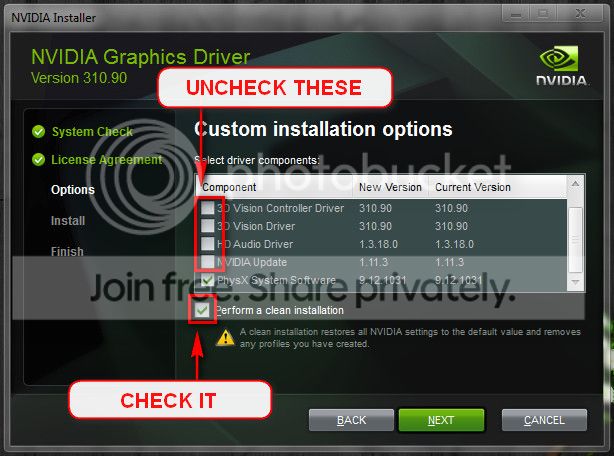
Are you overclocking? As you are getting BSODs, you should stop overclocking and run all the hardware components like CPU, GPU and RAM to their default settings.
Check if the Power Supply Unit (PSU) supplying adequate power to the computer or not.
eXtreme Power Supply Calculator
Is the computer hot? Report us the heat of the computer after a couple of hours of your normal usage. Upload a screenshot of the summery tab of
Speccy.
Test your RAM modules for possible errors.
How to Test and Diagnose RAM Issues with Memtest86+
Run memtest for at least 8 passes, preferably overnight.
If it start showing errors/red lines, stop testing. A single error is enough to determine that something is going bad there.
Stress test the Graphics Card using Furmark.
Video Card - Stress Test with Furmark
Stress test the CPU.
Hardware - Stress Test With Prime95
Let us know the results.
_________________________________________________________________________________________________
Code:
BugCheck 3B, {c0000005, fffff8000309fffc, fffff88006e4c800, 0}

Probably caused by : ntkrnlmp.exe ( nt!SepAccessCheck+2bc )

Followup: MachineOwner
-----------------------------------------------------------------------------
BugCheck A, {0, 2, 1, fffff800030e834b}

Probably caused by : ntkrnlmp.exe ( nt!KiRetireDpcList+1fb )

Followup: MachineOwner
-----------------------------------------------------------------------------
BugCheck 124, {0, fffffa800dd22028, b6344000, 135}

Probably caused by : AuthenticAMD

Followup: MachineOwner
---------



