BSOD when using Chrome, dxgkml.sys & ndis.sys

apollin3

New member
Local time
7:36 AM
Messages
2
Hello,

I've been having BSOD problems for some time but i until now i've never had the time to tackle the problem.

Some info about the issue:

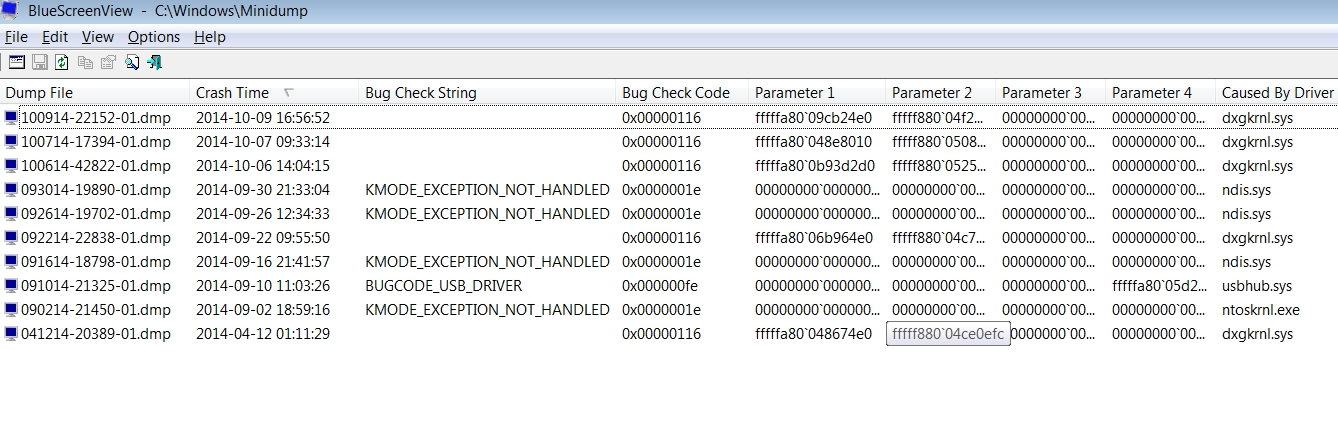
  1. There's a chance that i'm dealing with 2 problems - just looking at the BlueScreenView, one coded: 0x00000116 caused by driver dxgkml.sys and the second coded: 0x0000001e caused by driver ndis.sys
  2. the problems appear when i was opening another tab on chrome - but since this is what i mostly do on the laptop i don't know if that's the cause
  3. I've actually never seen the blue screen
  4. I'm not sure about it but as far as i remember when i encounter the bug coded: 0x00000116 caused by driver dxgkml.sys the screen simply disappears and i cant do anything (just hard reset with the power button) but with the coded: 0x0000001e caused by driver ndis.sys - the system just resets (Windows restarts)
  5. it's a laptop and i haven't changed anything apart the HDD (the previous one broke 2-3 years ago), so no OC, new hardware etc

Print Screen from BlueScreenView:
B1BhjYY.png


I'll be checking this thread at least twice a day to make sure i respond to your questions/suggestions asap.

I really appreciate your help
 

My Computer

Computer type
Laptop
Computer Manufacturer/Model Number
Sony Vaio VGN-NW21MF
OS
Windows 7 Home Premium 64bit SP1
CPU
Core 2 Duo T6600 2,2
Memory
4 GB
Graphics Card(s)
M Radeon HD 4570
Hard Drives
WD 500 GB
Antivirus
Avast
Hello,

Code:
SFEP.sys                    Fri Aug  3 00:35:53 [COLOR="Red"]2007[/COLOR] (46B2BEB9)
This driver belongs to Sony Firmware Extension Parser, this particular year of the driver has issues with windows 7, and can cause BSODs. Update: Sony eSupport - - Select a Model

Code:
[COLOR="red"]dtsoftbus01.sys   [/COLOR]          Fri Jan 13 07:45:46 2012 (4F10358A)
This driver belongs to Daemon Tools, which is also know for BSODs in windows 7. Please uninstall.

Code:
Probably caused by: [COLOR="red"]atikmpag.sys[/COLOR]
atikmpag.sys                Wed Jul  4 00:10:55 [COLOR="red"]2012[/COLOR]
The dump files are blaming your video drivers for the problem. Please update your video drivers as they are out of date: Support & Drivers

Make sure you completely remove all drivers for this video card, including programs like:
Code:
Start Menu\Programs\[COLOR="red"]Catalyst Control Center[/COLOR]
When you download the lated version ONLY install the DISPLAY drivers.

Post back the results,
-Justin
 

My Computer

Computer type
PC/Desktop
Computer Manufacturer/Model Number
Custom
OS
Windows 8.1 Pro x64
CPU
Intel Core i5-4570 CPU @ 3.20GHz
Motherboard
Gigabyte Z87-D3HP-CF
Memory
8GB DDR3-1596 - Dual Channel
Graphics Card(s)
NVIDIA GeForce GTX 750 Ti SC
Sound Card
Onboard
Monitor(s) Displays
Samsung
Screen Resolution
1920x1080
Hard Drives
SSD - 120GB
Second - 1TB
Antivirus
MSE
Browser
Chrome
thanks for such a quick response!

Code:
SFEP.sys                    Fri Aug  3 00:35:53 [COLOR="Red"]2007[/COLOR] (46B2BEB9)
This driver belongs to Sony Firmware Extension Parser, this particular year of the driver has issues with windows 7, and can cause BSODs. Update: Sony eSupport - - Select a Model
I can't find the updated driver - it's not in the Software and Downloads section of my model. I wrote to support and asked for the driver, will do it when they reply - maybe the name of the driver is different so they simply point out which one should i download. No driver has Parser or Extension in its name anyway.

I found the driver but for a different model so i dunno if i can install it: Sony eSupport - VPCF115FM - Drivers & Software

Code:
[COLOR="red"]dtsoftbus01.sys   [/COLOR]          Fri Jan 13 07:45:46 2012 (4F10358A)
This driver belongs to Daemon Tools, which is also know for BSODs in windows 7. Please uninstall.

DONE

Code:
Probably caused by: [COLOR="red"]atikmpag.sys[/COLOR]
atikmpag.sys                Wed Jul  4 00:10:55 [COLOR="red"]2012[/COLOR]
The dump files are blaming your video drivers for the problem. Please update your video drivers as they are out of date: Support & Drivers

Make sure you completely remove all drivers for this video card, including programs like:
Code:
Start Menu\Programs\[COLOR="red"]Catalyst Control Center[/COLOR]
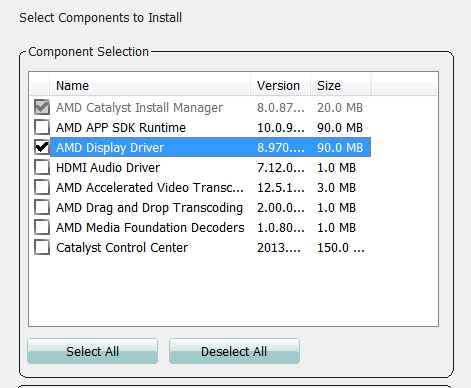
When you download the lated version ONLY install the DISPLAY drivers.

DONE
7gVrgvm.jpg


-----------------


by "Post back the results" you mean the dm log collector? If so im attaching it.
 

My Computer

Computer type
Laptop
Computer Manufacturer/Model Number
Sony Vaio VGN-NW21MF
OS
Windows 7 Home Premium 64bit SP1
CPU
Core 2 Duo T6600 2,2
Memory
4 GB
Graphics Card(s)
M Radeon HD 4570
Hard Drives
WD 500 GB
Antivirus
Avast
No, now we wait if you get another BSOD
 

My Computer

Computer type
PC/Desktop
Computer Manufacturer/Model Number
Custom
OS
Windows 8.1 Pro x64
CPU
Intel Core i5-4570 CPU @ 3.20GHz
Motherboard
Gigabyte Z87-D3HP-CF
Memory
8GB DDR3-1596 - Dual Channel
Graphics Card(s)
NVIDIA GeForce GTX 750 Ti SC
Sound Card
Onboard
Monitor(s) Displays
Samsung
Screen Resolution
1920x1080
Hard Drives
SSD - 120GB
Second - 1TB
Antivirus
MSE
Browser
Chrome
Back
Top