BSOD when using DVD drive

Bonjourmate

New member
Local time
10:50 PM
Messages
5
Been having a lot of BSOD recently. Every time I try to burn a disc, I come back to it and this has happened now with two different drives (just upgraded to a blu ray burner). The computer has also been locking up often within 15 minutes of starting up and requires a hard reset. I imagine if I left it be during those times, it'd ultimately result in another BSOD.

I'll try uploading the information as per instructions, but I manually wrote down the message BSOD...

"Stop: 0x0000000F4 (0x000000000000000003, 0xFFFFFA8010F95100, 0xFFFFFA8010F958E0, 0xFFFFF800037DD460)"
 

My Computer

OS
Windows 7 Ultimate x64
Welcome bonjourmate.

The zip you uploaded does not contain any crash dump. You first search them manually in the default path,
C:\Windows\Minidump or %SystemRoot%\Minidump.

If that location is empty, Follow the tutorial:
http://www.sevenforums.com/tutorials/174459-dump-files-configure-windows-create-bsod.html
Wait for the next crash, and then post it following the Blue Screen of Death (BSOD) Posting Instructions.

Anyway, a stop 0xF4 is storage related. For it, what you are to do initially is:

  1. Update your SSD's Firmware (not needed if you are not using a SSD)
  2. Re-seat the sata and power. (for all drives including Optical and internal disks)
  3. Run chkdsk /f/r, following the option two of the tutorial Disk Check
  4. Seatool for dos: SeaTools | Seagate download
    Burn it in a blank cd. boot from the CD, click on "Accept", wait for it to finish detecting the drives, then in the upper left corner select "Basic Tests", then select "Long Test" and let it run.
Let us know the results.
 

My Computer

Computer type
PC/Desktop
Computer Manufacturer/Model Number
Self Assembled
OS
Microsoft Windows 10 Pro Insider Preview 64-bit
CPU
Intel(R) Core(TM) i3-4130 CPU @ 3.40GHz
Motherboard
Gigabyte Technology Co., Ltd. B85M-D3H
Memory
Corsair Vengence 4GB x2 (8.00GB Dual-Channel DDR3 @ 798MHz)
Graphics Card(s)
2047MB GeForce GTS 450 (ZOTAC International)
Sound Card
Onboard (Realtek High Definition Audio)
Monitor(s) Displays
LG Flatron E2040T
Screen Resolution
1600x900
Hard Drives
Western Digital 1 TB
Seagate 500 GB
PSU
Corsair VS550
Case
Cooler Master K380
Cooling
Cooler Master Seidon 120V Plus
Keyboard
Logitech MK260r
Mouse
Logitech MK260r
Internet Speed
PMPL Broadband
Antivirus
Windows Defender + MBAM
Browser
Firefox
Other Info
Dell Studio 15" Laptop
Hmmm, I thought I configured it correctly already to create a dump file. I'll fiddle around with it and get back to you.
 

My Computer

OS
Windows 7 Ultimate x64
Now I'm confused. I configured for the Minidump and have experienced a BSOD, but still nothing is found at C:\Windows\Minidump
 

My Computer

OS
Windows 7 Ultimate x64
Have you followed I suggested there?

  1. Update your SSD's Firmware (not needed if you are not using a SSD)
  2. Re-seat the sata and power. (for all drives including Optical and internal disks)
  3. Run chkdsk /f/r, following the option two of the tutorial Disk Check
  4. Seatool for dos: SeaTools | Seagate download
    Burn it in a blank cd. boot from the CD, click on "Accept", wait for it to finish detecting the drives, then in the upper left corner select "Basic Tests", then select "Long Test" and let it run.
 

My Computer

Computer type
PC/Desktop
Computer Manufacturer/Model Number
Self Assembled
OS
Microsoft Windows 10 Pro Insider Preview 64-bit
CPU
Intel(R) Core(TM) i3-4130 CPU @ 3.40GHz
Motherboard
Gigabyte Technology Co., Ltd. B85M-D3H
Memory
Corsair Vengence 4GB x2 (8.00GB Dual-Channel DDR3 @ 798MHz)
Graphics Card(s)
2047MB GeForce GTS 450 (ZOTAC International)
Sound Card
Onboard (Realtek High Definition Audio)
Monitor(s) Displays
LG Flatron E2040T
Screen Resolution
1600x900
Hard Drives
Western Digital 1 TB
Seagate 500 GB
PSU
Corsair VS550
Case
Cooler Master K380
Cooling
Cooler Master Seidon 120V Plus
Keyboard
Logitech MK260r
Mouse
Logitech MK260r
Internet Speed
PMPL Broadband
Antivirus
Windows Defender + MBAM
Browser
Firefox
Other Info
Dell Studio 15" Laptop
Have you followed I suggested there?

  1. Update your SSD's Firmware (not needed if you are not using a SSD)
  2. Re-seat the sata and power. (for all drives including Optical and internal disks)
  3. Run chkdsk /f/r, following the option two of the tutorial Disk Check
  4. Seatool for dos: SeaTools | Seagate download
    Burn it in a blank cd. boot from the CD, click on "Accept", wait for it to finish detecting the drives, then in the upper left corner select "Basic Tests", then select "Long Test" and let it run.

1. It's not an SSD.
2. Yes, did that.
3. I did run chkdsk, but it takes so long to actually finish that I'm never able to be at the computer long enough after restart to see what it ultimately comes up with. I always end up coming back to my desktop.
4. Burning is not really an option, as that's what's causing the BSOD.
 

My Computer

OS
Windows 7 Ultimate x64
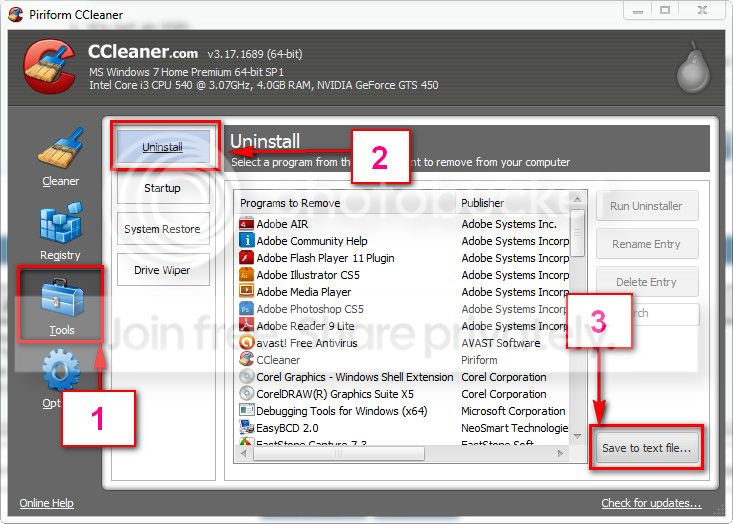
Download and install CCleaner. Then run it.
Go to "Tools" .... by default it will open the "uninstall" tab.
Click on save as text file. Save it on your desktop.
Upload the text file for us.
2012-11-02_224417.jpg
 

My Computer

Computer type
PC/Desktop
Computer Manufacturer/Model Number
Self Assembled
OS
Microsoft Windows 10 Pro Insider Preview 64-bit
CPU
Intel(R) Core(TM) i3-4130 CPU @ 3.40GHz
Motherboard
Gigabyte Technology Co., Ltd. B85M-D3H
Memory
Corsair Vengence 4GB x2 (8.00GB Dual-Channel DDR3 @ 798MHz)
Graphics Card(s)
2047MB GeForce GTS 450 (ZOTAC International)
Sound Card
Onboard (Realtek High Definition Audio)
Monitor(s) Displays
LG Flatron E2040T
Screen Resolution
1600x900
Hard Drives
Western Digital 1 TB
Seagate 500 GB
PSU
Corsair VS550
Case
Cooler Master K380
Cooling
Cooler Master Seidon 120V Plus
Keyboard
Logitech MK260r
Mouse
Logitech MK260r
Internet Speed
PMPL Broadband
Antivirus
Windows Defender + MBAM
Browser
Firefox
Other Info
Dell Studio 15" Laptop
Well, my suggestion is ... You uninstall those programs as a test.

  • Nero 12.
  • Handbreak
  • Dolby Home Theater.
  • Power Iso
  • VSO Blu Ray Converter.
Does it causing any crash now? If yes, it is hardware. Coz all the software that uses DVD Drive busy (imgburn dont do it) is uninstalled now.


But if no, good, and troublesome situation. Then it is to trial and error, which one is causing it.


--------------------------------------------------
On a side note, Uninstall AVG, its not only problematic, but also not a good AV at all. Use MSE, or free Avast.

Also uninstall PC Tools registry mechanic. That can do nothing but harms there.
 

My Computer

Computer type
PC/Desktop
Computer Manufacturer/Model Number
Self Assembled
OS
Microsoft Windows 10 Pro Insider Preview 64-bit
CPU
Intel(R) Core(TM) i3-4130 CPU @ 3.40GHz
Motherboard
Gigabyte Technology Co., Ltd. B85M-D3H
Memory
Corsair Vengence 4GB x2 (8.00GB Dual-Channel DDR3 @ 798MHz)
Graphics Card(s)
2047MB GeForce GTS 450 (ZOTAC International)
Sound Card
Onboard (Realtek High Definition Audio)
Monitor(s) Displays
LG Flatron E2040T
Screen Resolution
1600x900
Hard Drives
Western Digital 1 TB
Seagate 500 GB
PSU
Corsair VS550
Case
Cooler Master K380
Cooling
Cooler Master Seidon 120V Plus
Keyboard
Logitech MK260r
Mouse
Logitech MK260r
Internet Speed
PMPL Broadband
Antivirus
Windows Defender + MBAM
Browser
Firefox
Other Info
Dell Studio 15" Laptop
Back
Top