Solved BSOD while connecting controller via MotionJoy, error 0x0000010D

mostwanted27

New member
Local time
1:30 AM
Messages
14
Hi guys!

I've been looking around Google and this seems to be the best and most accurate community for help.

I have just recently purchased a laptop, Asus N53SN-RH71 from BestBuy, refurbished just 2 weeks ago. About an hour ago, I wanted to play a video game on my laptop so I decided to connect my controller to it via the MotionJoy Application. I noticed that I was having trouble connecting specifically with Bluetooth, After about a minute on the application, the BSOD error popped up.

Yesterday I updated many things on my laptop, like the Graphics Card, Processor, even my USB 3.0 port with the updates supplied on Asus's website.

Also, about a week ago I installed a program (MagicDisc) which I was not able to uninstall, and the only way I would have got the uninstall button to work was by going to my drivers, and deleting a driver which was a part of the program. (Maybe this might have affected other drivers or system files?)

I want to supply you guys with extra info but I'm not sure what you guys need exactly, could you please tell me?


EDIT: I supplied the Dump file found in my Minidump folder.
 

Attachments

Last edited:

My Computer

OS
Windows 7 Premium 64bit
I forgot to mention that I am new when it comes to these things and don't know much about system files, so please try to make it as easy to follow as possible. :P
 

My Computer

OS
Windows 7 Premium 64bit
This was also the first BSOD I've got on this laptop.
 

My Computer

OS
Windows 7 Premium 64bit
No one will help piracy. IT IS ILLEGAL and especially to talk on here.
The edit button helps you stop bumping your own thread.

You dont want problem's buy the game, ill try to help you once.
Next time ill report you.

anyway......

click start, Right click where it says computer, click manage, on the left select device manager.
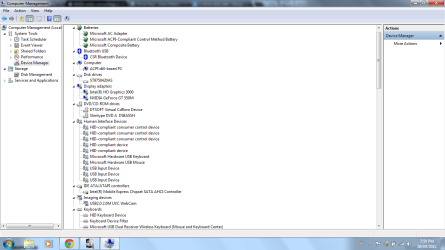
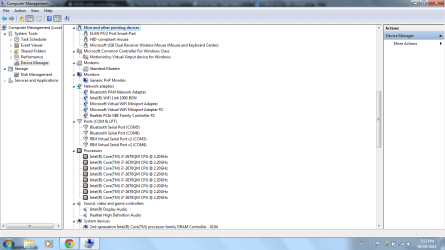
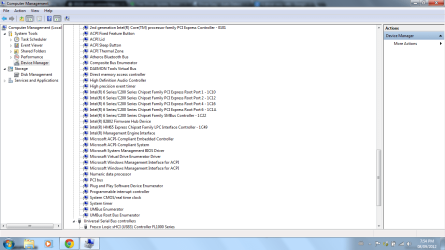
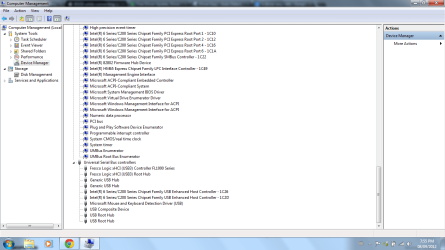
on the right now your in device manager can you open each tab and print screen and post the image on here please.

Use These Software To Scan Correct Driver

http://www.drivereasy.com/
http://www.devicedoctor.com/

Ohh and btw! its also a code that could mean Virus/malware so i suggest using and full scanning your pc with this:

http://www.malwarebytes.org/products/malwarebytes_free/

As your pirate games may have infected your pc and is mostly both DRIVER! AND VIRUS related

Lastly use this free software and use it to clean your registry of unwanted files and it will also find errors and automatically fix them if you would like it too.

TuneUp Utilities 2012 - Download

Feel free to delete these after you have finished.

Let me know how you get on
 

My Computer

Computer type
PC/Desktop
OS
Windows 7 Ultimate 64
CPU
AMD FX - 8350 Oc
Motherboard
ASUS Crosshair V Formula-Z AMD 990FX
Memory
16GB Corsair Vengeance
Graphics Card(s)
HD 4870 1GB
Sound Card
Onboard.
Monitor(s) Displays
Samsung Syncmaster 2032MW & ASUS p191
Screen Resolution
1680x1050
Hard Drives
1 TB WD
320gb WD
PSU
650w OCZ PSU
Case
Zalman Z11
Cooling
Antec H20 920 , 6x Antec Quiet
Keyboard
Logitech RAZ71 Keyboard
Mouse
Logitech RAZ71 Wireless Mouse
Internet Speed
120mb Virgin
Antivirus
Malwarebytes
Browser
Chrome
I installed DriverEasy and ran it, I got back about 31 outdated drivers, coming from various places. I also did a test while waiting for replies on my thread, I ran MotionJoy, went to Manage Drivers, re-installed the drivers, my PC started to lag a little, then the BSOD popped up again with the same files causing the BSOD. (Checked with Blue Screen View) I have also uploaded the images you wanted me to take.
 

Attachments

  • 1.png
    1.png
    47.6 KB · Views: 42
  • 2.png
    2.png
    47.9 KB · Views: 15
  • 3.png
    3.png
    46.1 KB · Views: 18
  • 4.png
    4.png
    46.2 KB · Views: 17

My Computer

OS
Windows 7 Premium 64bit
Your computer doesnt like MotionJoy's Drivers at all what controller are you using MotionJoy is fairly common to do this to pc's is your driver correct for OS? and have you updated pc so its at a current update state?
 

My Computer

Computer type
PC/Desktop
OS
Windows 7 Ultimate 64
CPU
AMD FX - 8350 Oc
Motherboard
ASUS Crosshair V Formula-Z AMD 990FX
Memory
16GB Corsair Vengeance
Graphics Card(s)
HD 4870 1GB
Sound Card
Onboard.
Monitor(s) Displays
Samsung Syncmaster 2032MW & ASUS p191
Screen Resolution
1680x1050
Hard Drives
1 TB WD
320gb WD
PSU
650w OCZ PSU
Case
Zalman Z11
Cooling
Antec H20 920 , 6x Antec Quiet
Keyboard
Logitech RAZ71 Keyboard
Mouse
Logitech RAZ71 Wireless Mouse
Internet Speed
120mb Virgin
Antivirus
Malwarebytes
Browser
Chrome
I use a PS3 controller however, I select the option that I use an Xbox 360 emulator since all games accept that kind of controller. Also, I my PC is up to date, for the exception of the drivers DriverEasy recommended me to update as their server are very slow.
 

My Computer

OS
Windows 7 Premium 64bit

My Computer

Computer type
PC/Desktop
OS
Windows 7 Ultimate 64
CPU
AMD FX - 8350 Oc
Motherboard
ASUS Crosshair V Formula-Z AMD 990FX
Memory
16GB Corsair Vengeance
Graphics Card(s)
HD 4870 1GB
Sound Card
Onboard.
Monitor(s) Displays
Samsung Syncmaster 2032MW & ASUS p191
Screen Resolution
1680x1050
Hard Drives
1 TB WD
320gb WD
PSU
650w OCZ PSU
Case
Zalman Z11
Cooling
Antec H20 920 , 6x Antec Quiet
Keyboard
Logitech RAZ71 Keyboard
Mouse
Logitech RAZ71 Wireless Mouse
Internet Speed
120mb Virgin
Antivirus
Malwarebytes
Browser
Chrome
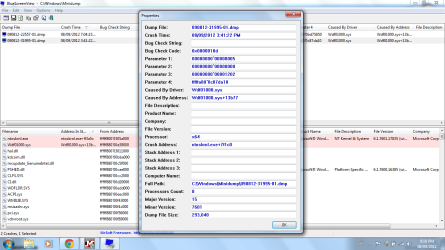
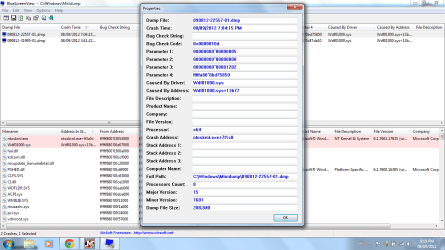
I already obtained the data from BlueScreenView:
 

Attachments

  • 5.png
    5.png
    58.6 KB · Views: 90
  • 6.png
    6.png
    59.6 KB · Views: 28

My Computer

OS
Windows 7 Premium 64bit
Yeah i have a good idea can you use the other software to find out aswell whilst i see if im correct jsut want to double check feel free to clean up your pc of this software aswell :)
 

My Computer

Computer type
PC/Desktop
OS
Windows 7 Ultimate 64
CPU
AMD FX - 8350 Oc
Motherboard
ASUS Crosshair V Formula-Z AMD 990FX
Memory
16GB Corsair Vengeance
Graphics Card(s)
HD 4870 1GB
Sound Card
Onboard.
Monitor(s) Displays
Samsung Syncmaster 2032MW & ASUS p191
Screen Resolution
1680x1050
Hard Drives
1 TB WD
320gb WD
PSU
650w OCZ PSU
Case
Zalman Z11
Cooling
Antec H20 920 , 6x Antec Quiet
Keyboard
Logitech RAZ71 Keyboard
Mouse
Logitech RAZ71 Wireless Mouse
Internet Speed
120mb Virgin
Antivirus
Malwarebytes
Browser
Chrome

My Computer

Computer type
PC/Desktop
OS
Windows 7 Ultimate 64
CPU
AMD FX - 8350 Oc
Motherboard
ASUS Crosshair V Formula-Z AMD 990FX
Memory
16GB Corsair Vengeance
Graphics Card(s)
HD 4870 1GB
Sound Card
Onboard.
Monitor(s) Displays
Samsung Syncmaster 2032MW & ASUS p191
Screen Resolution
1680x1050
Hard Drives
1 TB WD
320gb WD
PSU
650w OCZ PSU
Case
Zalman Z11
Cooling
Antec H20 920 , 6x Antec Quiet
Keyboard
Logitech RAZ71 Keyboard
Mouse
Logitech RAZ71 Wireless Mouse
Internet Speed
120mb Virgin
Antivirus
Malwarebytes
Browser
Chrome
Crash dump directory: C:\Windows\Minidump

Crash dumps are enabled on your computer.


On Sat 08/09/2012 11:02:19 PM GMT your computer crashed
crash dump file: C:\Windows\Minidump\090812-22557-01.dmp
This was probably caused by the following module: wdf01000.sys (Wdf01000+0x13B77)
Bugcheck code: 0x10D (0x5, 0x0, 0x1202, 0xFFFFFA800BD75850)
Error: WDF_VIOLATION
file path: C:\Windows\system32\drivers\wdf01000.sys
product: Microsoft® Windows® Operating System
company: Microsoft Corporation
description: Kernel Mode Driver Framework Runtime
Bug check description: This indicates that Kernel-Mode Driver Framework (KMDF) detected that Windows found an error in a framework-based driver.
This appears to be a typical software driver bug and is not likely to be caused by a hardware problem.
The crash took place in a standard Microsoft module. Your system configuration may be incorrect. Possibly this problem is caused by another driver on your system which cannot be identified at this time.


On Sat 08/09/2012 11:02:19 PM GMT your computer crashed
crash dump file: C:\Windows\memory.dmp
This was probably caused by the following module: mijxfilt.sys (MijXfilt+0x363A)
Bugcheck code: 0x10D (0x5, 0x0, 0x1202, 0xFFFFFA800BD75850)
Error: WDF_VIOLATION
file path: C:\Windows\system32\drivers\mijxfilt.sys
product: MotioninJoy DS3 driver
company: MotioninJoy
description: MotioninJoy DS3 driver
Bug check description: This indicates that Kernel-Mode Driver Framework (KMDF) detected that Windows found an error in a framework-based driver.
This appears to be a typical software driver bug and is not likely to be caused by a hardware problem.
A third party driver was identified as the probable root cause of this system error. It is suggested you look for an update for the following driver: mijxfilt.sys (MotioninJoy DS3 driver, MotioninJoy).
Google query: mijxfilt.sys MotioninJoy WDF_VIOLATION


On Sat 08/09/2012 7:37:20 PM GMT your computer crashed
crash dump file: C:\Windows\Minidump\090812-31995-01.dmp
This was probably caused by the following module: wdf01000.sys (Wdf01000+0x13B77)
Bugcheck code: 0x10D (0x5, 0x0, 0x1202, 0xFFFFFA800C87DA10)
Error: WDF_VIOLATION
file path: C:\Windows\system32\drivers\wdf01000.sys
product: Microsoft® Windows® Operating System
company: Microsoft Corporation
description: Kernel Mode Driver Framework Runtime
Bug check description: This indicates that Kernel-Mode Driver Framework (KMDF) detected that Windows found an error in a framework-based driver.
This appears to be a typical software driver bug and is not likely to be caused by a hardware problem.
The crash took place in a standard Microsoft module. Your system configuration may be incorrect. Possibly this problem is caused by another driver on your system which cannot be identified at this time.


--------------------------------------------------------------------------------
Conclusion
--------------------------------------------------------------------------------

3 crash dumps have been found and analyzed. A third party driver has been identified to be causing system crashes on your computer. It is strongly suggested that you check for updates for these drivers on their company websites. Click on the links below to search with Google for updates for these drivers:

mijxfilt.sys (MotioninJoy DS3 driver, MotioninJoy)

If no updates for these drivers are available, try searching with Google on the names of these drivers in combination the errors that have been reported for these drivers and include the brand and model name of your computer as well in the query. This often yields interesting results from discussions from users who have been experiencing similar problems.


Read the topic general suggestions for troubleshooting system crashes for more information.

Note that it's not always possible to state with certainty whether a reported driver is actually responsible for crashing your system or that the root cause is in another module. Nonetheless it's suggested you look for updates for the products that these drivers belong to and regularly visit Windows update or enable automatic updates for Windows. In case a piece of malfunctioning hardware is causing trouble, a search with Google on the bug check errors together with the model name and brand of your computer may help you investigate this further.
 

My Computer

OS
Windows 7 Premium 64bit
Btw Please try this solution the root to your problem may be this simple.

Go to Microsoft and update to the latest Microsoft Framework:

Download: Microsoft .NET Framework 4 (Web Installer) - Microsoft Download Center - Download Details

As WDF01000.sys is a Microsoft driver and if im not mistaken is an error to do with your framework incorrect.
Which maybe why Motionjoy is giving you problems

There you have it problem solved for you like i said in previous post Above^^^^^

Your report shows motionjoy is the conflicting driver and that your framework is out of date follow the link update your framework and let me know if it fixes it :)
 

My Computer

Computer type
PC/Desktop
OS
Windows 7 Ultimate 64
CPU
AMD FX - 8350 Oc
Motherboard
ASUS Crosshair V Formula-Z AMD 990FX
Memory
16GB Corsair Vengeance
Graphics Card(s)
HD 4870 1GB
Sound Card
Onboard.
Monitor(s) Displays
Samsung Syncmaster 2032MW & ASUS p191
Screen Resolution
1680x1050
Hard Drives
1 TB WD
320gb WD
PSU
650w OCZ PSU
Case
Zalman Z11
Cooling
Antec H20 920 , 6x Antec Quiet
Keyboard
Logitech RAZ71 Keyboard
Mouse
Logitech RAZ71 Wireless Mouse
Internet Speed
120mb Virgin
Antivirus
Malwarebytes
Browser
Chrome
Thank you, its now stable and all of the drivers were able to be installed! :)
 

My Computer

OS
Windows 7 Premium 64bit
feel free to rep and mark this down as solved then :)
 

My Computer

Computer type
PC/Desktop
OS
Windows 7 Ultimate 64
CPU
AMD FX - 8350 Oc
Motherboard
ASUS Crosshair V Formula-Z AMD 990FX
Memory
16GB Corsair Vengeance
Graphics Card(s)
HD 4870 1GB
Sound Card
Onboard.
Monitor(s) Displays
Samsung Syncmaster 2032MW & ASUS p191
Screen Resolution
1680x1050
Hard Drives
1 TB WD
320gb WD
PSU
650w OCZ PSU
Case
Zalman Z11
Cooling
Antec H20 920 , 6x Antec Quiet
Keyboard
Logitech RAZ71 Keyboard
Mouse
Logitech RAZ71 Wireless Mouse
Internet Speed
120mb Virgin
Antivirus
Malwarebytes
Browser
Chrome
Back
Top