BSOD While Gaming

l3radrocks

New member
Local time
11:14 PM
Messages
8
Hey guys, first off let me thank you guys for taking the time to help me. A week ago, I built my very first computer. It has been working great, except that I have been getting BSOD while gaming sometimes. The first time it happened it was while I was playing Skyrim. I shrugged it off as a random occurrence. Then it happened again, and again, and again. Some games have been working fine, but I get BSOD on the following games:
Skyrim
Fallout New Vegas
Minecraft

I haven't been able to figure out why they are happening, and happen at random points throughout the game, not whenever I do something specific.Here are my computer specs.
Computer type: PC/Desktop
Computer Manufacturer/Model Number: Custom
OS: Windows 7 64 Bit home premium
CPU: I5- 4570k @ 4.0 GhZ
Motherboard: MSI Z87 G45
Memory: Crucial 16GB Ballistix Sport
Graphics Card(s): Gigabyte GTX 770
Hard Drives: Samsung 120 GB SSD
Seagate Barracuda 1TB
Antivirus: Microsoft Essentials
Browser: Firefox
 
Last edited:

My Computer

Computer type
PC/Desktop
Computer Manufacturer/Model Number
Custom
OS
Windows 7 64 Bit home premium
CPU
I5- 4570k @ 4.0 GhZ
Motherboard
MSI Z87 G45
Graphics Card(s)
Gigabyte GTX 770
Hard Drives
Samsung 120 GB SSD
Seagate Barracuda 1TB
Antivirus
Microsoft Essentials
Browser
Firefox

My Computer

Computer type
PC/Desktop
Computer Manufacturer/Model Number
Golden Mk. I.4
OS
Windows 10 Pro x64 ; Xubuntu x64
CPU
Intel i7 860 @ 2.80 GHz O/C'ed to 4.0GHz
Motherboard
Gigabyte P55A-UD3R Rev.1. Award BIOS F13
Memory
16GB Corsair Vengance DDR3 @ 661 MHz Dual Channel (9-9-9-24)
Graphics Card(s)
EVGA NVidia GTX 560 1024MB
Sound Card
Realtek Integrated
Monitor(s) Displays
Dual Samsung SyncMaster 2494HS
Screen Resolution
1920*1080 and 1920*1080
Hard Drives
1*Samsung 840 EVO 120GB SSD;
1*OCZ Vertex 2 60GB SSD;
2*Samsung F3 SpinPoint 1TB in RAID0;
1*Samsung F1 SpinPoint 1TB;
2*Western Digital 1TB External USB 3.0
1*Western Digital 500GB External USB 3.0
1*Seagate 500GB External USB 2.0
PSU
Thermaltake ToughPower QFan 750W
Case
Thermaltake Element S VK60001W2Z
Cooling
Corsair H60 Water Cooling, 2*230mm and 2*80mm case fans
Keyboard
Logitech G110
Mouse
Logitech MX518
Sorry, I should have followed the instructions. I just rushed the post. I fixed it now, please let me know if there is anything else you guys need.
 

My Computer

Computer type
PC/Desktop
Computer Manufacturer/Model Number
Custom
OS
Windows 7 64 Bit home premium
CPU
I5- 4570k @ 4.0 GhZ
Motherboard
MSI Z87 G45
Graphics Card(s)
Gigabyte GTX 770
Hard Drives
Samsung 120 GB SSD
Seagate Barracuda 1TB
Antivirus
Microsoft Essentials
Browser
Firefox
Code:
crash dump file: E:\BSOD\070913-2979-01.dmp
uptime: 00:00:01
This was probably caused by the following module: ntkrnlmp.exe (nt!WheapCreateLiveTriageDump+0x6C) 
Bugcheck code: 0x124 (0x0, 0xFFFFFA800E7A88F8, 0x0, 0x0)
Error: WHEA_UNCORRECTABLE_ERROR
Bug check description: This bug check indicates that a fatal hardware error has occurred. This bug check uses the error data that is provided by the Windows Hardware Error Architecture (WHEA). 
This is likely to be caused by a hardware problem problem. This problem might be caused by a thermal issue.

All your errors are 0x124 - hardware specific.

Please follow this first:

http://www.sevenforums.com/tutorials/220743-cpu-stress-test-using-intelburntest.html
 

My Computer

Computer type
PC/Desktop
Computer Manufacturer/Model Number
Golden Mk. I.4
OS
Windows 10 Pro x64 ; Xubuntu x64
CPU
Intel i7 860 @ 2.80 GHz O/C'ed to 4.0GHz
Motherboard
Gigabyte P55A-UD3R Rev.1. Award BIOS F13
Memory
16GB Corsair Vengance DDR3 @ 661 MHz Dual Channel (9-9-9-24)
Graphics Card(s)
EVGA NVidia GTX 560 1024MB
Sound Card
Realtek Integrated
Monitor(s) Displays
Dual Samsung SyncMaster 2494HS
Screen Resolution
1920*1080 and 1920*1080
Hard Drives
1*Samsung 840 EVO 120GB SSD;
1*OCZ Vertex 2 60GB SSD;
2*Samsung F3 SpinPoint 1TB in RAID0;
1*Samsung F1 SpinPoint 1TB;
2*Western Digital 1TB External USB 3.0
1*Western Digital 500GB External USB 3.0
1*Seagate 500GB External USB 2.0
PSU
Thermaltake ToughPower QFan 750W
Case
Thermaltake Element S VK60001W2Z
Cooling
Corsair H60 Water Cooling, 2*230mm and 2*80mm case fans
Keyboard
Logitech G110
Mouse
Logitech MX518
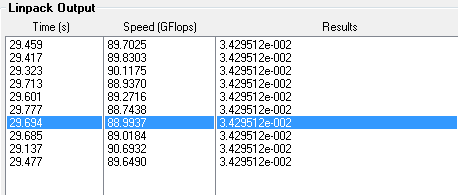
I ran the normal stress test, and averaged about C 60. It maxed at C 70. I will run the other two In a while, I have to go run and do some other stuff.

EDIT: I managed to run the High stress test, and the temp averaged around 64. The max was 71.
 

My Computer

Computer type
PC/Desktop
Computer Manufacturer/Model Number
Custom
OS
Windows 7 64 Bit home premium
CPU
I5- 4570k @ 4.0 GhZ
Motherboard
MSI Z87 G45
Graphics Card(s)
Gigabyte GTX 770
Hard Drives
Samsung 120 GB SSD
Seagate Barracuda 1TB
Antivirus
Microsoft Essentials
Browser
Firefox

My Computer

Computer type
PC/Desktop
Computer Manufacturer/Model Number
Golden Mk. I.4
OS
Windows 10 Pro x64 ; Xubuntu x64
CPU
Intel i7 860 @ 2.80 GHz O/C'ed to 4.0GHz
Motherboard
Gigabyte P55A-UD3R Rev.1. Award BIOS F13
Memory
16GB Corsair Vengance DDR3 @ 661 MHz Dual Channel (9-9-9-24)
Graphics Card(s)
EVGA NVidia GTX 560 1024MB
Sound Card
Realtek Integrated
Monitor(s) Displays
Dual Samsung SyncMaster 2494HS
Screen Resolution
1920*1080 and 1920*1080
Hard Drives
1*Samsung 840 EVO 120GB SSD;
1*OCZ Vertex 2 60GB SSD;
2*Samsung F3 SpinPoint 1TB in RAID0;
1*Samsung F1 SpinPoint 1TB;
2*Western Digital 1TB External USB 3.0
1*Western Digital 500GB External USB 3.0
1*Seagate 500GB External USB 2.0
PSU
Thermaltake ToughPower QFan 750W
Case
Thermaltake Element S VK60001W2Z
Cooling
Corsair H60 Water Cooling, 2*230mm and 2*80mm case fans
Keyboard
Logitech G110
Mouse
Logitech MX518
wsdXwA0.png


There is the results for the high stress test. I will re-run the normal stress test and give you those results.
 

My Computer

Computer type
PC/Desktop
Computer Manufacturer/Model Number
Custom
OS
Windows 7 64 Bit home premium
CPU
I5- 4570k @ 4.0 GhZ
Motherboard
MSI Z87 G45
Graphics Card(s)
Gigabyte GTX 770
Hard Drives
Samsung 120 GB SSD
Seagate Barracuda 1TB
Antivirus
Microsoft Essentials
Browser
Firefox
Thats fine.....they are stable on high, so they will be stable on the others.

Please see that thread about 0x124 errors.
 

My Computer

Computer type
PC/Desktop
Computer Manufacturer/Model Number
Golden Mk. I.4
OS
Windows 10 Pro x64 ; Xubuntu x64
CPU
Intel i7 860 @ 2.80 GHz O/C'ed to 4.0GHz
Motherboard
Gigabyte P55A-UD3R Rev.1. Award BIOS F13
Memory
16GB Corsair Vengance DDR3 @ 661 MHz Dual Channel (9-9-9-24)
Graphics Card(s)
EVGA NVidia GTX 560 1024MB
Sound Card
Realtek Integrated
Monitor(s) Displays
Dual Samsung SyncMaster 2494HS
Screen Resolution
1920*1080 and 1920*1080
Hard Drives
1*Samsung 840 EVO 120GB SSD;
1*OCZ Vertex 2 60GB SSD;
2*Samsung F3 SpinPoint 1TB in RAID0;
1*Samsung F1 SpinPoint 1TB;
2*Western Digital 1TB External USB 3.0
1*Western Digital 500GB External USB 3.0
1*Seagate 500GB External USB 2.0
PSU
Thermaltake ToughPower QFan 750W
Case
Thermaltake Element S VK60001W2Z
Cooling
Corsair H60 Water Cooling, 2*230mm and 2*80mm case fans
Keyboard
Logitech G110
Mouse
Logitech MX518
A stop 0x124 is a hardware error, usually.

Alongwith Golden's suggestion to run CPU - Stress Test Using IntelBurnTest, I would suggest you to run a few more hardware tests.

Test your RAM modules for possible errors.
How to Test and Diagnose RAM Issues with Memtest86+
Run memtest for at least 8 passes, preferably overnight.

Stress test the Graphics Card using Furmark.
Video Card - Stress Test with Furmark

Are you overclocking? As you are getting BSODs, you should stop overclocking and run all the hardware components like CPU, GPU and RAM to their default settings. Also set the BIOS to default, too.
How To Clear CMOS (Reset BIOS)

Check if the Power Supply Unit (PSU) supplying adequate power to the computer or not.
eXtreme Power Supply Calculator
At least 30% extra is safe. Also let us know the wattage of your PSU.

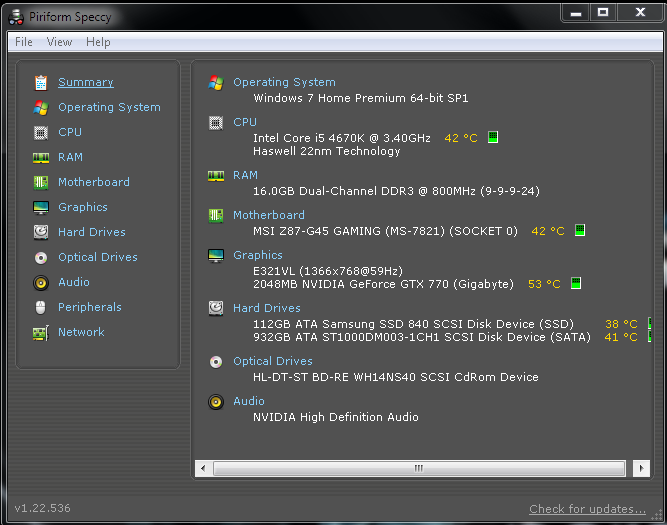
Is the computer hot? Report us the heat of the computer after a couple of hours of your normal usage. Upload a screenshot of the summery tab of Speccy.

And dont worry. As it is a new build, your hardware are under warranty. Now it is to determine which hardware component is failing actually, and then RMA it.
_____________________________________________________________
BSOD ANALYSIS:
Code:
..............
*******************************************************************************
*                                                                             *
*                        Bugcheck Analysis                                    *
*                                                                             *
*******************************************************************************

Use !analyze -v to get detailed debugging information.

BugCheck 124, {0, fffffa800d31a028, bf800000, 124}

Probably caused by : GenuineIntel

Followup: MachineOwner
---------

2: kd> !analyze -v
*******************************************************************************
*                                                                             *
*                        Bugcheck Analysis                                    *
*                                                                             *
*******************************************************************************

WHEA_UNCORRECTABLE_ERROR (124)
A fatal hardware error has occurred. Parameter 1 identifies the type of error
source that reported the error. Parameter 2 holds the address of the
WHEA_ERROR_RECORD structure that describes the error conditon.
Arguments:
Arg1: 0000000000000000, Machine Check Exception
Arg2: fffffa800d31a028, Address of the WHEA_ERROR_RECORD structure.
Arg3: 00000000bf800000, High order 32-bits of the MCi_STATUS value.
Arg4: 0000000000000124, Low order 32-bits of the MCi_STATUS value.

Debugging Details:
------------------


BUGCHECK_STR:  0x124_GenuineIntel

CUSTOMER_CRASH_COUNT:  1

DEFAULT_BUCKET_ID:  WIN7_DRIVER_FAULT

PROCESS_NAME:  svchost.exe

CURRENT_IRQL:  f

STACK_TEXT:  
fffff880`0316da58 fffff800`02c12a3b : 00000000`00000124 00000000`00000000 fffffa80`0d31a028 00000000`bf800000 : nt!KeBugCheckEx
fffff880`0316da60 fffff800`02dd5443 : 00000000`00000001 fffffa80`0d123a60 00000000`00000000 fffffa80`0d123ab0 : hal!HalBugCheckSystem+0x1e3
fffff880`0316daa0 fffff800`02c12700 : 00000000`00000728 fffffa80`0d123a60 fffff880`0316de30 fffff880`0316de00 : nt!WheaReportHwError+0x263
fffff880`0316db00 fffff800`02c12052 : fffffa80`0d123a60 fffff880`0316de30 fffffa80`0d123a60 00000000`00000000 : hal!HalpMcaReportError+0x4c
fffff880`0316dc50 fffff800`02c11f0d : 00000000`00000004 00000000`00000001 fffff880`0316deb0 00000000`00000000 : hal!HalpMceHandler+0x9e
fffff880`0316dc90 fffff800`02c05e88 : 00000000`00000007 00000000`0175e0c8 00000000`00000000 00000000`00000000 : hal!HalpMceHandlerWithRendezvous+0x55
fffff880`0316dcc0 fffff800`02cbd4ec : 00000000`00000000 00000000`00000000 00000000`00000000 00000000`00000000 : hal!HalHandleMcheck+0x40
fffff880`0316dcf0 fffff800`02cbd353 : 00000000`00000000 00000000`00000000 00000000`00000000 00000000`00000000 : nt!KxMcheckAbort+0x6c
fffff880`0316de30 fffff800`0306a260 : 00000000`00000000 00000000`00000000 00000000`00000000 00000000`00000000 : nt!KiMcheckAbort+0x153
fffff880`0bb69908 00000000`00000000 : 00000000`00000000 00000000`00000000 00000000`00000000 00000000`00000000 : nt!CmpCallCallBacks


STACK_COMMAND:  kb

FOLLOWUP_NAME:  MachineOwner

MODULE_NAME: GenuineIntel

IMAGE_NAME:  GenuineIntel

DEBUG_FLR_IMAGE_TIMESTAMP:  0

FAILURE_BUCKET_ID:  X64_0x124_GenuineIntel_PROCESSOR_CACHE

BUCKET_ID:  X64_0x124_GenuineIntel_PROCESSOR_CACHE

Followup: MachineOwner
---------

 

My Computer

Computer type
PC/Desktop
Computer Manufacturer/Model Number
Self Assembled
OS
Microsoft Windows 10 Pro Insider Preview 64-bit
CPU
Intel(R) Core(TM) i3-4130 CPU @ 3.40GHz
Motherboard
Gigabyte Technology Co., Ltd. B85M-D3H
Memory
Corsair Vengence 4GB x2 (8.00GB Dual-Channel DDR3 @ 798MHz)
Graphics Card(s)
2047MB GeForce GTS 450 (ZOTAC International)
Sound Card
Onboard (Realtek High Definition Audio)
Monitor(s) Displays
LG Flatron E2040T
Screen Resolution
1600x900
Hard Drives
Western Digital 1 TB
Seagate 500 GB
PSU
Corsair VS550
Case
Cooler Master K380
Cooling
Cooler Master Seidon 120V Plus
Keyboard
Logitech MK260r
Mouse
Logitech MK260r
Internet Speed
PMPL Broadband
Antivirus
Windows Defender + MBAM
Browser
Firefox
Other Info
Dell Studio 15" Laptop
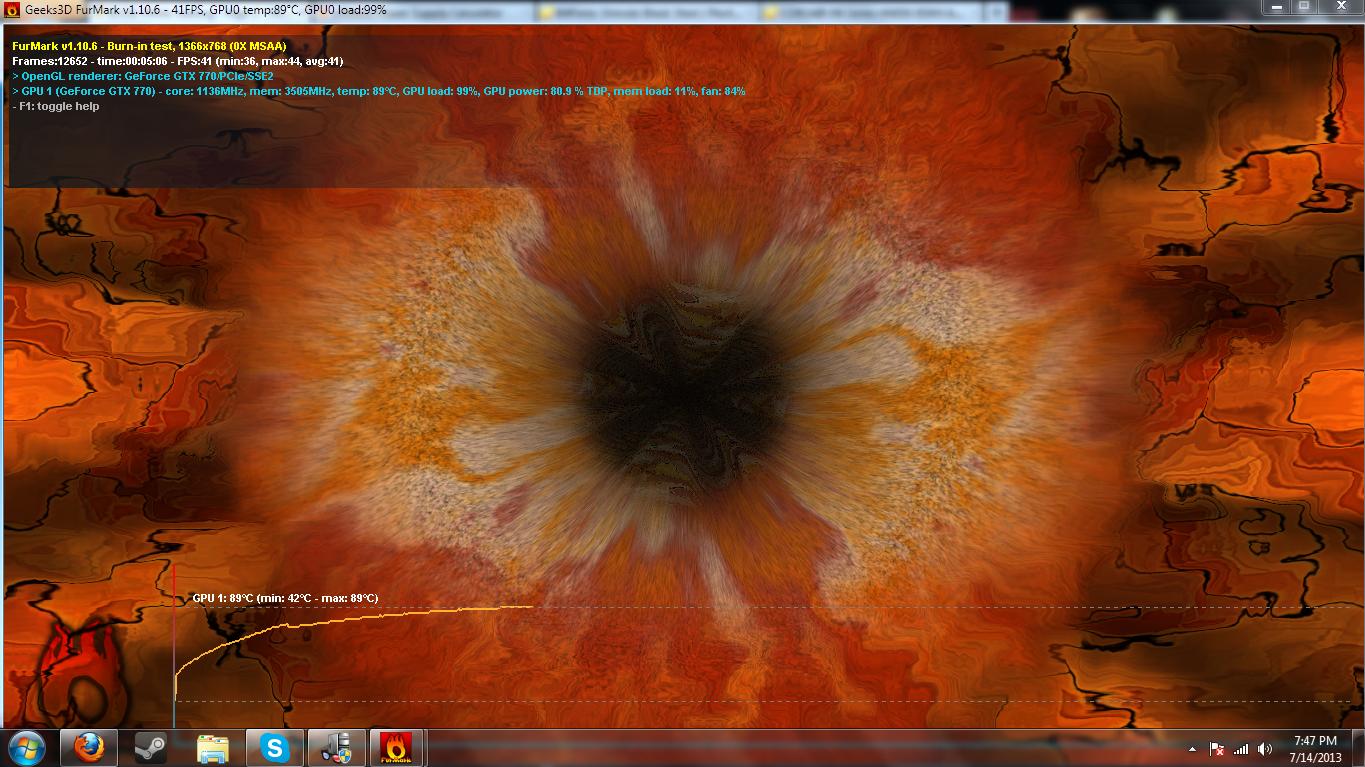
I will run the Memory test over night, and hopefully reinstall the OS in the morning. I was running Furmark, but the temperatures started to level out, so I took the advice on the GPU Stress Test post and stopped the test.

Is there a log that I could post that contained all the info prior to the termination of the test?
 

My Computer

Computer type
PC/Desktop
Computer Manufacturer/Model Number
Custom
OS
Windows 7 64 Bit home premium
CPU
I5- 4570k @ 4.0 GhZ
Motherboard
MSI Z87 G45
Graphics Card(s)
Gigabyte GTX 770
Hard Drives
Samsung 120 GB SSD
Seagate Barracuda 1TB
Antivirus
Microsoft Essentials
Browser
Firefox
A screenshot of furmark window before closing the program will give us the necessary ideas.

Let us know the other info, like speccy screenshot as asked in the earlier post and the PSU wattage. Will wait for the test results.
 

My Computer

Computer type
PC/Desktop
Computer Manufacturer/Model Number
Self Assembled
OS
Microsoft Windows 10 Pro Insider Preview 64-bit
CPU
Intel(R) Core(TM) i3-4130 CPU @ 3.40GHz
Motherboard
Gigabyte Technology Co., Ltd. B85M-D3H
Memory
Corsair Vengence 4GB x2 (8.00GB Dual-Channel DDR3 @ 798MHz)
Graphics Card(s)
2047MB GeForce GTS 450 (ZOTAC International)
Sound Card
Onboard (Realtek High Definition Audio)
Monitor(s) Displays
LG Flatron E2040T
Screen Resolution
1600x900
Hard Drives
Western Digital 1 TB
Seagate 500 GB
PSU
Corsair VS550
Case
Cooler Master K380
Cooling
Cooler Master Seidon 120V Plus
Keyboard
Logitech MK260r
Mouse
Logitech MK260r
Internet Speed
PMPL Broadband
Antivirus
Windows Defender + MBAM
Browser
Firefox
Other Info
Dell Studio 15" Laptop
Here are the test results.

Furmark -
kUcHhkW.jpg


PSU Calculater -

V5R1cmf.png

My PSU is a Corsair HX850. It is a bit overkill right now, but I planned on having a 2 way SLI with 770s later on.

Speccy:
erE5787.png


The only test missing is the Memory test. I will run that overnight, and post the results in the morning.
 

My Computer

Computer type
PC/Desktop
Computer Manufacturer/Model Number
Custom
OS
Windows 7 64 Bit home premium
CPU
I5- 4570k @ 4.0 GhZ
Motherboard
MSI Z87 G45
Graphics Card(s)
Gigabyte GTX 770
Hard Drives
Samsung 120 GB SSD
Seagate Barracuda 1TB
Antivirus
Microsoft Essentials
Browser
Firefox
So apparently temperature is not seeming to be the issue here. Let us know the results of the other tests when you can.
 

My Computer

Computer type
PC/Desktop
Computer Manufacturer/Model Number
Self Assembled
OS
Microsoft Windows 10 Pro Insider Preview 64-bit
CPU
Intel(R) Core(TM) i3-4130 CPU @ 3.40GHz
Motherboard
Gigabyte Technology Co., Ltd. B85M-D3H
Memory
Corsair Vengence 4GB x2 (8.00GB Dual-Channel DDR3 @ 798MHz)
Graphics Card(s)
2047MB GeForce GTS 450 (ZOTAC International)
Sound Card
Onboard (Realtek High Definition Audio)
Monitor(s) Displays
LG Flatron E2040T
Screen Resolution
1600x900
Hard Drives
Western Digital 1 TB
Seagate 500 GB
PSU
Corsair VS550
Case
Cooler Master K380
Cooling
Cooler Master Seidon 120V Plus
Keyboard
Logitech MK260r
Mouse
Logitech MK260r
Internet Speed
PMPL Broadband
Antivirus
Windows Defender + MBAM
Browser
Firefox
Other Info
Dell Studio 15" Laptop
I ran the memory test overnight. It is on it has done 7 passes, about to finish it's 8'th, without any errors. What should I do next?
 

My Computer

Computer type
PC/Desktop
Computer Manufacturer/Model Number
Custom
OS
Windows 7 64 Bit home premium
CPU
I5- 4570k @ 4.0 GhZ
Motherboard
MSI Z87 G45
Graphics Card(s)
Gigabyte GTX 770
Hard Drives
Samsung 120 GB SSD
Seagate Barracuda 1TB
Antivirus
Microsoft Essentials
Browser
Firefox

My Computer

Computer type
PC/Desktop
Computer Manufacturer/Model Number
Self Assembled
OS
Microsoft Windows 10 Pro Insider Preview 64-bit
CPU
Intel(R) Core(TM) i3-4130 CPU @ 3.40GHz
Motherboard
Gigabyte Technology Co., Ltd. B85M-D3H
Memory
Corsair Vengence 4GB x2 (8.00GB Dual-Channel DDR3 @ 798MHz)
Graphics Card(s)
2047MB GeForce GTS 450 (ZOTAC International)
Sound Card
Onboard (Realtek High Definition Audio)
Monitor(s) Displays
LG Flatron E2040T
Screen Resolution
1600x900
Hard Drives
Western Digital 1 TB
Seagate 500 GB
PSU
Corsair VS550
Case
Cooler Master K380
Cooling
Cooler Master Seidon 120V Plus
Keyboard
Logitech MK260r
Mouse
Logitech MK260r
Internet Speed
PMPL Broadband
Antivirus
Windows Defender + MBAM
Browser
Firefox
Other Info
Dell Studio 15" Laptop
Ran Prime 95 for two hours. Temperature was averaging about 65. No errors, but one worker was a bit behind of the others. I'm just gonna rule that off as one of the cores doing being busy doing some other processing work. I am re-running it right now, it is an hour in and again, no errors.

What now?
 

My Computer

Computer type
PC/Desktop
Computer Manufacturer/Model Number
Custom
OS
Windows 7 64 Bit home premium
CPU
I5- 4570k @ 4.0 GhZ
Motherboard
MSI Z87 G45
Graphics Card(s)
Gigabyte GTX 770
Hard Drives
Samsung 120 GB SSD
Seagate Barracuda 1TB
Antivirus
Microsoft Essentials
Browser
Firefox
When apparently all the hardware tests are failed to find any error, then it is wait for aother same BSOD. Just to observe its frequency.

In the mean time, a clean reinstall will rule out the chance of a driver driven BSOD.
 

My Computer

Computer type
PC/Desktop
Computer Manufacturer/Model Number
Self Assembled
OS
Microsoft Windows 10 Pro Insider Preview 64-bit
CPU
Intel(R) Core(TM) i3-4130 CPU @ 3.40GHz
Motherboard
Gigabyte Technology Co., Ltd. B85M-D3H
Memory
Corsair Vengence 4GB x2 (8.00GB Dual-Channel DDR3 @ 798MHz)
Graphics Card(s)
2047MB GeForce GTS 450 (ZOTAC International)
Sound Card
Onboard (Realtek High Definition Audio)
Monitor(s) Displays
LG Flatron E2040T
Screen Resolution
1600x900
Hard Drives
Western Digital 1 TB
Seagate 500 GB
PSU
Corsair VS550
Case
Cooler Master K380
Cooling
Cooler Master Seidon 120V Plus
Keyboard
Logitech MK260r
Mouse
Logitech MK260r
Internet Speed
PMPL Broadband
Antivirus
Windows Defender + MBAM
Browser
Firefox
Other Info
Dell Studio 15" Laptop
Back
Top