I am using windows 7 build 7260 as my primary Os.
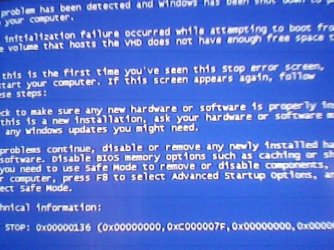
I wanted to try Windows 7 Home Basic edition. So I modified build 7201 iso and started installing it into a vhd. After the first restart during installation process it gave me a BSOD. It is telling me that the drive containing the vhd file does`nt have enough space so that the vhd could expand. But i already have enough space left in that drive that is more than 11Gb while windows 7 takes only 8Gb to install.
help me guys.....
I am posting the screeshot of the Bsod which i took with my mobile phone:
Foobar on 8gb! Try more like 80gb like you would for a normal drive.
I'm still trying to work on seeing the 32bit or even 64bit RC installed on the VPC while it's mainly flexoble for Vista there besides the XP mode itself. Besides the minimum amount of space recommended by MS is at least 16gb for 7.
From the looks of that you likely ran out of space during the installation attempt with the main drive running out of space. The installation simply crashed on you for that reason. Remember the present installation on the hard drive itself reserves space for system restore points as well as the paging file used for virtual memory.
For a 98gb vhd I started off with the maximum of 130gb by setting the expandibility rather then fixed size option whie still leaving quite a bit more free drive space available for the host OS(2 RC64s, 1 RC32 all run the VPC).
W7 Ultimate x64/W10 Pro x64/W11 Pro Triple Boot - Main PC W7 Remote PC Micro ATX W7 Pro x64/W11 Pro
CPU
AMD Phenom II X4 975 Deneb 3.6ghz - 965 2nd remote pc
Motherboard
Gigabyte GA-790XTA-UD4-Gigabyte GA-880GM-D2H remote pc
Memory
Kingston Hyper X DDR3 1600 1.5v 16gb - Hyper X Fury 8gb 2nd
Graphics Card(s)
MSI HD Radeon 5750 1gb - MSI HD Radeon 6450 on mini tower
Sound Card
Creative Labs X-Fi Xtreme Audio P - Realtek onooard 2nd case
Monitor(s) Displays
ASUS VW199T-P 19" HP 2082a Main-HP 2082a 20" remote pc
Screen Resolution
Asus 1440x900 - HP 1600x900
Hard Drives
WD Black 1TB HD per OS W7, W10, and pending W11 presently on 500gb OS Drive - Pending Triple 1TB HDs for Spanned Storage/backup volume
Single 2TB external USB enclosure, single 1TB System 7 Host/Boot drive, Pending 8TB external HD for system image b
PSU
Corsair 750TX - primary / Corsair CX600 - second
Case
Antec 900-2 - SSD compatible / NZXT Vulcan mini tower
Well that's one thing people have to know about when people start using the Virtual PC option and XP mode or when simply creating a new vhd for something. You have to start off with adequate free space just as if you were performing a full install of Windows.
If you want to add programs on you then need to calculate a little more over just the basics. Here the host drive is still under 50% used even with both the XP mode and Vista running on the VPC as well since when hibernated or shutdown those remain in a compressed state. The 97gb Vista vhd opened is only about 24.9gb with a right click to look at the properties while the XP mode is just over 50gb!
W7 Ultimate x64/W10 Pro x64/W11 Pro Triple Boot - Main PC W7 Remote PC Micro ATX W7 Pro x64/W11 Pro
CPU
AMD Phenom II X4 975 Deneb 3.6ghz - 965 2nd remote pc
Motherboard
Gigabyte GA-790XTA-UD4-Gigabyte GA-880GM-D2H remote pc
Memory
Kingston Hyper X DDR3 1600 1.5v 16gb - Hyper X Fury 8gb 2nd
Graphics Card(s)
MSI HD Radeon 5750 1gb - MSI HD Radeon 6450 on mini tower
Sound Card
Creative Labs X-Fi Xtreme Audio P - Realtek onooard 2nd case
Monitor(s) Displays
ASUS VW199T-P 19" HP 2082a Main-HP 2082a 20" remote pc
Screen Resolution
Asus 1440x900 - HP 1600x900
Hard Drives
WD Black 1TB HD per OS W7, W10, and pending W11 presently on 500gb OS Drive - Pending Triple 1TB HDs for Spanned Storage/backup volume
Single 2TB external USB enclosure, single 1TB System 7 Host/Boot drive, Pending 8TB external HD for system image b
PSU
Corsair 750TX - primary / Corsair CX600 - second
Case
Antec 900-2 - SSD compatible / NZXT Vulcan mini tower
I removed some files from my hdd and win7 installed perfectly except I forgot that not sku boot from vhd. we can only boot ultimate and enterprise edition from vhd..
Or Vista! That would also have to be the Ultimate edition as well it seems. My next step here will be trying to attack a new vhd for the 32bit 7 and set that up for a second dual boot only from vhd not the 4th hard drive to see how that one goes.
I had an old ide drive here if for a period of time with the Home Premium 7000 builds setup in a dual boot there. Basically the desktop is going to look the same. The Ultimate however has all the features including new support for the "UNIX based applications subsystem"! http://www.sevenforums.com/tutorials/14422-compare-windows-7-editions.html
W7 Ultimate x64/W10 Pro x64/W11 Pro Triple Boot - Main PC W7 Remote PC Micro ATX W7 Pro x64/W11 Pro
CPU
AMD Phenom II X4 975 Deneb 3.6ghz - 965 2nd remote pc
Motherboard
Gigabyte GA-790XTA-UD4-Gigabyte GA-880GM-D2H remote pc
Memory
Kingston Hyper X DDR3 1600 1.5v 16gb - Hyper X Fury 8gb 2nd
Graphics Card(s)
MSI HD Radeon 5750 1gb - MSI HD Radeon 6450 on mini tower
Sound Card
Creative Labs X-Fi Xtreme Audio P - Realtek onooard 2nd case
Monitor(s) Displays
ASUS VW199T-P 19" HP 2082a Main-HP 2082a 20" remote pc
Screen Resolution
Asus 1440x900 - HP 1600x900
Hard Drives
WD Black 1TB HD per OS W7, W10, and pending W11 presently on 500gb OS Drive - Pending Triple 1TB HDs for Spanned Storage/backup volume
Single 2TB external USB enclosure, single 1TB System 7 Host/Boot drive, Pending 8TB external HD for system image b
PSU
Corsair 750TX - primary / Corsair CX600 - second
Case
Antec 900-2 - SSD compatible / NZXT Vulcan mini tower