
BSOD while logging in Normal Mode

Look forward to your results.
 

My Computer

Computer type
PC/Desktop
Computer Manufacturer/Model Number
Self assembled
OS
Windows 10 Home 64Bit
CPU
Intel Core i5 10400 @ 2.90GHz
Motherboard
Intel Corporation DG41WV (PROCESSOR)
Memory
8.00GB Single-Channel Unknown @ 1329MHz (16-20-20-38)
Sound Card
Realtek High Definition Audio
Monitor(s) Displays
DELL E170S
Screen Resolution
1280x1024 pixels
Hard Drives
931GB TOSHIBA DT01ACA100 (SATA)
238GB TEAM TM8PS7256G (SATA SSD)
Case
Nothing Fancy
Cooling
Fans
Keyboard
A4 Tech Co LTD
Mouse
A4 Tech Co Ltd/Logitech
Internet Speed
25 Mbps
Look forward to your results.

Well, after scanning on my main PC, the results are the same as the other one: ESET scanned 3 viruses included Win32/Adware.RK.AM application, Win32/Adware.RK application and Win32/Adware.RK.AE application and cleaned it.

Kaspersky TDSSKiller found nothing.

They're coming from an application that I'm a member of a survey group and recently downloaded in order to take surveys called Opinion Square. This software application does not have an uninstaller.
 
Last edited:

My Computer

Computer type
PC/Desktop
Computer Manufacturer/Model Number
Dell Dimension 5150
OS
Windows 7 Professional x86
CPU
Intel 2.66GHz Dual Core
Motherboard
Intel
Memory
PC2-5300 4GB
Graphics Card(s)
1GB PCI-Ex
Sound Card
Sound Blaster X-Fi Extreme Audio
Monitor(s) Displays
emachines LCD 18.5"
Hard Drives
Western Digital Caviar Green 500GB
PSU
500watts
Cooling
heatsink for CPU
Keyboard
MadCatz
Mouse
espow Optical
Internet Speed
16Mbps
Antivirus
Norton 360
Browser
Comodo Dragon (Chrome)

My Computer

Computer type
PC/Desktop
Computer Manufacturer/Model Number
Self assembled
OS
Windows 10 Home 64Bit
CPU
Intel Core i5 10400 @ 2.90GHz
Motherboard
Intel Corporation DG41WV (PROCESSOR)
Memory
8.00GB Single-Channel Unknown @ 1329MHz (16-20-20-38)
Sound Card
Realtek High Definition Audio
Monitor(s) Displays
DELL E170S
Screen Resolution
1280x1024 pixels
Hard Drives
931GB TOSHIBA DT01ACA100 (SATA)
238GB TEAM TM8PS7256G (SATA SSD)
Case
Nothing Fancy
Cooling
Fans
Keyboard
A4 Tech Co LTD
Mouse
A4 Tech Co Ltd/Logitech
Internet Speed
25 Mbps
Hi hunter

Open up an elevated command prompt . Click on the :orb: button type CMD inside the Search programs and files box . Once CMD appears under Programs (1) right-click and choose Run as administrator . Command prompt should open to this path C:\Windows\System32>_ . Type in this command below to uninstall the OpinionSqaure .

Code:
opnsqr.exe -bootremove -uninst:OpinionSquare

Report back with the results .
 

My Computer

Computer Manufacturer/Model Number
Custom Built
OS
Windows 7 Ultimate 32-Bit & Windows 7 Ultimate 64-Bit
CPU
Intel Core i7 CPU 950 @ 3.07GHz
Motherboard
ASUS P6T DELUXE V2
Memory
OCZ 6GB (3 x 2GB) 240-Pin DDR3 SDRAM DDR3 1600 OCZ3X1600R2
Graphics Card(s)
ATI Radeon HD 5700 Series
Sound Card
OnBoard
Hard Drives
WD6400AACS-00M3B0 (640GB SATA )
PSU
CORSAIR 850w
Case
NZXT LEXA
Cooling
Intel Stock Heatsink Fan
Keyboard
Microsoft Wireless Laser Keyboard 7000
Mouse
Microsoft Wireless Laser Mouse 7000
Hi hunter

Open up an elevated command prompt . Click on the :orb: button type CMD inside the Search programs and files box . Once CMD appears under Programs (1) right-click and choose Run as administrator . Command prompt should open to this path C:\Windows\System32>_ . Type in this command below to uninstall the OpinionSqaure .

Code:
opnsqr.exe -bootremove -uninst:OpinionSquare

Report back with the results .

Sorry I'm late again, just removed the OpinionSquare app a couple of weeks ago. Now a new problem, Bad Pool Header. I've already disabled the Volume Shadow Copy and the Microsoft Shadow Copy Provider before I logged on here today. But something about disabling caching in the BIOS is new to me, I need some details about that.
 

My Computer

Computer type
PC/Desktop
Computer Manufacturer/Model Number
Dell Dimension 5150
OS
Windows 7 Professional x86
CPU
Intel 2.66GHz Dual Core
Motherboard
Intel
Memory
PC2-5300 4GB
Graphics Card(s)
1GB PCI-Ex
Sound Card
Sound Blaster X-Fi Extreme Audio
Monitor(s) Displays
emachines LCD 18.5"
Hard Drives
Western Digital Caviar Green 500GB
PSU
500watts
Cooling
heatsink for CPU
Keyboard
MadCatz
Mouse
espow Optical
Internet Speed
16Mbps
Antivirus
Norton 360
Browser
Comodo Dragon (Chrome)
Hunter

Your bsod was caused by MpFilter.sys which is from Microsoft Security Essentials . Uninstall it
 

My Computer

Computer Manufacturer/Model Number
Custom Built
OS
Windows 7 Ultimate 32-Bit & Windows 7 Ultimate 64-Bit
CPU
Intel Core i7 CPU 950 @ 3.07GHz
Motherboard
ASUS P6T DELUXE V2
Memory
OCZ 6GB (3 x 2GB) 240-Pin DDR3 SDRAM DDR3 1600 OCZ3X1600R2
Graphics Card(s)
ATI Radeon HD 5700 Series
Sound Card
OnBoard
Hard Drives
WD6400AACS-00M3B0 (640GB SATA )
PSU
CORSAIR 850w
Case
NZXT LEXA
Cooling
Intel Stock Heatsink Fan
Keyboard
Microsoft Wireless Laser Keyboard 7000
Mouse
Microsoft Wireless Laser Mouse 7000
Have you tested your RAM?
 

My Computer

Computer type
PC/Desktop
Computer Manufacturer/Model Number
Self assembled
OS
Windows 10 Home 64Bit
CPU
Intel Core i5 10400 @ 2.90GHz
Motherboard
Intel Corporation DG41WV (PROCESSOR)
Memory
8.00GB Single-Channel Unknown @ 1329MHz (16-20-20-38)
Sound Card
Realtek High Definition Audio
Monitor(s) Displays
DELL E170S
Screen Resolution
1280x1024 pixels
Hard Drives
931GB TOSHIBA DT01ACA100 (SATA)
238GB TEAM TM8PS7256G (SATA SSD)
Case
Nothing Fancy
Cooling
Fans
Keyboard
A4 Tech Co LTD
Mouse
A4 Tech Co Ltd/Logitech
Internet Speed
25 Mbps
Have you tested your RAM?

Yes, koolkat77. The RAM's healthy. And I uninstalled MSE, VistaKing. But this new problem came up last night while I was uninstalling Revo Uninstaller Pro and restarting my computer. So before I came here, I fixed both the Boot and rebuild the BCD, so I'm not sure what happened last night.
 

My Computer

Computer type
PC/Desktop
Computer Manufacturer/Model Number
Dell Dimension 5150
OS
Windows 7 Professional x86
CPU
Intel 2.66GHz Dual Core
Motherboard
Intel
Memory
PC2-5300 4GB
Graphics Card(s)
1GB PCI-Ex
Sound Card
Sound Blaster X-Fi Extreme Audio
Monitor(s) Displays
emachines LCD 18.5"
Hard Drives
Western Digital Caviar Green 500GB
PSU
500watts
Cooling
heatsink for CPU
Keyboard
MadCatz
Mouse
espow Optical
Internet Speed
16Mbps
Antivirus
Norton 360
Browser
Comodo Dragon (Chrome)
Scan the system for possible virus infection with the following programs.

Uninstall the following ....

  • Start Menu\Programs\SUPERAntiSpyware
  • Start Menu\Programs\TuneUp Utilities 2011
Do some Disc checks.

  1. Re-seat the sata and power.
    72974453_zps85c47d93.jpg
  2. Run chkdsk /f/r, following the option two of the tutorial Disk Check
  3. Seatool for dos: SeaTools | Seagate download
    Burn it in a blank cd. boot from the CD, click on "Accept", wait for it to finish detecting the drives, then in the upper left corner select "Basic Tests", then select "Long Test" and let it run.
  4. Post a screenshot of your HDD using CrystalDiskInfo - Software - Crystal Dew World
Let us know the results.

EDIT: After a consultation with koolkat77, we think you may try to set the storage controllers to AHCI mode, and not at IDE mode as now, at least as a try.

ITEM | VALUE
Name | AMD SATA Controller (IDE Mode)
Driver | c:\windows\system32\drivers\amdide64.sys
Name | AMD PCI IDE Controller
Driver | c:\windows\system32\drivers\amdide64.sys
______________________________________________________________________
BSOD ANALYSIS:
Code:
*******************************************************************************
*                                                                             *
*                        Bugcheck Analysis                                    *
*                                                                             *
*******************************************************************************

Use !analyze -v to get detailed debugging information.

BugCheck F4, {3, fffffa800f1ef660, fffffa800f1ef940, fffff800035d5350}

----- ETW minidump data unavailable-----
Probably caused by : csrss.exe

Followup: MachineOwner
---------
 

My Computer

Computer type
PC/Desktop
Computer Manufacturer/Model Number
Self Assembled
OS
Microsoft Windows 10 Pro Insider Preview 64-bit
CPU
Intel(R) Core(TM) i3-4130 CPU @ 3.40GHz
Motherboard
Gigabyte Technology Co., Ltd. B85M-D3H
Memory
Corsair Vengence 4GB x2 (8.00GB Dual-Channel DDR3 @ 798MHz)
Graphics Card(s)
2047MB GeForce GTS 450 (ZOTAC International)
Sound Card
Onboard (Realtek High Definition Audio)
Monitor(s) Displays
LG Flatron E2040T
Screen Resolution
1600x900
Hard Drives
Western Digital 1 TB
Seagate 500 GB
PSU
Corsair VS550
Case
Cooler Master K380
Cooling
Cooler Master Seidon 120V Plus
Keyboard
Logitech MK260r
Mouse
Logitech MK260r
Internet Speed
PMPL Broadband
Antivirus
Windows Defender + MBAM
Browser
Firefox
Other Info
Dell Studio 15" Laptop
Scan the system for possible virus infection with the following programs.

Uninstall the following ....

  • Start Menu\Programs\SUPERAntiSpyware
  • Start Menu\Programs\TuneUp Utilities 2011
Do some Disc checks.

  1. Re-seat the sata and power.
    72974453_zps85c47d93.jpg
  2. Run chkdsk /f/r, following the option two of the tutorial Disk Check
  3. Seatool for dos: SeaTools | Seagate download
    Burn it in a blank cd. boot from the CD, click on "Accept", wait for it to finish detecting the drives, then in the upper left corner select "Basic Tests", then select "Long Test" and let it run.
  4. Post a screenshot of your HDD using CrystalDiskInfo - Software - Crystal Dew World
Let us know the results.

EDIT: After a consultation with koolkat77, we think you may try to set the storage controllers to AHCI mode, and not at IDE mode as now, at least as a try.

ITEM | VALUE
Name | AMD SATA Controller (IDE Mode)
Driver | c:\windows\system32\drivers\amdide64.sys
Name | AMD PCI IDE Controller
Driver | c:\windows\system32\drivers\amdide64.sys
______________________________________________________________________
BSOD ANALYSIS:
Code:
*******************************************************************************
*                                                                             *
*                        Bugcheck Analysis                                    *
*                                                                             *
*******************************************************************************

Use !analyze -v to get detailed debugging information.

BugCheck F4, {3, fffffa800f1ef660, fffffa800f1ef940, fffff800035d5350}

----- ETW minidump data unavailable-----
Probably caused by : csrss.exe

Followup: MachineOwner
---------

Okay, but I have a hard drive from Western Digital, not Seagate. And why in AHCI mode? I've never even attempted that before.
 

My Computer

Computer type
PC/Desktop
Computer Manufacturer/Model Number
Dell Dimension 5150
OS
Windows 7 Professional x86
CPU
Intel 2.66GHz Dual Core
Motherboard
Intel
Memory
PC2-5300 4GB
Graphics Card(s)
1GB PCI-Ex
Sound Card
Sound Blaster X-Fi Extreme Audio
Monitor(s) Displays
emachines LCD 18.5"
Hard Drives
Western Digital Caviar Green 500GB
PSU
500watts
Cooling
heatsink for CPU
Keyboard
MadCatz
Mouse
espow Optical
Internet Speed
16Mbps
Antivirus
Norton 360
Browser
Comodo Dragon (Chrome)
I know that your HDD is Western Digital Caviar Green (WD10EARS-00Y5B1) 1 TB. Still I suggested Seatools as work good on any HDD, and it works better than any other HDD testing tool. If you want, you may try Western Digital Data Lifeguard, but Seatools work better.

AHCI mode, coz IDE mode is not really very suitable with Windows versions higher than XP. They work, but AHCI works better. SCSI works even better, but that sometimes fails, too. So AHCI is the better and stable storage controller option.

As the issues are storage related only (filter drivers are storage related, too), we suggested as per our best of knowledge and experience. Acceptance and otherwise is on you only :) But all the questions are most welcome.
 

My Computer

Computer type
PC/Desktop
Computer Manufacturer/Model Number
Self Assembled
OS
Microsoft Windows 10 Pro Insider Preview 64-bit
CPU
Intel(R) Core(TM) i3-4130 CPU @ 3.40GHz
Motherboard
Gigabyte Technology Co., Ltd. B85M-D3H
Memory
Corsair Vengence 4GB x2 (8.00GB Dual-Channel DDR3 @ 798MHz)
Graphics Card(s)
2047MB GeForce GTS 450 (ZOTAC International)
Sound Card
Onboard (Realtek High Definition Audio)
Monitor(s) Displays
LG Flatron E2040T
Screen Resolution
1600x900
Hard Drives
Western Digital 1 TB
Seagate 500 GB
PSU
Corsair VS550
Case
Cooler Master K380
Cooling
Cooler Master Seidon 120V Plus
Keyboard
Logitech MK260r
Mouse
Logitech MK260r
Internet Speed
PMPL Broadband
Antivirus
Windows Defender + MBAM
Browser
Firefox
Other Info
Dell Studio 15" Laptop
I know that your HDD is Western Digital Caviar Green (WD10EARS-00Y5B1) 1 TB. Still I suggested Seatools as work good on any HDD, and it works better than any other HDD testing tool. If you want, you may try Western Digital Data Lifeguard, but Seatools work better.

AHCI mode, coz IDE mode is not really very suitable with Windows versions higher than XP. They work, but AHCI works better. SCSI works even better, but that sometimes fails, too. So AHCI is the better and stable storage controller option.

As the issues are storage related only (filter drivers are storage related, too), we suggested as per our best of knowledge and experience. Acceptance and otherwise is on you only :) But all the questions are most welcome.
Understood, Arc. Here's a screenshot of my hard drive stats. I shall get right on with the hard drive check.


My Computer

Computer type
PC/Desktop
Computer Manufacturer/Model Number
Dell Dimension 5150
OS
Windows 7 Professional x86
CPU
Intel 2.66GHz Dual Core
Motherboard
Intel
Memory
PC2-5300 4GB
Graphics Card(s)
1GB PCI-Ex
Sound Card
Sound Blaster X-Fi Extreme Audio
Monitor(s) Displays
emachines LCD 18.5"
Hard Drives
Western Digital Caviar Green 500GB
PSU
500watts
Cooling
heatsink for CPU
Keyboard
MadCatz
Mouse
espow Optical
Internet Speed
16Mbps
Antivirus
Norton 360
Browser
Comodo Dragon (Chrome)
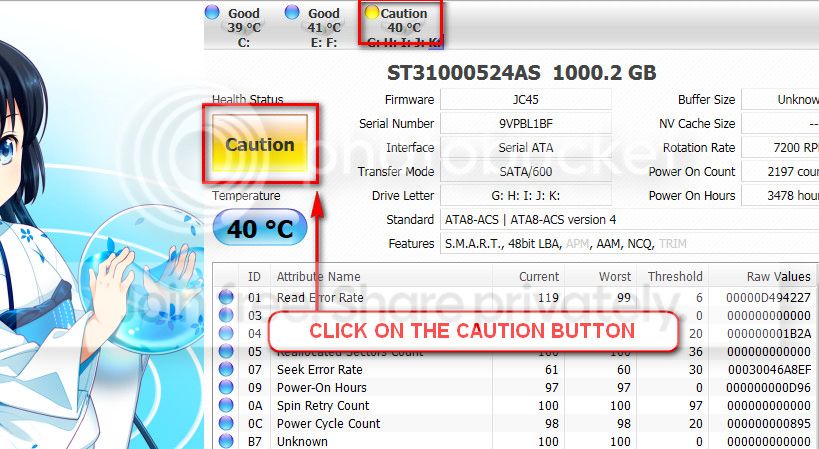
The caution indication can be converted to good using CrystalDiscInfo. Click on the caution Button, you will get another window ....
1_zps1eeadfca.jpg


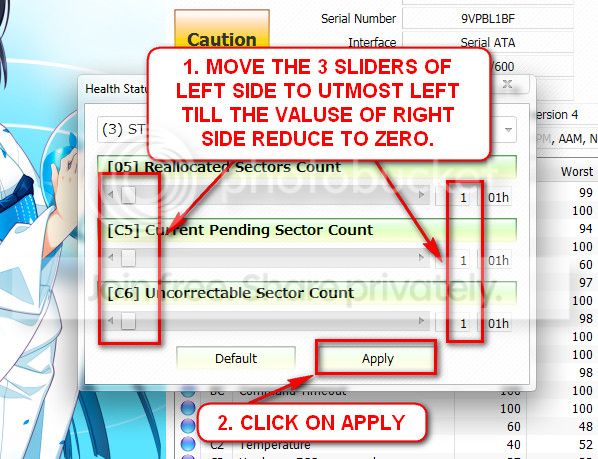
In the resulting window, there are three sliders in the left. Drag them to the ultimate left, and notice the values at the right side are converting to zeros.
2_zps50ae6eec.jpg


Now click the apply button, and notice that the caution is gone.

Still, the result of the HDD test is most important. And, can you back your all data up externally?

Also, is the HDD within warranty?
 

My Computer

Computer type
PC/Desktop
Computer Manufacturer/Model Number
Self Assembled
OS
Microsoft Windows 10 Pro Insider Preview 64-bit
CPU
Intel(R) Core(TM) i3-4130 CPU @ 3.40GHz
Motherboard
Gigabyte Technology Co., Ltd. B85M-D3H
Memory
Corsair Vengence 4GB x2 (8.00GB Dual-Channel DDR3 @ 798MHz)
Graphics Card(s)
2047MB GeForce GTS 450 (ZOTAC International)
Sound Card
Onboard (Realtek High Definition Audio)
Monitor(s) Displays
LG Flatron E2040T
Screen Resolution
1600x900
Hard Drives
Western Digital 1 TB
Seagate 500 GB
PSU
Corsair VS550
Case
Cooler Master K380
Cooling
Cooler Master Seidon 120V Plus
Keyboard
Logitech MK260r
Mouse
Logitech MK260r
Internet Speed
PMPL Broadband
Antivirus
Windows Defender + MBAM
Browser
Firefox
Other Info
Dell Studio 15" Laptop
The caution indication can be converted to good using CrystalDiscInfo. Click on the caution Button, you will get another window ....
1_zps1eeadfca.jpg


In the resulting window, there are three sliders in the left. Drag them to the ultimate left, and notice the values at the right side are converting to zeros.
2_zps50ae6eec.jpg


Now click the apply button, and notice that the caution is gone.

Still, the result of the HDD test is most important. And, can you back your all data up externally?

Also, is the HDD within warranty?

I do not know how to back it up internally and yes, the hard drive is still under warranty.


My Computer

Computer type
PC/Desktop
Computer Manufacturer/Model Number
Dell Dimension 5150
OS
Windows 7 Professional x86
CPU
Intel 2.66GHz Dual Core
Motherboard
Intel
Memory
PC2-5300 4GB
Graphics Card(s)
1GB PCI-Ex
Sound Card
Sound Blaster X-Fi Extreme Audio
Monitor(s) Displays
emachines LCD 18.5"
Hard Drives
Western Digital Caviar Green 500GB
PSU
500watts
Cooling
heatsink for CPU
Keyboard
MadCatz
Mouse
espow Optical
Internet Speed
16Mbps
Antivirus
Norton 360
Browser
Comodo Dragon (Chrome)
Waiting for the seatools result.

Not internally, but externally. You are supposed to back up all your important data saved on the HDD to an external removable HDD, then send it for RMA if seatools failed. Even if Seatools passed, better you format the entire HDD.
 

My Computer

Computer type
PC/Desktop
Computer Manufacturer/Model Number
Self Assembled
OS
Microsoft Windows 10 Pro Insider Preview 64-bit
CPU
Intel(R) Core(TM) i3-4130 CPU @ 3.40GHz
Motherboard
Gigabyte Technology Co., Ltd. B85M-D3H
Memory
Corsair Vengence 4GB x2 (8.00GB Dual-Channel DDR3 @ 798MHz)
Graphics Card(s)
2047MB GeForce GTS 450 (ZOTAC International)
Sound Card
Onboard (Realtek High Definition Audio)
Monitor(s) Displays
LG Flatron E2040T
Screen Resolution
1600x900
Hard Drives
Western Digital 1 TB
Seagate 500 GB
PSU
Corsair VS550
Case
Cooler Master K380
Cooling
Cooler Master Seidon 120V Plus
Keyboard
Logitech MK260r
Mouse
Logitech MK260r
Internet Speed
PMPL Broadband
Antivirus
Windows Defender + MBAM
Browser
Firefox
Other Info
Dell Studio 15" Laptop
Waiting for the seatools result.

Not internally, but externally. You are supposed to back up all your important data saved on the HDD to an external removable HDD, then send it for RMA if seatools failed. Even if Seatools passed, better you format the entire HDD.

I see, well I tried to do the Long Test, came up with errors at the 19% mark, so I could not get the results then.


My Computer

Computer type
PC/Desktop
Computer Manufacturer/Model Number
Dell Dimension 5150
OS
Windows 7 Professional x86
CPU
Intel 2.66GHz Dual Core
Motherboard
Intel
Memory
PC2-5300 4GB
Graphics Card(s)
1GB PCI-Ex
Sound Card
Sound Blaster X-Fi Extreme Audio
Monitor(s) Displays
emachines LCD 18.5"
Hard Drives
Western Digital Caviar Green 500GB
PSU
500watts
Cooling
heatsink for CPU
Keyboard
MadCatz
Mouse
espow Optical
Internet Speed
16Mbps
Antivirus
Norton 360
Browser
Comodo Dragon (Chrome)
I see, well I tried to do the Long Test, came up with errors at the 19% mark, so I could not get the results then.
Your statement itself is the result.

So we can say that the HDD is corrupted itself.

Back up (save) the necessary things to elsewhere and then RMA the HDD.
 

My Computer

Computer type
PC/Desktop
Computer Manufacturer/Model Number
Self Assembled
OS
Microsoft Windows 10 Pro Insider Preview 64-bit
CPU
Intel(R) Core(TM) i3-4130 CPU @ 3.40GHz
Motherboard
Gigabyte Technology Co., Ltd. B85M-D3H
Memory
Corsair Vengence 4GB x2 (8.00GB Dual-Channel DDR3 @ 798MHz)
Graphics Card(s)
2047MB GeForce GTS 450 (ZOTAC International)
Sound Card
Onboard (Realtek High Definition Audio)
Monitor(s) Displays
LG Flatron E2040T
Screen Resolution
1600x900
Hard Drives
Western Digital 1 TB
Seagate 500 GB
PSU
Corsair VS550
Case
Cooler Master K380
Cooling
Cooler Master Seidon 120V Plus
Keyboard
Logitech MK260r
Mouse
Logitech MK260r
Internet Speed
PMPL Broadband
Antivirus
Windows Defender + MBAM
Browser
Firefox
Other Info
Dell Studio 15" Laptop
Okay then, Arc. Thanks for trying, all of you. I mean this, you've been great.
 

My Computer

Computer type
PC/Desktop
Computer Manufacturer/Model Number
Dell Dimension 5150
OS
Windows 7 Professional x86
CPU
Intel 2.66GHz Dual Core
Motherboard
Intel
Memory
PC2-5300 4GB
Graphics Card(s)
1GB PCI-Ex
Sound Card
Sound Blaster X-Fi Extreme Audio
Monitor(s) Displays
emachines LCD 18.5"
Hard Drives
Western Digital Caviar Green 500GB
PSU
500watts
Cooling
heatsink for CPU
Keyboard
MadCatz
Mouse
espow Optical
Internet Speed
16Mbps
Antivirus
Norton 360
Browser
Comodo Dragon (Chrome)
Back
Top