BSOD while running normal tasks or games. Really, whenever.

iGiveGoatsHugs

New member
Local time
1:34 AM
Messages
3
Hello everyone,

I have decided to post here in hopes that someonne may be able to help solve my problem. I am not much of a debugger and have a hard time understanding my bug check analysis.

I recently build my pc, installed all required software and got my computer rolling. Its been about two weeks, maybe a bit less and I have recieved 4 blue screens out of no where. I have not installed any strange software on my main OS hard drive so I am not sure what may be causing this. Possible faulty drivers? They do not happen while particular programs or games are running.

Anyways, here is the .zip file from the DM log collector and here is the .dmp file as a .rar.

If you require any specific information or if I missed anything, feel free to ask.

Thank you for taking time out of your day to read my thread.
 

My Computer

Computer type
PC/Desktop
Computer Manufacturer/Model Number
Custom Build
OS
Windows 7 Home Premiun 64bit
CPU
Intel i7 4790k
Motherboard
Asus Sabertooth z97 mark2
Memory
2x 4gb kingston hyper x 1866
Graphics Card(s)
gigabyte geforce gtx 970
Hard Drives
1x samsung 840 exo 250gb ssd (os + main programs)
1x western digital 1tb blue series (all other files)
PSU
Corsaid cx750m
Case
Phanteks enthoo pro
Antivirus
Norton
Browser
Google chrome
Code:
Host Name:                 SEANS-BEAST-PC
OS Name:                   Microsoft Windows 7 Home Premium 
OS Version:                6.1.7600 N/A Build [B][COLOR="Red"]7600[/COLOR][/B]
OS Manufacturer:           Microsoft Corporation
OS Configuration:          Standalone Workstation
OS Build Type:             Multiprocessor Free
Registered Owner:          Sean's-Beast
Registered Organization:   
Product ID:                00359-OEM-8992687-00191
Original Install Date:     12/19/2014, 9:51:51 AM
System Boot Time:          12/30/2014, 12:45:59 PM
System Manufacturer:       ASUS
First thing to do is update Windows 7 fully - you have a few hours worth of updates to do, including updating to Service pack 1.
 

My Computer

Computer type
PC/Desktop
Computer Manufacturer/Model Number
Golden Mk. I.4
OS
Windows 10 Pro x64 ; Xubuntu x64
CPU
Intel i7 860 @ 2.80 GHz O/C'ed to 4.0GHz
Motherboard
Gigabyte P55A-UD3R Rev.1. Award BIOS F13
Memory
16GB Corsair Vengance DDR3 @ 661 MHz Dual Channel (9-9-9-24)
Graphics Card(s)
EVGA NVidia GTX 560 1024MB
Sound Card
Realtek Integrated
Monitor(s) Displays
Dual Samsung SyncMaster 2494HS
Screen Resolution
1920*1080 and 1920*1080
Hard Drives
1*Samsung 840 EVO 120GB SSD;
1*OCZ Vertex 2 60GB SSD;
2*Samsung F3 SpinPoint 1TB in RAID0;
1*Samsung F1 SpinPoint 1TB;
2*Western Digital 1TB External USB 3.0
1*Western Digital 500GB External USB 3.0
1*Seagate 500GB External USB 2.0
PSU
Thermaltake ToughPower QFan 750W
Case
Thermaltake Element S VK60001W2Z
Cooling
Corsair H60 Water Cooling, 2*230mm and 2*80mm case fans
Keyboard
Logitech G110
Mouse
Logitech MX518
Code:
Host Name:                 SEANS-BEAST-PC
OS Name:                   Microsoft Windows 7 Home Premium 
OS Version:                6.1.7600 N/A Build [B][COLOR="Red"]7600[/COLOR][/B]
OS Manufacturer:           Microsoft Corporation
OS Configuration:          Standalone Workstation
OS Build Type:             Multiprocessor Free
Registered Owner:          Sean's-Beast
Registered Organization:   
Product ID:                00359-OEM-8992687-00191
Original Install Date:     12/19/2014, 9:51:51 AM
System Boot Time:          12/30/2014, 12:45:59 PM
System Manufacturer:       ASUS
First thing to do is update Windows 7 fully - you have a few hours worth of updates to do, including updating to Service pack 1.
Hello Golden. I have tried updating windows, even service pack 1. And when i went to boot my computer the screen would go black at the "Starting windows" screen. I did a system restore to when it was working correctly and have not tried updating since. Any suggestions? That happeened twice.
 

My Computer

Computer type
PC/Desktop
Computer Manufacturer/Model Number
Custom Build
OS
Windows 7 Home Premiun 64bit
CPU
Intel i7 4790k
Motherboard
Asus Sabertooth z97 mark2
Memory
2x 4gb kingston hyper x 1866
Graphics Card(s)
gigabyte geforce gtx 970
Hard Drives
1x samsung 840 exo 250gb ssd (os + main programs)
1x western digital 1tb blue series (all other files)
PSU
Corsaid cx750m
Case
Phanteks enthoo pro
Antivirus
Norton
Browser
Google chrome

My Computer

Computer type
PC/Desktop
Computer Manufacturer/Model Number
Golden Mk. I.4
OS
Windows 10 Pro x64 ; Xubuntu x64
CPU
Intel i7 860 @ 2.80 GHz O/C'ed to 4.0GHz
Motherboard
Gigabyte P55A-UD3R Rev.1. Award BIOS F13
Memory
16GB Corsair Vengance DDR3 @ 661 MHz Dual Channel (9-9-9-24)
Graphics Card(s)
EVGA NVidia GTX 560 1024MB
Sound Card
Realtek Integrated
Monitor(s) Displays
Dual Samsung SyncMaster 2494HS
Screen Resolution
1920*1080 and 1920*1080
Hard Drives
1*Samsung 840 EVO 120GB SSD;
1*OCZ Vertex 2 60GB SSD;
2*Samsung F3 SpinPoint 1TB in RAID0;
1*Samsung F1 SpinPoint 1TB;
2*Western Digital 1TB External USB 3.0
1*Western Digital 500GB External USB 3.0
1*Seagate 500GB External USB 2.0
PSU
Thermaltake ToughPower QFan 750W
Case
Thermaltake Element S VK60001W2Z
Cooling
Corsair H60 Water Cooling, 2*230mm and 2*80mm case fans
Keyboard
Logitech G110
Mouse
Logitech MX518
Alright, so a few things.

sfc /scannow did not find any corrupt files.

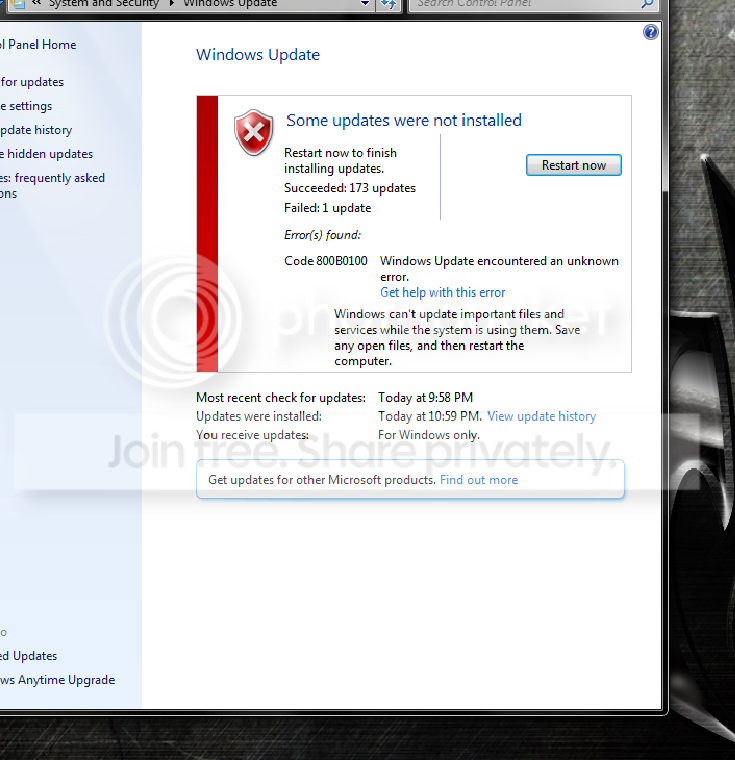
I installed all 174 updates unlike the first time that I tried to update windows(there was only like 7 important updates). I recieved only one error. Error Code 800B0100 which i believe has to do with a windows 7 security update.
error3_zpscf9be8e9.png


And below, I attatched a recent dm log like the first post aswell as the cbs logs. If I am missing any important files or information, please let me know.

EDIT: I cannot get the files uploaded for some reason. I wil try to correct this and if I cannot, then I will post an external link.

EDIT 2: The dm log uploaded, but the cbs logs did not. Here is a link to the cbs.zip CBS
 

My Computer

Computer type
PC/Desktop
Computer Manufacturer/Model Number
Custom Build
OS
Windows 7 Home Premiun 64bit
CPU
Intel i7 4790k
Motherboard
Asus Sabertooth z97 mark2
Memory
2x 4gb kingston hyper x 1866
Graphics Card(s)
gigabyte geforce gtx 970
Hard Drives
1x samsung 840 exo 250gb ssd (os + main programs)
1x western digital 1tb blue series (all other files)
PSU
Corsaid cx750m
Case
Phanteks enthoo pro
Antivirus
Norton
Browser
Google chrome
Please post your C:\Windows\windowsupdate.log file as well as the CBS data.
 

My Computer

Computer type
Laptop
Computer Manufacturer/Model Number
Asus K52F or Lenovo B51-80
OS
Win 7 x64 Home Premium (and x86 VirtualBox VM)/Win10
CPU
i3 370M/i7 6500U
Motherboard
Asus/Lenovo
Memory
8GB - finally :)/8GB
Graphics Card(s)
it's an i3, dude!/dual Intel&nVidia
Sound Card
onboard
Monitor(s) Displays
15.6" built-in
Screen Resolution
1366x768/1920x1080
Hard Drives
750GB Seagate internal
Sundry external drives attached to other computers on the local network
1TB SSD on the Lenovo
PSU
n/a
Internet Speed
as much as I can get - usually on a dongle/phone, so <1MB/s
Antivirus
MSE/Defender
Browser
IE11/12/Edge/Chrome/FF(if I must)
Back
Top