BSOD while surfing, error 000000F4

BillIsEvil

New member
Local time
9:10 PM
Messages
10
Had this comp for 2 years with no problems until April then the BSOD started. Had just started playing Fiesta and having problems with game and over next couple months BSOD became more frequent. Decided game was at fault so quit playing, followed by a period with no BSOD, then it started again. Had just started to check online for solutions when the hard drive fried and lost everything so got a new one.

Was only a brief time before BSOD started again(how does that happen on a new hard drive?), only this time only happening while I'm surfing(can play both online and offline games with no problem). Having the fear of being almost completely tech-stupid the following is what I've done so far from solutions found mainly on this site:

1. Made sure everything was updated.
2. Set it so bluescreen doesn't disappear(but it does anyway)
3. Did diagnostic, memory test, checked that it's not overheating, did the sfc\verifyonly, ran checkdisk, limited the startup programs to only what seemed necessary, did quickscan then fullscan with Malwarebytes, ran WhoCrashed, and ran Driver Verifier. No problems at all were found so far.
4. Did a reboot then tried to remove Malwarebytes from tray then comp froze up and saw a mostly light green screen with black lines. Rebooted into safe mode. While checking windows logs got another BSOD.
5. Did Normal startup then sent comp back to original factory settings. As I was continuing to look for other solutions I got another BSOD. Found out how to change dump path so did that. Got another BSOD then did system restore.

Now going to go learn how to post a dump file here(and what a learning experience it has been so far)and wait for the next BSOD. In the meantime if there's any other steps I can try or at least let me know what the cause is it would be greatly appreciated. Don't know if it would help but I can provide some windows system logs or Problem Reporting findings.
 

My Computer

Computer type
PC/Desktop
Computer Manufacturer/Model Number
HPE-580t
OS
Windows 7 Home Premium x64bit
CPU
Intel Core i7 CPU @ 3.07GHz, 3068 Mhz, 4 Core(s), 8 Logical
Memory
9 GB
Graphics Card(s)
AMD 6450
Antivirus
Some preinstalled Microsoft thing
Browser
IE
Now going to go learn how to post a dump file here(and what a learning experience it has been so far)and wait for the next BSOD. In the meantime if there's any other steps I can try or at least let me know what the cause is it would be greatly appreciated. Don't know if it would help but I can provide some windows system logs or Problem Reporting findings.
Post it following the Blue Screen of Death (BSOD) Posting Instructions.

BTW, 9 GB memory is an odd figure. How much it was originally and how much you have added later?
 

My Computer

Computer type
PC/Desktop
Computer Manufacturer/Model Number
Self Assembled
OS
Microsoft Windows 10 Pro Insider Preview 64-bit
CPU
Intel(R) Core(TM) i3-4130 CPU @ 3.40GHz
Motherboard
Gigabyte Technology Co., Ltd. B85M-D3H
Memory
Corsair Vengence 4GB x2 (8.00GB Dual-Channel DDR3 @ 798MHz)
Graphics Card(s)
2047MB GeForce GTS 450 (ZOTAC International)
Sound Card
Onboard (Realtek High Definition Audio)
Monitor(s) Displays
LG Flatron E2040T
Screen Resolution
1600x900
Hard Drives
Western Digital 1 TB
Seagate 500 GB
PSU
Corsair VS550
Case
Cooler Master K380
Cooling
Cooler Master Seidon 120V Plus
Keyboard
Logitech MK260r
Mouse
Logitech MK260r
Internet Speed
PMPL Broadband
Antivirus
Windows Defender + MBAM
Browser
Firefox
Other Info
Dell Studio 15" Laptop
Well I'm really curious how you know what my memory is since I didn't post it....but anyway 9gb is what the comp came with when I bought it(it's upgradable to 24). I actually only have 6gb since I had to remove 3gb before installing the new hard drive would work(no idea why). Took nearly a week of trial and error to find that out and afraid to find out how to put the 3gb back now in case something messes up.
 

My Computer

Computer type
PC/Desktop
Computer Manufacturer/Model Number
HPE-580t
OS
Windows 7 Home Premium x64bit
CPU
Intel Core i7 CPU @ 3.07GHz, 3068 Mhz, 4 Core(s), 8 Logical
Memory
9 GB
Graphics Card(s)
AMD 6450
Antivirus
Some preinstalled Microsoft thing
Browser
IE
Well I'm still waiting for a BSOD. Odd that it hasn't happened yet. Only thing I've done since the last one is finishing Windows and HP updates. In the meantime I have another question. I had SF Diagnostic Tool generate a report and saw under the dxdiag report that it's showing that I have 3072 memory.

As said before I had 9 but had to take out 3 to get new hard drive to work so shouldn't memory be around 6? Could this be what's causing the problem?
 

My Computer

Computer type
PC/Desktop
Computer Manufacturer/Model Number
HPE-580t
OS
Windows 7 Home Premium x64bit
CPU
Intel Core i7 CPU @ 3.07GHz, 3068 Mhz, 4 Core(s), 8 Logical
Memory
9 GB
Graphics Card(s)
AMD 6450
Antivirus
Some preinstalled Microsoft thing
Browser
IE
There should still be some saved Minidumps within the C:\Windows\Minidump directory.

You either have a bad DIMM slot or bad RAM stick, they could be a reason why not all the RAM is being recognized.
 

My Computer

Computer type
Laptop

My Computer

Computer type
PC/Desktop
Computer Manufacturer/Model Number
Self Assembled
OS
Microsoft Windows 10 Pro Insider Preview 64-bit
CPU
Intel(R) Core(TM) i3-4130 CPU @ 3.40GHz
Motherboard
Gigabyte Technology Co., Ltd. B85M-D3H
Memory
Corsair Vengence 4GB x2 (8.00GB Dual-Channel DDR3 @ 798MHz)
Graphics Card(s)
2047MB GeForce GTS 450 (ZOTAC International)
Sound Card
Onboard (Realtek High Definition Audio)
Monitor(s) Displays
LG Flatron E2040T
Screen Resolution
1600x900
Hard Drives
Western Digital 1 TB
Seagate 500 GB
PSU
Corsair VS550
Case
Cooler Master K380
Cooling
Cooler Master Seidon 120V Plus
Keyboard
Logitech MK260r
Mouse
Logitech MK260r
Internet Speed
PMPL Broadband
Antivirus
Windows Defender + MBAM
Browser
Firefox
Other Info
Dell Studio 15" Laptop
I did look for dumps when I first installed SF Tool but it said none were found but here's what I do have.
 

My Computer

Computer type
PC/Desktop
Computer Manufacturer/Model Number
HPE-580t
OS
Windows 7 Home Premium x64bit
CPU
Intel Core i7 CPU @ 3.07GHz, 3068 Mhz, 4 Core(s), 8 Logical
Memory
9 GB
Graphics Card(s)
AMD 6450
Antivirus
Some preinstalled Microsoft thing
Browser
IE
Well don't know what happened but that's not all the files I had in the attachments.

Edit: Oh, it seems the files are exceeding the forum limit.
 

My Computer

Computer type
PC/Desktop
Computer Manufacturer/Model Number
HPE-580t
OS
Windows 7 Home Premium x64bit
CPU
Intel Core i7 CPU @ 3.07GHz, 3068 Mhz, 4 Core(s), 8 Logical
Memory
9 GB
Graphics Card(s)
AMD 6450
Antivirus
Some preinstalled Microsoft thing
Browser
IE
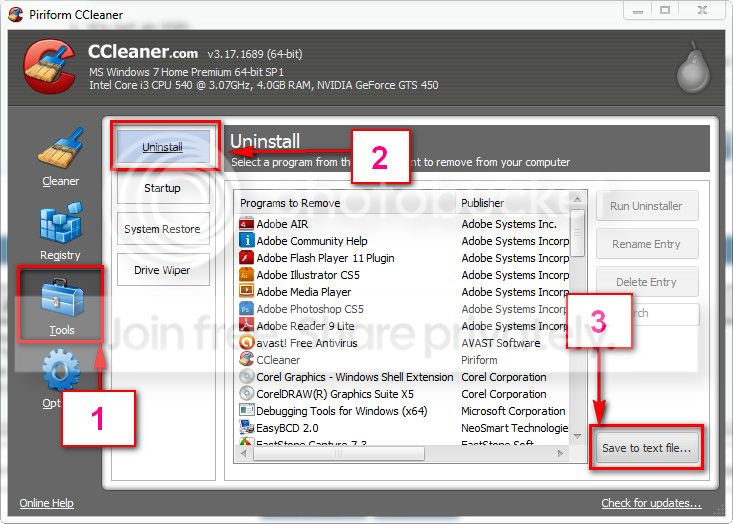
Download and install CCleaner. Then run it.
Go to "Tools" .... by default it will open the "uninstall" tab.
Click on save as text file. Save it on your desktop.
Upload the text file for us.
2012-11-02_224417.jpg


And upload your MSINFO32.nfo file.

  1. Click on the start button
  2. Type "msinfo32" (without quotes) in the search bar of the start menu, click the resulting link. It will open the System Information window.
  3. File>Save. In the "File Name" filed, put "MSINFO32" (without Quote), give the save location to desktop, and click the "save" button.
  4. Give the time for processing, it will save a .nfo file on your desktop.
  5. Zip it, and upload it following the instruction.
 

My Computer

Computer type
PC/Desktop
Computer Manufacturer/Model Number
Self Assembled
OS
Microsoft Windows 10 Pro Insider Preview 64-bit
CPU
Intel(R) Core(TM) i3-4130 CPU @ 3.40GHz
Motherboard
Gigabyte Technology Co., Ltd. B85M-D3H
Memory
Corsair Vengence 4GB x2 (8.00GB Dual-Channel DDR3 @ 798MHz)
Graphics Card(s)
2047MB GeForce GTS 450 (ZOTAC International)
Sound Card
Onboard (Realtek High Definition Audio)
Monitor(s) Displays
LG Flatron E2040T
Screen Resolution
1600x900
Hard Drives
Western Digital 1 TB
Seagate 500 GB
PSU
Corsair VS550
Case
Cooler Master K380
Cooling
Cooler Master Seidon 120V Plus
Keyboard
Logitech MK260r
Mouse
Logitech MK260r
Internet Speed
PMPL Broadband
Antivirus
Windows Defender + MBAM
Browser
Firefox
Other Info
Dell Studio 15" Laptop
Well, I downloaded ccleaner as instructed after picking a site I thought looked legitimate(ccleaner.en.softonic.com)then had the fun of having my browser hijacked by conduit even after I said no to adding anything. I suppose they think it's funny to put it in a program that is meant to remove such things.

Anyway, here are the files.
 

My Computer

Computer type
PC/Desktop
Computer Manufacturer/Model Number
HPE-580t
OS
Windows 7 Home Premium x64bit
CPU
Intel Core i7 CPU @ 3.07GHz, 3068 Mhz, 4 Core(s), 8 Logical
Memory
9 GB
Graphics Card(s)
AMD 6450
Antivirus
Some preinstalled Microsoft thing
Browser
IE
Not seeing any antivirus installed there? Is it? Let us know.

If you are using RAID, disable it in the BIOS. Use the storage controllers in AHCI mode.

Get rid of intel rapid storage. First uninstall it from Control Panel > Programs and Features. Then Uninstall the driver from device manager.

  1. Right click on "my computer" icon and click "manage" on the context menu.
  2. It will open the "computer management" window.
  3. Select "Device Manager" in the left pane, It will list all the existing devices up.
  4. Expand "IDE ATA/ATAPI controllers" by clicking on the triangle in front of it.
  5. Select one Intel device item under it, right click, uninstall.
  6. Continue the process for all Intel items under "IDE ATA/ATAPI controllers"
  7. Now restart the computer. At restart, windows will auto configure the appropriate native system driver.
Update JMicron JMB36X Controller. Get it from ftp://driver.jmicron.com.tw/SATA_Controller/Windows/

Test the 2 TB seagate. Seatool for dos: SeaTools | Seagate download

  • Burn it in a blank cd. boot from the CD, click on "Accept", wait for it to finish detecting the drives, then in the upper left corner select "Basic Tests", then select "Long Test" and let it run.
  • You can use Win32 DiscImager to create a bootable USB and run Seatools for DOS. Follow this post to know how to make a bootable Seatools USB.
Let us know the results.

** And, never download software from places like softonic. They always puts adwares and PUPs in their downloads. Either search in the official sites, or search in either Majorgeeks or Filehippo.
 

My Computer

Computer type
PC/Desktop
Computer Manufacturer/Model Number
Self Assembled
OS
Microsoft Windows 10 Pro Insider Preview 64-bit
CPU
Intel(R) Core(TM) i3-4130 CPU @ 3.40GHz
Motherboard
Gigabyte Technology Co., Ltd. B85M-D3H
Memory
Corsair Vengence 4GB x2 (8.00GB Dual-Channel DDR3 @ 798MHz)
Graphics Card(s)
2047MB GeForce GTS 450 (ZOTAC International)
Sound Card
Onboard (Realtek High Definition Audio)
Monitor(s) Displays
LG Flatron E2040T
Screen Resolution
1600x900
Hard Drives
Western Digital 1 TB
Seagate 500 GB
PSU
Corsair VS550
Case
Cooler Master K380
Cooling
Cooler Master Seidon 120V Plus
Keyboard
Logitech MK260r
Mouse
Logitech MK260r
Internet Speed
PMPL Broadband
Antivirus
Windows Defender + MBAM
Browser
Firefox
Other Info
Dell Studio 15" Laptop
In addition to the above post,

The only programs which also have potential to cause problems is the HP Bloatware, the only HP programs I have installed are:

View attachment 277587

I would enable Microsoft Security Essentials at boot too, I will be listed as MSC.
 

My Computer

Computer type
Laptop
Not seeing any antivirus installed there? Is it? Let us know.

If you are using RAID, disable it in the BIOS. Use the storage controllers in AHCI mode.

Get rid of intel rapid storage. First uninstall it from Control Panel > Programs and Features. Then Uninstall the driver from device manager.

  1. Right click on "my computer" icon and click "manage" on the context menu.
  2. It will open the "computer management" window.
  3. Select "Device Manager" in the left pane, It will list all the existing devices up.
  4. Expand "IDE ATA/ATAPI controllers" by clicking on the triangle in front of it.
  5. Select one Intel device item under it, right click, uninstall.
  6. Continue the process for all Intel items under "IDE ATA/ATAPI controllers"
  7. Now restart the computer. At restart, windows will auto configure the appropriate native system driver.
Update JMicron JMB36X Controller. Get it from ftp://driver.jmicron.com.tw/SATA_Controller/Windows/

Test the 2 TB seagate. Seatool for dos: SeaTools | Seagate download

  • Burn it in a blank cd. boot from the CD, click on "Accept", wait for it to finish detecting the drives, then in the upper left corner select "Basic Tests", then select "Long Test" and let it run.
  • You can use Win32 DiscImager to create a bootable USB and run Seatools for DOS. Follow this post to know how to make a bootable Seatools USB.
Let us know the results.

** And, never download software from places like softonic. They always puts adwares and PUPs in their downloads. Either search in the official sites, or search in either Majorgeeks or Filehippo.


Well I'm officially lost. I have no clue what RAID, BIOS, storage controllers, or AHCI mode are. Found the rapid storage under Uninstall Programs but wouldn't let me uninstall(said it's part of the hard drive). Couldn't even find the my computer icon to do the other steps.
As for what's after the 7 steps that falls under "Sorry, I only understand English". Don't know anything about this stuff and have been learning on-the-fly since coming here a week ago, and obviously have far to go. Going to have to put this on hold until I can understand your language. Hopefully my computer won't blow up before then.

Oh, and I tried the Filehippo link for Ccleaner but it directed me to a link to download 7zip. So much deception everywhere. Anyway, thanks for the help and will be back as soon as possible.
 

My Computer

Computer type
PC/Desktop
Computer Manufacturer/Model Number
HPE-580t
OS
Windows 7 Home Premium x64bit
CPU
Intel Core i7 CPU @ 3.07GHz, 3068 Mhz, 4 Core(s), 8 Logical
Memory
9 GB
Graphics Card(s)
AMD 6450
Antivirus
Some preinstalled Microsoft thing
Browser
IE
In addition to the above post,

The only programs which also have potential to cause problems is the HP Bloatware, the only HP programs I have installed are:

View attachment 277587

I would enable Microsoft Security Essentials at boot too, I will be listed as MSC.


No idea what to do there either, but I'll find out. And thanks.
 

My Computer

Computer type
PC/Desktop
Computer Manufacturer/Model Number
HPE-580t
OS
Windows 7 Home Premium x64bit
CPU
Intel Core i7 CPU @ 3.07GHz, 3068 Mhz, 4 Core(s), 8 Logical
Memory
9 GB
Graphics Card(s)
AMD 6450
Antivirus
Some preinstalled Microsoft thing
Browser
IE
Well I'm officially lost. I have no clue what RAID, BIOS, storage controllers, or AHCI mode are. Found the rapid storage under Uninstall Programs but wouldn't let me uninstall(said it's part of the hard drive). Couldn't even find the my computer icon to do the other steps.
As for what's after the 7 steps that falls under "Sorry, I only understand English". Don't know anything about this stuff and have been learning on-the-fly since coming here a week ago, and obviously have far to go. Going to have to put this on hold until I can understand your language. Hopefully my computer won't blow up before then.

Oh, and I tried the Filehippo link for Ccleaner but it directed me to a link to download 7zip. So much deception everywhere. Anyway, thanks for the help and will be back as soon as possible.
All possible. Everybody may not have some inner knowledge of computing. It is not needed to operate a computer more than enough successfully. If you dont have the idea what those things are, it will not loss anything, but in that case you would not be able to troubleshoot the issue yourself; despite of our remote assistance. You should not do it, as you dont know what you are doing. It may take a wrong direction in that case I am worried.

Best you take the computer to a technician, and ask for a fix. You may let him see what the people suggested you to do. If needed, get connected with us, take opinions.
 

My Computer

Computer type
PC/Desktop
Computer Manufacturer/Model Number
Self Assembled
OS
Microsoft Windows 10 Pro Insider Preview 64-bit
CPU
Intel(R) Core(TM) i3-4130 CPU @ 3.40GHz
Motherboard
Gigabyte Technology Co., Ltd. B85M-D3H
Memory
Corsair Vengence 4GB x2 (8.00GB Dual-Channel DDR3 @ 798MHz)
Graphics Card(s)
2047MB GeForce GTS 450 (ZOTAC International)
Sound Card
Onboard (Realtek High Definition Audio)
Monitor(s) Displays
LG Flatron E2040T
Screen Resolution
1600x900
Hard Drives
Western Digital 1 TB
Seagate 500 GB
PSU
Corsair VS550
Case
Cooler Master K380
Cooling
Cooler Master Seidon 120V Plus
Keyboard
Logitech MK260r
Mouse
Logitech MK260r
Internet Speed
PMPL Broadband
Antivirus
Windows Defender + MBAM
Browser
Firefox
Other Info
Dell Studio 15" Laptop
Well, finally got a BSOD only to have it say there was no dump when I did the Grab All so wound up with the same report you already have. Unfortunately, due to circumstances, I have no choice but to attempt the fix myself unless I carry the computer 8 miles to the nearest shop. At this point it doesn't seem to matter if I mess up anything since the hard drive is going out anyway.

No guts no glory. :D
 

My Computer

Computer type
PC/Desktop
Computer Manufacturer/Model Number
HPE-580t
OS
Windows 7 Home Premium x64bit
CPU
Intel Core i7 CPU @ 3.07GHz, 3068 Mhz, 4 Core(s), 8 Logical
Memory
9 GB
Graphics Card(s)
AMD 6450
Antivirus
Some preinstalled Microsoft thing
Browser
IE
Thought I'd do an update after doing extensive research and finding a solution to this problem, and perhaps help someone else. The cause is the Pegatron IPMTB-TK motherboard(majority consensus was the transistors). The problems with these boards began in 2009 and culminated in a nearly 400 page thread of numerous people complaining about this defective board, followed by lawsuits afterwards when HP's attitude was basically to give a big middle finger.

For salt in the wound, those that were willing to put in the effort to return their computers for a replacement were to find that it was replaced with the exact same motherboard. Even after knowing of this problem in 2009 HP continued to put them in new computers for years, including the one I bought in 2011. Of course the only fix is to get an upgraded motherboard. For those on a low to moderate budget I've learned that the Asus P8z77 line or Agrockz77 Extreme 4 work well. As a gamer I'll be getting the Asus P8zz77-VLK, after making sure it will work with a new Corsair HX 650 Bronze(Gold are defective)power supply and GTX 650 ti Boost video card.

Arc: to better answer your earlier question about the odd number of memory I've learned that it's because the motherboard supports triple channel memory(3x2GB + 3x1GB= 9GB).
 

My Computer

Computer type
PC/Desktop
Computer Manufacturer/Model Number
HPE-580t
OS
Windows 7 Home Premium x64bit
CPU
Intel Core i7 CPU @ 3.07GHz, 3068 Mhz, 4 Core(s), 8 Logical
Memory
9 GB
Graphics Card(s)
AMD 6450
Antivirus
Some preinstalled Microsoft thing
Browser
IE
Thanks for the update, and thanks for posting the solution to your problem :)
 

My Computer

Computer type
Laptop
Back
Top