
Solved BSOD while using utorrent

shadow15

New member
Local time
12:16 PM
Messages
8
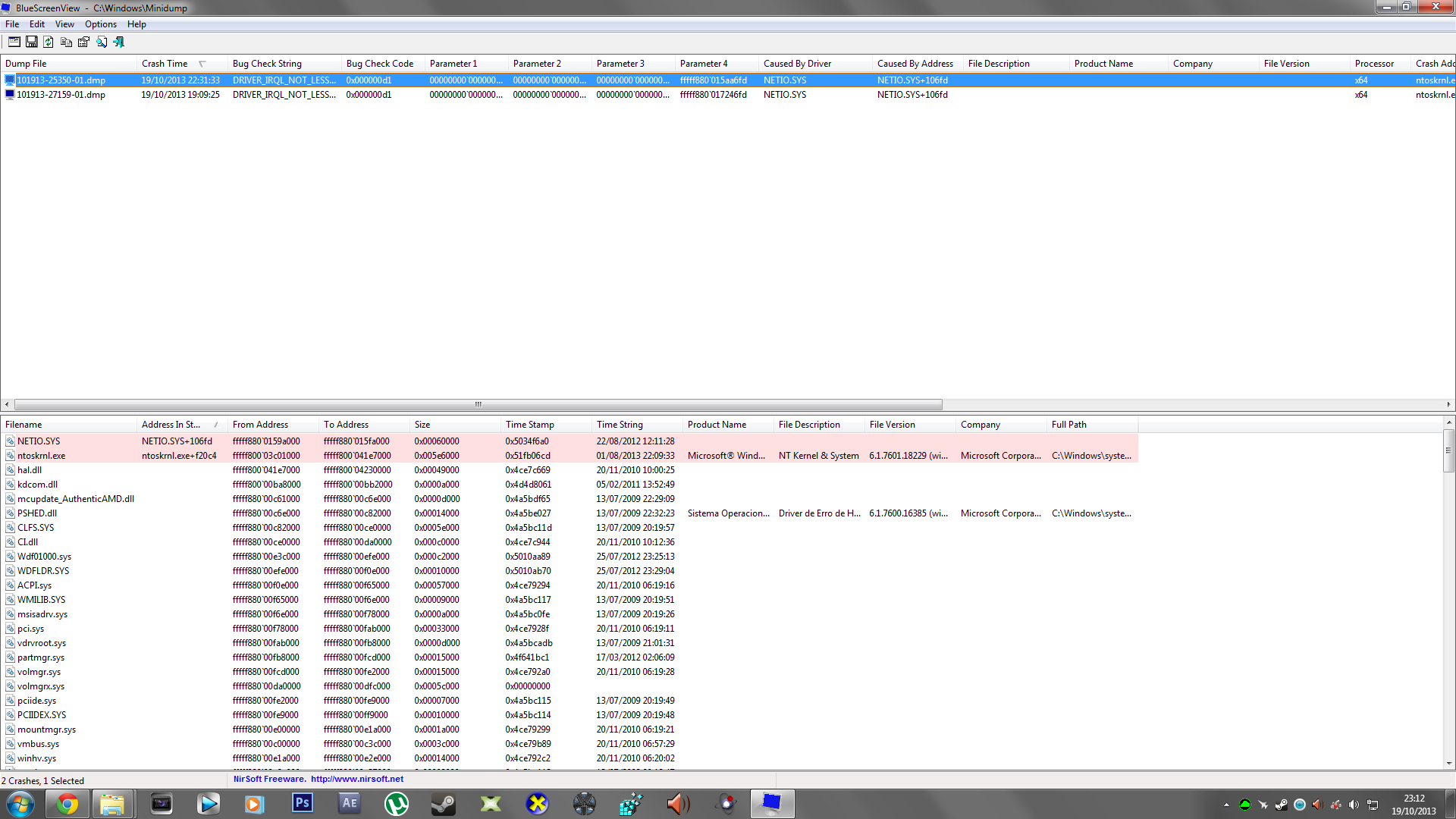
Here's my problem, it has been happening to me for almost 2 weeks now, when using utorrent sometimes i get a BSOD related to netio.sys and ntoskrnl.exe, i have no idea what's causing this, so i hope you guys can help me
fFpzvEC.png


Dump files:
 

My Computer

Computer type
PC/Desktop
OS
Windows 7 Ultimate x64
Hi shadow15.

It is your Antivirus (ESET) that is causing conflicts there.
Code:
fffff880`031a7648  fffff880`059862b5Unable to load image \SystemRoot\system32\DRIVERS\epfw.sys, Win32 error 0n2
*** WARNING: Unable to verify timestamp for [URL="http://www.carrona.org/drivers/driver.php?id=epfw.sys"]epfw.sys[/URL]
*** ERROR: Module load completed but symbols could not be loaded for [URL="http://www.carrona.org/drivers/driver.php?id=epfw.sys"]epfw.sys[/URL]
 epfw+0x1f2b5
Description here: Driver Reference Table - epfw.sys
Code:
fffff880`031a77e8  fffffa80`06094d38[COLOR=Red]Unable to load image C:\Program Files\ESET\ESET Smart Security\em008_64.dat[/COLOR], Win32 error 0n2
*** WARNING: Unable to verify timestamp for em008_64.dat
*** ERROR: Module load completed but symbols could not be loaded for em008_64.dat
 em008_64+0xb8d38
Code:
fffff880`031a7970  fffff880`018bf000Unable to load image \SystemRoot\system32\DRIVERS\epfwwfp.sys, Win32 error 0n2
*** WARNING: Unable to verify timestamp for [URL="http://www.carrona.org/drivers/driver.php?id=epfwwfp.sys"]epfwwfp.sys[/URL]
*** ERROR: Module load completed but symbols could not be loaded for [URL="http://www.carrona.org/drivers/driver.php?id=epfwwfp.sys"]epfwwfp.sys[/URL]
 epfwwfp+0xf000
Description here: Driver Reference Table - epfwwfp.sys
Code:
fffff880`031a8038  fffff880`02dace42Unable to load image \SystemRoot\system32\DRIVERS\EpfwLWF.sys, Win32 error 0n2
*** WARNING: Unable to verify timestamp for [URL="http://www.carrona.org/drivers/driver.php?id=EpfwLWF.sys"]EpfwLWF.sys[/URL]
*** ERROR: Module load completed but symbols could not be loaded for [URL="http://www.carrona.org/drivers/driver.php?id=EpfwLWF.sys"]EpfwLWF.sys[/URL]
 EpfwLWF+0x7e42
So if you want to get rid of BSODs, uninstall ESET. Use Microsoft Security Essentials as your antivirus with windows inbuilt firewall, and free MBAM as the on demand scanner.
Download, install and update those, and then run full system scans with both of them, one by one.

Also, the Realtek network driver is failing, too.
Code:
fffff880`031a7d80  fffff880`08a92938Unable to load image \SystemRoot\system32\DRIVERS\Rt64win7.sys, Win32 error 0n2
*** WARNING: Unable to verify timestamp for [URL="http://www.carrona.org/drivers/driver.php?id=Rt64win7.sys"]Rt64win7.sys[/URL]
*** ERROR: Module load completed but symbols could not be loaded for [URL="http://www.carrona.org/drivers/driver.php?id=Rt64win7.sys"]Rt64win7.sys[/URL]
 Rt64win7+0x1b938
And the driver is old enough.
Code:
fffff880`08a77000 fffff880`08b17000   Rt64win7 T (no symbols)           
    Loaded symbol image file: Rt64win7.sys
    Image path: \SystemRoot\system32\DRIVERS\Rt64win7.sys
[COLOR=Red]    Image name: Rt64win7.sys
    Timestamp:        Tue Sep 27 20:20:33 2011[/COLOR] (4E81E2B9)
    CheckSum:         0009FB77
    ImageSize:        000A0000
    Translations:     0000.04b0 0000.04e4 0409.04b0 0409.04e4
Update it from Realtek.

Let us know the results.
 

My Computer

Computer type
PC/Desktop
Computer Manufacturer/Model Number
Self Assembled
OS
Microsoft Windows 10 Pro Insider Preview 64-bit
CPU
Intel(R) Core(TM) i3-4130 CPU @ 3.40GHz
Motherboard
Gigabyte Technology Co., Ltd. B85M-D3H
Memory
Corsair Vengence 4GB x2 (8.00GB Dual-Channel DDR3 @ 798MHz)
Graphics Card(s)
2047MB GeForce GTS 450 (ZOTAC International)
Sound Card
Onboard (Realtek High Definition Audio)
Monitor(s) Displays
LG Flatron E2040T
Screen Resolution
1600x900
Hard Drives
Western Digital 1 TB
Seagate 500 GB
PSU
Corsair VS550
Case
Cooler Master K380
Cooling
Cooler Master Seidon 120V Plus
Keyboard
Logitech MK260r
Mouse
Logitech MK260r
Internet Speed
PMPL Broadband
Antivirus
Windows Defender + MBAM
Browser
Firefox
Other Info
Dell Studio 15" Laptop
Hello, i've done what you suggested, uninstalled ESET, installed Microsoft Security Essentials and MBAM(runned a complete scan for viruses, found none) uninstalled the realtek ethernet drivers, downloaded the newest one and installed, i even downloaded another torrent client, but i'm still getting BSOD!

Also here's another dumpfile
 

My Computer

Computer type
PC/Desktop
OS
Windows 7 Ultimate x64
Help please, i'm going crazy with this!
 

My Computer

Computer type
PC/Desktop
OS
Windows 7 Ultimate x64
Enable Driver Verifier to monitor the drivers.
Driver Verifier - Enable and Disable
Run Driver Verifier for 24 hours or the occurrence of the next crash, whichever is earlier.

   Information
Why Driver Verifier:
It puts a stress on the drivers, ans so it makes the unstable drivers crash. Hopefully the driver that crashes is recorded in the memory dump.

How Can we know that DV is enabled:
It will make the system bit of slow, laggy.

   Warning
Before enabling DV, make it sure that you have earlier System restore points made in your computer. You can check it easily by using CCleaner looking at Tools > System Restore.

If there is no points, make a System Restore Point manually before enabling DV.

   Tip


Let us know the results, with the subsequent crash dumps, if any. Post it following the Blue Screen of Death (BSOD) Posting Instructions.
 

My Computer

Computer type
PC/Desktop
Computer Manufacturer/Model Number
Self Assembled
OS
Microsoft Windows 10 Pro Insider Preview 64-bit
CPU
Intel(R) Core(TM) i3-4130 CPU @ 3.40GHz
Motherboard
Gigabyte Technology Co., Ltd. B85M-D3H
Memory
Corsair Vengence 4GB x2 (8.00GB Dual-Channel DDR3 @ 798MHz)
Graphics Card(s)
2047MB GeForce GTS 450 (ZOTAC International)
Sound Card
Onboard (Realtek High Definition Audio)
Monitor(s) Displays
LG Flatron E2040T
Screen Resolution
1600x900
Hard Drives
Western Digital 1 TB
Seagate 500 GB
PSU
Corsair VS550
Case
Cooler Master K380
Cooling
Cooler Master Seidon 120V Plus
Keyboard
Logitech MK260r
Mouse
Logitech MK260r
Internet Speed
PMPL Broadband
Antivirus
Windows Defender + MBAM
Browser
Firefox
Other Info
Dell Studio 15" Laptop
I enabled Driver Verifier and got 2 crashes on the windows, but no BSOD or dump file, i had to also reboot my pc manually after those crashes, i dunno if the files will help but here they are
 

My Computer

Computer type
PC/Desktop
OS
Windows 7 Ultimate x64
We need the DV enabled crash dumps to debug any further.

You disable DV. then re-enable it, making it sure that no driver provided by "microsoft" or "unknown" is selected in the list.

Also upload your MSINFO32.nfo file.

  1. Click on the start button
  2. Type "msinfo32" (without quotes) in the search bar of the start menu, click the resulting link. It will open the System Information window.
  3. File>Save. In the "File Name" filed, put "MSINFO32" (without Quote), give the save location to desktop, and click the "save" button.
  4. Give the time for processing, it will save a .nfo file on your desktop.
  5. Zip it, and upload it following the instruction.
 

My Computer

Computer type
PC/Desktop
Computer Manufacturer/Model Number
Self Assembled
OS
Microsoft Windows 10 Pro Insider Preview 64-bit
CPU
Intel(R) Core(TM) i3-4130 CPU @ 3.40GHz
Motherboard
Gigabyte Technology Co., Ltd. B85M-D3H
Memory
Corsair Vengence 4GB x2 (8.00GB Dual-Channel DDR3 @ 798MHz)
Graphics Card(s)
2047MB GeForce GTS 450 (ZOTAC International)
Sound Card
Onboard (Realtek High Definition Audio)
Monitor(s) Displays
LG Flatron E2040T
Screen Resolution
1600x900
Hard Drives
Western Digital 1 TB
Seagate 500 GB
PSU
Corsair VS550
Case
Cooler Master K380
Cooling
Cooler Master Seidon 120V Plus
Keyboard
Logitech MK260r
Mouse
Logitech MK260r
Internet Speed
PMPL Broadband
Antivirus
Windows Defender + MBAM
Browser
Firefox
Other Info
Dell Studio 15" Laptop
Hello, i've done exactly what you suggested me, but again, the windows crashes with no BSOD and i have to manually reboot the computer
 

My Computer

Computer type
PC/Desktop
OS
Windows 7 Ultimate x64
For my two cents worth both of those originally quoted netio.sys and ntoskrnl.exe I have seen are related to memory just wondering if there is something amiss in that department??

Maybe a memtest if only to eliminate the possibility?? what have you got tot lose??


http://www.sevenforums.com/tutorials/105647-ram-test-memtest86.htmlthisone you will need to make a bootable disk set the BIOS to optical (or USB ifpreferred) boot the machine and let it run for at LEAST 8 passes unless theerrors come up straight away. Takes fair time to complete and some leave itrunning overnight.
 

My Computer

Computer type
PC/Desktop
Computer Manufacturer/Model Number
Own build (new) Desk1 / Asus ROG Win 7 / Desk2 1st build
OS
Desk1 7 Home Prem / Desk2 10 Pro / Main lap Asus ROG 10 Pro 2 laptop Toshiba 7 Pro Asus P2520 7 & 10
CPU
Desk1 i5 3750K / Laptop i7 GTX 860M / Desk2 i5 2500
Motherboard
Desk1 Asus P877-V / Desk2 Gigabyte H67 UD3H / Laptop ?
Memory
Desk1 8GB (1866) / Desk2 16GB (1333) / Laptop 8Gb DDR3
Graphics Card(s)
Desk 1& 2NVidia GTX 650 & Laptops on board Intel
Sound Card
Desk 1 & 2 -XONAR DG Realtek High Def audio Laptop
Monitor(s) Displays
Desk 1 Benq HD 2450 / Desk2 Philips 24" / Laptop 17.5"
Screen Resolution
1920x1080 D1 & D2 & Laptop 1
Hard Drives
Desk1 Samsung 120GB 830 SSD
Asus ROG 256GB 850 Pro SSD
Desk2 Samsung 840 256 SSD
Toshiba 120GB EVO
PSU
Desk 1 Corsair HX 1050/ Laptop ? / Desk 2 Corsair HX 650
Case
Desk 1 Cooler HAF XM ? Toshiba laptop / Desk2 Coolermaster
Cooling
Fans on all Desk1 -2 Desk2 - all Coolermasters 5 Laptop ?
Keyboard
Desk 1 MS Sidewinder X6 Desk 2 MS Sidewinder X 4
Mouse
Desk 1&2 - Gigabyte MS 900 gamer - laptop - Logitec wireless
Internet Speed
ADSL2+
Other Info
One other Desktop (tester) and spare Toshba laptop both with SSD's
Running Kaspersky 2016 ISS on all machines config'd identically
Logitec audio stereo systems on each machine (x3)
Canon MG5250MFC
Router/modem TP-Link running WPA2SK
NETIO.sys being pointed out, usually relates to a internet security program or networking program causing problems.
 

My Computer

Computer type
Laptop
I know is something related to the network or network drivers, but if only knew what it is, also just to let you guys know, i installed W7 x64 on another partition and so far no BSOD while using torrent, but i want to keep using my main partition
 

My Computer

Computer type
PC/Desktop
OS
Windows 7 Ultimate x64
Same HDD another partition
 

My Computer

Computer type
PC/Desktop
OS
Windows 7 Ultimate x64
Alright guys, i'll be using the other partition, problem solved!
 

My Computer

Computer type
PC/Desktop
OS
Windows 7 Ultimate x64
Back
Top