Hello ronlut.
A fltmgr.sys error may be caused by a large range of factors, and one of them is the storage controller. And in your case it is the issue I am thinking.
Your Storage controller in use (RAID /SCSI mode) is NVIDIA nForce Serial ATA Controller, nvstor.sys; which is way old.
Code:
fffff880`00cc0000 fffff880`00ceb000   nvstor     (deferred)
    Image path: \SystemRoot\system32\drivers\nvstor.sys
[COLOR=Red]    Image name: nvstor.sys
    Timestamp:        Sat Mar 20 02:15:11 2010[/COLOR] (4BA3E257)
    CheckSum:         000291A5
    ImageSize:        0002B000
    Translations:     0000.04b0 0000.04e4 0409.04b0 0409.04e4
Updates are necessary. I dont know any right source to update it, you may search in your computer manufacturer's wabsite (GBT NVDAACPI).
At the same time, as the fltmgr.sys may be blocked by an antivirus program's filter manager driver, I would suggest you to uninstall AVG. Use
Microsoft Security Essentials as your antivirus with windows inbuilt firewall, and
free MBAM as the on demand scanner.
Download, install and update those, and then run full system scans with both of them, one by one.
Daemon Tools, Alcohol 120% and Power Archiver Pro uses
SCSI Pass Through Direct (
SPTD), which is a well known BSOD causer. Uninstall
Daemon Tools at first. Then download SPTD standalone installer from
Disk-Tools.com, and execute the downloaded file as guided below :
- Double click to open it.
- Click this button only:
-
- If it is grayed out, as in the picture, there is no more SPTD in your system, and you just close the window.
Some problems are there in the display driver, too. It is also failing.
Code:
fffff880`0b3636a8  fffff880`079a7df0Unable to load image \SystemRoot\system32\DRIVERS\nvlddmkm.sys, Win32 error 0n2
*** WARNING: Unable to verify timestamp for nvlddmkm.sys
*** ERROR: Module load completed but symbols could not be loaded for nvlddmkm.sys
 nvlddmkm+0x758df0
And teh driver in use is known to be buggy.
Code:
fffff880`0724f000 fffff880`07cf6000   nvlddmkm T (no symbols)
    Loaded symbol image file: nvlddmkm.sys
    Image path: \SystemRoot\system32\DRIVERS\nvlddmkm.sys
[COLOR=Red]    Image name: nvlddmkm.sys
    Timestamp:        Fri Jan 18 18:52:15 2013[/COLOR] (50F94C87)
    CheckSum:         00A92B69
    ImageSize:        00AA7000
    Translations:     0000.04b0 0000.04e4 0409.04b0 0409.04e4
Install the 314.22 WHQL only.
- Uninstall All nvidia items in Control Panel > Programs and features
- 3D Vision Control Driver
- 3D Vision Driver
- Graphics Driver
- HD Audio Driver
- PhysX
- nvidia Update
(Are you using nvidia chipset drivers? If so, dont uninstall anything other than those are listed).
- Now follow Drivers - Clean Left over Files after Uninstalling
- Boot normally now. Go to Drivers - Download NVIDIA Drivers, Download 314.22 WHQL. While installing, Select Custom (Advanced) install. In the next page, follow this settings:
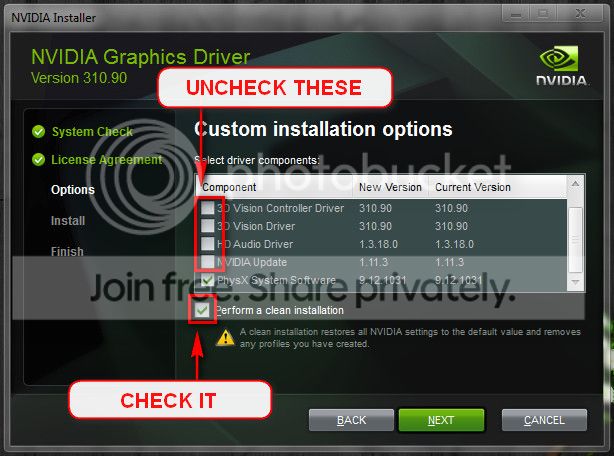
But you have to pay attention to update Nforce at first. At the same time, plan to update the BIOS too, if possible.
Code:
BIOS Version/Date Award Software International, Inc. F9, 25/06/2007
I would request northernsoul55 to add his suggestions too; as he has deeper insight about nforce.
Let us know about your tries.






