BSOD Windows 7 64-bit : Happening Frequently (again)

moffett71

New member
Local time
4:32 PM
Messages
5
Last year, I was having frequent BSOD moments on my Windows 7 system. Following advise from koolkat77, I did remove Norton Antivirus and went with Avast as my virus provider. All was going well for quite some time. Until recently. I've added no new programs, but I've begun crashing to the BSOD on a frighteningly frequent basis (even several times a day)

Guidance would be keenly appreciated. I am considering a hammer and mallet to solve the problems.

Thanks,
moffett71 (Stephanie)
 

My Computer My Computer

At a glance

Windows 7 Ultimate 64 bit
OS
Windows 7 Ultimate 64 bit
Hello Stephanie and welcome back to Seven Forums. Sorry it's under these circumstances. Hopefully koolkat will pop in shortly to offer her awesome expertise. In looking though the latest dump file bug check analysis, I noticed that the atikmdag.sys driver was being flagged. This is the ATI Video driver from AMD. It's recommended that you remove the Catalyst Control Center and only install the Display Driver. So I'd go to the AMD support site, make sure you have the latest driver, remove the catalyst control center, and see what happens.

Driver Reference Table - atikmdag.sys

http://support.amd.com/us/Pages/AMDSupportHub.aspx

Code:
*******************************************************************************
*                                                                             *
*                        Bugcheck Analysis                                    *
*                                                                             *
*******************************************************************************

PAGE_FAULT_IN_NONPAGED_AREA (50)
Invalid system memory was referenced.  This cannot be protected by try-except,
it must be protected by a Probe.  Typically the address is just plain bad or it
is pointing at freed memory.
Arguments:
Arg1: fffff6f880000038, memory referenced.
Arg2: 0000000000000000, value 0 = read operation, 1 = write operation.
Arg3: fffff80002edc501, If non-zero, the instruction address which referenced the bad memory
	address.
Arg4: 0000000000000005, (reserved)

Debugging Details:
------------------


Could not read faulting driver name

READ_ADDRESS: GetPointerFromAddress: unable to read from fffff800030f8100
 fffff6f880000038 

FAULTING_IP: 
nt!MiDispatchFault+d1
fffff800`02edc501 4b8b1c1c        mov     rbx,qword ptr [r12+r11]

MM_INTERNAL_CODE:  5

CUSTOMER_CRASH_COUNT:  1

DEFAULT_BUCKET_ID:  VISTA_DRIVER_FAULT

BUGCHECK_STR:  0x50

PROCESS_NAME:  OUTLOOK.EXE

CURRENT_IRQL:  0

TRAP_FRAME:  fffff8800ad1b820 -- (.trap 0xfffff8800ad1b820)
NOTE: The trap frame does not contain all registers.
Some register values may be zeroed or incorrect.
rax=f100000071182d1c rbx=0000000000000000 rcx=00000000f1000000
rdx=00000000ffffffff rsi=0000000000000000 rdi=0000000000000000
rip=fffff80002edc501 rsp=fffff8800ad1b9b0 rbp=fffff68000057748
 r8=fffff10000007118  r9=0000000000000000 r10=0000000fffffffff
r11=fffff68000000000 r12=0000000000000000 r13=0000000000000000
r14=0000000000000000 r15=0000000000000000
iopl=0         nv up ei pl nz na pe nc
nt!MiDispatchFault+0xd1:
fffff800`02edc501 4b8b1c1c        mov     rbx,qword ptr [r12+r11] ds:fffff680`00000000=????????????????
Resetting default scope

LAST_CONTROL_TRANSFER:  from fffff80002f3c673 to fffff80002ebfc40

STACK_TEXT:  
fffff880`0ad1b6b8 fffff800`02f3c673 : 00000000`00000050 fffff6f8`80000038 00000000`00000000 fffff880`0ad1b820 : nt!KeBugCheckEx
fffff880`0ad1b6c0 fffff800`02ebdd6e : 00000000`00000000 fffff6f8`80000038 fffffa80`0a5a8400 00000000`00000000 : nt! ?? ::FNODOBFM::`string'+0x43801
fffff880`0ad1b820 fffff800`02edc501 : 00000000`00000570 00000000`000005f8 00000000`000001e0 00000000`000009a0 : nt!KiPageFault+0x16e
fffff880`0ad1b9b0 fffff800`02ecc269 : 00000000`00002358 00000000`0aee9970 00000000`00000250 fffff880`00000000 : nt!MiDispatchFault+0xd1
fffff880`0ad1bac0 fffff800`02ebdd6e : 00000000`00000000 00000000`0aee9970 00000000`00000001 00000000`0af81e60 : nt!MmAccessFault+0x359
fffff880`0ad1bc20 00000000`77c60608 : 00000000`00000000 00000000`00000000 00000000`00000000 00000000`00000000 : nt!KiPageFault+0x16e
00000000`03d8fb70 00000000`00000000 : 00000000`00000000 00000000`00000000 00000000`00000000 00000000`00000000 : 0x77c60608


STACK_COMMAND:  kb

FOLLOWUP_IP: 
nt!MiDispatchFault+d1
fffff800`02edc501 4b8b1c1c        mov     rbx,qword ptr [r12+r11]

SYMBOL_STACK_INDEX:  3

SYMBOL_NAME:  nt!MiDispatchFault+d1

FOLLOWUP_NAME:  MachineOwner

MODULE_NAME: nt

DEBUG_FLR_IMAGE_TIMESTAMP:  50e79935

IMAGE_NAME:  memory_corruption

FAILURE_BUCKET_ID:  X64_0x50_nt!MiDispatchFault+d1

BUCKET_ID:  X64_0x50_nt!MiDispatchFault+d1

Followup: MachineOwner
-------------------------------------------------------
[COLOR="Red"]fffff880`0ad1b6f8  fffff880`04b7af15Unable to load image \SystemRoot\system32\DRIVERS\atikmdag.sys, Win32 error 0n2
*** WARNING: Unable to verify timestamp for atikmdag.sys
*** ERROR: Module load completed but symbols could not be loaded for atikmdag.sys
 atikmdag+0x378f15
fffff880`0ad1b700  fffffa80`0843a000
fffff880`0ad1b708  fffff880`0484be48 atikmdag+0x49e48[/COLOR]
--------------------------------------------------------

One other caution and a suggestion. When adding/deleting drivers it's a good idea to have a current restore point just in case something breaks. You would be able to return your computer to it's current condition and be no worse off than you are now.

http://www.sevenforums.com/tutorials/697-system-restore-point-create.html

http://www.sevenforums.com/tutorials/700-system-restore.html

And the suggestion is to run a system file checker scan from an elevated command prompt (option two.) If problems are found, run the scan 3 times and immediately reboot the computer after each scan.

http://www.sevenforums.com/tutorials/1538-sfc-scannow-command-system-file-checker.html

And my apologies for jumping in. It's not my intent to interfere with the working relationship you've established with koolkat.
 

My Computer My Computer

At a glance

Win 7 Pro 64-bitIntel i5 2.4 Ghz8GB DDR3Intel HD 3000
Computer type
Laptop
Computer Manufacturer/Model Number
Sony Vaio VPCEB47GM Laptop
OS
Win 7 Pro 64-bit
CPU
Intel i5 2.4 Ghz
Memory
8GB DDR3
Graphics Card(s)
Intel HD 3000
Sound Card
IDT High Definition
Monitor(s) Displays
15.6 WGXA Anti-Glare LED
Screen Resolution
1280x800
Hard Drives
640Gb 7200rpm
Antivirus
MSE
Browser
Opera (primary) with IE9 backup
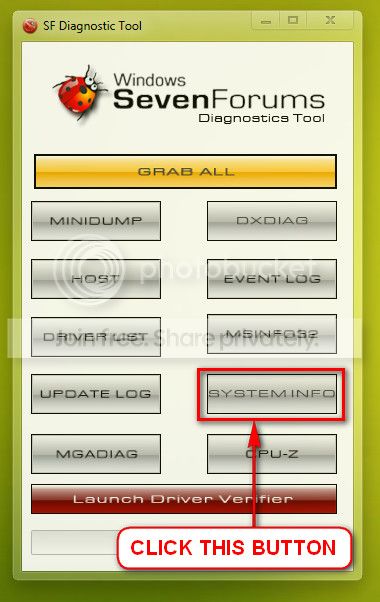
One important part of the diag tool output is missing here. Upload your SystemInfo.txt file.

  • Click this button of SF Diag Tool.
    2013-01-23_143245_zpsca2553b4.jpg
  • Zip the output on desktop
  • Upload it here following http://www.sevenforums.com/tutorials/9733-screenshots-files-upload-post-seven-forums.html
 

My Computer My Computer

At a glance

Microsoft Windows 10 Pro Insider Preview 64-bitIntel(R) Core(TM) i3-4130 CPU @ 3.40GHzCorsair Vengence 4GB x2 (8.00GB Dual-Channel ...2047MB GeForce GTS 450 (ZOTAC International)
Computer type
PC/Desktop
Computer Manufacturer/Model Number
Self Assembled
OS
Microsoft Windows 10 Pro Insider Preview 64-bit
CPU
Intel(R) Core(TM) i3-4130 CPU @ 3.40GHz
Motherboard
Gigabyte Technology Co., Ltd. B85M-D3H
Memory
Corsair Vengence 4GB x2 (8.00GB Dual-Channel DDR3 @ 798MHz)
Graphics Card(s)
2047MB GeForce GTS 450 (ZOTAC International)
Sound Card
Onboard (Realtek High Definition Audio)
Monitor(s) Displays
LG Flatron E2040T
Screen Resolution
1600x900
Hard Drives
Western Digital 1 TB
Seagate 500 GB
PSU
Corsair VS550
Case
Cooler Master K380
Cooling
Cooler Master Seidon 120V Plus
Keyboard
Logitech MK260r
Mouse
Logitech MK260r
Internet Speed
PMPL Broadband
Antivirus
Windows Defender + MBAM
Browser
Firefox
Other Info
Dell Studio 15" Laptop
Marsmimar, thanks for the jump in. I've tried the changes and we'll see if this works.

Koolkat: The systems diagnostic version I have doesn't appear to collect the system info. Is there a newer version of the tool? I've looked around on the site and can't find one newer than the 2010 from Captn Jack.

Thanks!
 

My Computer My Computer

At a glance

Windows 7 Ultimate 64 bit
OS
Windows 7 Ultimate 64 bit
kooklat:

I re-ran the diagnostics and verified that I see a file called MSINFO32 in the zip. If there is a newer version of the SF_diagnostics, I'll gladly run it.

I've disabled part of the AMD Catalyst Center for my video card. AMD doesn't have a driver for the Radeon 5450 alone without the larger software. They have a Beta one, but I was leery about adding one more level of potential bugginess to a system that is going up and down like a pinata.

And many thanks
 
Last edited:

My Computer My Computer

At a glance

Windows 7 Ultimate 64 bit
OS
Windows 7 Ultimate 64 bit
Back
Top