
BSOD with Pantech UM175 modem driver?

JimLucTKirkard

New member
Local time
4:36 AM
Messages
12
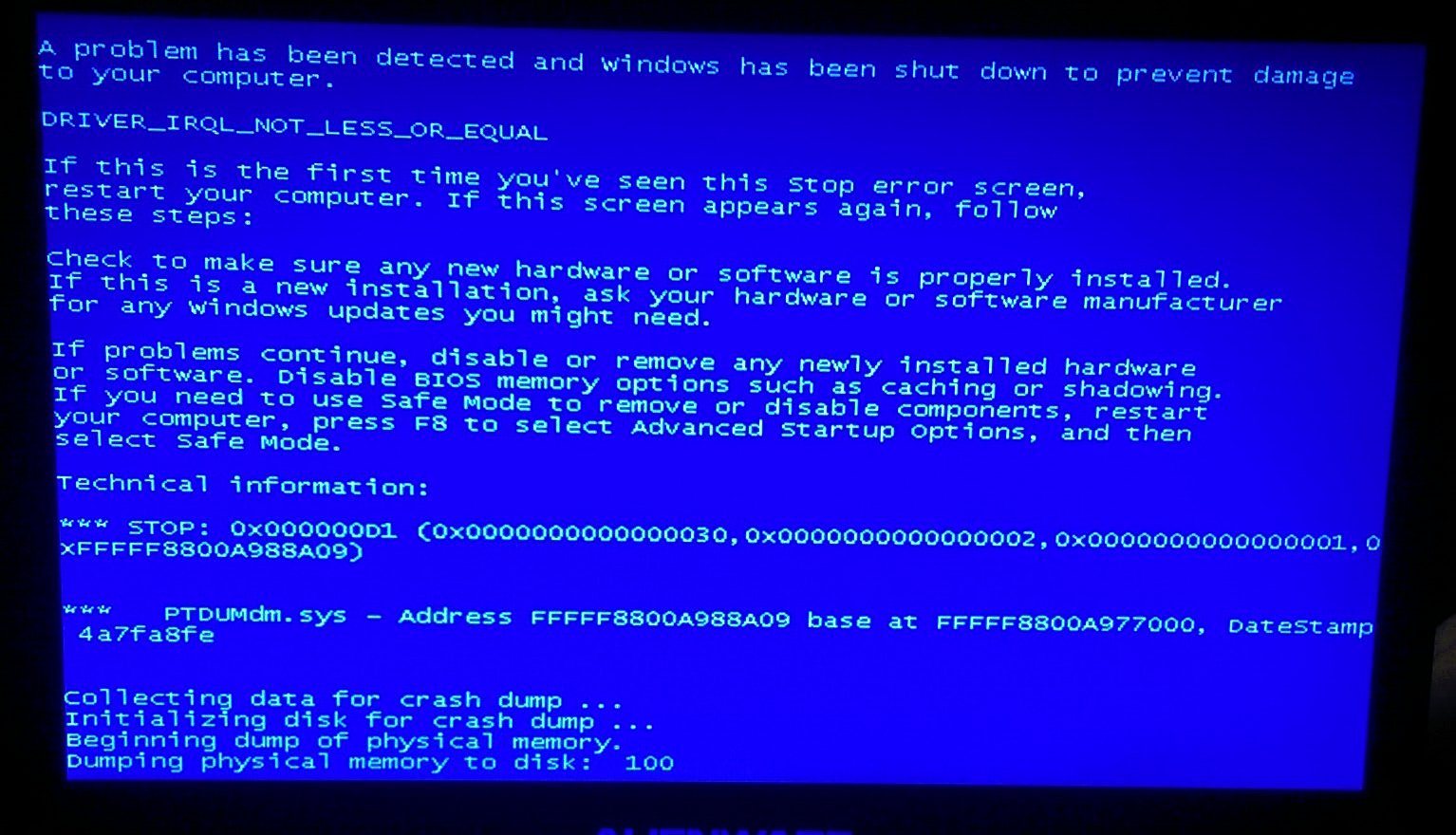
Hello, I have an Alienware m14x, and my only means of internet at my home is a Verizon Pantech UM175 USB modem. Problem is, on this laptop it causes a blue screen. I updated my drivers and everything, but it still happens. The crash dump never seems to finish, it gets to 100, I wait five minutes, then turn it off with the power button. Really annoying because this is my gaming computer and I want to play StarCraft 2 with friends among other games. Here is a picture of the error:
uroQmN4.jpg


The modem is an old one, but still works on other systems. Tried "Whocrashed", but it said latest crash dump was in February of 2014. Anybody got any suggestions?

Thanks guys.
 

My Computer

Computer type
Laptop
Computer Manufacturer/Model Number
Alienware m14x
OS
Windows 7 Home Premium Service Pack 1
CPU
Intel(R) Core(TM) i7-2820QM CPU @ 2.30GHz 2.30 Ghz
Memory
8GB
Graphics Card(s)
NVIDIA GeForce GT 555M
Hard Drives
750GB
Antivirus
AVG Free
Browser
Chrome
Additional information is required.

1. Download the DM Log Collector application to your desktop by clicking the link below

DM Log Collector.exe

2. Run it by double-clicking the icon on your desktop, and follow the prompts.
3. Locate the .ZIP file that is created on your desktop, and upload it here in your next reply.

picture.php
 

My Computer

Computer type
PC/Desktop
Computer Manufacturer/Model Number
Golden Mk. I.4
OS
Windows 10 Pro x64 ; Xubuntu x64
CPU
Intel i7 860 @ 2.80 GHz O/C'ed to 4.0GHz
Motherboard
Gigabyte P55A-UD3R Rev.1. Award BIOS F13
Memory
16GB Corsair Vengance DDR3 @ 661 MHz Dual Channel (9-9-9-24)
Graphics Card(s)
EVGA NVidia GTX 560 1024MB
Sound Card
Realtek Integrated
Monitor(s) Displays
Dual Samsung SyncMaster 2494HS
Screen Resolution
1920*1080 and 1920*1080
Hard Drives
1*Samsung 840 EVO 120GB SSD;
1*OCZ Vertex 2 60GB SSD;
2*Samsung F3 SpinPoint 1TB in RAID0;
1*Samsung F1 SpinPoint 1TB;
2*Western Digital 1TB External USB 3.0
1*Western Digital 500GB External USB 3.0
1*Seagate 500GB External USB 2.0
PSU
Thermaltake ToughPower QFan 750W
Case
Thermaltake Element S VK60001W2Z
Cooling
Corsair H60 Water Cooling, 2*230mm and 2*80mm case fans
Keyboard
Logitech G110
Mouse
Logitech MX518
Additional information is required.

1. Download the DM Log Collector application to your desktop by clicking the link below

DM Log Collector.exe

2. Run it by double-clicking the icon on your desktop, and follow the prompts.
3. Locate the .ZIP file that is created on your desktop, and upload it here in your next reply.

picture.php

Here you go. Sorry this took so long, been a busy time with a lot of happenings and goings ons. Anyway, I thought it happened in February since that's when I posted this, but I guess the one from January would be it.
 

My Computer

Computer type
Laptop
Computer Manufacturer/Model Number
Alienware m14x
OS
Windows 7 Home Premium Service Pack 1
CPU
Intel(R) Core(TM) i7-2820QM CPU @ 2.30GHz 2.30 Ghz
Memory
8GB
Graphics Card(s)
NVIDIA GeForce GT 555M
Hard Drives
750GB
Antivirus
AVG Free
Browser
Chrome
I didn't see any rules about bumping, but I waited over 24 hours just to be sure.
 

My Computer

Computer type
Laptop
Computer Manufacturer/Model Number
Alienware m14x
OS
Windows 7 Home Premium Service Pack 1
CPU
Intel(R) Core(TM) i7-2820QM CPU @ 2.30GHz 2.30 Ghz
Memory
8GB
Graphics Card(s)
NVIDIA GeForce GT 555M
Hard Drives
750GB
Antivirus
AVG Free
Browser
Chrome
I'll take a look at this tonight.
 

My Computer

Computer type
PC/Desktop
Computer Manufacturer/Model Number
Golden Mk. I.4
OS
Windows 10 Pro x64 ; Xubuntu x64
CPU
Intel i7 860 @ 2.80 GHz O/C'ed to 4.0GHz
Motherboard
Gigabyte P55A-UD3R Rev.1. Award BIOS F13
Memory
16GB Corsair Vengance DDR3 @ 661 MHz Dual Channel (9-9-9-24)
Graphics Card(s)
EVGA NVidia GTX 560 1024MB
Sound Card
Realtek Integrated
Monitor(s) Displays
Dual Samsung SyncMaster 2494HS
Screen Resolution
1920*1080 and 1920*1080
Hard Drives
1*Samsung 840 EVO 120GB SSD;
1*OCZ Vertex 2 60GB SSD;
2*Samsung F3 SpinPoint 1TB in RAID0;
1*Samsung F1 SpinPoint 1TB;
2*Western Digital 1TB External USB 3.0
1*Western Digital 500GB External USB 3.0
1*Seagate 500GB External USB 2.0
PSU
Thermaltake ToughPower QFan 750W
Case
Thermaltake Element S VK60001W2Z
Cooling
Corsair H60 Water Cooling, 2*230mm and 2*80mm case fans
Keyboard
Logitech G110
Mouse
Logitech MX518
Code:
*******************************************************************************
*                                                                             *
*                        Bugcheck Analysis                                    *
*                                                                             *
*******************************************************************************

Use !analyze -v to get detailed debugging information.

BugCheck D1, {8, 2, 0, fffff88007c16b72}

*** WARNING: Unable to verify timestamp for vsdatant.sys
*** ERROR: Module load completed but symbols could not be loaded for vsdatant.sys
Probably caused by : [B][COLOR="red"]vsdatant.sys[/COLOR][/B] ( vsdatant+16b72 )

Followup: MachineOwner
---------

2: kd> lmvm vsdatant
start             end                 module name
fffff880`07c00000 fffff880`07c95000   vsdatant T (no symbols)           
    Loaded symbol image file: vsdatant.sys
    Image path: \SystemRoot\system32\DRIVERS\vsdatant.sys
    Image name: vsdatant.sys
    Timestamp:        Fri May 06 15:01:14 [B][COLOR="Red"]2011[/COLOR][/B] (4DC387A2)
    CheckSum:         0007EB69
    ImageSize:        00095000
    Translations:     0000.04b0 0000.04e4 0409.04b0 0409.04e4
The outdated ZoneAlarm installation is the cause of the issues. Update it, or uninstall it and use MSE and Windows firewall instead.
 

My Computer

Computer type
PC/Desktop
Computer Manufacturer/Model Number
Golden Mk. I.4
OS
Windows 10 Pro x64 ; Xubuntu x64
CPU
Intel i7 860 @ 2.80 GHz O/C'ed to 4.0GHz
Motherboard
Gigabyte P55A-UD3R Rev.1. Award BIOS F13
Memory
16GB Corsair Vengance DDR3 @ 661 MHz Dual Channel (9-9-9-24)
Graphics Card(s)
EVGA NVidia GTX 560 1024MB
Sound Card
Realtek Integrated
Monitor(s) Displays
Dual Samsung SyncMaster 2494HS
Screen Resolution
1920*1080 and 1920*1080
Hard Drives
1*Samsung 840 EVO 120GB SSD;
1*OCZ Vertex 2 60GB SSD;
2*Samsung F3 SpinPoint 1TB in RAID0;
1*Samsung F1 SpinPoint 1TB;
2*Western Digital 1TB External USB 3.0
1*Western Digital 500GB External USB 3.0
1*Seagate 500GB External USB 2.0
PSU
Thermaltake ToughPower QFan 750W
Case
Thermaltake Element S VK60001W2Z
Cooling
Corsair H60 Water Cooling, 2*230mm and 2*80mm case fans
Keyboard
Logitech G110
Mouse
Logitech MX518
Code:
*******************************************************************************
*                                                                             *
*                        Bugcheck Analysis                                    *
*                                                                             *
*******************************************************************************

Use !analyze -v to get detailed debugging information.

BugCheck D1, {8, 2, 0, fffff88007c16b72}

*** WARNING: Unable to verify timestamp for vsdatant.sys
*** ERROR: Module load completed but symbols could not be loaded for vsdatant.sys
Probably caused by : [B][COLOR="red"]vsdatant.sys[/COLOR][/B] ( vsdatant+16b72 )

Followup: MachineOwner
---------

2: kd> lmvm vsdatant
start             end                 module name
fffff880`07c00000 fffff880`07c95000   vsdatant T (no symbols)           
    Loaded symbol image file: vsdatant.sys
    Image path: \SystemRoot\system32\DRIVERS\vsdatant.sys
    Image name: vsdatant.sys
    Timestamp:        Fri May 06 15:01:14 [B][COLOR="Red"]2011[/COLOR][/B] (4DC387A2)
    CheckSum:         0007EB69
    ImageSize:        00095000
    Translations:     0000.04b0 0000.04e4 0409.04b0 0409.04e4
The outdated ZoneAlarm installation is the cause of the issues. Update it, or uninstall it and use MSE and Windows firewall instead.


Thank you. It's no longer in the programs list, so I guess just reinstall then uninstall?
 

My Computer

Computer type
Laptop
Computer Manufacturer/Model Number
Alienware m14x
OS
Windows 7 Home Premium Service Pack 1
CPU
Intel(R) Core(TM) i7-2820QM CPU @ 2.30GHz 2.30 Ghz
Memory
8GB
Graphics Card(s)
NVIDIA GeForce GT 555M
Hard Drives
750GB
Antivirus
AVG Free
Browser
Chrome
Just try and uninstall from Control Panel.
 

My Computer

Computer type
PC/Desktop
Computer Manufacturer/Model Number
Golden Mk. I.4
OS
Windows 10 Pro x64 ; Xubuntu x64
CPU
Intel i7 860 @ 2.80 GHz O/C'ed to 4.0GHz
Motherboard
Gigabyte P55A-UD3R Rev.1. Award BIOS F13
Memory
16GB Corsair Vengance DDR3 @ 661 MHz Dual Channel (9-9-9-24)
Graphics Card(s)
EVGA NVidia GTX 560 1024MB
Sound Card
Realtek Integrated
Monitor(s) Displays
Dual Samsung SyncMaster 2494HS
Screen Resolution
1920*1080 and 1920*1080
Hard Drives
1*Samsung 840 EVO 120GB SSD;
1*OCZ Vertex 2 60GB SSD;
2*Samsung F3 SpinPoint 1TB in RAID0;
1*Samsung F1 SpinPoint 1TB;
2*Western Digital 1TB External USB 3.0
1*Western Digital 500GB External USB 3.0
1*Seagate 500GB External USB 2.0
PSU
Thermaltake ToughPower QFan 750W
Case
Thermaltake Element S VK60001W2Z
Cooling
Corsair H60 Water Cooling, 2*230mm and 2*80mm case fans
Keyboard
Logitech G110
Mouse
Logitech MX518

My Computer

Computer type
Laptop
Computer Manufacturer/Model Number
Alienware m14x
OS
Windows 7 Home Premium Service Pack 1
CPU
Intel(R) Core(TM) i7-2820QM CPU @ 2.30GHz 2.30 Ghz
Memory
8GB
Graphics Card(s)
NVIDIA GeForce GT 555M
Hard Drives
750GB
Antivirus
AVG Free
Browser
Chrome
Use RevoUninstaller to remove it.
 

My Computer

Computer type
PC/Desktop
Computer Manufacturer/Model Number
Golden Mk. I.4
OS
Windows 10 Pro x64 ; Xubuntu x64
CPU
Intel i7 860 @ 2.80 GHz O/C'ed to 4.0GHz
Motherboard
Gigabyte P55A-UD3R Rev.1. Award BIOS F13
Memory
16GB Corsair Vengance DDR3 @ 661 MHz Dual Channel (9-9-9-24)
Graphics Card(s)
EVGA NVidia GTX 560 1024MB
Sound Card
Realtek Integrated
Monitor(s) Displays
Dual Samsung SyncMaster 2494HS
Screen Resolution
1920*1080 and 1920*1080
Hard Drives
1*Samsung 840 EVO 120GB SSD;
1*OCZ Vertex 2 60GB SSD;
2*Samsung F3 SpinPoint 1TB in RAID0;
1*Samsung F1 SpinPoint 1TB;
2*Western Digital 1TB External USB 3.0
1*Western Digital 500GB External USB 3.0
1*Seagate 500GB External USB 2.0
PSU
Thermaltake ToughPower QFan 750W
Case
Thermaltake Element S VK60001W2Z
Cooling
Corsair H60 Water Cooling, 2*230mm and 2*80mm case fans
Keyboard
Logitech G110
Mouse
Logitech MX518
Okay, appreciate it.
 

My Computer

Computer type
Laptop
Computer Manufacturer/Model Number
Alienware m14x
OS
Windows 7 Home Premium Service Pack 1
CPU
Intel(R) Core(TM) i7-2820QM CPU @ 2.30GHz 2.30 Ghz
Memory
8GB
Graphics Card(s)
NVIDIA GeForce GT 555M
Hard Drives
750GB
Antivirus
AVG Free
Browser
Chrome
Back
Top