Hey SF
Find .zip below.
This whole thing started like 2 weeks ago, the system was running fine until then. Never had a BSOD or anything similar. Then it started, suddenly, with one Bluescreen a day. Yesterday I hit the 5 / day mark - wat an accomplishment. There should be an achievement system like in the 360. "Everything is blue!" - Get 10 BSODs at one day
Fine, what was I doing? I can't remember any hardware or software specific task which could trigger such an behavior. First I was like "meh, I'm gonna do a clean install" but that didn't work as expected.
What causes the Bluescreens? I really don't know. Before I did the re-install I triggered a few while developing in Visual Studio 2010, while writing some Word docs or even while browsing the interwebs. Yesterday i tried to run the new COD - I can tell you: baaad idea.
I get the following stop code types (both, before and after re-install):
- ATTEMPTED_WRITE_TO_READONLY_MEMORY
- SYSTEM_SERVICE_EXCEPTION
- SYSTEM_THREAD_EXCEPTION_NOT_HANDLED
- INTERRUPT_EXCEPTION_NOT_HANDLED
- DRIVER_IRQL_NOT_LESS_OR_EQUAL
- NTFS_FILE_SYSTEM
- SYSTEM_SERVICE_EXCEPTION
My system looks like this:
- Motherboard: Asus P5QL PRO
- CPU: Intel Core 2 Quad Q9550 E0, 2.83 GHz, 2x6MB, 4C/4T
- Video card: Gigabyte GTX-460 OC 1GB GDDR5
- RAM: Some cheap Kingston 2G-UDIMM 2 GB DDR2-667 DDR2 SDRAM - twice
- Primary HDD: Corsair P128 SSD MLC, 2.5", 128GB, SATA-II
- Storage HDD1: WDC WD5000AAVS-00ZTB0 (465 GB)
- Storage HDD2: SAMSUNG HD501LJ (465 GB)
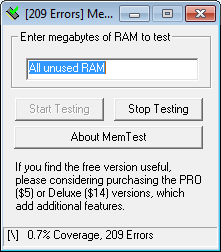
Sounds like some broken Memory to me. Any other thoughts?
Thank you so much.
Find .zip below.
This whole thing started like 2 weeks ago, the system was running fine until then. Never had a BSOD or anything similar. Then it started, suddenly, with one Bluescreen a day. Yesterday I hit the 5 / day mark - wat an accomplishment. There should be an achievement system like in the 360. "Everything is blue!" - Get 10 BSODs at one day
Fine, what was I doing? I can't remember any hardware or software specific task which could trigger such an behavior. First I was like "meh, I'm gonna do a clean install" but that didn't work as expected.
What causes the Bluescreens? I really don't know. Before I did the re-install I triggered a few while developing in Visual Studio 2010, while writing some Word docs or even while browsing the interwebs. Yesterday i tried to run the new COD - I can tell you: baaad idea.
I get the following stop code types (both, before and after re-install):
- ATTEMPTED_WRITE_TO_READONLY_MEMORY
- SYSTEM_SERVICE_EXCEPTION
- SYSTEM_THREAD_EXCEPTION_NOT_HANDLED
- INTERRUPT_EXCEPTION_NOT_HANDLED
- DRIVER_IRQL_NOT_LESS_OR_EQUAL
- NTFS_FILE_SYSTEM
- SYSTEM_SERVICE_EXCEPTION
My system looks like this:
- Motherboard: Asus P5QL PRO
- CPU: Intel Core 2 Quad Q9550 E0, 2.83 GHz, 2x6MB, 4C/4T
- Video card: Gigabyte GTX-460 OC 1GB GDDR5
- RAM: Some cheap Kingston 2G-UDIMM 2 GB DDR2-667 DDR2 SDRAM - twice
- Primary HDD: Corsair P128 SSD MLC, 2.5", 128GB, SATA-II
- Storage HDD1: WDC WD5000AAVS-00ZTB0 (465 GB)
- Storage HDD2: SAMSUNG HD501LJ (465 GB)
Sounds like some broken Memory to me. Any other thoughts?
Thank you so much.
Last edited:
My Computer
- OS
- Windows 7 Ultimate x64
- CPU
- Q9550
- Motherboard
- Asus P5QL Pro
- Memory
- 2x Kingston 2G-UDIMM DDR2 667
- Graphics Card(s)
- GTX 460
- Monitor(s) Displays
- Samsung SyncMaster P2770
- Hard Drives
- CORSAIR CMFSSD-128GBG2D
SAMSUNG HD501LJ | Only used for temporary data
WDC WD5000AAVS-00ZTB0 | Only used for temporary data